
Your Browsing History


Anand S.
Joined on 01/09/05
0
0
product reviews
- 2
Perfect for HTPC
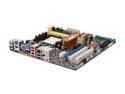
ASUS M3A78-EM AM2+/AM2 AMD 780G HDMI Micro ATX AMD Motherboard
Pros: Rich in features, considering this is a mATX board. A multitude of output display options from VGA to DVI, HDMI and even Displayport. Has optical audio output, a ton of USB ports, firewire, and even eSATA. Robust caps.
Cons: The VGA port did not output correctly, but its not a huge issue since the HDMI works wonderfully.
Overall Review: Using this board as part of a HTPC alongside a X2 BE-2400 CPU running at stock speed and cooling, 2GB DDR2-800 RAM, an ancient 80GB IDE HDD, 200W PSU, and Windows Vista Ultimate 32-bit as the OS. With the onboard video (HD3200 with Catalyst 8.9), it can play back 720p and 1080p x264 content perfectly with the right decoding options. Blu ray discs play back without any problems as well. Using Media Portal as a front end for now since you can customize which decoders to use for a particular media type. Temperatures are relatively cool, and the NB does not get hot unlike that other popular 780G board which I used to own.
10/11/2008See more detail
Good Ultrabook for the Price
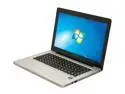
Lenovo IdeaPad U310 43752CU 13.3" Ultrabook
Pros: - Thin, sleek form factor, looks a lot like a Macbook Pro with the chiclet style keyboard and brushed aluminum look - WiFi not an issue so far - Fast for casual activities (Web browsing, email, word processing, etc.) thanks to SSD - Light in weight - Newegg delivery was quick and hassle-free
Cons: - 1366x768 display resolution is a bit low - Battery life is a little shorter than expected (5 hours with constant web browsing, was expecting closer to 6) - OS comes preloaded on HDD and not SSD - SSD capacity is 25GB so after installing Windows 8 x64 and MS Office 2013 there's only 9GB of free space - Noisy, thanks to the HDD - Documentation from Lenovo is sparse - no recovery CD or CD containing drivers is included (drivers are available online)
Overall Review: I bought this for my mother to use for surfing the web and using Microsoft Office. Works wonderful for this type of usage, though most likely disadvantageous for gaming. It is an ultrabook, which means there's no CD-RW/DVD-R/W Drive . If you need to clean install an OS like Windows 8, it is recommended to put the installation files on a bootable USB drive. One other note: by default, the storage drives are configured in a RAID setup. When I was trying to install Windows 8, the installer was not able to detect the drives as a result. I had to go to the BIOS and change the storage setup from RAID to AHCI. This will cause bluescreens when trying to load the preloaded installation of Windows but will allow the Windows 8 installer to detect the drives and format accordingly. I personally deleted all existing partitions and installed to the SSD.
2/4/2013See more detail