
Your Browsing History


Wayne P.
Joined on 01/28/05
0
0
product reviews
- 9
Nice Speaker Set
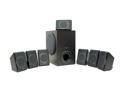
Creative Inspire P7800 90 Watts 7.1 Speaker
Pros: These speakers have excellent sound reproduction for the price you're paying. Speaker wires are of adequate length, providing their layout is optimal. Due to the low power of this set, it seems pointless to put them at the front, sides, and back of a large room. They sound much better at close range (3-4 feet, about a meter). The power pack is corded on both input and output, making it easier to plug in to a crowded power strip.
Cons: Proprietary hookup-you have to purchase an additional audio cable for connection to non-Creative 8.1 audio cards. The headphone jack on the wired remote cuts out all speakers, but only outputs the LF and RF speaker to the headphones.
Overall Review: If you don't have a Creative soundcard, proper hookup can still be done with Neweg Item# N82E16882123079, or Radio Shack Part# 42-2607 (Recommended). The headset problem can be overcome by manually switching sound card output to 2-channel. This is a tiny hassle, but at least it works.
9/4/2006See more detail
Unreliable
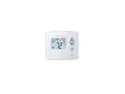
Venstar Explorer T3950-IAQ Residential Air Patrol VenNet Thermostat (4H/2C)
Pros: Integrates well with Home Assistant. Does not require any registration or account. Does not require an internet connection.
Cons: The instructions are not bad, but not great. The website has a slightly different manual than what was included. I had to refer to both to get everything set the way I wanted. The clock gains just over 1 minute per week. This makes the scheduling feature kinda pointless. There are detailed instructions on setting up an account, but nothing for offline setup. Filter reminder, CO2, and IAQ are unreliable.
Overall Review: This is the third thermostat I've purchased for use with Home Assistant. The other two brands required an internet connection to setup, so they were returned. This one doesn't, but the instructions made it look like it does. Once I figured it out on my own, it connected to HA easily. I'm still trying to figure out how the filter reminder works. The clock is currently almost 30 minutes fast. I don't use the scheduling feature, so I just ignore it.. Other than those two issues, it been operating trouble-free for several months. Update 1: The filter reminder worked once at 5 hours of total usage, as I wanted it to. It then alerted me again a week later due to 30 calendar days. I disabled the calendar days at that time. I just discovered the filter has well over 5 hours total usage time, but it's still showing as "OK". The instructions for this functionality are useless, so the reminder is useless as well. Update 2: At 9 months, I discovered CO2 is reporting exactly ten times IAQ. Those readings change with temperature and/or humidity. At one point, CO2 was reporting over 4500 ppm, which should have caused immediate health concerns. I observed no health issues during that time. I've sent it back for replacement. Another update will be added once I've fully tested the second one.
5/21/2026See more detail
Not what I expected
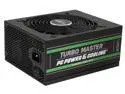
PC Power & Cooling Turbo Master Series 1350 Watt ATX, 80 Plus Gold, Fully-Modular, Active PFC, Quiet Industrial Grade, ATX PC Power Supply, 7 Year Warranty, TM1350
Pros: Worked great (for 5 days)
Cons: Dead at 5 days
Overall Review: I have two 8+ year old PC Power & Cooling power supplies that still work without issue. The 750 watt unit was bought when PC Power & Cooling was it's own company. The 1200 watt unit was bought after OCZ took over. It appears PC Power & Cooling has changed hands again, and quality control went out the window. Installation was easy, and it appeared to work perfectly for about 5 days. On the evening of the 5th day, I tapped my space bar to wake the PC. I'd done this dozens of times with no issue, but the PC just shut off completely this time. Pressing the power button on my case did nothing. After extensive testing, I verified the power supply was completely dead. I installed another manufacturer's 850 watt power supply, and my PC has been running without issue ever since. PC Power & Cooling is just a name slapped on poorly made products now. I won't waste my time or money on this name again.
6/28/2021See more detail
Solid, needs work
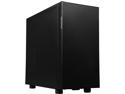
Thermaltake Suppressor F31 ATX Mid Tower Tt LCS Certified Gaming Silent Computer Case CA-1E3-00M1NN-00
Pros: Lots of options
Cons: 1. Door isn't reversible 2. Front filter does nothing 3. 5 1/4" front slots are not truly tool-less
Overall Review: This is a great case, except for the cons I've listed. It's very heavy due to the sound dampening, but it's also very quiet for the same reason. There are plenty of options for fan placement, water cooling, and cable management. There are just too many good things about this case to list. +5 eggs Unfortunately, the front door swings the wrong way (for me), and closing it completely seals off the front filter. Airflow has to enter from the un-filtered sides of the front panel when the door is closed. I had to remove the door and and hinges, then seal up the front panel's side vents, in order to actually utilize the front filter. This required dismantling the front panel, and resulted in a slight increase in noise level. -1/2 egg The tool-less mechanism for the 5 1/4" front bays were in the wrong position for my drive dock. It was very easy to correct, but required tools to correct. -1/2 egg Overall, I'm quite happy with this case. I'll definitely consider Thermaltake when making future purchases.
6/26/2021See more detail
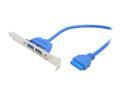
SYBA CL-PCI20114 Blue 2-Port USB 3.0 Bracket w/ Built-in 18 Inch 20-pin Header Cable
Pros: Well built, fits perfectly at both ends, delivers speeds as expected for USB 3.0
Cons: Ummm.... It isn't black?
Overall Review: Everything in my case is black, but this is blue. I don't have a window, so I could really care less. That's why no eggs were actually deducted. I don't consider a touch of OCD to be reason enough to smash eggs. I have a Gigabyte GA-X79-UP4 in an Antec Three Hundred Two case. The case's front port assembly was junk, and the replacement from Antec was also junk (literally). I bought this so I could at least utilize all four USB 3.0 ports that my motherboard supports.
6/7/2013See more detail
Not USB 3.0
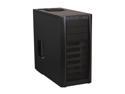
Antec Three Hundred Two Black Steel ATX Mid Tower Computer Case with Upgraded 2 x USB 3.0
Pros: Looks great, plenty of internal HDD slots, decent cable management, SSD provisions (see cons), has 2 fans with room for several more, filters for front fans and PS fan. water cooling provisions (I prefer air cooling, but it's nice to have the option), screw-less drive install.
Cons: There is no way to install SSDs screw-less. SSD removal requires either laying the case on it's side to access the bottom, or removal of the motherboard (depending on your chosen mounting location). minus 1 egg The front USB 3.0 ports are poorly made, and DO NOT support USB 3.0. I connected the cable to my Gigabyte GA-X79-UP4 USB 3.0 port. Any drives plugged into either port would simply disappear within a few minutes of plugin. I contacted Antec on Apr 29, and they instructed me to create a ticket on the website. The representative asked for my name so he could expedite the process for me. I created the ticket, and quickly received a reply stating that a new front port assembly would be shipped. I received a second email May 10, stating it would take a month for them to obtain a replacement port assembly. I called them to complain, and was eventually informed that they would have the part the following week. I just received the new port assembly today, May 22. It took about 45 minutes to install the part, only to find that it was bad as well. I then dismantled the old assembly to see if I could fix it. Once I opened up the connector end, I realized there was no fixing it. It was just a big tangle of wires and solder, with a gob of silicone to hold it all in place. Lightly tugging on the wires resulted in several slipping right out of the silicone. minus 1 egg for each defective port assembly Once I saw this, I just connected the USB 2.0/1.1 plug to my motherboard's 2.0/1.1 port instead.
Overall Review: If you want a nice case with front USB 2.0, and don't plan on utilizing SSDs, this case is a 5-egg. I bought this specifically for front USB 3.0 and SSD mounting in a nice, plain case. Antec dropped the ball with the SSD provisions, and then kicked it out of sight with the poorly made front port assembly.
5/22/2013See more detail
seller reviews
- 1
Seems Legit
I ordered a new 2230 sized NVME device, half expecting it to be used (that's happened before). SMART data shows it is indeed new. I'm hoping the data is correct, as I've heard it can be zeroed out. Only time will tell, but It is working as expected at this time. Tracking was received in a timely manner. I wasn't happy about it shipping via USPS, but it did arrive, and on time. Based on this order experience, I would buy from this seller again.
On-time
Delivery
Product
Accuracy
Customer Service
Satisfactory
8/8/2023See more detail