

Your Browsing History


Matthew S.
Joined on 11/21/13
0
0
product reviews
- 5
Phenomenal! Best affordable CPU on the market
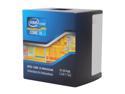
Intel Core i5-3570K - Core i5 3rd Gen Ivy Bridge Quad-Core 3.4GHz (3.8GHz Turbo) LGA 1155 77W Intel HD Graphics 4000 Desktop Processor - BX80637I53570K
Pros: Absolutely amazing. I purchased this for my computer build just because I already had an Ivy Bridge board, couldn't afford the i7, and couldn't afford to upgrade to the Haswell. I am more than happy with what this thing can do. I've been beating the hell out of it's stock speed + turbo with 1080p rendering without a GPU and I haven't seen temps rise about 65C. The speeds on it are fantastic, and the heatsink that came with it seems to be doing much more than I had expected. I figured the GPU was going to be the last part of my build (since a computer can run without dedicated GPU), and the Intel Graphics 4000 with this are able to run games I'd never expect it to run. Because of this, I could hold off on rushing to get a GPU so I can save and get a GTX770.
Cons: The heatsink was a pain in the neck to get on to my motherboard correctly, but I highly doubt that was the heatsink's fault. Probably user error and/or motherboard issue. Like I stated above, the heatsink seems to be doing its job so I'm not worried.
Overall Review: If you're looking to build a budget gaming computer while avoiding AMD products, this is the CPU to get. Performance is excellent, and I'm sure once I get a dedicated GPU my rig will be ready to conquer everything I'll want it to do.
1/22/2014See more detail
Would Be Great If It Worked
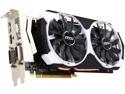
MSI GeForce GTX 970 4GD5T OC
Pros: Powerful card. Quiet and power efficient. What you'd expect from a card with NVIDIA technology.
Cons: On my third dead card and MSI has been little/no-help except for sending me scrap refurbs that last a month or two before breaking down. First card lasted me 6 months before freezing/locking up and giving me the red screen of death. Refurb card came in six weeks later, worked for about two months and then eventually just died (wasn't receiving power or anything). Replaced my PSU, didn't resolve the issue. RMA'd the card again, next one worked for a few weeks and then my rig wouldn't even power on anymore unless the card was removed. GPU was pretty much cancer.
Overall Review: My rig has excellent airflow, sufficient cooling, and sufficient power. There are no reasons why these cards didn't last as long as they should have. Go with EVGA or Gigabyte. Better customer service, and much more reliable products. I wish Newegg would kind of help me out here seeing as how MSI isn't, but I know that this isn't the retailers fault. Stuck with a $340 paperweight. DO NOT GO MSI.
10/6/2015See more detail
Phenomenal Card
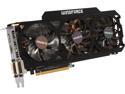
GIGABYTE GV-N770OC-4GD GeForce GTX 770 4GB 256-Bit GDDR5 PCI Express 3.0 HDCP Ready WindForce 3X 450W Video Card
Pros: Beyond powerful, runs cool and very quiet, zero performance issues. Will be able to keep up with upcoming games' maximum graphics for the next 4 years at LEAST.
Cons: Heavy as all hell and barely fits in an ATX Mid case, requires 4 molex connectors. Not cost effective for gaming.
Overall Review: I bought this card because I do a lot of gaming and some graphic design as well. Before this card, I was running Intel Graphics HD 4000 on an i5 3570k @ 4 GHz, so this was a tremendous upgrade. When I received it in the mail, the card alone weighed as much as a 2 liter bottle of soda. My dumba55 forgot to bolt it down so when I stood my case up to work on cable management, it started to pull my motherboard off of its risers. Also, I couldn't SLI them if I wanted to because it only fits in one of my ports (HDD bays are in the way of the bottom port, so it will not fit lengthwise). Anyway, after installation and drivers and stuff it ran amazing. Crysis 3, BF4, Skyrim, etc. all on highest settings, graphics enhancing mods, etc. I realized that even with all of these settings tweaked, the card wasn't even using half of its capable power and peaked at (maybe) 55C. I'm sure the 2GB would have been just fine, 4GB is not necessary for gaming. If you're looking for a good graphics card and are on some sort of budget, the 4GB model is not the one to get because you'll find yourself not even using what it's capable of. I'd only recommend it if you're doing video production, graphic design, quad monitors, etc.
3/11/2014See more detail
So Far, So Good.
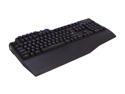
Gigabyte Aivia Osmium Cherry Red Mechanical Gaming Keyboard Blue Back-lit (GK-OSMIUM)
Pros: Bright backlights, excellent response time, comfortable feel, love the volume/brightness controls, audio and USB inputs are great, and the handrest is plastic so it doesn't attract dirt and dust like the other rubber/foam handrests on other brands of keyboards.
Cons: Opened the box and noticed the shift key and 0 key on the numpad were detached. Probably an issue with shipping, but the keys were a PAIN to get back on. The stabilizer bars underneath the longer length keys are really cheap and kept popping off as I was trying to put the keys back on. Needed to use a paperclip in order to get the keys back on correctly.
Overall Review: Great keyboard, but I'm not looking forward to cleaning this in the future :/
1/9/2014See more detail
Apevia Did Not Try!
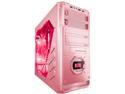
APEVIA X-DREAMER4 Series X-DREAMER4-PK Pink Steel ATX Mid Tower Computer Case
Pros: Decent cable length, durable design. Unique appearance, easy to customize, pretty easy to assemble. Excellent ventilation. Neat temperature gauge. Cool bright LED fans. Supports all sorts of hardware, much universal. Wow.
Cons: Upon first inspection, I noticed that the PCI bay covers in the back are connected to the chassis and once you remove them once, you cannot put the covers back on. This could get annoying in the future, and if you plan on removing your GPU, sound card, etc. now you'll have to worry about dust getting into your system. Fitting the I/O shield on the case was a task and almost resulted in me breaking the shield. Also didn't like how the case didn't come with 2.5" HDD mounting capabilities (I had to order the enclosures seperately). If your motherboard has any front panel headers on the bottom left corner of the mobo (when mounted, right above the power supply), you'll run into cable length issues. I had to order an extension cable for the front panel HD audio because it was a few inches away from reaching. Once my entire computer was assembled and was ready to power on, I realized that the front panel power button was defective. I thought it was my motherboard's headers, but after reversing the connections with the reset and power buttons I could get the reset button to power the motherboard on just fine. When I did this, the power button did not reset the computer as it should have. Not only is this a real PITA, but it isn't what I would have expected out of this case. Now I'm debating on whether it's worth it to disassemble everything and RMA the case with Apevia or to just suck it up and use the reset switch as the power button :/ Maybe if I choose to keep it, I'll try to repair the power button myself by removing the front panel and resoldering the button's connections. Meh.
Overall Review: I would give the case an extra egg if it wasn't defective out of the box; it's a shame because I really like the case and was interested in keeping it for my build. The cable issues can be worked around, but a defective power switch sort of drives me away.
1/2/2014See more detail