

Your Browsing History


Joseph C.
Joined on 10/23/05
0
0
product reviews
- 10
Excellent Card, good price
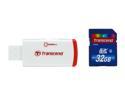
Transcend 32GB Secure Digital High-Capacity (SDHC) Flash Card w/ P2 Card Reader Model TS32GSDHC6-P2
Pros: Excellent product at a good price. Personal track record with Transcend CF and SD cards. Speed of the card is excellent.
Cons: None. Unless you miss those cards that boast they're extremely extreme.
Overall Review: I've shot digital for 11 years. The Canon 20D was my first DSLR and move up. I bought expensive cards, then bought an 8 gb Transcend, quick and reliable. It's been my brand since then, reinforced by independent testing show it on a par with any. It was not a well known brand at the time, primarily selling to rebranders. I moved to a 5D and a 5D MkII and always stuck with the largest card Transcend sold in CF. I moved to 16gb, then 32gb. I now have four 32s and use Transcend SDHC in our smaller cameras. I'm using this one in a Canon S90 can provide RAW images and the other byte-hogging ways I prefer. I frequently shoot the multiple images needed for HDR images or Panoramas. I always shoot RAW WITH in camera jpgs. These are huge chunks of data and the Transcends handle them without a problem.
6/29/2010See more detail
Seagate Quality is an Issue
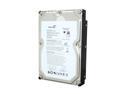
Seagate BarraCuda ES.2 ST31000340NS 1TB 7200 RPM 32MB Cache SATA 3.0Gb/s 3.5" Internal Hard Drive Bare Drive
Pros: I'm using five of these drives in a RAID 5 array for four Terabytes. It's a nice setup that works well for what we do. The NAS and Terabyte drives gives me the size and backup capability I need and, if these drives hold up, it['s not an unreasonable package. i To date the performance has been good. I paid the higher cost of these ES drives in an attempt to keep the assurance level high, bypassing the less expensive Seagates, Samsungs, etc. of the same size. That cost would be justified if Seagate would pay a little more attention to quality control. Like mot Seagate drives, they have a good feel about them - I just don't know if they're as good as they feel - and won't until they've been around a while Seagate does build drives with good speed and characteristics - if they're up to spec. Mine are, so far.
Cons: I have no confidence in Seagate quality control, in particular when it comes to drives built in China. I've had four new or almost new Seagate drives fail in recent weeks. Two Chinese made drives were DOA. One of the dead drives was Thai-built. And I didn't pay attention to the other. The two DOA drives (externals) were purchased locally and the seller was plagued with complaints. Looked great. Didn't work. (this obvious is not New Egg's problem, but Seagate).
Overall Review: If the timing of the drive failures had been just a bit different, I wouldn't have bought these drives. Seagate warranty is good, but their customer service is atrocious. And a dead drive takes forever to get replaced. Given my recent exeperience with Seagate, the smart thing to do would be to keep a couple of spares around. The last thing I want is another drive failure while I wait on replacement for the first. Seagateis mostly keeping quiet about this, although they've conceded problems with Chinese-made product. Apple gets it done well in China. There's something wrong with the Seagate quality control chain right now.
1/19/2008See more detail
WARNING ON AUTOFOCUS -READ SPECS
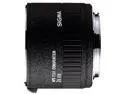
Sigma APO Teleconverter 2x EX DG for Canon EF-Mount Lenses
Pros: Read the specs.. I've had good Sigma gear and passable. Here's the deal. Read specs. I've done well with this one, but I paid attention to the specs. Canon tells you in specs that lenses won't autofocus at less than f/5.6. This lens with a 2x is never more than F/8, usually less. In good light with enough contrast, maybe. Learn to manually focus unless you've got a bundle of money for a really fast telephoto. To be reasonably sure of autofocuse, you need at least an f/2.8 to get f/5.6 with this. Secondly, I once bought a Canon extender and learned that it didn't work except with Canon and only a few others. It's not unusual. This Sigma works with some, not all 3rd party brands. Canons with work with non-comparitble lenses, not necessarily true the other way. . TAlk to the dealer. It will avoid problems. I know how you feel. Call New Egg, but don'r complain because you guessed wrong.
Cons: None, except, see pros. Not a con per se, but the best of the extenders are aimed at specific lenses and their optical designs. There's nothing wrong with general telex tenders, but the more lenses they handle, the less they're designed for one lenses particular optics.
Overall Review: Users need to be responsible for what they buy. I have all but tossed out Sigma lenses, but others, not so. Pay attention to what you buy. Don't accept myth an don't assume too much. Saying something has AF doesn't mean it will AF with this or that -- or that it will work with all lenses.
9/25/2011See more detail
Good value 4 Big Storage
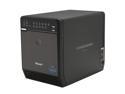
Mediasonic HFR2-SU3S2FW Raid 0 (Spanning) JBOD Raid 0 (Stripping) Raid 1 (Mirroring) Raid 3 (Stripped set with dedicated parity) Raid 5 (Striped set with distributed parity) Raid 10 (Mirroring + Striping) 4 3.5" Drive Bays USB 3.0 eSA
Pros: It's easy to set up and it's been no problem since installation other than drive going bad. I personally feel the need for Firewire and I can't speak to USB 3.0 because I don't have it. I have the USB 2.0 model, but appears to be no basic changes. For Macs, the dual FW800 makes a daisy chain a snap. As it is, I use this in Raid 5 with 4 2TBs on my desk. It's just a whole lot faster than my NAS which serves a different purpose.
Cons: The new version is pricier, but not outrageous, and in any event I bought it on sale. Most of the build is solid, but I find the front door a little shoddy. Documentation, unless something has changed, is all but nil, but can be found on line at Mediasonic site.
4/27/2011See more detail
Good value 4 Big Storage
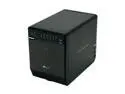
Mediasonic HFR2-S3B RAID 0 / 1 / 3 / 5 / 10 4 3.5" Drive Bays USB 2.0 eSATA Firewire 400 (1 Port) Firewire 800 (2 Port) PRORAID Box 4 Bay Raid Enclosure with USB 2.0, eSATA & FireWire 400/800
Pros: Cheap, Not Cheesy, 6 TB storage w/RAID 5, Outstanding connectivity for those needing Firewire 400 or 800, USB quick assembly, Quiet, easy fan replacement if needed. Very compact for Desktop.
Cons: Slightly cheesy front door mount, but it works well. E-SATA note specs requiring port multiplication(I don't). Documentation is a bit weak. Included are skimpy. YOU NEED TO USE WEBSITE. If you get a drive error indication, you did something wrong.
Overall Review: I needed bigstorage I could use on line with an iMac quad or plug into the MBPro laptop. The FW800 is perfect for that. If you don't need or want FW, pay attention, the same box is cheaper with few connects. I filled the box with 4 Seagate 2TB Green drives, i.e. 5900 rpm. They run cool and quiet other than the fan occasionally waking up. They're plenty fast for this purpose. FWIW, I've seen complaints on the 2TB limit, but my hugely more costly Thecus NAS has five 1 TB drives, the Thecus limit. It's a great NAS, but it cost a whole lot more, I need more room and the FW is faster than the net. I might consider another Mediasonics and jumper the FW if I need more.
12/9/2010See more detail
Great Camera, minor flaws
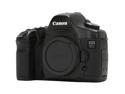
Canon EOS 5D Black 12.8 MP Digital SLR Camera - Body Only
Pros: This is a great camera that I've owned for more than two years. I worked in film and other digital for more than 40 years. This was the breakthrough digital camera for me, even more than the 20D. There are exceptions in circumstance, but the 5D consistently produces better images than 35mm. I travel with a laptop and the days of image uncertainty are over. Up to a point, there is also more room for error. The 5D let me get back to full frame 35mm lenses that work with it. There are smaller sensor lenses, e.g. the 10-22, that are very, very good. But I lose most of what I want with my 15mm fisheye with smaller sensors and it's pointless to spend the money (as I did) on 16-35 and 24-70 L lenses when the crop factor makes them a lot less wideangle than designed. There are very good, maybe great cameas with smaller sensors. But full frame is not a myth. The sensor is less noisy and especially when you dial down the ISO to 50-100, there is a creaminess of image.
Cons: 35mm cameras started putting on weight years ago and while the 5D is smaller and lighter than the other higher end full frames or the old pro 35mms, it's a chunk. You won't notice it so much with a lens of two, but pack up a kit with just one camera, some lenses and related items, you'll be surprised at how heave it can be. The price has been stiff, but is dropping now that Canon has a replacement in the works. The 5D doesn't have a lot of sins, but for better dust sealing and sensor cleaning, it might be worth a wait for Mark II if you have the bucks. Real Con: the camera will not properly format any card larger than 8 GB. It will shoot okay, but if you wipe with format, you've reduced your 16GB to 8. There are workarounds, but too complicated. Canon is not holding up its end on this.
Overall Review: There are people who think picture style settings are irrelevant in RAW. That's becae Adobe, Aperture and the rest use a generic RAW processing. Canon has some proprietary data in its RAW. The result is that in Adobe Camera Raw, you'll get a color image even thought you shot it with a B&W setting with Red filter. You can mimic this in Photoshop or Aperture, but personally I find it a lot simpler to experiment with the RAW file in Canon software. You can convert that B&W image to a JPG or TIF, change the filtration or try the color modes. I just wish that Canon would offer slightly better editing tools to go with what is generally a good program. I hate having to save a file and reopen it in Photoshop to make a minor edit. Another wish That Canon would do something about the dismal updating system for software.
12/18/2007See more detail