

Your Browsing History


A L.
Joined on 10/31/03
0
0
product reviews
- 8
Where's the engineering?
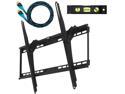
Cheetah Mounts APTMM2B Ultra Flush 32"-65" LCD LED Flat Screen TV Bracket Wall Mount With Integrated Bubble Level
Pros: Very good kit with respect to included hardware -- nuts & bolts, etc.
Cons: Where is the mechanical engineering? There are NO holes in the wall-mounting brackets that allow you to symmetrically bolt this thing on 16-inch-centered studs. This means that the bracket must be shifted right or left a bit, creating an uneven weight load on the mounting hardware.
Overall Review: Get your calculator out to figure out where on the mounting bracket to hang your TV in order to balance the weight load. This bracket should be redesigned with specific hole patterns for both 16-inch and 24-inch studs.
5/22/2012See more detail
HDD Failure
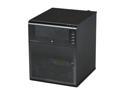
HP ProLiant N40L MicroServer Server System AMD Turion II Neo N40L 1.5GHz 2-Core 2GB (1 x 2GB) DDR3 1 x 250GB LFF SATA 658553-001
Pros: ProLiant MicroServer is great. This review is about the OEM Seagate HDD.
Cons: After receiving the ProLiant, I immediately pulled the original Seagate 250GB HDD to install a 2TB RAID configuration. This week I installed the Seagate 250GB HDD in another system. It failed in less than an hour. Seagate does not honor its usual warranty because this is regarded as an OEM drive. HP's warranty is only for one year. The drive is junk, and Seagate's failure to honor their normal warranty leads to major loss of customer loyalty.
6/12/2014See more detail
What SSD?
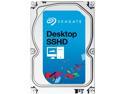
Seagate Desktop SSHD ST1000DX001 1TB 7200 RPM 64MB Cache SATA 6.0Gb/s 3.5" Solid State Hybrid Drive Bare Drive
Pros: As an HDD the drive works flawlessly. 5 eggs! (But read the cons...)
Cons: As a hybrid drive, which is why I bought this in the first place, I have to wonder if the SSD electronics are actually working. I give it 1 egg. The Seagate hype is that this drive will boot Windows with the speed of an SSD. NO WAY! This drive is about twice as SLOW as my other two PCs that have real SSDs. After taking the time to do a clean Windows 7 installation, I am grossly disappointed. When you average the pros and cons, you get 3 eggs...
Overall Review: I'll eventually replace this with a 250-500GB SSD, and use the Seagate for ???
5/28/2014See more detail
Very Disappointed
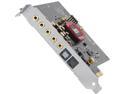
Creative Sound Blaster Z 70SB150200000 5.1 Channels 24-bit PCI Express (x1, x4 or x16) Interface Sound Card
Pros: It works, sort of... Windows Media Player and my music library sound GREAT!
Cons: I give an item the benefit of the doubt and start out with 5 Eggs. The Sound Blaster Z is a big disappointment for many reasons. (1) When the SB Z powers up, it produces clicking noises in the speakers. It also produces clicking noise when the sound source changes. This is infrequent, and I haven't correlated the condition. (2) The Windows Startup sound is ALWAYS cut short and gets garbled at the end. (3) The sounds in various programs DO NOT PLAY! Yesterday, I looked up a word in "Merriam-Webster's 11th Collegiate Dictionary." When I clicked on the word to get the pronunciation, I got NOTHING!! NO AUDIO!! I've noticed this with a couple of other programs, also. These are event sounds, and, hence, I did not deem them that important. The MWCD problem is unacceptable. (4) The volume level for certain events -- the same events -- sometimes varies. Again, this is infrequent, and I haven't correlated the condition. This may be an issue with the "Sound Blaster Z-Series Control Panel" applet. (5) This is somewhat trivial, but the icons on the card's mounting bracket that show the function of the I/O jacks are VERY difficult to discern. Other Sound Blaster products that I've owned came with an adhesive multicolored label that could be affixed to the mounting bracket. No such label with the SB Z. Six months from now, if I change the cabling to the card, I'll have to dig out the QSG to figure out the functions of the card's I/O jacks.
Overall Review: I purchased the SB Z to replace an external SB Audigy 2 ZS unit. (The ZS was added to the computer when the mobo's integrated sound chip/system started getting flaky.) None of the problems (1) through (4) described above were experienced with the Audigy 2 ZS. I have four other computers in my home network, and none of them have any of the problems described above. I suspect that the problem of 'NO SOUND with various programs' could be a driver issue. (I am, of course, using the latest driver and the latest version of the "Sound Blaster Z-Series Control Panel" applet.) Maybe Creative will come up with a fix, but right now I'm just very disappointed.
8/20/2013See more detail
Poor throughput
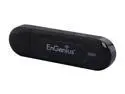
EnGenius EUB600 Dual-Band Wireless-N Adapter IEEE 802.11a/b/g/n USB 2.0 Up to 300+300Mbps Wireless Data Rates
Pros: Small size. Fairly straightforward installation. (User guide says do it one way, installation software says do it another way.) Fairly inexpensive -- on sale -- but not the cheapest.
Cons: Poor performance. Poor range. Its small size means that its antenna does NOT grab wi-fi like units with an external antenna. Side-by-side performance with another USB adapter shows the EnGenius EUB600 to have -15dB to -20dB less signal strength. I won't be using this unit in its intended role, but I'll try it again if I need a wi-fi adapter 15 feet away from my wireless router.
6/27/2013See more detail
Beware!
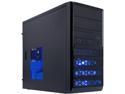
Rosewill RANGER-M Dual-Fan Micro ATX Mini Tower Gaming Computer Case with Blue LED Lighting
Pros: Attractive case. Yes, the steel is lightweight, but it is not flimsy. If you don't attack the case like a maniac, you'll have no problems with your installation.
Cons: Beware! If you attempt to use memory modules with an integrated heatsink -- most memory these days -- HARD DRIVES WILL NOT FIT IN THIS CASE!! This is a very compact uATX case. A uATX mobo, such as the Gigabyte GA-Z77MX-D3H, has its memory slots positioned right next to this case's hard drive cage. If the memory you're using has a heatsink, such as the G.SKILL Ripjaws Z Series, no standard 3-1/2" hard drive will fit. I'm thinking of putting mounting rails on the HDD and moving it to the 5-1/4" drive bay, but that's a pretty ugly work-around. What if I want more than one 3-1/2" HDD?
Overall Review: This is a nice little case, well worth its value (I paid $25). It seems to be best suited for a lower performance system that does NOT require four high-performance memory modules.
7/20/2012See more detail
seller reviews
- 1
Great Buying Experience
This Newegg Marketplace seller is top notch. They worked with me to cancel an order that had the wrong quantity so that I could place a new order with the correct quantity. Their communication was outstanding, and the refund was near instantaneous. Product (2 hard drives) was shipped Priority Mail and arrived im just a couple of days. Packaging was very good, and the drives are perfect.
On-time
Delivery
Product
Accuracy
Customer Service
Satisfactory
3/2/2019See more detail