

Your Browsing History


KRISTON R.
Joined on 10/05/03
0
0
product reviews
- 69
Great feel and nice loud sound, but not a Model M clone
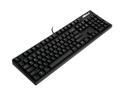
ABS M1 Heavy Duty Professional Gaming Mechanical Keyboard
Pros: Loud, ringing reverberation is just like keyboards of old PC clones not made by IBM (see Cons). The keyboard is only a little larger than the keys take up. This is a major bonus if you like small keyboards but don't want to compromise on keys. FULL SIZE caps lock key for Unix people who remap CTRL to caps lock. This is rather rare on any keyboard (and I am still searching for a Model M clone with full-sized caps lock either). The keyboard is nice and heavy as nature intended, with amazing, grippy rubber feet (and really good rubber on the risers, too, also rare). Stiff, solid, and a very tasteful matte black finish that isn't painted on (the plastic is black).
Cons: The case reverberates a bit with a ring. Your table may amplify or muffle it. I don't happen to care but you might. This is not a Lexmark Model M keyboard clone and does not pretend to be. The reviewers who think this is a Model M are confusing this with another type of old-school "clicky" keyboard.
Overall Review: This type of keyboard is not the same as a Model M. The clicking noise comes from the keys landing, not from the (very faint) click in the key mechanisms themselves. However, the click happens at the moment of keystroke actuation which gives this a nice touch. I didn't feel any of the "halfway down" actuation some other reviewers claimed. This keyboard is an excellent a clone of those "other" clicky keyboards that came with Compaq IBM PC clones in the late 1980s and early 1990s. I have about twenty real IBM/Lexmark Model M keyboards in various states of repair. Those boards click loudly as the key is struck and also when the key hits the back plate. This one only really clicks when it hits the back plate. If you had a PC clone in the late 1980s or early 1990s you know this feel. I think some people call it the "Cherry" feel. It's not better or worse than the Lexmark Model M; it is just different.
4/21/2010See more detail
Cannot tell if it records at D1 or CIF
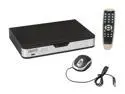
Zmodo DVR-H9108V 8 x BNC 8 Channel CCTV Security Surveillance Security DVR - 3G Mobile
Pros: Great price. Reasonably good brand (see Cons). Claims it can do D1 resolution (see Cons).
Cons: The marketing materials says recording resolutions are "selectable" and can record at CIF and D1. The user manul says it only records at CIF (352x288). I cannot tell how to record at D1 (720×480). This uses the same software as the other generic DVR units coming out of China (Zhuhai Raysharp Technology Co.).
Overall Review: D1 is the minimum resolution you want, which is 720×480. Anything lower and the images are too pixellated to be useful. I am disappointed that I cannot figure out what this machine can and cannot do due to the contradicting marketing and product documentation.
12/7/2011See more detail
Works fine
![WAVLINK USB 3.0 to SATA I/II/III Dual Bay External Hard Drive Docking Station for 2.5/3.5 Inch HDD/SSD with UASP (6Gbps), Support Offline Clone Duplicator Function [Max 16TB X2 ]](https://c1.neweggimages.com/ProductImageCompressAll125/0VN-0069-00014-S02.jpg)
WAVLINK USB 3.0 to SATA I/II/III Dual Bay External Hard Drive Docking Station for 2.5/3.5 Inch HDD/SSD with UASP (6Gbps), Support Offline Clone Duplicator Function [Max 16TB X2 ]
Pros: Works fine. May need to adjust USB driver settings.
Cons: May need to adjust driver settings to get it to keep working in Windows 10.
Overall Review: Recommended.
12/24/2020See more detail
Small, fast, and quiet
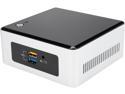
Intel NUC NUC5PPYH, HDMI, VGA, Intel HD Graphics, USB 3.0
Pros: It's impossibly small!! The processor has large cache and is far better than the Atom and more like a non-HyperThreading Core i3. HDMI and a real Ethernet port are a big plus. A total of 4 USB 3.0 ports (see Cons). Build-in wireless networking. VESA adapter plate is required to mount to the rear of a VESA-compliant display (see Cons).
Cons: The glossy plastic top panel scratches instantly and for no reason. Please, people, stop making computers with this stupid scratchy, glossy plastic. Protip: If it requires a plastic film to protect the surface during shipping, it should not be part of your product!! This a ponderous cosmetic problem with this computer. This tiny computer has 4 USB 3.0 ports, but no USB 2.x ports. If you want to install Windows 7, you are out of luck unless you know how to slipstream drivers into Windows 7 installation disks. Linux is touch-and-go, but if it's fairly recent, it will work. It seems to take a long time for the power light to turn blue. I've held down the power button for up to 10 seconds before it actually lights up and the computer starts. The VESA adapter plate is rather clumsy. Taking the unit apart to install drives and memory is somewhat risky because a cable remains attached from the motherboard to the removed panel. This risks damage to the cable and/or its socket.
Overall Review: Best experienced with Windows 10 so you'll need to buy a license. Be sure to update the BIOS. Even though the BIOS claims it can update via the internet, it never recognized any internet connection from the hardware ethernet port.
11/4/2015See more detail
Amazingly fast for the price
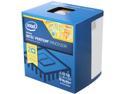
Intel Pentium G3258 - Pentium Dual-Core 3.2 GHz LGA 1150 53W Intel HD Graphics Desktop Processor - BX80646G3258
Pros: Insanely fast. Big caches mean big performance. For multiprocessing tasks the big, dedicated cache really helps. Dual-core (see Cons).
Cons: Dual-core but no hyperthreading, but this isn't such a bad thing since it means each CPU core will be using its full fair share of the cache memory. Even though the pipeline won't be kept as full as possible (which is why Intel uses hyperthreading), you won't notice. For multiprocessing tasks the big, dedicated cache really helps. You won't like the heatsink/fan bundled with it. It's a little too small and the smaller fan spins faster and more loudly to compensate.
Overall Review: I just bought another one of these gems on sale. If you're looking for the cheapest bang for the buck possible, this is it.
10/5/2014See more detail
Compatible with VMware ESXi 5.5 U2
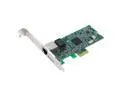
SEDNA PCIE 10/100/1G LAN Card for Server ( Broadcom BCM5721 ) - Supported by VMware ESXi 5.5 with Low Profile bracket
Pros: This card has a Broadcom BCM5721 chipset. This card works with VMware ESXi 5.5 U2.
Cons: The RJ-45 socket on the card I received is very, very tight. I'm not sure why, but I have the similar "low-cost" Newegg item #9SIA1JM1ZD6387 which is not tight. Just like the other card, the chip gets very hot and you'll burn your finger on it. You might want to consider sticking a VGA heatsink kit to the chip cool it down.
Overall Review: There are three versions of the Broadcom BCM5721 chipset, but they do not vary in performance, just power consumption and thermal requirements. This is a good card for a VMware ESXi 5.5 U2 server with reasonably good airflow.
9/28/2014See more detail