


Your Browsing History


ALAN Q.
Joined on 12/21/03
0
0
product reviews
- 7
Excellent value for the budget minded
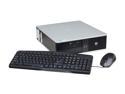
HP Desktop PC DC7900 DC7900 3.00GHz 2GB 160GB HDD Windows 7 Professional 32-bit
Pros: Excelltn Core 2 Duo E8400 CPU, pre-equipped with Windows 7 Professional, small form factor ideal for use in a media center for a television viewing setup.
Cons: VGA output only for video. Form factor means a power supply upgrade is tricky and requires compromises to be made.
Overall Review: For the price you are paying, this is a great computer. Keep in mind that it is a 4+ year old computer, after all, so compared to the Intel i5 Core computer I have, this isn't that fast but it will still hold its own. My intent for this computer was to use it as a web streaming machine for my television, so this PC being a smaller form factor fit all my needs there. Once I upgraded the hard drive with a solid state drive, the on-board video card with one that had HDMI output, as well as the power supply to power the new, power thirstier video card, I had a nice functional machine which I can now utilize on my big screen LED television. The solid state drive makes a world of a difference in boot up performance for this PC, while opting for a video card tat had HDMI output meant a far superior picture quality on today's LED TV than the VGA output that this computer had. Unfortunately, because the video card requires a 300W minimum power supply and the equipped power supply is only good for 230W, I had to upgrade the power supply. The power supply form factor for this PC is very unique and is not readily available, so I ended up buying a standard power supply that had to sit outside of the PC casing to power this PC. Nevertheless, because this computer resides in my cabinet, having the power supply sitting next to my PC is a non-issue, but for those of you wanting to use this as a main PC but with a better video card, be aware of this need.
2/8/2014See more detail
Works as advertised, but not much faster
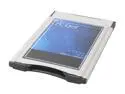
LINKSKEY LKA-CRP11 5-in-1 Type II PC Card (PCMCIA) Type II PC Card Reader/Writer
Pros: Card was easy to install and use on a HP Pavilion ZT1145 laptop. Plugs right into the PCMCIA slot, and once I put a SD card into this adapter, the computer automatically installed the drivers and was able to read the card in no time.
Cons: My laptop is 5 years old and came equipped with USB1.1. I was hoping this card would allow me to read flash memory cards faster than the USB card readers that I have, but was disappointed to find out that its read speed was approximately the same as my USB card reader on a USB 1.1 port.
Overall Review: If your old laptop lacks USB support, this PCMCIA card would be a a good buy. However, if it does have USB1.1 or USB 2.0 ports, buy a USB card reader instead for comparable (USB1.1) or superior (USB2.0) download speed.
7/10/2007See more detail
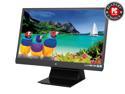
ViewSonic VX2270Smh-LED 22" Full HD 1080P SuperClear IPS 178/178 Viewing Angles Monitor, 1000:1, 250cd/m2, HDMI&VGA&DVI-D, Built-in Speaker
Pros: Good performing screen with excellent color contrast. Viewsonic X-Series performance at good pricing. Perfect size for my space limitations. Multiple inputs accepted (HDMI, DVI, VGA).
Cons: None so far after 1 month of usage
Overall Review: Have always had Viewsonic monitors from the past. Had a 17" CRT monitor, then to a X-series 19" LED monitor which has lasted about 10 years now, and now finally upgraded it to this 22" X-series monitor. My space constraints for a monitor upgraded limited my decisions out there as it is hard to find smaller widescreen monitors, but this one fits the bill, looks good, and has the usual Viewsonic quality that I've become accustomed to.
2/8/2014See more detail
Good value
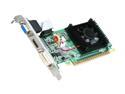
EVGA 200 GeForce 210 1GB DDR3 PCI Express 2.0 x16 Low Profile Graphics Card 01G-P3-1312-LR
Pros: Needed a cheap video card for a refurbished HP dc7900 computer I bought here as I am not a fan of using a VGA connection to my 60" LED LCD TV. This card is budget friendly, has a HDMI port on it that would supply both video and audio to my TV on one convenient HDMI cable. Installation was a cinch though I did have to upgrade my power supply to meet the minimum power requirement of this card, and, at least with the dc7900 computer, had to go into the BIOS to re-enable the on-board audio as this card will install its own NVidia audio drivers to allow for you to utilize the audio/video function of the HDMI cable.
Cons: As others have mentioned, the fan on this card is quite loud. It won't be a big issue for me as my computer will be located inside a cabinet that has doors on it, but if you have it sitting out in the open, you will hear the fan.
1/28/2014See more detail
Incompatible with ECS P4M800PRO-M V2.0
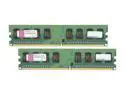
Kingston ValueRAM 2GB (2 x 1GB) DDR2 533 (PC2 4200) Dual Channel Kit Desktop Memory Model KVR533D2K2/2GR
Pros: Small form factor, nice packaging, Kingston name
Cons: ECS Elitegroup P4M800Pro-M V2.0 motherboard will only recognize the each module as being 512MB, not 1GB. Thought it was a memory issue as I had the latest BIOS installed on the computer, but the RMA set does the same thing. Will be returning for a refund. :(
11/13/2009See more detail
Good and portable
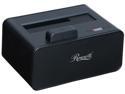
Rosewill RX234 2.5"/3.5" SATA III USB 3.0 LED Single Bay HDD Docking Supports UASP and Hard Drive Capacity Up to 10TB
Pros: Easy, small, lightweight, and portable. No need to carry around a bulky power supply as the computer's USb ports provides enough juice to power the drive. Install a 2.5" drive to it, plug the Y-cord to two USB ports, and Windows does the rest.
Cons: Y-cord is kinda cumbersome, but I suppose it's needed for the extra current to run the drive without a power supply.
Overall Review: None
7/15/2008See more detail