

Your Browsing History


Henry L.
Joined on 02/12/05
0
0
product reviews
- 13
Worthy RAM upgrade
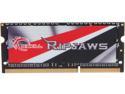
G.SKILL Ripjaws Series 8GB 204-Pin DDR3 SO-DIMM DDR3L 1600 (PC3L 12800) Laptop Memory Model F3-1600C9S-8GRSL
Pros: It's another G-Skill masterpiece.I purchased this to replace the RAM in my Avatar Tellus Ultrabook. The hallmark of this module is that it runs at 1.35 volts vs the usual 1.5 volts. This transition offered me a measurable difference in battery life. The module also runs cooler so there's less heat on my lap. I haven't faced any stability issues, and the module was plug and play like any other stick of RAM.
Cons: N/A
10/29/2013See more detail
Reliable, Versatile, Affordable
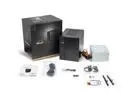
ASRock DeskMeet X600 Series Barebone mini PC , Supports AMD Socket AM5 Ryzen™ 9000&8000&7000 Series Processors, up to 65W, support 4 x DDR5 DIMMs, up to 7200+ MHz (OC), 256GB Memory.
Pros: - 4 RAM slot ITX, a rare combo - Relatively easy build - Reasonable venting & airflow - Reliable motherboard
Cons: - The PSU "ketchup/mustard" colored cables aren't my favorite, but you mostly can't see inside the computer anyways - The port selection on the back side is par for a low end system, but makes up for it by providing additional ports on the front
Overall Review: I went through 2 big brand mITX motherboards, both of which had reliability issues with my CPU/GPU combo (Ryzen 7900, RTX 4600 LP). Random BSOD, slow boot times due to complex BIOS/UEFI, and higher CPU temps potentially due to constrained airflow around the CPU, all of which the X600 overcame for me. This kit was cheaper than those two other motherboards, while also providing the case and psu, making it a great value. I added two 2.5 inch SATA SSDs instead of a fan (multi-purpose chassis mount point) and my CPU temps are still very good (Ryzen 7900, Noctua NH-L9a-AM5). This system is a "it just works" piece of kit for me, coming from two other motherboards which just fustrated me, THIS is the build I'm happy I landed on.
1/31/2026See more detail
Runs perfectly on my Ryzen 5 build
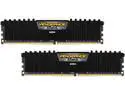
CORSAIR Vengeance LPX (AMD Ryzen Ready) 32GB (2 x 16GB) DDR4 2400 (PC4 19200) Desktop Memory Model CMK32GX4M2Z2400C16
Pros: It's a no frills, get it done, dual channel kit. There's no XMP profile, most (if not all) motherboards will auto-detect the speed and voltage. It's literally plug and play. Stable with hours of continuous Prime95 testing, something I can't say with all the RAM I test.
Cons: N/A
Overall Review: I have a Ryzen 5 OC to 3.8 Ghz at 1.4 volts. I played around with both this DDR4 2400 kit and DDR4 3200 ram of similar standing. Although you can see modest benchmark differences, real world use is almost transparent to me. From transcoding video, to playing games, and running computationally intensive scientific calculations, it don't notice the difference between 2400 and 3200 RAM at all.
1/19/2019See more detail
Needed voltage bump on my Ryzen 5 1400.
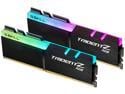
G.SKILL TridentZ RGB Series 32GB (2 x 16GB) 288-Pin PC RAM DDR4 3200 (PC4 25600) Intel XMP 2.0 Desktop Memory Model F4-3200C16D-32GTZR
Pros: Works fine but needs extra juice.
Cons: I have an MSI B350M Gaming Pro (motherboard) paired to a Ryzen 5 1400 that I'm overclocking 3.8GHz @ 1.4 volts. The motherboard has the latest BIOS as of November 2018. It would boot and run at all configurations for hours but BSOD would eventually creep in. I eventually got it stable with XMP set to DDR4-3200 but with the voltage increased from 1.35 volts to 1.4 volts.
11/10/2018See more detail
Buttery smooth
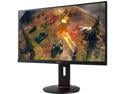
Acer XF250Q Abmiidprzx Black 24.5" Full HD Gaming Monitor, 240Hz, 1ms (GTG), AMD FreeSync, Height & Pivot Adjustment, Built-in Speakers, HDMI 2.0, DisplayPort, USB 3.0x4
Pros: - Slim bezel - No dead pixels - Buttery smooth gameplay - Enhanced Windows 10 experience @ 240Hz - Viewing angles are actually pretty decent for a TN panel - Great value for the price
Cons: - I read that the colors weren't great on other reviews so my expectations were low. With that in mind, after receiving the monitor, my expectations were exceeded. It's not my best panel, but I've used plenty of other monitors and laptops with worse color reproduction. - Speakers are low quality, but nobody buys a monitor like this for the audio
Overall Review: I bought this monitor to improve my gameplay experience, and it definitely enhances the experience. I'm a terrible FPS gamer, and buying this did nothing to up my game. I was pleasantly surprised to say that it also really improved my Windows 10 experience. If you scrolling quickly up and down a webpage, its buttery smooth. It's actually very helpful if you're looking for something in a large document (i.e. large PDF) and you have to scroll quickly through to find whatever you need it find. This monitor makes it significantly easier to spots things you need to see when you're scrolling quickly. Fantastic monitor at this price point.
5/1/2018See more detail
Looks great in a Phanteks Eclipse P400. Bad position for the USB3 front header, however all other connectors good. Great price, heat-sinked VRMs ideal for mild overclocking on Ryzen.
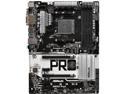
ASRock AB350 Pro4 AM4 AMD Promontory B350 USB 3.1 HDMI ATX AMD Motherboard
Pros: Love the 2 PCIE slots, slotted in 2 GPU's working individually for protein folding compute. Colors match my white Phanteks Eclipse P400 perfectly. Felt like the fan headers, CPU, and motherboard power connectors were decently positioned. Heat sinked VRMs on a super cheap board lends itself well for mild overclocking at least the 4 and 6 core Ryzens.
Cons: Bad position for the USB 3.0 header. Wish it was at the bottom, top, or even right angled on the right side of the board for easier cable management. Wish the IO shield wasn't the plain shiny silver, but instead a matte labelled black.
Overall Review: This review for ASROCK review rebate.
11/7/2017See more detail