




 here!
here!
I’m your shopping assistant for PC builds, upgrades, and everything tech.
Got questions? Ask away!
Start a conversation
here!
I’m your shopping assistant for PC builds, upgrades, and everything tech.
Got questions? Ask away!
Start a conversation

Joined on 03/28/06
Lots of performance for cheap
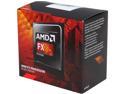
Pros: WEI CPU score of 7.8 without overclocking, (I've found my particular CPU can be overclocked to 4400GHz without issue using AMD CCC, however I chose to run it at stock settings), included fan is quiet and manages to kees everything very cool (typically in the 20-30C range... into the 40C if pushed really hard).
Cons: Its a shame more software programs don't take advantage of the 8 cores, this really is a fast processor... especially when one considers the price/performance ratio.
Overall Review: Mated together with 16 GB HyperX 1866 memory, Gigabyte GA-970A-UD3P motherboard, and a Gigabyte GTX750, it make for a well-balance, performance-wise combo all for under $500. Together with a big SSD and its now my "go-to" video editing rig.
Too many of these are turning up defective
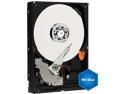
Pros: The drives were both faster and larger than the drives they were supposed to replace
Cons: Both drives were defective in different ways. First drive was throwing out read errors from the start. A surface scan show a ton of errors that couldn't be fixed. RMAed it to Newegg. Second drive took the cloning and appeared to work for 10-12 hours of use time all totalled and then suddenly went to doing "click-click-click..." leaving me to troubleshoot my computer for a couple hours before it was the hard drive preventing my computer from even posting... I thought it was a BIOS issue until I finally put the old hard drive back in and tada, everything booted normally. I've since trying it in other computers and it will freeze all of them as it goes "click, click, click..." Newegg wouldn't take the RMA on this one (because I didn't get around to installing the drive until 4 weeks had gone by and the 5-6 days it took for the drive to fail put it beyond their 30-day warranty, sigh)... so I've RMAed it to Western Digital, which has cost me $6.48 in shipping.
Overall Review: I puchased two of these drives and both turned out to be defective in short order. The real question now is will their replacements be any better... and even if they do work I'll always have the nagging question of "How long before they too will die?" going on in the back of my mind. This is no bargain. I tried to save $10 by purchasing two of these on sale but already the RMA shipping has almost eaten that up not to mention the aggrivation and time lost dealing with these drive failures, added to that the lost of "peace of mind" in being able to trust the replacement drives with my valuable data. I repeat "These drives are NO BARGAIN at any price." If you value your data and your time I recommend you avoid these hard drives.
Its a fan
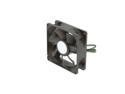
Pros: Doesn't click or whine or vibrate unnecessarily and PWM control means it remain quiet at low RPMs until more air flow is required for additional cooling effect.
Cons: None.
Overall Review: Its a fan. Marketing pitches abound where fan are concerned. I was a sucker for the hype for awhile but this is the bottom line: there are no free-lunches. We all want that magic fan that provides gobs of air flow while remaining whisper quiet... but the reality is you can't cheat the laws of physics. Greater air flow means faster RPMs which result in greater noise generation. There are no miracle designs or break-through in technology that will bend those laws... all you can hope for is a fan with a motor that doesn't whine, or have annoying frequency harmonics, or clicks due to defects in manufacturing. And in the case of a sleeve-bearing fan... DON'T MOUNT IT HORIZONTALLY, it will fail within weeks or months. This SLEEVE BEARING fan has none of those issues and is priced reasonably anything more for a fan is a rip-off.
Added a little more than what I was expecting
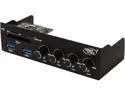
Pros: Everything on it works! Hooking it up is very straight forward and I had no issues. I like the blue LED under each control knob. The two USB 3.0 ports and Multi-Card reader are nice extras that I really appreciate now, its one of those things I didn't know how much I really needed until I installed this unit. All three models of fans I've used with this unit have a large degree of RPM adjustability... from a very slow dead-quiet up to a high RPM whoosh of rushing air. Its exactly how I imagined it would all work.
Cons: It would have been nice to get actual RPM read-outs on this but in this price range I really didn't expect to get that.
Overall Review: This is a very good value if its what you're looking for. The convenience of the USB 3.0 ports and multi-card reader should not be under-estimated. I've only used this with standard 3-pin fans but it seems to offer a large range of speeds. I also have other fans on my system that are PWM controlled and so don't need a manual controller. I only crank up the (non-PWM) case fans I have attached to this controller when I really want to push some air but mostly I leave them set to inaudible levels.
Great printer so far....
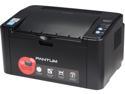
Pros: Cheap, cheap, cheap... I paid just $29 including shipping!!! That's downright cheap for any printer that works... this is a laser printer! Wireless and it works!! It prints very fast and crisp... appears to be built quite solid. Software works for PC Windows 7 64-bit for sure but I'd assume it works with all versions of Windows.
Cons: The instruction "manual" (its a foldout pamphlet) is done all in pictograms... pretty cheesy but is effective enough as a multi-lingual strategy I guess.
Overall Review: I can't believe what a value this printer is... I'm going to tell everyone I know about it. Honestly this was an impulse buy, though I was looking for a laser printer for my small business (out of my home), so I wasn't expecting much and wouldn't have even considered it (because the price just seemed too cheap to be true)... but after carefully reading the review and check for the availability and pricing of toner for it I decided to give it a shot... after all it was only $29 including shipping. (For a comparison, tonight the wife and I ate a sandwich and salad and had two beers at a local brewery which all came to $38 including tip... folks, this laser printer was $9 cheaper!!!) When it arrived I was quite impressed just at the heft of the box. Took the printer out and was further impressed by its build quality and feel... so I went about setting it up and in less than 20 minutes I was printing on it through WiFi. To sum it up: I can't believe how good deal this has turned out to be... if there turns out to be a catch (like it dies in the first year, or toner cartridges expense or availability changes, etc) I will be sure to post back here and let everyone know... but so far, I'm pleased as punch (whatever that expression means...) I love it!!!!
Revisited... does recover for sleep mode properly
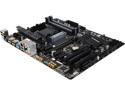
Pros: Nearly everything except the one "con" below... also see other thoughts.
Cons: Doesn't properly come out of sleep mode.
Overall Review: I reviewed this board a few weeks earlier after I just got it and everything appeared to work fine and so I gave it 5-stars. Everything I said it that review is still true and I still love this MB and would purchase it again HOWEVER, I've since discovered a problem that wasn't quite so apparent at first. What appeared to be randomly, I began having strange overheating issues while not doing anything more than simply browsing the internet... it would just suddenly do a hard shutdown. After a little sleuthing I realized it would get to 80C and immediately shutdown (which is what I had it set to do in the BIOS). Very long story made short... after a couple weeks of this odd behavior I finally tracked it down. If I boot the system up it will run cool as a cucumber for hours on end regardless of what I'm doing (meaning it typically stays below 30C and under no circumstances ever exceeds 43C) HOWEVER if I put it to sleep (or allow it to go to sleep) and then wake it, the CPU will operate at 100% when it comes out while the fans continue to remain at low RPMS and eventually the system temps will cause the CPU temp to gradually rise to an overheating situation and then finally end with a the hard shutdown... it takes about hour or more before this happens and I guess that's what took me so long to draw the connection. I have verified this behavior and when I search the internet about this MB and the sleep mode, I find other owners commenting about BSOD and such. I didn't find any mention of overheating though, perhaps mine is the only example or maybe others haven't yet made the connection or the BSOD prevents the board from going into sleep mode or maybe they are using more aggressive cooling systems. I believe if I had a more aggressive cooling system setup it would probably never reach the point of shutdown but running at such high temps still cannot be a good thing for the CPU. I'm fortunate that I can be happy without using sleep mode but if that is important to you, then I might suggest you stay away from this MB.


