

Your Browsing History


Eric B.
Joined on 01/01/05
0
0
product reviews
- 15
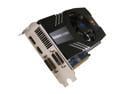
SAPPHIRE Radeon HD 6850 1GB 256-bit GDDR5 PCI Express 2.1 x16 HDCP Ready CrossFireX Support Video Card with Eyefinity (100315L )
Pros: Great bang for your buck; inexpensive Overclocks easily with Sapphire software Efficient cooling; low temperatures at stock settings Silent at idle
Cons: Fan whines at full tilt Sapphire TrixX (Overclocking software) must be run at startup to apply overclocked settings
Overall Review: Great performer at stock speeds (775mHz core, 1000mHz memory) and provides a nice ~15-20% boost when overclocked, depending on your comfort levels with temperature. At factory clock settings, it idles at 34c and tops out around 52c with very average case cooling (nothing fancy.) Plug in another card with Crossfire, and they dominate every game I've thrown at it so far (Skyrim, Diablo 3, Battlefield 3, DiRT 3.) Sapphire's cooling system is very efficient, but the fan whines when it tops out at around 5000 RPM. You may consider headphones when playing newer games that can push this card to its limits. Got these cards at a great price (114 each after IR & MIR) -- thanks so much, Newegg! Finally, a note about the DiRT 3 voucher -- lots of people complained that it's expired, and the included voucher says that it is (12/31/11.) Tried it anyway, and it worked. Downloads through Steam. Try it out anyway!
4/29/2012See more detail
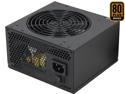
Rosewill RG630-S12 - Green Series 630-Watt Active PFC Power Supply Unit - Continuous @ 104 Deg. F (40C), 80 PLUS Bronze Certified, Single 12V Rail, Compatible with Core i7, i5
Pros: Works well, good price, quiet (no coil whine that I can discern,) all voltages correct according to BIOS
Cons: Occasional violent rattling on boot
Overall Review: Good power supply for the money. Most of the cables are wrapped in netting, which makes it easy to route and keep clean. Delivers all of the right voltages, and has been perfectly stable for me (typically 24/7 uptime) since I bought it in Q1 2012. It's inaudible, even when my case fans are turned down to their minimum. Which leads to... Every once in a while, notably when my PC has been off for more than 24 hours, I will boot up and the PSU begins to rattle loudly in sync with its fan. A reboot fixes it, but this kind of worries me, since a power supply failure could be catastrophic to the rest of my components. Perhaps it's just one of the fan's bearings, but that's just wishful thinking. It's done this since day one... I stubbornly haven't gotten around to replacing it. If I had known the first few incidents weren't just a fluke (I always run into some sort of hardware oddities for the first few weeks into a new build,) I would've returned it. It's not a reassuring sound.
12/1/2012See more detail
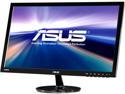
ASUS VS Series VS238H-P Black 23" HDMI LED Backlight Widescreen LCD Monitor 250 cd/m2 50,000,000:1
Pros: Price, low weight, slim profile, low power consumption
Cons: Requires minor configuration out of the box for a preferable display
Overall Review: This is an excellent monitor for the price. Coming from a 5-year old LCD display with inferior specs (higher dot pitch, much higher contrast ratio, etc.) this display blows my socks off! It requires some tweaking out of the box to not look washed out with blue -- for me, using Windows 7's monitor adjustment wizard complemented my Catalyst Control Center adjustments (AMD/ATI video card.) Tweaks which really did it for me: manually setting the warmth in CCC to taste, enabling "Theatre Mode" in the monitor's OSD, turning "Trace Free" (response time overdrive) to 80 (100 resulted in a bit of flicker), and enabling "ASCR," the dynamic contrast option. That last bit was what made this display shine. The huge boost in contrast really helps colors pop in movies and games, without being overly obnoxious on the eyes (especially on the desktop.) The effect reminded me of when I upgraded from a Voodoo1 to a Voodoo3. As of now, I have no negative things to mention aside from the minor configuration necessary out of the box to get an optimal display. I noticed a number of people complained about the wobbly stand -- it's not much of an issue if you remove the rectangular cover on the back (near the bottom, where the arm attaches) and tighten the four screws that hold the mounting assembly to the monitor. From the factory, mine took another quarter turn to tighten. There's a touch of wobble, but it's negligible, and I've got a cheap IKEA desk.
2/9/2013See more detail
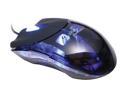
RAZER Plasma Diamondback RZ01-020300-R1M1 Plasma Blue 7 Buttons 1 x Wheel USB Optical Mouse
Pros: Ambidextrous, attractive, nice feet.
Cons: Fell apart in under two years in every way possible.
Overall Review: This thing was a hunk of junk. I loved the way it looked on day one, and its movement and precision were pretty great from what I recall, but that's about all the good things I can say about it. The first issue was in the scroll wheel; it lost its tactile feel within the first six months, and made scrolling a waste of time (jumped all over the place.) Next were the rubber grips on the sides; they started chipping and ripping away, making the mouse feel generally bad in the hand. Then came the ghosting in the left mouse button into the second year, on buttons that never really felt nor sounded good to begin with... Finally, the optical tracking died, before I made it to year three. I foolishly replaced it with another Razer mouse, which ended up splitting down its center over the course of a few months. And no, I didn't throw/hit/drop it. And no, I don't weigh 800 lbs, and no, I don't death grip my mouse... This isn't exactly meant to be anti-Razer propaganda, but I no longer have any faith in their products. It's a gimmick. I'll likely stick to Logitech mice for the rest of my life.
12/1/2012See more detail
Persona 4 Arena

Persona 4 Arena Playstation3 Game - Atlus
Pros: Excellent hand drawn models and animations, great soundtrack, fast-paced action, respectable story mode
Cons: Sometimes a little too hectic, fast, and just generally noisy
Overall Review: I took a gamble on this game, as I love the Persona/Shin Megami Tensei series, but haven't really been into fighting games since the arcade glory days (i.e. Mortal Kombat I/II/III, Street Fighter 2/Turbo/Alpha.) Very pleased to say that this is an all-around excellent game, and one of the very few fighting games I've been able to get into of the past decade (or two!!) The game plays very much like its influences, those being the Guilty Gear/BlazBlue franchise, but feels a little more well-rounded and user friendly. Definitely easier to just pick up and learn, in my opinion. My only complaint is that the game can get downright annoying with extended play sessions. The music is intense and great, but when combined with the fact that the sound effects and character voiceovers are pummeling your speakers nonstop, it can get overwhelming. It certainly adds to the action of the game, but prevents me from ever being able to play this game for more than a half hour at a time. Would've loved to have seen some older characters from other Persona games, but it IS called Persona 4 Arena, after all. The presence of Teddie makes it all OK.
11/24/2012See more detail
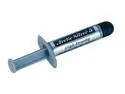
Arctic Silver 5 High-Density Polysynthetic Silver Thermal Compound AS5-3.5G
Pros: Very efficient
Cons: Expensive
Overall Review: This is great stuff. Between this and Arctic Silver's Ceramique, I've never wanted to use any other compound. A single tube very well may last you a lifetime! Oh, and be sure to use the "pea method" when applying... take it from a former "spreader" that this is the way to go. Seriously!
9/24/2012See more detail