

Your Browsing History


Richard E.
Joined on 06/26/09
0
0
product reviews
- 9
Sweet Upgrade Kit
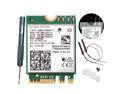
Fenvi Wi-Fi 6E AX210 802.11ax WiFi Card Tri-Band 2400Mbps 5G/6G Wireless Module MU-MIMO for Laptop ,With Intel AX210NGW,Bluetooth 5.3,Internal WiFi Wlan Adapter Support Win 10/11 64bit,M.2/NGFF 2230
Pros: I used this to upgrade my laptop and a desktop PC's. Both upgrades went smoothly. My laptop had only one antenna wire, and only one connection on its wi-fi module. I connected it to this replacement card, leaving one post unoccupied, and I still get full signal strength and 6E speeds. Using these to upgrade older motherboards to 6E for < $20/ea., and without using a USB dongle or PCIE card is the way to go.
Cons: None
Overall Review: Glad I bought them. The kit has everything you need, including a small screwdriver.
1/20/2025See more detail
Sorry I Ever Bought These
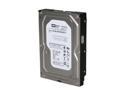
Western Digital Blue WD3200AAKS 320GB 7200 RPM 16MB Cache SATA 3.0Gb/s 3.5" Internal Hard Drive Bare Drive
Pros: 1st time I've ever had to RMA anything to Newegg.
Cons: Bought two - one was DOA, wouldn't even format. Other formatted, but died the next day with the dreaded dead drive click - the 1st time I tried to write something to it. I've been buying and installing hard drives since they came out. This was far and away my worst experience. 30 day replacement only warranty. No refund. Cost over $10 to return a $48 purchase under RMA.
Overall Review: Doesn't seem right that I'd have to pay shipping to return defective product. I could see it if I changed my mind, or if I ordered the wrong part.
3/6/2011See more detail
This Kit Helped Me Fix My Motherboard
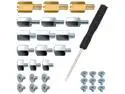
PCIe NVMe M.2 SSD Mounting Screws Kit for PS5 Asus Gigabyte ASRock Msi Motherboards,30pcs
Overall Review: I broke the nut on my motherboard that held the M.2 screw. I used a drill to remove it. This kit had the size nut I needed. I glued it to the motherboard and used one of the included screws and it functions and looks like it's supposed to. The one nut and screw were worth the $6.99 cost to me, and I have a whole gob of assorted sizes of nuts and screws left over for my next blunder or dropped and lost M.2 screw. It doesn't take up much space, and it's nice to have on hand.
9/20/2023See more detail
Doesn't Use M.2 Screw. Holes Aren't Threaded. Unable to Fasten With the Rubber Gizmo.
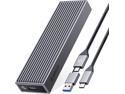
ORICO M.2 NVMe SSD Enclosure USB 3.2 Gen2 10Gbps Type-C for PCIE NVMe SSD Disk for SSD Size 2230/2242/2260/2280 Support Up to 4TB SSD With Built-in Cooling Vest
Pros: The case is solid, stylish, and easy to use. The heat sink and thermal adhesive are nice. I tried it, and it works. I didn't do speed tests, so can't help you there.
Cons: It won't accept an M.2 screw. The holes are not threaded. The SSD is supposed to be held down with a tiny rubber gizmo (They include 2). If you think the screws are a pain, wait till you try this gizmo. It's like trying to push a marshmallow through a keyhole. The picture is tiny, and the instructions aren't helpful. There's only one way it appears it can work, and that's if you can get the small end of the rubber gizmo into the hole. I struggled for 30 minutes and gave up. Other reviewers have had difficulty with this, too. Even with the heat sink installed, it's not held down tight enough without having the rubber gizmo in the hole. It moves inside the case as you'd expect. The USB cable is ridiculous. Look at the pic in the listing. To use the type C connection, you pull off the type A adapter, but it stays attached by a rubber cord that's in the way when you plug it in, preventing a flush connection.
Overall Review: I have 2 other Orico SSD enclosures for M.2's, and 2 for SATA drives, and like them, but this one is frustrating and disappointing. I wouldn't take off an egg for the cable, but not being able to fasten the M.2 drive in place renders it useless to me. I've installed dozens of M.2s in various computers and external cases without a hitch. I have a motherboard that eliminated the need for M.2 screws, and that system works great. I'm all for being able to eliminate the screws, but only if the solution is better than a screw. This is not.
4/28/2023See more detail
Sorry I Bought This
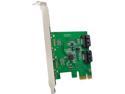
SYBA SI-PEX40094 PCI Express Low Profile Ready SATA III 2 Internal 6 Gbps Ports PCI-e Controller Card
Pros: Cheap
Cons: - Wouldn't recognize any drive attached to either SATA port. - Driver Disc that came with it is useless. Drivers were more than 4 years old. Disc has drivers for lots of different products. A small note on the back of the instructions in size 4 font says which driver to install. It failed to install. Downloaded updated driver from sybausa.com, which got Windows 10 to recognize the card. - Tried different power and data cables, connected known good drives that are recognized by the motherboard SATA ports, no good. Wouldn't recognize any drive attached to it. - Didn't get around to installing it till the return window had expired, so I'm out $. - Spent 2 hours trying to get this card to work. Waste of time as well as money.
Overall Review: Disappointed.
2/10/2019See more detail
Great Processor
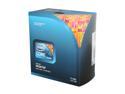
Intel Core i7-940 - Core i7 Bloomfield Quad-Core 2.93 GHz LGA 1366 130W Desktop Processor - BX80601940
Pros: Works flawlessly. Fast. Hyperthreading. Idiot-proof installation (much improved over older line of cpu's). Didn't use stock heat sink, but probably could have. It, too, is much improved over older lines.
Cons: None yet.
Overall Review: Don't think you're going to get the UBISOFT game. Newegg says it's a $49.99 value. What you get with your processor is a card with a code and a download address. The site says you can buy it for $29.99, not $49.99. The download is >5GB. Read GIGAbytes. I'm on a rural satellite system and will never be able to download it. If they're too cheap to throw in a DVD, they should scrap this promo.
3/7/2011See more detail
seller reviews
- 1
I Saved More Than $50 Buying From Jennifer
I was skeptical at first, but the thought of saving more than $50 buying from "Jennifer" instead of the "A" store (Newegg wouldn't allow me to name it) made me pull the trigger. I'm glad I did. Item was promptly shopped (2 business days), arrived on time, and was as described. Don't hesitate to buy from Jennifer.
On-time
Delivery
Product
Accuracy
Customer Service
Satisfactory
8/19/2023See more detail