

Your Browsing History


KI P.
Joined on 01/12/05
0
0
product reviews
- 23
OK for basic GPS
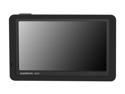
GARMIN 5.0" GPS Navigation w/ Lifetime Map & Traffic Updates
Pros: big screen. easy to use. life time map update. firmware updates (which the latest firmware update that I applied few weeks ago seem to fix the random reboot or freeze problem and etc. I strongly recommend picking up the latest firmware update). Navigation and telling directions in general works OK, but not perfect.
Cons: Bluetooth function at least with two of cells phones that I have rarely links the phone number entries. A few times, I actually saw Phone book icon and saw the list of people that's in my phone and was able to select and make call or when I get a receiving call, it shows who's calling by the entry name. But probably 99% of times, the phone book is not linked, so I can't select people from my phone book list to call, and when I receive call, it shows phone number and not the name that's in my phone book. Also the calls tells me it's hard to hear when I talk through Garmin. Moving around the map is pretty bad too. If you happen to click and get this bubble with info, I don't know how to get rid of that, so if I zoom in to get closer look at the area, this info bubble blocks part of the screen. Some firmware updates ago, my unit started to freeze and reboot, but with the latest that seem to be fixed.
Overall Review: I didn't buy the unit I have from Newegg. Overall, it's a good unit. If you want well functioning Bluetooth, I would go with higher model assuming they will work better. If you don't care about Bluetooth, I would go with 1450. If you still like to have some Bluetooth function like receiving a call and seeing the number that's calling, this is one is good enough though you might have to speak loud when you are driving. Overall, I'm fairly happy with this unit. I wish the phone book is linked more often. As I mentioned in Pros/Cons section... Do your firmware update! I have both 1450 and 1490 and both had similar rebooting issue since 3rd to the last firmware update, but with the last firmware update that I did maybe a month ago, I no longer see the reboot and freezing problems and I see whole lot more pictures showing the exits.
4/28/2012See more detail
OK for Pics, not so for videos
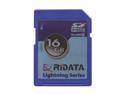
RiDATA Lightning Series 16GB Secure Digital High-Capacity (SDHC) Flash Card Model RDSDHC16G-LIG10
Pros: It's an actual 16GB card(not a 8GB as others received). I used this with my Nikon Coolpix S6000 camera and it works fine for taking pictures.
Cons: I used this with my Nikon Coolpix S6000 camera and recording videos at 720P resolution hangs and freezes my camera in the middle of recording or saving. Luckily, I had extra Sandisk Extream II card and when I use the Sandisk card, I do not hit this problem. So it must be this memory card which is causing the problem. I bought this because I needed faster IO rate memory card. But this "faster" one is giving trouble while my old Sandisk one is working fine. So, I regret buying this. Maybe it's just some compatibility issues, but what compatibility issues could there be with this one? Both are standard SDHC card!
Overall Review: It was just too cheap to be true to provide both good quality and good quantity.
8/12/2010See more detail
Very happy with the product
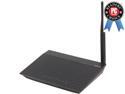
ASUS RT-N10P Wireless N150 Router IEEE 802.11b, IEEE 802.11g, IEEE 802.11n, IEEE 802.11d, IEEE 802.3, IEEE 802.3u, IEEE 802.11i, IEEE 802.11e, IPv4
Pros: Good features with multiple SSID support. Low price. Pretty good signal. Very stable. Easy setup.
Cons: Something I wish it had is 1000M LAN instead of the 100M LAN that this has. The spec does state this has 100M LAN, so it's not really a con.
Overall Review: This is almost perfect for my need. I use MAC filtering for main SSID access control, and the password for the guest SSID.And it has support for all these which I think most of the wireless routers do have. I also like to assign a static IP to my local LAN resources and it allows me to set specific IP to a MAC address from the router configuration instead of configuring each device to a specific IP. These are really the main settings that I set and this wireless router has worked very well for that. If this router had gigabit LAN speed, it would have made this perfect. I guess I will have to upgrade to more expensive model when I have to have that 1000M LAN speed. I described the settings that I am using, so I don't know how well it works in some other more complex settings. But since switching to this wireless router (it's been over 5 months now), I didn't need to perform any sort of reset on this router and it's been working great for me.
2/27/2014See more detail
Works on all except WII
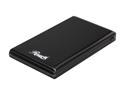
Rosewill RX81U-ES-25B 2.5" IDE to USB 2.0 External Enclosure
Pros: Small, tight fit, no extra power needed, and it worked for my desktop, laptop and WD Media Player.
Cons: My WII will not see the drive.
Overall Review: I got this mainly for WII and WII is not recognizing the hard drive on this case. I have a "modified" version of WII that I can load games from hard drive. And I had old IDE laptop hard drive that I wanted to use for WII. I had other 3.5" external hard drive case by Rosewill and work worked well with WII. But for some reasons, WII will not see the IDE hard drive that's inside this case. In all other use, it works fine. So I am not sure if it's the case issue or WII issue. I just know that my WII would not recognize this laptop hard drive that I had put inside this case.
1/9/2014See more detail
Works well

Rosewill RTCA-TN450 Premium Quality Toner Cartridge (Replaces OEM# Brother TN-450, TN-420) 2,600 Pages Yield; Black
Pros: I got this almost a year ago and finally put to use a few days ago. It fits well, printer recognized it OK. Though at first, the toner light was still on and the green light wasn't on, but after pressing the "Go" button 7 times, toner light was still there, but green light came and I was able to print. As long as I was able to print I didn't care about the toner light, but the next day I noticed the light was gone and I only have green light. So all looks good and prints are good. I'm happy. I couldn't give 5 eggs mainly because I do not know if it will really give the capacity that it said it would as I just started using it.
Cons: none from me!
Overall Review: I see a version 2 of this on sale now, I wonder if If it's better or worse than this...
10/1/2013See more detail
Much better than I expected
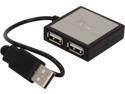
Rosewill RHB-220 - 4-Port USB 2.0 Hub
Pros: It works as described. Currently using 3 ports(USB mouse, USB keyboard, USB phone charge) connected to a single USB port in my laptop and everything works as if each of them were connected to individual USB ports on laptop.
Cons: nothing yet. hope it lasts long.
Overall Review: I have a laptop with 3 USB ports and I have USB keyboard and mouse connected to 2 of the ports and usually have my phone charging cable connected to the last one. I often enough use scanner and external hard drive and usb thumb drive which all use USB ports and I was not able to use USB external hard drive and thumb drive together unless I unplug mouse or keyboard so I had to use the laptop built-in keyboard or mouse in this case. Now with this, I connected all 3 that I normally use into this device so on my laptop it's only taking 1 USB port and I have 2 free USB ports now! Yeah!!!
1/11/2013See more detail