


Your Browsing History


Ty C.
Joined on 06/19/04
0
0
product reviews
- 22
Powerful card
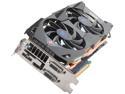
SAPPHIRE Radeon HD 6970 2GB GDDR5 PCI Express 2.0 x16 CrossFireX Support Graphics Card 100311-3L
Pros: This is the 3rd sapphire 6970 i have bought, and am using it now in a trifire setup. this one seems to be a better overclocker than my other 2 (high end reference design on those 2), and it stays cool even with max ccc overclocking on it. it does make the middle card very hot, but this isnt the fault of the card design.
Cons: the card is MORE than 2 slots thick. this means that in order to run it in crossfire or trifire you will probably have to have a reference design card to go in the top and/or middle slot. placing this in a slot above another card will block the next slot enough that you will have to be brave in order to wedge it in there: i am extreme and i still cannot recommend that configuration.
Overall Review: It's fine as a single card or with reference design cards or thinner cards alongside it. don't buy 2 of these if you want to crossfire, make sure all your cards are going to fit (this one must be on bottom, dont add a second of these in any case unless you have a free slot BETWEEN them). This card is about 2.1 slots thick.
8/14/2013See more detail
good enough for physx
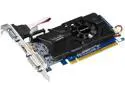
GIGABYTE GeForce GT 630 2GB DDR3 PCI Express 2.0 Low Profile Graphics Card GV-N630D3-2GL
Pros: finally got it to work for hybrid physx. fits in my packed pc case (got trifire hd 6970's hogging all the space) with the help of a pci-e extension cable. the sparse design and efficient fan keeps it cool. single slot, low profile compatible (brackets included). low power usage, no aux power need.
Cons: nvidia. that may explain it to some, to others who wonder what i mean, i offer this explanation: nvidia have added another mark to their endless supply of bull and lies when they began to actively block hybrid physx mods with their recent drivers. a year and a half or two back two representatives of nvidia went on record saying they were not planning to do anything to stop hybrid mods from working... just like they don't do anything to stop amd cards from producing equal graphics without alot of (if not for nvidia trying to be crafty) unnecessary tweaking and workarounds. they are shady and care nothing for their customers, only their gpu sales (and only the high end ones, at that... judging by their unwillingness to allow amd and nvidia cards to work together in a gpu+ppu combo, though you buy a new card just for physx...). however, after alot of trying (around 12 hours) i finally got a successful config with 3 hd6970's as the primary renderers and the gt 630 as the physx unit. no thanks to nvidia... after this i hate them more than ever. but they hold the keys... so i had to buy this gpu if nothing else.
Overall Review: i knew what i was getting into before my purchase, and i realize some people do not have the trouble i did getting hybrid physx to work. my problem is that i am fully aware that the problems with getting it to work were 100% artificially placed in the road by nvidia themselves. they foolishly believe that if they frustrate enough people those people may just give up and buy their product exclusively... and it would have worked, aside from the glaring fact (they apparently didnt consider, lol) that when someone is ticked off they don't want to buy your products. they make enemies daily with their policies and efforts to sabotage amd at any cost (financial or moral). installing a simple physx card became a nightmare i don't want to repeat, and all thanks to nvidia. jerks.
10/5/2013See more detail
Great for the price so far
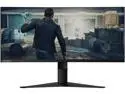
Lenovo G34w-10 34" WQHD Curved Gaming Monitor, 21:9 Ultra-Wide, 3 Side NearEdgeless, AMD FreeSync, 144Hz, HDMI, DP, Adjustable Stand, VESA
Pros: This monitor checks all the boxes I wanted in this upgrade. The large 34" size, 2k, 144hz ultrawide, curved... Has 10 bit color RGB 4:4:4 @ 144hz (if you use the correct cable, select the correct displayport setting 1.4). This isn't an HDR panel, but is the closest thing I've had so far, and can look really great if you are careful when setting up game gamma, etc. Coming from a 29" 75hz 1080p Freesync LG ultrawide (a good monitor itself) Resident Evil Village looks even better than before, as do pretty much all my games. Of course, driving 2k ultrawide resolutions (about 30% more pixels than standard 2k) can be hard on my 5700xt, but games like Village have the new AMD resolution/sharpening options, which helps to keep the framerate at or around 144, while still looking fantastic (I couldn't tell a difference between native and the Ultra Quality setting, in a sequential gameplay comparison). To be fair, high framerates don't improve the gameplay experience in single player games as much as the Freesync function, although the smooth frames when turning is quite pleasant. One place the higher framerate does make more of a difference is competitive games. I have only spent a few hours playing Team Fortress 2 since I got this monitor, but the experience was very good. I'm on a wireless connection to the router (no other option, but it is a 6g connection at least), so it's hard to say how much my gameplay was improved (while good for wireless, any wireless connection has some inconsistency when 50 feet away). But, whether confirmation bias or not, it seemed easier to track rockets etc.
Cons: More backlight bleed on black and dark screens than other monitors I've had. May have something to do with the curved screen. Not a dealbreaker for me, as it is only noticeable on loading screens, and occasional in-game scenes. Took more trial and error than I expected, to get the full 10bit 144 rgb 4:4:4 settings working. At first, it kept defaulting to ycbpr 4:2:2, or reducing refresh to 100, or reducing color to 6 bit... but eventually the stars aligned, and it worked correctly.
Overall Review: I have only had this monitor for a few days, so I can't say how long it will last. Others have had problems with it just dying suddenly after a few months. I have not noticed any dead or partially dead pixels, but I have not tried to find any with any special equipment, either. I don't mind if there happens to be a pixel malfunctioning if I can't perceive it, but I doubt there are any. Seems fine to me so far.
8/3/2021See more detail
3333 14cas @1.5v
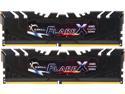
G.SKILL Flare X (for AMD) 16GB (2 x 8GB) DDR4 3200 (PC4 25600) Desktop Memory Model F4-3200C16D-16GFX
Pros: Maybe im lucky, but i doubt it. What i think it is, is that i always just go for it. I buy parts that I think can take a lot of voltage, and then I push a lot of voltage and do what i can AFTER that. I didn't start out at 1.5 volts, but I don't waste time with minute adjustments to start with, either. my method is more sloppy but i get good results. My timings are 14-17-17-34-52 at 1666 (3333) at, as the title states, 1.5 volts. I have a 120mm fan blowing on the fins, the modules are perfectly fine. So far... I have had stable operation, even including the most brutal prime95 version i have, and memtest86 stability (though, i am unclear if that test used my current timings or the xmp timings. I use bios to set timings,fyi). I also use a variety of games and in game benchmarks, to ensure stability. None of the issues i have encountered with various games are likely related to ram. I say all this to assure you I am not just saying "stable" without knowing how to verify that myself, or what it really means. specs: crosshair vi hero ryzen 3 1200 @ 3.9 mhz @ 1.48v 16gb this ram 2x rx580 4gb (crossfire) enermax max revo 1350w update a month or so later: I have purchased an R5 3600, which i am overclocking to 4.2 on all cores, if that is relevant. I have taken some advice i read in a forum or two, and skipped 200mhz, and then bumped it again after verifying stability. I now have CL14 3600, with the same timings as above, which is running as stable as I am able to verify. Which I accomplished by merely giving the ram 1.5v (actively cooled with a 120mm fan blowing past the fins). I am not sure what other people's results will be, but I am very happy, considering that is about a 3-4x more expensive pair of modules, based on the newegg search i just did, for only .1 less volts (and, I'm not sure about the other primary timings, though i think they may be a bit tighter), if it doesn't ignite in a fireball or just stop working (anything's possible I guess). I consider these results phenomenal, for the price i payed.
Cons: None. Edit: I bought another pair of these, and could not get any kind of overclock beyond the D.O.C.P. (xmp) speeds the modules are rated for. Ironically enough, the modules I was able to get the crazy overclocks with were Hynix, and the new ones are Samsung. I'm not sure if the new modules would overclock by themselves, as I only tried them in tandem with the original pair, but my motherboard supposedly doesn't lose any performance when adding another pair of modules, according to asus at least. I also installed a corsair ram cooler. Crosshair VIII Hero (wifi) Ryzen 3700x (h150i a.i.o. cooler) Powercolor Red Devil 5700xt Enermax 850w psu etc, etc
Overall Review: This is the best deal for a ryzen build, assuming you can get the same results as me (cl 14 3600 @1.5v), and don't mind the extra voltage. But, even at stock voltage and xmp settings, I was very happy.
10/12/2020See more detail
Best CPU i have yet owned
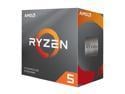
AMD Ryzen 5 3rd Gen - RYZEN 5 3600 Matisse (Zen 2) 6-Core 3.6 GHz (4.2 GHz Max Boost) Socket AM4 65W 100-100000031BOX Desktop Processor
Pros: I'm overclocking this to 4.2 ghz on all cores with an h150i a.i.o. water cooler, at 1.4 volts. I'm not positive I could get more stable speed than this with my sample, with any amount of volts (I have tried some, not much). I get great scores on any benchmark I use, and, more importantly, I get over 75fps (my monitor is 75hz) in any game (Though, in my "real world", I do have some dips below in some games, but only because I use 4xeq supersampling on almost all games I play, nothing to do with the cpu). I use crossfire, and i believe the cpu is more important in sli/crossfire setups. I upgraded from an R3 1200 (I had it at 3.9ghz, 1.5 volts), which was a minor improvement overall (but certainly not in every way) from my trusty (4.8ghz) 8350. Both upgrades, which i did within a couple of months of eachother (the 1200 was a stopgap to afford the mobo and ram, and not have to wait for the cpu, essentially), made significant improvements to my fps. The 3600 has surpassed the cpu bottleneck threshold for my system, and probably therefore most any system out there.
Cons: I bought this with the xbox game pass, which is cancer for your pc (i installed it, and it got very... shady. It isnt worth installing to play older games like dishonored 2, trust me. I had to uninstall it to stop it from downloading that specific game (though, it would be the same for any game on the platform, we can assume), because simply uninstalling the game didnt keep it from continuously restarting the (hard to locate) download... it is typical microsoft "all your pc's are belong to us" bullsh*t. avoid taking advantage of that. I didnt buy the cpu for that reason, but it's almost like a virus attached to software, if you don't just avoid it. Now, the 3600x comes with borderlands 3, which i would totally pay 40 extra dollars for... but it's too late for me. Also, the 3600x probably has greater all core capability (similar to the 3.4 to 3.6 ghz upgrade you get in single core boost performance when you get the 'x'). The moral of the story is, be patient, and buy the part you actually want. And never look at that item again on newegg. I am still 100% satisfied with my purchase, just wishing I had the current deal being offered.
Overall Review: Fantastic CPU. No reason to buy any other 3000 series cpu, considering there willl still be another series (at least) on the socket.
10/8/2019See more detail
18 months later
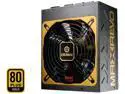
Enermax MaxRevo 1350W 80 Plus Gold Certified, Full Modular, ATX12V/EPS12V SLI Ready, Server Ready, 7 Year Warranty, Power Supply, EMR1350EWT
Pros: plenty of power and features, see my other (5 star) review.
Cons: Fan. It has been failing (LOUD screeching that has the ability to drive us all nuts) for some time, though the sound was intermittent enough for me to avoid fixing it. recently my pc shut down, and upon investigating i found the psu extremely hot and that the fan had stopped turning. i spun it til it started again, but obviously this is temporary and i will have to replace the fan.
Overall Review: im sure this is covered by warranty, but i am not eager to send my psu off for 2 weeks if there is another way to fix it. i run my pc 24/7 most of the time, so im sure i put more wear and tear on the unit than the average user in this amount of time.
2/4/2014See more detail