

Your Browsing History


Justin T.
Joined on 07/03/04
0
0
product reviews
- 13
25 Watts, going green makes me smile.
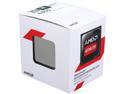
AMD Athlon 5350 - Athlon Kabini Quad-Core 2.05 GHz Socket AM1 25W AMD Radeon R3 Desktop Processor - AD5350JAHMBOX
Pros: I purchased this as part of my effort to replace my current home server with something much, much greener. Quad core at only 25w was impressive. I use this as a 24/7 file server, Plex media server, NAS, and torrent seeder. It's running Server 2012 and the APU is more than capable of doing all of these tasks. There is one area it lacks just slightly, see Cons below.
Cons: Unfortunately, I may have to wait until the Beema chips hit the market before the full jump to low-power works for my needs. While the 5380 is sufficient for most of my needs, it lacks in ability to run full-screen 1080p video on my 50" TV without stuttering. I knew this was a potential issue going into it, however, and I've used a non-discrete video card to compensate. This solution works, but adds up to 60 extra watts to my system. Still going green, but not as much as I'd like. Using the on-die GPU, 1080p does play full screen on my 50", but there is a slightly noticeable frame-rate drop from time-to-time. I suspect this may not be an issue with a standard monitor.
Overall Review: If you're looking for a 24/7 file server CPU / APU, this choice has a lot of benefits. Low power, all-in one solution, quiet fan, not much heat, and plenty of mini-ITX boards to keep the footprint small. If you're looking for a desktop build for someone who just wants to web surf, watch Netflix, and play some casual games, this is also a great choice.
5/7/2014See more detail
Not unhappy with my choice.
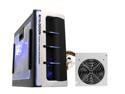
RAIDMAX SMILODON ATX-612WBP Black 1.0mm SECC Steel ATX Mid Tower Foldout MB Computer Case With 500W Power Supply
Pros: The case looks nice next to my TV, cools adequately, and comes with a decent power supply (depending on what you need it for). This case meets my needs, and while some of the cons I list keep it from being a four or five egg rated product, I am not unhappy with my choice.
Cons: Although the motherboard panel rocks open the power supply's connection to the motherboard is too short, so you have to unplug that first. Also, when moving that panel back my CPU fan catches on the corner of the power supply, so I have to take care to prevent that from damaging the fins. The bottom drive cage removes, but once I installed my 8800 GT video card in the slot I was unable to move the tray without first moving the card. The power supply only comes with one PCI-E power connector. Fortunately the video card I bought came with an adaptor. If you buy two video cards, you'll need to ensure you have a way to plug both cards into power.
Overall Review: I know I listed many more cons than pros, but really you already like the case, what's the point in reading all the good things about it. Know the case has a few flaws, decide if you can work around them or live with them, then make your decision. Personally I think the case is worth the low asking price. I'm using mine as a gaming PC and a home theater PC, this case does my needs justice.
10/11/2008See more detail
Little Green Machine
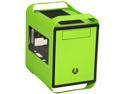
BitFenix Prodigy with Window Vivid Green Steel / Plastic Mini-ITX Tower Computer Case
Pros: First, looks. Assuming you want a green case (you DID notice this was greener than Kermit's whole family, right?), this one is fantastic. The paint is nice, and scratch-resistant enough to hold up after I dropped the side panel on a wood floor during initial setup (whoops!). Second, accessibility. Both side panels come off, sure, that's nice. However, this thing has a moon roof. The top part pops right off if you need a vantage point looking down, which is handy for, say, installing additional RAM while the motherboard is in place. Third, silence. This could vary depending on if you have a CPU or video card which runs hot, I suppose. I have a Kabini APU which only uses 25w of power, so there isn't much to keep cool. Just the same, I can run the front and back case fan, the CPU fan, and the video card's fan, and not hear a thing in this case. It's like a padded room in a mental hospital.
Cons: The thumb screws for the PCI slots in the back are a bit cumbersome. Two slots, three thumb screws. I'm not a huge fan of the logo on the front of the case. But since my number one "pro" was looks, I don't think it detracts too much.
Overall Review: I installed a PICO PSU for my mini-ITX board, so I did not have to install traditional PSU to install. As such, I cannot review that aspect of using this case.
5/10/2014See more detail
An update to my original review
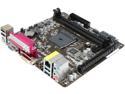
ASRock AM1B-ITX AM1 USB 3.0 HDMI Mini ITX AMD Motherboard
Pros: This is an addendum to my initial review, dated 5/6/2014 2:53:49 PM. I wanted to post my success running two sticks of RAM. Initially, I had four sticks of identical RAM, and I couldn't get the device to POST with two sticks in at the same time. I borrowed some RAM from work. The board POSTs with these two sticks in place. I am returning my review to a full five eggs. There must be some issue with the board not liking the specific timings on the RAM that I had before. If you decide to buy RAM, I'd follow this guide: http://www.asrock.com/mb/AMD/AM1B-ITX/?cat=Memory to make sure you get something tested specifically for this board.
Cons: I do have a minor con to add as well. I set up my board before my case arrived. When I disconnected everything from the board to put it into place, plastic on my PCI express slot broke. This is near the rear of the slot, where the video card is secured, but not where the actual connection occurs, so there was no damage to the electronics. I'm not docking any eggs, since I believe I am at fault in this. But I didn't use much force, and I didn't hear anything break or snap. The con is just a notice to be gentle with your PCI-E, in case you run into a similar issue.
Overall Review: The board is running stable, which is the reason I love ASRock's products. All the Windows 8 x64 drivers work without fail on Server 2012, so if that's important to you then you're good-to-go.
5/10/2014See more detail
Works as expected
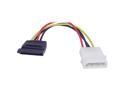
Link Depot POW-SATA 4-Pin PC power to SATA Converter
Pros: If you've got a MOLEX 4pin connector, and you need to power a SATA drive, this is the adapter you want. Works 100%.
Cons: There are no cons. This is a basic adapter. If you need one, this is it.
Overall Review: If you get a PICO PSU (I recommend them for low-power systems, VERY nice, efficient, small), then you may well need one of these. Mine came with one SATA, one MOLEX connector. But if you're reading this review, you probably already know that.
5/7/2014See more detail
Swanky SSD
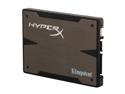
HyperX 3K 2.5" 120GB SATA III MLC Internal Solid State Drive (SSD) (Stand-Alone Drive) SH103S3/120G
Pros: This is my second SSD, and the first to come with an adapter plate. Very nice addon, and it's a nice blue finish too, which is good if you can see it. Speeds are good, although this one goes on my Kabini system, which is not exactly the fastest system out there, it's a low-power design. Still, the SSD is very responsive, despite my system's limitation, and it is perhaps the most device in terms of having the most positive impact on my speed.
Cons: None
Overall Review: Keep in mind that this drive only holds 120GB of data. If you're using a laptop, and cannot add an extra HD, I'd suggest something at least twice this size. If you've got a desktop, pair this with a storage drive.
5/7/2014See more detail