

Your Browsing History


Erik S.
Joined on 12/02/06
0
0
product reviews
- 6
Works great
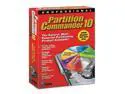
Avanquest Partition Commander 10
Pros: A previous reviewer complained about the need to register this software over the Internet, but I'm assuming that's because they tried to install this software *inside* Windows. However, there's another way: boot directly to the CD! When I need to partition drives, it's usually because I'm either building a new machine, or repairing one that has problems. In such scenarios, I would rather *not* be running the installed operating system. The fact that the Partition Commander CD is bootable (it can even create a boot floppy for use on older systems that can't boot to a CD) makes it far more useful, in my view. Booted to the CD, it has two modes: a smooth Windows-like graphical interface, or a text-menu UI. It's easy to use, yet powerful and fast. I haven't had the software long, but it's already helped me clone three PCs and repair a machine that had a corrupted MBR. In a short time, its worth is far more than I paid.
Cons: Can clone drive-to-drive, but can't save a clone image file (à la Ghost).
Overall Review: Partition Commander is a powerful tool to have in your toolbox. It does everything that Partition Magic can, plus features from Ghost and Norton Utilities -- all for less than any one of them.
10/1/2009See more detail
This review for ASRock review rebate program
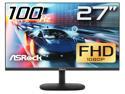
ASRock 27" 100Hz (Max.) IPS Full HD FreeSync (AMD Adaptive Sync) 1920 x 1080 sRGB 99% Challenger CL27FF Monitor
Pros: This monitor has rock-solid colors and performance. I tried it on both a Windows PC and a Mac (both HDMI, haven't tried VGA), and it came right up without a hitch. I tried the included (mostly plastic) mounting stand briefly, but it's now in its new VESA-rig home on my arm-mount.
Cons: The default settings are a bit dark. My first action was to adjust the brightness (see control comments below), which prompted a message about power consumption. I dismissed this, cranked up the brightness all the way, and enjoyed the view. The only real downside for me is that the external controls are limited to a single power button/mini-joystick. Pressing this turns the monitor on or pulls up the menu (or powers it off, if held down), while the "joystick" functions serve to navigate the configuration menus. This isn't terrible, once you get the hang of it (and, thankfully, it isn't something most of us will need to do very often), but it does take some getting used to. Also note: this control is on the *back* of the monitor, in the bottom right corner (as faced from the front), so you end up trying to configure it while reaching behind it with your right hand. I have an ergonomics engineering buddy who would write this thing up in a heartbeat.
Overall Review: I would recommend this monitor as a solid performer. It's a flat screen (not a curved model, as is all the rage), but it's a good value.
3/1/2024See more detail
Worth the extra cost
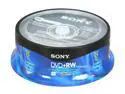
SONY 4.7GB 4X DVD+RW 25 Packs Spindle Media Model 25DPW47RS2
Pros: I bought these for use in a Philips consumer video DVD recorder. I had tried several cheaper brands of DVD-RW and DVD+RW, but none of them would work reliably in the DVD recorder. The Sonys were only a few dollars more for a 25-disc spindle (roughly $.10 more per disc), but the performance has been rock-solid.
Cons: Not the cheapest around. For what I needed (video recording with consumer device), the cost was worth it, but for other purposes (e.g. computer backup), a cheaper brand might work just fine.
Overall Review: Apparently, rewriteable DVD media has not reached the point of a commodity; you get what you pay for.
1/17/2012See more detail
Handy little "hub"
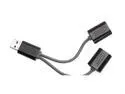
Griffin SmartShare Ultra-slim 2-Port USB Hub
Pros: Because of the way the USB protocol works, it's not possible to create a simple "splitter" cable. However, this little device physically appears to do exactly that! In actuality, there's a tiny USB hub embedded in the cable. This is evident because when you plug it into a host, a quick plug-and-play cycle is performed, and a new hub is found. Once it's set up, however, it does exactly what you'd expect: give you two ports. It's smaller than most other hubs, flexible, lightweight, and bus-powered. The host plug is nice and slim, so it shouldn't block adjacent ports (while allowing connection of devices that otherwise would).
Cons: Like other USB-powered devices, it creates a slight draw on the available power. Some devices with heavier power needs might have problems if connected through this hub (but this will be true of any non-self-powered hub).
Overall Review: A great addition to any toolkit. Well worth the price.
10/12/2009See more detail
Nice mobile reader
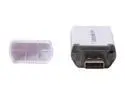
Kingston FCR-ML 9-in-1 USB 2.0 MobileLite Card Reader
Pros: Like many others, this reader says it reads microSD and miniSD. However, in most cases, the reader simply has an SD slot, and those other formats can be read only with the appropriate adapter. In this case, I was pleasantly surprised to discover that the product was exactly what it claimed: this reader actually has *three* card slots. There are two little white clamshell "doors" on this reader. On one side, the door reveals a full-size SD slot. On the other side, the door covers a miniSD slot and a microSD slot - no adapters necessary. The doors snap shut to completely enclose the slots. I bought this reader for my daughter to move photos off her SD camera. She's keeping an 8GB card in the microSDHC slot, effectively making it an 8GB UFD, with a built-in SD slot! I don't have any miniSD cards, but the reader seemed fine with any combination of SD, SDHC, microSD, and microSDHC cards I tried. I didn't do any speed tests, but Class 6 SDHCs blazed along as fast as I've seen.
Cons: The plastic construction seems a bit fragile. In particular, getting the little doors open when the reader is plugged in can be a challenge. We found it easier to put the cards in the reader before plugging it into the computer. The three slots show up as three drives (under Windows, that means 3 drive letters), even if you're only using one slot. The body is pretty thick, so it can get in the way of adjacent ports. However, the package includes a short (~4") USB pigtail, so you have a bit of flexibility plugging it in.
Overall Review: Like many Kingston UFD's, the little keychain-sized micro-lanyard runs through the cap, making the cap nearly impossible to lose.
9/17/2009See more detail
One tough drive
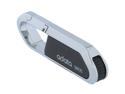
ADATA 8GB USB 2.0 Flash Drive S805 8GB
Pros: This is exactly what I was looking for: tough. I chose this model because I needed a UFD that I could give to teenagers for a class, and the metal construction of this drive fits the bill. Tossed in a backpack, clipped to a keychain, shoved in a back pocket, you name it, this little drive will take it. The fact that there's no cap to lose is also a terrific feature. The USB plug flips out of the body, snapping to position at 90° or 180°, and the drive itself is pretty slim (although there are slimmer), so it shouldn't get in the way of adjacent ports. I haven't done any formal speed testing, but just from general experience, it seems pretty fast.
Cons: No activity LED.
9/16/2009See more detail