


Your Browsing History


ZACHARY B.
Joined on 01/01/04
0
0
product reviews
- 19
Follow-up to review on 2/22/2012
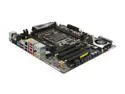
ASRock X79 EXTREME4-M LGA 2011 Intel X79 USB 3.0 Micro ATX Intel Motherboard
Pros: Received a new BIOS chip from ASRock several days ago with version 1.6 on it. The compatibility issue with the i7 3820 was resolved quickly. It was definitely a positive support experience. ASRock was quick to respond via email support. They also sent the replacement chip quickly. Replacing the chip was a piece of cake. I already had tools necessary to do it. Many years ago when I last had a motherboard problem it wasn't this easy to fix. Good job, ASRock! I like the AXTU software included with this board. It made checking the thermal and clock performance of the i7 3820 during initial testing easy. The included capability to create a RAM disk without needing another tool is nice too. The SB fan on the motherboard is quiet. I have not been able to hear it. PCIe, audio, networking, and fan control all appear to be working just fine. No unresponsive ports. I used the RST Enterprise software to put 2 SSDs in RAID0. Nice and stable.
Cons: Razer mouse input is inverted in UEFI. Horizontal is normal. No big deal.
Overall Review: If you're like me and purchased a tiny case, a huge GPU, and a cooling system that didn't install as easy as the instructions said it should try to prepare yourself for an impending BIOS problem by checking the revision numbers on the little square sticker near the SB fan. If it's not 1.6 then you need an updated chip for use of an i7 3820 or you will get a 0xAF error. You might need an update for other CPUs too. Get in touch with ASRock or, if impatient, use the internet to learn how to update the chip yourself. It is not necessary to remove the motherboard to fix this problem. Also, stop staying up so late fiddling with computers. Specs: Lepa G500-MA PSU, ASRock Extreme4-m Mobo, Intel i7 3820 CPU, Intel liquid cooler, Sapphire Radeon 7950 OC GPU, 4x4GB Kingston DDR3 1600 RAM, 2x240GB OCZ Agility 3 SSD
2/27/2012See more detail
Regret Decision to Purchase
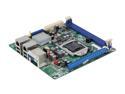
Intel S1200KP Mini ITX Server Motherboard LGA 1155 Intel C206 DDR3 1066/1333
Pros: Mini-ITX form factor is nice and small. Board layout is good.
Cons: As the previous reviewer stated V2 Xeon CPUs are not supported even though ark.intel.com says they are on the S1200KP product page. The compatibility information provided by Intel is highly misleading. You have to read the manual to see that there is a compatibility problem. You actually need the S1200KPR which Newegg does not carry at the time of this review. It's hard to find. Intel also indicates that the chipset and CPU support VT-D. The S1200KP and S1200KPR do not because Intel has arbitrarily decided not to include these features by blocking them from the BIOS. Intel's support does not recognize this as a problem. This is disgusting. Also, unlike everything else, the S1200KP family does not support registered ECC RAM or x16 organization RAM. It is very very picky about RAM. You have to dive into the manual to find this out.
Overall Review: Really regret my decision to build a mini-ITX home server. It would have been smarter to go with micro-ATX where I could buy a non-Intel motherboard. I really wanted to stash this thing away and run a home server hosting a couple of virtual machines. Now I have to scale back those plans plus I'm out $60 for shipping, return, and restocking. Thanks, Intel. This is the second Intel system I've built this year and the second one to give me problems. The x79 system I built earlier this year also had a motherboard/CPU related problem with the stepping. Getting help from ASRock was a piece of cake. Intel just wants you to post onto their community forum where they can ignore you. Really terrible product support. I will never buy an Intel motherboard again. It's 2012. These problems should not still be happening. Important features should not be missing. Avoid this product.
9/6/2012See more detail
Keeps a 5900X under 80C
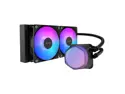
Cooler Master Elite Liquid 240 CPU AIO Cooler - 240mm Radiator, 2x ARGB PWM Fans, Dual-Chamber Pump Design, Ultra-Quiet High-Performance Cooling, AMD AM5/AM4 & Intel LGA 1851/1700, Black
Pros: - My 5900X stays under 80C when loaded thanks to this cooler - This cooler is quieter than my previous air cooler - I can't hear the Cooler Master when my BenQ projector is running
Cons: - There is a gurgling noise sometimes
Overall Review: This cooler fits in my ATX case perfectly, keeps my 5900X cool, and operates quieter than my projector. The RGB lighting is basic and that's fine for me -- I don't look at my computer while it's being used. I found the AM4 install process to be completely painless. No problems with clearances or the length of the tubes and wires either. The whole cooler just fit right in and does its job.
9/12/2026See more detail
Tons of connectivity but overly optimistic defaults
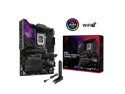
ASUS ROG STRIX Z890-E GAMING WIFI Intel® Z890 LGA 1851 ATX motherboard, Advanced AI PC-ready, 18+2+1+2 stages, DDR5, WiFi 7, 7x M.2, Thunderbolt™ 4, USB Type-C®, AI Overclocking, Cooling & Networking
Pros: - Thunderbolt 5 support - Tons of USB ports at various speeds - Lots of M2. slots with PCIe 5 and 4 support - BIOS has a ton of configuration options - DIMM Fit tool was able to stabilize non-QVL RAM
Cons: - BIOS defaults apply increased voltages and mild overclocks - A separate ME update tool is provided even though ME updates are rolled into BIOS updates - Intel's PPP driver was not included with the motherboard drivers - The Asus motherboard driver update tool frequently gets confused about whether or not updates are available
Overall Review: I bundled this Z890-E with 64GB CMH64GX5M2N6000Z40 RAM and a 270k CPU. I haven't owned an Asus motherboard in decades (I'm an ASRock fan). This motherboard has all the modern connectivity I could want, support for the latest speedy things, and a configuration option for nearly everything. It's definitely the most elaborate and expensive motherboard I've ever owned. I did have some problems with heat and stability upon first building a system around this motherboard. Running the RAM in XMP was unstable until I ran the DIMM Fit utility (4 hours to find a working solution). My CPU thermals were hotter than expected at first due to some aggressive BIOS defaults that only gave 1-2% performance uplift (not worth it). The driver update utility also appeared to miss a couple of important Intel drivers (particularly the PPP driver) and frequently shows that updates are available in the toolbar when they're not once you open the utility. Overall a positive experience. Definitely not plug-and-play like I've experienced on past motherboards, but also way more capable than anything I've used in the past.
9/12/2026See more detail
Took extra effort to get XMP working
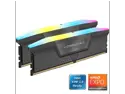
CORSAIR Vengeance RGB 64GB (2 x 32GB) 288-Pin PC RAM DDR5 6000 (PC5 48000) Desktop Memory Model CMH64GX5M2N6000Z40
Pros: - This was the most affordable 64GB kit at the time of my purchase - The capacity supports my Blender and UE5 indie gamedev projects
Cons: - JEDEC 4800 MHz profile was stable but XMP 6000 MHz profile was not - The RGB lights add extra height that is too close to my radiator
Overall Review: I'm used to enabling XMP profiles without any fuss. This memory would be stable one day and unstable the next when in XMP mode. I recognize that it was not my motherboard's QVL (doesn't appear to be on any vendor's QVL or Corsair's own website at this time). Forza Horizon 6 and MemTest86 test 7 (32-bit moving inversions) would rapidly crash or display errors during instability. My Asus motherboard, a Z890-E, has a tool called DIMM Fit that stabilized this RAM at XMP speed. No problems since running DIMM Fit -- just be aware it took over 4 hours to come up with a solution. Overall, this RAM is fine. Be prepared for extra steps to get it working at XMP though. My kit was reported by HWInfo to be Micron A-die.
9/12/2026See more detail
Very sensitive to placement
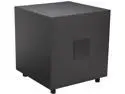
Definitive Technology POWERFIELD 310 Subwoofer
Pros: I bought this sub to complement some DefTech StudioMonitor 350's also sold by Newegg. The speakers are part of a surround system in my new home theater. I have to say that I am happy with the Powerfield 310. At first I wasn't too thrilled. The sub seemed like it either threw a lot of bass or none at all. It also seemed hypersensitive on the power-saving feature. There wasn't a note about break-in for the sub. The SM350's did have a break-in note on them so I ended up applying that to the PF310. The system played random music for a solid 18 hours with the sub turned up higher than it should have been. I am now happy with this sub. It is very sensitive to placement though. My carpeted floor eats up a lot of the low-end sound, but putting it near a wall or corner helped better project the sound. If you're looking to feel low-end audio this unit may not be strong enough. I live in a townhouse so I figured this would make a good compromise between power and not making my neighbors hate me. Definitely an upgrade over an older HTIB subwoofer! I've found that he power-saving feature doesn't seem to kick in quite as aggressively anymore and the sub puts out a wider range of low frequencies now. I wasn't so sure of it at first. Now I am convinced the price was right and this was the right sub for me.
Cons: As stated above there seemed to be an undocumented break-in period. Give the sub some time to loosen up. It seems to help it create a wider range of low frequency noise and not be so aggressive on the power-saving. I'm going to kick an egg off for the downward-firing woofer and port. It seems to limit the placement flexibility of this unit. You really need to experiment with it to get it in the right spot. I found side-firing and ported units a bit more flexible.
Overall Review: Is it as good as a movie theater? When you're at a nice theater you feel the bass. You can feel the explosions rattle your seats. Does the PF310 do that? I don't think it can. You've got to look at the PF312 if you want that sort of sound. For me and my 12 foot wide, 24 foot-deep theater room in a townhouse this seemed just right. Overall, happy customer here!
3/16/2015See more detail