

Your Browsing History


Tom B.
Joined on 01/06/09
0
0
product reviews
- 11
Big, beautiful monitor.
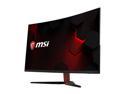
MSI Optix AG32CQ Black / Red 31.5" 144Hz Curved 2K Gaming Monitor, 2560 x 1440, FreeSync, Widescreen LED Backlight, HDMI, and 250 cd/m2 3000:1
Pros: -Feels sturdy, well made. -Colors are BEAUTIFUL. -On screen settings are easy to use and navigate. -Puts gaming on an ENTIRELY new level -Wasn't sure if I would like the curve, but I love it. No lie when they say it makes gamming more "submersive" -Its enormous. I have a large L-shaped desk so I could use another one... -The cables are plenty long enough. -I like where the panel control buttons are, as well as easy acess to the back plug ins'. -VIDEO PLAYBACK LOOKS AMAZING AT 2560 x 1440!!!!! So much color & detail.. -Achieves 144hz. Gaming at 120 hz, 2560X1440 (using DP port) in FPS games and its an entirely new experience.
Cons: ONE DEAD PIXEL : ( in the upper right hand corner ..UGGGHHHH ..Not going to RMA over this. Its a primarily a gaming monitor, and this is unnoticeable in gaming. Just wish it wasn't there. The other things I didn't like about this monitor, like lack of height adjustments, and the red color of the vertical stand were things I knew before I ordered it. I can live with it.
Overall Review: I didn't think my antiquated graphic cards (2x GTX 680 in SLI) would be able to do 2K resolution in games without going into meltdown. Maybe a 3-4 degree increase, and usually staying under 60 degrees in 2560X1440. But I have nine case fans, two of which are dedicated to water cooler for CPU. Fast, graphics intensive games like DOOM & Bulletstorm (~100 fps on bulletstorm at 2k, 120hz) literally FLY with no screen tearing. But don't worry-1080p gaming looks great on this thing! This should be a 3-egg review over the dead pixel, especially since I had to RMA the first one (which the review of never was published) The fist monitor was cracked down the middle-literaly. However the RMA experience was fast and relatively painless....Not trying to plug Newegg or anything, but after they received and verified my return, I had a new one in about five days. I have only had to return two other items back to Newegg out of many, many items ordered over the years-their RMA process is the best-and you don't get this type of treatment from other vendors-trust me. I have seen other reviews of very poor text display on this monitor. My heart sank when I first set it up and and couldnt hardly make out the writing under icons, text in emails, and alot of websites. This can be fixed by adjusting windows scaling, and cleaned alot of it up with NVIDIA control panel-there is also another windows tool to clarify icons & text, cant remember what its called. I have found that SOME web sites dont want to display as crisp as others at this resolution, thats just the way it is. But when you watch a video that supports this resolution, you will LIKE. Freesync? It would be nice to have the NVIDIA optiion of this, but its more expensive, and aparantly I dont need it. Price? Seems competitive, considering the specs on this monitor when compares to others. I would rather spend a couple extra dollars and get it from a quality vender such as this that stands behind what they sell. You get what you pay for. I am far from an expert on display monitors. Hope this helps & happy gaming.
8/2/2018See more detail
My new desktop-very nice for the price.
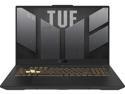
ASUS TUF Gaming F17 Gaming Laptop, 17.3" 144Hz FHD IPS-Type Display, Intel Core i7-12700H Processor, GeForce RTX 3060, 16GB DDR5 RAM, 1TB PCIe SSD, Wi-Fi 6, Windows 11 Home, FX707ZM-RS74
Pros: More than ample power. I can charge a USB-C keyboard and a USB mouse, power an RGB cooling tray and external speakers while intense gaming on an external monitor, & on AC, it never drops below 99% for hours. Graphics are great. Was thinking about the 3070, or even dumping the bucks for a 3080 based laptop. This is amazing and feels like I would have wasted money. Very solid. VERY SOLID. Does not feel cheap or flimsy like many others I have owned. *Great keyboard (but using external wireless) *Lighting is perfect, can actually get it "to" bright. *Fans are not too loud (even at 100%), heard a lot worse. *12th gen I7 is a BEAST- can't even recommend the I9 with all the heat issues. CPU always stays about ~8~ degrees cooler than GPU in max gaming. *Thunderbolt 4 is great technology, futureproof in a sense, can achieve 4K with ease. **Best bang for the buck, no doubt. <1500$ at time of purchase ** Having owned a lot of ASUS products in the past, from mobo's to GPU boards, I think their QC and design quality is a step above.
Cons: It's difficult to find a review of any laptop that doesn't gripe about heat. It can get toasty. The armory crate software can help in manual to adjust fan curve. Also can use MSI Afterburner software to help & regulate heat. The ASUS design on this machine seems to be the best at cooling among the other builds. Overall, not an issue, until you turn the frame limiter off in games-with external monitor @2K. But I like to stay in the 70's. Heat is an electronic component's worst enemy. Get a decent cooling tray. *Onboard speakers leave a lot to be desired. Sounds a little better than my cell phone. *As another review said, a lot of screws to install another TB of storage (but worth it) *16gb memory-not really an issue-it seems to be enough. But going to order a 32gb stick soon. One slot for this.
Overall Review: Highly recommended overall. Plugged in some external speakers and sound quality is great. Like so many these days, wanted to run this like a desktop. Plugged my 38" 2K 144hz external monitor to the thunderbolt 4, and not looking back. Colors and lighting are fantastic. While I game at 60hz to keep ALL games in the low 70's (maxed out) and usually under, most games can easily achieve consistent 100+ frames at 144hz, but you're in the 80's,, not too bad. OTHER THOUGHTS... I think the hertz stuff on a small laptop monitor is way overrated. Understanding its associated with frames,, BUT 144hz is an overkill on its monitor, especially at a lowly 1080. Gaming at 2K with 60hz on a large external monitor is no issue, a worthy tradeoff, even with fast games like Forza 5. No motion blur or tearing. I can't make it skip a beat. To me, it looks so much better than 1080p, 144hz tiny laptop monitor. Most high-end games will achieve well above 60 frames w/ 2K external monitor on this laptop with ease, and maintain decent temps. I don't think you will be disappointed!!
1/2/2023See more detail
Fast & Chilly
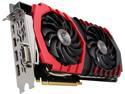
MSI GeForce GTX 1080 8GB GDDR5X PCI Express 3.0 x16 SLI Support ATX Graphics Card GTX 1080 GAMING 8G
Pros: So its fast and stays in mid 50's degrees C at 2k in a highly ventilated case, all settings ultra, with an unbelievable fame rate in various graphic intensive games set to max (at 2550x1440). It idles at ~30 degrees with zero fan speed...hmmm Gaming is really fun & fast again. Nice aesthetics, loving the design.
Cons: The useless bloatware on the disk. Just use MSI afterburner, its a free download on MSI website.
Overall Review: Again, I highly recommend MSI afterburner software. It comes bundled with Riva Tuner software that allows you to set fan curves to your liking, with a nice customizable on-screen display. I don't like the idea of no fans until this card reaches 60 degrees C. Other than water, the biggest enemy of any electrical component is heat. Not into overclocking, and this card has all the specs that really doesn't require it. The only game that gave it a hiccup was The Evil Within 2, which was designed around an AMD chipset. Also, I am becoming a die hard MSI fan. Their boards are great, I have a pair of old 670 GTX power edition upstairs that have been gaming hard for five years solid in SLI. My next MoBo will likely be MSI, depending on how this card plays out. Overall, this has the best reviews of most or all 1080's, something to take into consideration. This card is wider than other cards with this chipset-its MSI..made to run cooler. Had to re-route the power cables to keep them out of my side fans. Get the tape measure out, be sure it will fit your case. I don't think you will be disappointed with this card, IMO worth every penny.
10/26/2018See more detail
GELID 120 fans
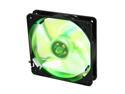
GELID Solutions FN-FW12PL-18 Green LED Case cooler
Pros: Great, love the color. lets a soft white/green down on the MoBo. Mounted inside on a top mounted H100i. In pull. With PWM, the noise and fan speeds are easily controlled.
Cons: A little loud, but these things can move some air (check the cfm ratings) they are pricey, but for what I paid for the rest of the rig, its a small price. Wish I had ordered 2 more for the top of my radiator, instead of the rosewill's. I keep them in quiet mode, and don't know they are even there.
Overall Review: using to cool a h100i, with CM scout advanced. In intense gaming, for over an hour, the highest core on my ivy bridge 4820 is 41 dg Celsius. Great radiator fan.
11/13/2013See more detail
MSI GTX 670
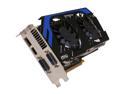
MSI GeForce GTX 670 2GB GDDR5 PCI Express 3.0 x16 SLI Support Graphics Card N670 PE 2GD5/OC
Pros: Very clean design. It works well. Runs cool,, was worried with the "open" design putting heat into the case instead of out the back, like the "box" cards. No increase on temps at all.
Cons: The board was slightly warped, its almost impossible to tell. Thought about a RMA because of this, but it runs fantastic.
Overall Review: SLI'd with an EVGA FTW, about the same specs. This card runs about 10 degree's Celsius lower than the FTW. Still use EVGA precision. Tweak the fan curve a little, and in SLI this card stays in the mid 40's with fan at 55%, max load on all modern games I have ran. Best bargain out there. Get the 670's while you can, looks like NVIDIA is about to discontinue this chip...
11/13/2013See more detail
Asus Sabertooth
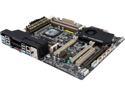
ASUS Sabertooth X79 LGA 2011 Intel X79 USB 3.0 ATX Intel Motherboard
Pros: Great layout, clean, well constructed board. The manual leaves a little to be desired, but enough to figure it out. Worked out of the box with my RAM (corsair dominator xmp @ 1600mhz)
Cons: No CMOS reset button, have to use the jumper. don't use the ASUS software. Its BUGGY and gives a lot of false reading. As someone else said, Asus makes great hardware, but the software leaves a lot to be desired. **the x79 chipset boots slow. I don't think this is the boards fault though**
Overall Review: Running with Ivy Bridge 4820. Did the usb bios flash, and all worked well. Only takes a usb drive, and the 24 pin power attached (no memory or processor). Bought this to game. With 2x GTX 680's all is WELL. PCI X@ 3.0 is there!! Combined with a lot of airflow & corsair H100i, couldn't ask for better.
11/13/2013See more detail