


Your Browsing History


Douglas S.
Joined on 08/13/06
0
0
product reviews
- 16
Good for the money
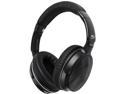
Mee audio Air-Fi Venture Bluetooth Over-Ear Headphone (Second Generation)
Pros: I use these in Windows 7 for gaming. I would use them on my Dish Hopper too, but they don't work too well on that. These are extremely comfortable and have very good sound, especially for the money. They are very lightweight as well. I would recommend these.
Cons: In Windows 7, I had some problems with delay and that they would not work in certain games. This is a Windows 7 issue. The fix is to open up your sound shortcut, go into the "recording tab", and delete (yes delete) the icon which says Air Fi and is for the mic. This caused some delay, static, and caused issues in some games. If this makes the mic not work in Windows 7 I don't know, and I don't care because I don't use the mic. If I ever need the icon back, just remove the headphones under Bluetooth devices and reconnect, and the icon will be reloaded in the sound options. As for now, I just delete it and I recommend you do the same.
Overall Review: These are headphones that I am now proud to own. I have other headphones which actually sound a bit better (but I think they're expensive, I got them free with my Dish Hopper) but they (my other free IHIP headphones) squeeze my head like a zit and within 10 minutes my ears are throbbing so that I switch over to these much more confortable Air Fi headphones which have very nice sound too, again especially for the money. So the bottom line, the sound good in windows and work good in windows once you delete the said icon in the recording tab. And they don't work well with the Dish Hopper which is unfortunate but ok with me because these headphones were a good price. And they are extremely comfortable. I did write a review earlier bashing these headphones. But that was before I found the said fix in Windows 7. After the Fix, the headphones are nice. Without the Fix they're almost a paper weight. One other thing. My review was based on using them via a Bluetooth usb doggle in my computer. But these have a hardline 3.5 mm cord option that is acceptable, although in BT mode they sound better.
10/10/2014See more detail
Buyer Beware
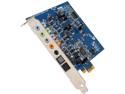
Creative Sound Blaster X-Fi Xtreme 7.1 Channels 24-bit 96KHz PCI Express x1 Interface Sound Card
Pros: Take this for what it's worth and it may not be worth much. I would caution anyone against obsessing too much about trying to improve sound or spending too much on trying to improve sound. This is because I have wasted literally thousands of dollars over the past 15 years on "sound", from stereo receivers to speakers, to PC sound cards and headphones. I have for a long time recognized that this has been the biggest waste of money in my entire life, as my expectations were rarely if ever met with these purchases, and many of them simply created a gigantic headache from bugs or compatibility issues. With that said, I may be hearing some improvement with the creative labs sound software when using my onboard sounds. Again, the creative labs sound card itself, has issues as stated previously. I tested by doing system restores back and forth. So it's possible that my real tek onboard sound is benefiting from the Creative sound software, as it sounds a little fuller now and not so flat. But the card itself is worthless. One egg for this.
Cons: I Installed this card yesterday. Tested it extensively for 6 hours on a variety of sources from games to movies to music. The bottom line is Tony was 100% right. The only difference in sound for the sound card is from gimmickry in the software, which actually makes it sound worse. The sound card also had a few problems that my onboard sound didn't have, such as slight crackling when playing movies. The worse problem though, was the "line in" was significantly worse than my onboard one. I ended up removing the soundcard before I went to bed. The Sound card I purchased was a Creative Labs X Fi. This company has a long history of actually having both buggy hardware and software, which explains the slight crackling and the line in issues I experienced. I thought that with windows 7 that I would have lower risk of having issues than with my previous experiences in years past. Unfortunately, I had just as many issues if not more. As far as just outputting sound aside from the line in issues, I think what Tony said is 100% correct. The Creative sound card hardware does exactly the same as onboard sound. It simply converts digital to analogue and nothing more. Then Creative's gimmicky software is what makes the difference in how it sounds. But at the end of the day, the pure sound through my onboard sound, was just better, and even has less artifacts and "noise" than the Creative sound card. In fact, my onboard sound has no artifacts whatsoever that I can hear. So I was disappointed. But lesson learned.
Overall Review: I used Windows 7 64 bit. I know, it doesn't list this as being supported, but I have experienced similar issues with Creative labs cards going back to windows XP and before, crackly sound and bad drivers. So this just seems par for the coarse.
8/31/2014See more detail
Not good
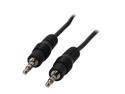
Nippon Labs 25 ft. Premium 3.5mm Audio Stereo Speaker 25ft Cable M/M Model SPC-25MM 25 feet
Pros: It works as long as I keep the cord bent in just the right spot.
Cons: The connectors aren't great. But aside from that, where the cord is attached to the connector there is something wrong. When I hold the connect in the headphone socket firmly (to ensure this isn't the problem) and then bend the cord around, one ear phone cuts out. It's extremely bad, and I almost cut it off last night and was going to splice it together myself, just to cut out the bad portion of the cord. This is almost like what you might experience on something like this after 10 years of wear and tear, not when it's brand new.
Overall Review: Stay away or you may be as sorry. I'm probably going to try and make due and in the mean time order a different brand. Aside from the cord issue, the connectors aren't the best, but I isolated the issue and connector was not causing my problem. It's the cord where it attaches to the connector.
8/31/2014See more detail
Camo Xbox 360 Controller
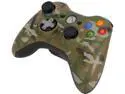
Microsoft Xbox 360 Special Edition Camouflage Wireless Controller
Pros: Improved D-Pad feels great. Improved thumbstick grips feel great. Nice Camo design. Links up well with my PC receiver. Wireless connection is solid and stable on my PC, I haven't lost connection once.
Cons: Had to return the first one because the right thumbstick drifted, which was noticeable in certain games. What happens is in an FPS game my character will keep turning all on it's own, even when I'm not touching the thumbstick. The replacement controller has the same problem although not quite as bad. My old 360 controllers don't do that for the right thumbstick, although the left thumbstick on one of my old controllers drifts. This is a quality control problem from Microsoft, as this drift has been a known issue for years on all their 360 controllers whether they are regular ones or special edition. Basically you have to get lucky to get one where neither thumbstick drifts. It cost me $7.50 to ship this camo controller back to Newegg, which is a significant chunk of money. Newegg was fast in sending the replacement.
Overall Review: Not sure what to tell you. Xbox 360 controllers are the best and most comfortable controllers ever made, and the special edition gives some very nice improvements, but on any of the Xbox 360 controllers whether they are regular or special edition, you could have drift on one of the thumbsticks (or both) unless you get lucky. Again, it's only noticeable in certain games with tight dead zones. I've only used this controller on my PC so far. I took off 2 stars for the drift problem.
12/22/2013See more detail
Works Great
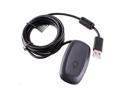
Black USB 2.0 Wireless Gaming Controller Receiver Adapter For Xbox 360 Xbox360
Pros: Works perfect. No lag. Fully functional. Long Range. Works just like when I play my xbox. Do yourself a favor and watch the youtube video on installing the windows drivers and it's a piece of cake. Only took 3 days to get it. YouTube Title: "Install drivers for Xbox 360 Wireless Controller PC Receiver [HD]"
Cons: None.
1/4/2013See more detail
Great Card
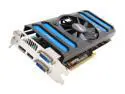
MSI GeForce GTX 660 Ti 2GB GDDR5 PCI Express 3.0 x16 SLI Support Graphics Card N660TI-2GD5/OC
Pros: This is a very nice GTX660 ti. Cool, quiet and fast. This comes factory OC which I like. I personally like this over the PE edition because imo the single fan keeps it quieter. You can oc the PE edition more because of the duel fan set up, but a few youtube videos should convince you that if you go too overboard the fans will sound like jet turbines in your computer. I prefer quiet to a few extra frame rates. This card looks good, looks and feels solid, has great software if you want to oc it even more, etc. So far runs all my games nicely without any crashes. To be honest, all I did was install the card and download the newest driver from the nvidia website. I didn't even us the driver cd yet, although I think I did pop it in and the setup menu was messed up. But I know the afterburner software is on the MSI website so no biggie.
Cons: This card is big, not huge but a little bigger than my GTX 550 ti was and smaller than my GTX 7950 was. I have a roomy mid tower ATX case and it fit no problem. Would give this 5 eggs no problem, but will only give it four because the assassins creed program requires a bloatware download and software running in the background in order to run. So IMO, that's not free and because of this I decided not to load that garbage on my computer. Free would be if the game was through Steam or if they gave you a working disk. Frankly, I think Nvidia would rather you didn't download the game as they probably have to pay ubisoft a couple of bucks per download. It's disappointing because I was looking forward to that game. 192-bit will probably force us to want to upgrade again in a few years. Not cool. But for now handles 1080p very well.
Overall Review: You can use max setting on most games @ 1980x1020 but on some games your minimum framerates may dip below acceptable levels too often. On games like Batman Arkham City, Serious Sam 3 BFE edition, or even Borderlands 2, you may have to back off a setting or two to keep the min frames above 30 and the average at 50-60. I've found that PhysX at normal instead of high helps, and the Nvidia FXAA can be adjusted to taste. Stuff like TSAA and that can also be turned off is they are spendy on resources and don't give much in return. But this card will run most games on super high settings with blazing frame rates. This card is also amazing for older titles like Far Cry 2, Half Life 2, etc. You can max out everything with all the eye candy on and they run at a consistent 60 fps with v-sync on. You can find these games on steam for dirt cheap. This card has made my computer into the most fun gaming rig I've ever owned. AMD FX-4300 VISHERA 3.8 GHZ AM3+ 95W QUAD CORE G.SKILL SNIPER SERIES 8GB (2X4GB) 240-PIN SDRAM DDR 3 1866 GIGABYTE GA-970A-D3+ AMD 970 SATA 6GB/s USB 3.0 ATX AMD MOBO MICROSOFT WINDOWS 7 HOME PREMIUM SP1 64-BIT - OEM SEAGATE BARRACUDA ST1000DM003 1TB 7200 RPM SATA 6.0GB/s internal HD RAIDMAX BLACKSTONE SERIES RX-700AC 700W POWER SUPPLY ASUS DRW-24B1ST/BLK/B/AS BLACK SATA 24X DVD BURNER MSI N660 TI - 2GD5/OC GeForce GTX 660 Ti 2GB
1/3/2013See more detail