
Your Browsing History


Christopher S.
Joined on 01/31/09
0
0
product reviews
- 6
Best speakers I've ever owned.
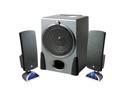
Cyber Acoustics CA3550RB 68 watts 2.1 Black Speakers
Pros: Amazing sound, simple as that. Sturdy, looks and feels high quality, and the price is right. Very clear highs and mids, powerful bass. I've owned a set of these for a few years now, this is my second set. Not because the first set broke or anything. A friend of mine needed good speakers and my computer was down (video card burned out), so I wasn't using them. When I replaced my video card, instead of asking for them back, I just bought another one. I'd buy these a third time if I had to lol. The quality vs price is outstanding.
Cons: Zero
Overall Review: I'm a musician and quality sound is a priority for me. I've owned expensive 5.1 and 7.1 speakers (up to $400) and none of them compared to these, especially for the price. The bass mesh grill is very nice, it can take a beating (it's been tested lol). I would like to see the same mesh grill over the satellite speakers but that's just personal preference. The light on the satellite speaker is pretty bright and I would like the available distance between the two satellite speakers increased. The satellite speakers are a little tall but nothing to take an egg away for. These are purely aesthetic preferences on my part and in no way does this decrease my opinion on this product. 5 eggs all the way. I'd recommend this product to anyone/everyone.
12/7/2013See more detail
A~mazing!
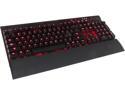
Corsair Vengeance K70 Mechanical Gaming Keyboard - Red LED - Cherry MX Red Switches
Pros: -Excellent keystroke reaction time. -Bright/vivid back lit keys. 3 levels of brightness. Some people would like "more customization options" for lighting but I'm happy with the options. -Solid aluminum framing plate. Very sturdy, feels high quality. The aluminum plating sits with a low profile, making dusting/cleaning very easy and thorough with canned air. Not many places for dust and dirt to hide. -Wrist rest is soft and comfortable. -Contoured WASD 1-6 keys are very nice. This comes with a key tool for easy extraction of standard keys. -Braided cord, very nice. I have worn through keyboard/mice cords int he past. The price is a little steep but you REALLY get what you pay for with this.
Cons: -Price BUT you get what you pay for. Totally worth it. -Contoured keys caps 1-6 DO NOT show ! @ # $ % ^ of their corresponding keys. This might throw off novice typers/gamers, or those who sometimes physically look at the keyboard when typing. For me, this really isn't a Con, I know a keyboard layout well. For those not too familiar, keep standard keys on until you get better acquainted.
Overall Review: Best keyboard I have ever owned. It was worth the extra few bucks. Plug & play. If you have heavy hands, having the back legs up might cause slight keyboard movement when typing/playing. Not an issue for me but I can see it being an issue for some people. When first plugging this in, I noticed the Scroll Lock light (next to Num Lock and Caps Lock light) was continuously blinking and the Windows Lock button didn't work. There is a Bios option switch between the USB pass through port and the keyboard cable itself. Mine was set to 1 on default (1, 2, 4, 8 are the options). Switch this to any other option, and then if you choose, you can put it back on 1. This removed the blinking, as well as fixed the functions of Scroll Lock and Windows Lock. If you slide the switch to another option and the blinking/lack of Windows function persists, reboot in selected option. I've read, depending on your Bios, some users require the use of 2, 4, or 8. Mine is fine on 1. Your necessity may vary.
3/13/2014See more detail
High/Ultra Graphic settings
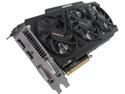
GIGABYTE GV-N760OC-2GD REV2.0 G-SYNC Support GeForce GTX 760 2GB 256-Bit GDDR5 PCI Express 3.0 HDCP Ready WindForce 3X 450W Video Card
Pros: Long time nVidia user. Previous graphics card burnt out. This one was reasonably priced for it's series. Also came with free game promo. This card handles all games I play with high/max graphics settings: WoW, GW2, ESO (beta), Battlefield 4, Black Flag, Skyrim (with over 100 mods), Sins of a Solar Empire, etc.
Cons: None
Overall Review: Graphic drivers sometimes fail to update. This is nothing on the card itself. I found that to fix this, once you download the new drivers, do a system restart, and then load the drivers. GeForce Experience, once minimized, will show up on your task bar as an opened program but will not maximize by clicking it's icon; seemingly making the program not running on your desktop. Either right click icon and maximize window, or hover house over icon, displaying a quick-view window... then click this window. I've seen a lot of forum questions on "GeForce Experience running but won't open". There you go.
3/12/2014See more detail
Works well, exactly what I got it for.
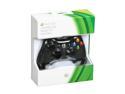
Xbox 360 Wired Controller Black/Glossy Black
Pros: Being a previous XBOX 360 player, using the same control interface for PC games made for an easy adjustment. I use this for games like Skyrim and AC4: Black Flag. My girlfriend, who is not gaming savvy, finds ease in learning a game through the controller vs keyboard/mouse.
Cons: None.
Overall Review: Cord is very long, which is good for those farther from their tower. Plug & Play
3/12/2014See more detail
Best case I ever owned...
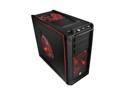
Thermaltake Element G VL10001W2Z Black Steel / Plastic ATX Mid Tower Computer Case
Pros: This is seriously one of the best cases I ever owned. I am normally a Cooler Master guy but after buying this case, I'm hooked on ThermalTake. This was an extremely easy case to build with. The top control panel comes with 4 additional USB ports and outer fan control. The front and side air intakes along with the top and back outakes makes for a very nice flow of air. The front/side intakes have a small mesh screening to restrict the intake of dust (as we all know: dust + computer components = fail). This case comes with a 850w power supply as well. I use to have the Corsair 1000w PSU. The price for this case with it's power supply is a huge plus. 850w is more than enough. The case fans come with multiple LED light configurations; easily switching between solid blue, green, red, and rotating colors in random patterns both slow and fast; all controlled by the fan speed dial on front control panel. It was easy, as well as a pleasure, to build with.
Cons: I have read some reviews about some not liking the case material being plastic. I was a little worried about that but am no longer worried. Yes, the outer case is plastic but it is very durable and makes the overall weight a little lighter so I don't see this is a con what so ever. I'm not a big fan of the hard drive storage area. The HDD slides in on rails and seems kind of unstable; moving the case too much feels as if the HDD will slide a bit. Most Cooler Master cases I had came with quick-snap features for all drives (disk, floppy, card reader, ect) and cards (graphics, sound, network, ect). This case does not have that. Although it is convenient it is nothing that would take an egg away.
Overall Review: Most cases I have had, the fan on the case door was usually connected by wires. The door for this case as an on-board sensor that connects to a sensor board on the case. This eliminates the wires getting in the way when opening and closing the case. A very nice feature.
2/8/2011See more detail
Amazing case.
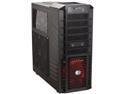
Cooler Master HAF 932 Advanced - High Air Flow Full Tower Computer Case with USB 3.0 and All-Black Interior
Pros: This case is huge. It has the real estate I need for my gear and some room to spare. The air intake lay out of this case is "inward and upward". The 230mm fan (with red LED) on the front and the 230mm fan on the side panel brings more than enough O2 in. There's also a 3rd 230mm fan in top, sucking all that heat right back out. Keeps a good air flow over ALL my components. Most of the case itself is grated. This case holds no heat what so ever. The case is very strong as well, made from steel. The accesibility of this case is almost idiot-proof. The thumbscrews for the side door allow you to open the case without any tools. Most of the components can be added or interchanged tooless; hard drives, disk drives, video cards, sound cards, ect. Not a single tool needed. The fans are easily interchanged or replaced, if you are going for a bright and colorful look with LED fans and such. The case has a lot of options and room for light-customizing as well.
Cons: If you live in a dusty area, be careful. With as many open-air instakes this case has, expect to get some dust inside. Most of the grated exterior is good at catching the dust like a filter but it still gets inside. Making home-made filters are pretty easy though. You can find tips on that online. Besides, it's nothing a can of air can't fix once in a while.
Overall Review: The panal backing the mother board as significant space to reroute most of the wires thru so they can be hidden for the most part. Nice feature. The case itself weighs almost 30lbs. Add all your components inside and it can get pretty hefty. If you plan on being mobile with it, taking it to friend's houses or LAN parties for instance... I suggest going to the store and buying some straws so you can suck it up. Maybe you can hit the gym even. It might help some. I have only found this case in black. I know a few detailers who could repaint it if I wanted to. Not a big deal. Just an idea in case you want to a more visual customized look.
11/22/2009See more detail