




 here!
here!
I’m your shopping assistant for PC builds, upgrades, and everything tech.
Got questions? Ask away!
Start a conversation
here!
I’m your shopping assistant for PC builds, upgrades, and everything tech.
Got questions? Ask away!
Start a conversation

Joined on 08/19/01
Great CPUs
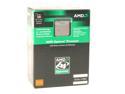
Pros: Excellent CPUs, especially for video editing. Have them paired with 4GB of RAM, system flies!!! To the previous poster: How in the world did you get 4 280 CPUs designed for dual-socket motherboards to run on a quad-socket motherboard? Unbelievable! It can't be true.
Cons: None
Does not live up to expectations, failed in less than 2 years
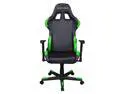
Pros: Highly adjustable, comfortable enough for me and my family members
Cons: Took less than 2 years for the rocking mechanism to fail to be smooth and the seat cushion to provide adequate support for my rear - I already feel like I am sitting on a metal plate which the seat is connected to.
Overall Review: Thanks to Newedge, they helped me with some of the warranty issues, but DXRacer has failed to provide warranty coverage for the seat cushion saying that normal wear and tear is not covered. I have 4 chairs in the house and only on as failed to do its job! DXRacer hides behind these words all the time because there is no proper definition of normal wear and tear i their warranty, thus they use this loophole to dodge warranty claims.
Designed well, but the BIOS is its weakest point
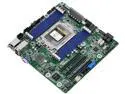
Pros: Well designed! Bought it for a VMWare server. Lots of features, fairly compact.
Cons: 1. For a workstation/server the board is missing any SAS connectivity. With the ability of the board to connect 11 SATA disks, having 0 SAS options worth removing one star 2. IPMI/BIOS need some work. IPMI port disappears once ESXi server fully boots up. You would have to power off the system completely and power up to get a chance to access the IPMI GUI again. Contacted AsRock Support over 6 months ago and still there is no new BIOS or Firmware available to remedy this behavior. I have several servers in my household and I always buy boards with IPMI port for remote management. This board with the current BIOS/Firmware cannot be managed remotely. It could be defective, but AsRock never offered the board to be replaced. So, that strikes the second star.
Overall Review: Overall, the board is fairly stable, at least under ESXi 7 and 8, but I would not choose it even for a small business as it needs more stability. Plenty of connectivity options with 3x PCIe expansion slots could make it a primary choice for a compact server, granted the BIOS could be fixed and polished out.
CyberPower Intelligent LCD Series BRG850AVRLCD 850 VA 510 Watts
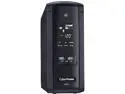
Pros: Just worked while it lasted, there is not much to say
Cons: This morning heard a constant beep. The unit was showing F02 on its display and a computer connected to the unit was down. The UPS was only powering a NAS which requires about 170W at most (usually 112W), there is no way it was overloaded or stressed out. This is my first CyberPower UPS, the rest in the house are APC Back-UPS units. Some of the APC units were running for 5 years already and not a single issue. This CyberPower unit is only 2 months old! I guess I am going to need to send it to CyberPower at my expense and will probably receive a refurbished unit at best... Not good! You pay for a new device and just two months later it literally turns into something else. I guess this is going to be my first and last CyberPower UPS. I have 7 servers at home, each requires its own UPS and I suppose this CyberPower UPS could not pass a simple test. Sad! Without competition APC is going to always charge high $$$$ for their devices
Overall Review: UPS is a device designed to protect your very expensive equipment and you expect to rely on stuff like this. When it fails within just 2 months of service while lightly used, it does not say a whole lot about QC or the materials CyberPower uses to manufacture their devices. This unit (if and when replaced/repaired; do not know yet about the support CyberPower provides) will probably end up powering a TV or something, but not a server.
Nice switch, but...
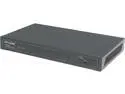
Pros: Nicely built, has a Web GUI, tons of features. Bought it since it has support for 802.3ad (link aggregation - LAG/LACP)
Cons: Unfortunately, current firmware (f/w 1.0.0 Build 20140626) is buggy - LACP does not work as expected - packets have wrong length - 128 byte instead of 124. People say there is a beta firmware out there in the wild by TP-LINK which addresses this issue, but it remains to be seen - no official version has been released yet though it has been almost a month since the problem was filed with TP-LINK support.
Overall Review: A bit too expensive to have the switch as an unmanaged one and until TP-LINK fixes the issue decribed in Cons it cannot be used as intended, thus only three eggs.
SSD Extreme 240GB... Died...
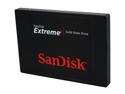
Pros: Fast as any other SSDs out there...
Cons: Died after 2 years of service in a notebook... Sad! Always thought of SanDisk as a reliable brand... Right until the SSDs died.. Suddenly! With no sign of weakness... Last Saturday tried to boot my notebook... It almost made all the way to the login screen and then froze... Never happened before! And apparently never will... Upon reboot the notebook did not detect it. Went south and took with it a lot of info I acquired over the business trip. Cr@p!
Overall Review: Only after 2 years? Last time I checked the drive had roughly about 2TB of data written on it. Very disappointed with SanDisk! Time to find a new maker!


