

Your Browsing History


Brian S.
Joined on 12/26/02
0
0
product reviews
- 6
Crosshair Formula-V Review
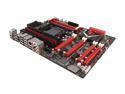
ASUS ROG Crosshair V Formula-Z AM3+ AMD 990FX + SB950 USB 3.0 ATX AMD Gaming Motherboard with 3-Way SLI/CrossFireX Support and UEFI BIOS
Pros: The Asus Crosshair Formula-V is a serious high end gaming motherboard. This red/black scheme motherboard contains a number of features for over-clocking of both memory and CPU (including a switch used to disable "cold boot" errors when using super-cool of the CPU). Their are a number of other features such as Fast Boot which allows Windows 8 to boot within seconds when using a SSD drive. On a base Windows 7 installed on a SSD drive I enjoyed boot times of less then 15 seconds from turning the power-switch. The UEFI-based BIOS offers a cool option which allows you to select the boot device when actually "in" the BIOS. The cool red LED strip around the audio chip on the M/B is s nice touch also. I really like the idea of having a power and reset switch present on the M/B during bench testing (you all do that right). Asus has done a great job of keeping up with BIOS updates too. In all honesty this M/B is a bit of overkill for me as I don't OC which this board is designed to do (but I did need a fast motherboard for the programming and office work I do).
Cons: The life of the PCI slot is now coming to an end just as the ISA slot did. The one feature that Intel-based chipsets have over the AMD chipsets is the lack of PCIe 3.0 support (this M/B supports PCIe 2.0) which I hope is addressed in the next version of the board.
Overall Review: This is my first AMD motherboard in over 15 years. I being an avid Intel fan could NOT justify the cost of a Intel-based high end system (a similar performing Intel CPU would of been and extra $100 and a similar LGA1055 M/B would of been an extra $75). I have been very happy with this motherboard and my AMD FX-8350 CPU. FYI: Be very careful about the type of heatsink/fan you purchase as some of them cover up 2 of the 4 memory slots when using memory with tall heat spreaders. BTW: For those of you with DOA motherboards did you observe ESD precautions; was all power removed when installing the CPU, expansion cards, or adding memory; remember that the Vsb voltage is present unless the power cord is un-plugged or the PSU switch is OFF. For the record I bought 25 motherboards for my computer hardware course that I teach and there has not been ONE DOA MOTHERBOARD.
6/27/2013See more detail
Review of Thermaltake DPS
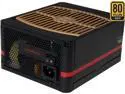
Thermaltake Toughpower DPS G 750W Digital SLI/CrossFire Ready ATX12V v2.31/SSI EPS v2.92 80 PLUS GOLD Certified 7 Year Warranty Full Modular Active PFC Power Supply Haswell Ready PS-TPG-0750DPCGUS-G
Pros: First power supply offered on Newegg which allows monitoring of the output voltages (including amps) as well as overall wattage being supplied to the system. There are a number of other aspects that can be monitored such as PSU Fan RPMs and PSU heat (both in C and F). It appears that you can also configure the PSU to update your friends on Facebook of the PSU operation (sorry, not going to implement this feature).
Cons: Just as an FYI that is you have a full tower case which supports cable management I found the main ATX Power Cable and Aux CPU Power Cable to be about an inch short for my Thermaltake GT Level 10 case; I did manage to route the cables using another cable management hole but again the cables are stretched pretty tight. The software uses a lot of monitor real estate so I would encourage the good folks at ThermalTake to offer a version of the software which is smaller in size; also desktop notifications of high PSU temp would be helpful.
Overall Review: To use the monitoring of the power supply you need: 1) USB Cable (USB 2.0) 2) Software which is downloaded from ThermalTake's website; also have the serial number of the Power Supply handy as you need the SN in order to download the monitoring software.
12/4/2013See more detail
Yet another review with test results
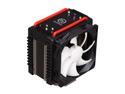
Thermaltake Frio Overclocking-Ready Intel Core i7 (6-core ready) & i5 Compatible Five 8mm Heatpipes Dual 120mm Fans Intel & AMD Universal CPU Cooler CLP0564 - Retail
Pros: A very solid and well built heat-sink/fan sporting the classic Thermaltake black/red color scheme. Other features worth pointing out: 1) Supports AM3+/AM3 Processors sockets 2) Supports all major Intel-based Processor sockets NOTE: The LGA2011 requires a free upgraded from Thermaltake for additional mounting hardware. 3) Includes a tube of thermal paste 4) Includes two fans that have a maximum RPM of 2500 5) Overall the fan noise was not noticeable at a RPM of 1400
Cons: A little larger diagram would of been helpful on the installation documentation to determine the orientation of the threads for the standoffs.
Overall Review: I installed the Frio on a Asus Crosshair Formula V running ann AMD FX-8350 as an upgrade to the stock heatsink/fan. Due to the fact that the motherboard was already installed in the case the installation of the Frio took two people to accomplish (as the plate on the back of the Motherboard also required upgrading). The install took just over 30 minutes which included sorting out parts, reviewing the installation documentation , as well as removal of the existing CPU/old thermal paste. The measurements were took using the temperature reported by the BIOS. The motherboard/CPU was installed in a Thermaltake GT Level 10 Case With a room temp of 72 degrees. Here are the results of the stock heatsink fan and the new Frio (with the computer idle with no over clocking configured): Stock Heatshink/Fan: 108 Degrees F Frio Heatsink/Fan: 1400 RPM: 86 Degrees F 2500 RPM: 80 Degrees F That is a decrease of 28 degrees F at 2500 RPM vs. the stock cooling solution!
3/4/2013See more detail
Great Board
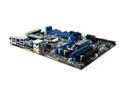
MSI H55-GD65 LGA 1156 Intel H55 HDMI ATX Intel Motherboard
Pros: My first MSI board in years! I purchased this motherboard to be used as my new Media Center PC running Windows 7 Professional 64 Bit. This board offers 4 memory slots; supports ATI Crossfire, software based RAID, Virtualization Technology, and most importantly HDMI output up to 1080i (it also has DVI and standard RGB video outputs). This board also supports capacitive touch buttons on the motherboard for power and reset functions; very nice feature when bench testing a motherboard. This motherboard has been running non-stop for over a month with no lock-ups or issues. I currently have over 30 hours of video stored using Media Center; simply put I have found this motherboard TO BE ROCK SOLID. This board also offers some very striking blue/sliver/black combinations that look very good in a system with other color matched components. I would strongly urge anyone who wants to setup a Media Center PC to consider this motherboard.
Cons: The following is more of personal tastes than actual issues. I would really like to see normal up-right SATA connectors; I don’t personally like having to buy right-angle SATA cables. Also this is a ATX form factor which will NOT fix into a HTPC-based case (my mistake when ordering). I won't award 5 eggs until I setup and test RAID. Someone made the claim that RAID will not work; I will test and verify and update later.
Overall Review: The motherboard manual shows actual switches for the power, reset functions when the production models use simple capacitive touch buttons (you simply touch the PCB of the motherboard). There is a one touch button for overclocking and there are also buttons for manually increasing and decreasing the system clock. I make it a habit NOT to overclock because reliability to me is more important that performance when you have a technically challenged significant other. Now the burn time. I frankly think there are a number of individuals that simply do not have the technical expertise to assemble systems. I teach computer hardware classes at a tech college and I have been building systems since the days of 486-based systems; I can count the number of bad motherboards that I have had to replace on less than one hand. I have never had a DOA motherboard…EVER. People simply need to observe ESD precautions and bench test a motherboard. Please take all DOA claims with a grain of salt.
3/9/2011See more detail
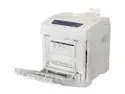
Xerox Phaser 6280/DN Workgroup Up to 31 ppm Color Ethernet (RJ-45) / USB Laser Printer
Pros: The Xerox 6280DN is a networkable color laser printer with duplexing capability (you can print on both back and the front of the page). I have found the printer to be much faster than my old HP LaserJet-4MP (which is at least 7 years older) due in part to the very short warm up times (which are less than 25 seconds from the time I press print within Office 2010 to when the document is printed with a standard document with no graphics over a wireless N connection). While I have not tired much color printing it does a decent job with standard paper with photos (great for the kid’s homework) and does an excellent job with graphics and text. I would like to pick up special glossy paper to see what impact that would have towards improved photos (again photos are just fine but they do not compare against an ink-jet printer with special glossy paper). The printer is silent until it begins the warm-up procedure; overall noise level is not enough to wake anyone up from a sleep.
Cons: As with most printing devices consumables are very high. I estimate the cost of replacement toner cartridges will be around $400 as of 2/2011. Also this printer is very tall (18”) and deep (18”) for only having one printer tray (in contrast my old HP has two trays and is just a-bit taller than my new Xerox).
Overall Review: I was able to install the Drivers without having to know the IP address of the printer because the install software detected the printer with DHCP assigned IP address; very cool. I haven’t looked into this very much yet but the default setting is to always print in color; I have not found a way to change the default settings yet. Overall very good printer for the money; I purchased a Xerox in part because of the fact that in my opinion Xerox makes great copy machines. Because replacement toner costs are high I won't award 5 eggs!
2/13/2011See more detail
Good Price/Performance
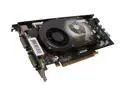
XFX GeForce 9600 GSO 768MB GDDR2 PCI Express 2.0 x16 SLI Support Graphics Card PVT96OSDFH
Pros: The main reason in purchasing this video card was to find a low-cost upgrade which would allow me to play my recently purchased Call of Duty-World At War! This video card allows me to play COD with many of the settings configured for maximum detail without any noticeable performance issues (I am using standard PCI Express 16; not version 2.0) using a ASUS socket 478 HT P4 running at 3GHz with 1GB of RAM without any noticeable frame-rate issues. This card runs very cool and I have had no problems using this video card on a non-SLI compliant power supplies (this board is running in a dual power-supply server chassis; I am planning on purchasing a SLI compliant power supply in the future which will NOT be ANTEC). I have no idea what other reviews (respectfully) are saying about fan noise; my experience is that this card is quiet! I did consider the 9600GT and 9800GT when purchasing this video card. I also like the idea of a lifetime warranty too!
Cons: This card is long (the card is just about as wide as my motherboard); be sure to that no connectors or jumpers are located “behind” the PCI-slot (this is not an issue with the card; just warning potential customers first).
Overall Review: Be mindful of what some reviewers say on Newegg; especially when offering insight on motherboards. I can tell you from experience that most motherboard issues are “user-induced”. I teach computer hardware classes at a local technical college and I can tell you that nearly 90% of motherboard power-up issues are problems relating to improper setup or what I will go out on a limb and guess DOA issues are relating to not taking proper ESD precautions. I cannot believe that there are nearly that many motherboard issues out there!
12/21/2008See more detail