


Your Browsing History


Dmitriy M.
Joined on 03/22/08
0
0
product reviews
- 17
Great, as advertised
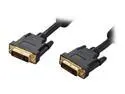
Rosewill Model RCDV-11004 - 15-Foot Black DVI-I Cable with Dual Ferrite Cores
Pros: Excellent quality, very long, yet at a competitive price! I am using it to route signal from one of three monitors to the PC, since the 3rd monitor is a bit far away.
Cons: None
Overall Review: Make sure you know what DVI-I means. There are other types of DVI connectors and cables, so if your monitor is DVI-D only, then a DVI-I cable like this one will not fit into the connector because it has extra pins for analog support (RGB and hsync).
12/7/2012See more detail
Decent if you get it cheap
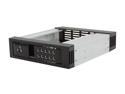
iStarUSA BPN-DE110SS-BLACK Trayless 5.25" to 3.5" SATA SAS 6 Gbps HDD Hot-swap Rack
Pros: Aluminum frame, aluminum latch. Cheap.
Cons: Of the two units I got, one had 4 out of 8 screw holes that were too small. I had to force the screw in there to open up it up, but now the threading is impacted and the screw rotates freely. Poor fabrication consistency on the aluminum threads! These 4 holes are all on one side, the other side is fine. Also as other reviewers noted, the height is lower than the height of a standard 5.25 bay, so there are 4mm gaps above and below each unit. If you don't have positive pressure airflow in your case, get ready for tons of dust to enter your case through these huge gaps. Includes plastic parts in the latch mechanism and also outer front frame, I am concerned about longevity.
12/8/2013See more detail
Solid X870E motherboard, easy installation
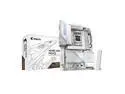
GIGABYTE X870E AORUS PRO ICE AM5 LGA 1718, ATX, DDR5, 4x M.2, PCIe 5.0, USB4, Wi-Fi 7, 2.5GbE LAN, EZ-Latch, 5-Year Warranty
Pros: Excellent aesthetics for a white-colored system build. Memory support is better than a competitor's X670E I was using previously. 2x48 GB (not as easily supported as the more common 2x32 or 2x16 formats) worked out of the box, along with EXPO profiles (this wasn't the case with the previous MB I was using). Love the screwless m.2 installation and having all the accessories included: rubber pad standoffs and additional pieces to accommodate either single-sided or dual-sided NVMe drives. Thermal pads are included for all 4 M.2 slots as well (3 on the large heatsink for top-surface cooling of those; there are preinstalled bottom and top surface pads for the main M.2 closest to the CPU as well as an extra pad to add thickness at the bottom for single-sided M.2 NVMe storage). EZ-Latch for the primary x16/x8 PCIe slot makes it much easier to remove a large GPU. Wifi/bluetooth antennae click into place: no more need for screwing them in one by one as in prior product I was using. While I know some folks dislike MB vendor supplied software, I found that GIGABYTE Control Center is simple and saves me time. After setting up the HW, I was able to quickly download and install all the drivers on one screen menu instead of having to manually search for and download one at a time as with some other MB manufacturers. There are also intriguing and intuitive features to customize fan controls, such that each fan/pump header can be associated with specific temp sensors on the board. You, as the user, can inform the OS & MB which areas of the MB each fan header is responsible for, so the temp sensor values from those areas drive the changes in corresponding fan speeds. RGB Fusion portion of the application was pretty straightforward for changing the onboard LED styles. Three of the four m.2 slots are off the CPU PCIe Gen5 (x4), in case you need the max speed. Just as with any X870E platform, the consumption of these lanes results in the x16 slot, typically used for a GPU, being downgraded to use only 8 lanes. However, this is not a major issue for current generation GPUs (including RTX 5000 series) as Gen5 x8 has minimal or no differences in performance from x16 and is comparable to Gen4 x16. Manual/documentation are great and detailed, including a block diagram of resource & lane allocations.
Cons: Debug segmented display and onboard Power and Reset(customizable function in BIOS, BTW) buttons are located in the top-right corner by the DRAM slots and can be difficult to access or observe compared to MBs where these features are at the bottom and near the front-panel header. E.g., main 24-pin power and DRAMs obstruct the view, so I can't easily monitor the debug codes from a distance. BIOS, while looking pretty, took some getting used to and could be slightly improved as some menus treat ESC differently than others and result in trying to exit BIOS altogether rather than the individual menu to go back to main/upper-level menus. I noted that one of the error LEDs (not the two-digit 7-segment display) would come on - DRAM - during training. Initially, I thought there may have been a problem, but that seems to be normal operation. One has to wait a bit on BIOS code 15 (displayed on the 7-segment displays) until DRAM training finishes (this is true regardless of MB vendor).
Overall Review: The Aorus Pro Ice offers good value in the X870E MB platform, solid build and great looks, convenient and easy installation. There are no crazy fancy features here, but the price is fantastic for just about everything you need, and the more expensive motherboards have diminishing returns for the higher price you pay. 10 Gbps ethernet would have been nice, but very few motherboards offer it and come with a hefty premium. I wanted a motherboard specifically in white for my build, and this is as good as it gets for that purpose!
1/31/2025See more detail
Excellent budget choice for occasional use
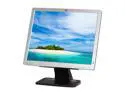
HP Compaq LE1711 17" LCD Monitor - 1280x1024, 1000:1 Native, 5ms, 60Hz, VGA
Pros: This isn't something you want for gaming or even casual use - you should get at least 1080p resolution monitors for everyday use, considering they're relatively cheap these days. Furthermore, this one is only 17", so the size is also not optimal for everyday use. What this is is a perfect budget, light, small-size monitor for occasional use. It is ideal for 24/7 PC setups such as servers that you don't use monitors with but where a monitor comes in handy should you lose network connectivity and in the event you become unable to control the host remotely. For its intended purpose, it does everything I needed at a great price. Refurbished, but looks like new.
Cons: VGA output only, have to use DVI adapter
Overall Review: Low resolution Small size
1/31/2014See more detail
Solid motherboard
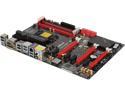
ASRock ASRock Fatal1ty Gaming Fatal1ty Z87 Killer LGA 1150 Intel Z87 HDMI USB 3.0 ATX Intel Gaming Motherboard
Pros: Good quality build from Asrock. 7 PCI-e (ranging from 1x to 16x) for all sorts of GPUs and other devices! Killer network manager suite provides extra networking priority control. Better audio hardware solution than other boards. Special mouse port for sniper mode during gaming. Small extras like USB key for authentication, tools for ramdisk.
Cons: I am using this for crypto coin mining with 5 GPUs. Unfortunately unlike other motherboards I have, this one does require the PCIe lane detect, so I had to jump a couple of pins on each slot where I used either a 1x slot or a 1x riser cable plugged into the 16x slot.
1/10/2014See more detail
Low-cost with extra features and control panel
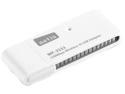
NETIS WF2111 150Mbps Wireless N USB Adapter Compatible with Windows MAC Linux OS
Pros: Does what it's supposed to do given its low cost. Don't expect miracles, but it does have some more features than some other simple devices. It comes with an application that gives you a few more knobs, such as software access point (share the wireless connection to other devices without having to use a wireless router), shows signal quality, allows you to create and save multiple configuration profiles, shows information such as MAC and IP addresses, has WPS pin and push button support. I am using 2 of these, where 1 is plugged into a PC with a wired ethernet connection and serves as a wireless access point, and the other is plugged into a 2nd PC and wirelessly connects to the 1st PC. This allows me to get internet connection on the 2nd PC without using a wireless router.
Cons: Although the application is nice, it comes at a cost: Windows won't find any drivers by default, so you have to install drivers and/or the application from either the included CD-ROM or by downloading it from netis's website (which you must access by some other means of getting to the internet). In contrast, I have other cheap wifi dongles that are plug and play with quick regular windows driver detection. 150 Mbps is slower speed than some other dongles you can get.
1/10/2014See more detail