

Your Browsing History


Robert F.
Joined on 03/04/05
0
0
product reviews
- 19
OEM means: no pouch, no manual
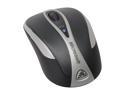
Microsoft Bluetooth Notebook Mouse 5000
Pros: Comfortable in the hand, good travel size, paired effortlessly with Windows XP on my Asus 1005HA, responsive, good tracking.
Cons: I wasn't expecting a box, but I was expecting instructions. What you get is a mouse, a pair of batteries, and some bubble wrap. No pouch, no software, and no manuals. The back button works, but it is in an awkward position, and doesn't make a good 'click' sound when you press it. So far, I usually wind up clicking more times than I intended to, but I suspect I'll get used to it over time.
Overall Review: I searched the Microsoft web site for a user manual, but all they have is a technical specifications sheet. If you have never installed a blue tooth mouse before, getting the computer to recognize the device could be a bit tricky. To pair: install the batteries, turn the mouse on, press and hold the blue tooth button until the led is blinking red and green. Enable blue tooth on your computer (on the Asus, it's done from the blue tooth icon on the task bar), add a new device (ditto), and choose the mouse. You shouldn't need a pass code, but if prompted, enter 0000. Once paired, you can turn the mouse and/or the computer off, and they find each other without any problems they next time you turn them on. Give me a mouse over a track pad any day!
10/19/2009See more detail
Not the best replacement for a TiVO
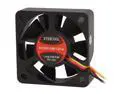
EVERCOOL FAN-EC5015M12CA 50mm Case cooler
Pros: Cheap. Quiet. Has a sense wire and comes with a 4-pin power to 2-pin adapter.
Cons: 4-pin power to 2-pin adapter is wired for 5 volts (wired to pins 3 and 4), but this fan requires 12 volt (wired to pins 1 and 2). Not a problem in my case since I didn't need the adapter.
Overall Review: This fan is a fine product, and it does what it says. Unfortunately for me, I needed a replacement fan for my TIVO box. Ideally, I should have bought a 50x50x25, instead of this fan, which is 50x50x15. It's not the fan's fault, but it doesn't push as much air as the factory TIVO fan. As a result, the TIVO used to run at 32C, and now it now runs between 39C and 40C. I don't think it will matter much in the long run, and frankly, you can't really can't beat the price.
12/1/2015See more detail
Wow!
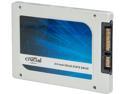
Crucial MX100 2.5" 512GB SATA III MLC Internal Solid State Drive (SSD) CT512MX100SSD1
Pros: My aging system boot 3 times faster than it did with the old hard drive. Acronis clone worked perfectly from the Boot CD (took about 50 minutes to clone 3 partitions and about 350 meg of data)
Cons: Doesn't come with a 2 1/2" to 3 1/2" adapter. Or a SATA cable. Of course, Crucial never said it would. If you don't have these items on hand, be sure to order them when you buy the drive.
Overall Review: After the cloning operation completes, you will have TWO hard drives in your system that are boot -able. If your are running Window, both drives will have an active partition. Do NOT boot your computer in this configuration: disconnect the old drive first. Otherwise, you have a 50/50 chance that Windows will "fix" your configuration by marking the SSD not-boot-able. I disconnected the power and data cables from the old drive, just in case the MX100 dies. It won't be fast, but at least I'll have a working computer.
1/22/2015See more detail
Works. Setup is a bit tricky
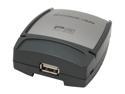
IOGEAR GPSU21 1-Port Print Server RJ45 USB 2.0
Pros: Small. Gets the job done. I have a Brother HL-5340D that I was sharing through my Win 7 64-bit PC. For some reason, one day the only thing I could print from other computers was the Printer Test Page. After a bunch of research, I decided that this product looked like the best way to put the printer on the network full-time (although let's face it: the best way to have a printer on the network full-time is to buy a printer with a network interface :) After getting the printer set up (tricky, so I knocked off a star), it works the waexpectedcted it to.
Cons: Vista is the last Window OS documented. I downloaded the setup program and documentation from the IO GEAR website and went through the setup. I made sure my router was assigning an IP address to the print server based on the print server's MAC address, and I set up the same IP address in the print server. I followed the rest of the instructions, but I could not get test pages to print. Ping responses from the server told me it was alive, but I could not even log on to it. I power cycled the print server (and the router) several times to no avail. Sadness. I moved the printer cable back to my PC and went to bed. The next day I moved the cable back to the print server. Pinging the print server said it was alive and well, so I moved the printer cable back to the print server and tried again. (running out of space here, continued in Other Thoughts)
Overall Review: Here's what I did: 1) Devices and Printers: add a Printer 2) Add a LOCAL Printer 3) Create a New Port Standard TCP/IP Port 4a) Hostname or IP Address: the IP address assigned to the print server (in my case, 192.168.1.10) 4b) Port name, the IP address followed by -1 (this was set up from my experiments the night before, so I just used it: 192.168.1.10-1) 5) Additional information: Custom: Settings.... 6) Protocol: LPR; Queue Name: lp1 I don't think the queue name is meaningful, but you have to have one 7) Pick the Manufacturer and Printer Model 8) Give the printer a name DO NOT SHARE THE PRINTER! Print a test page. If it comes out, congratulations. You can log on to the print server, using the IP address you assigned. In my case, I entered 192.168.1.10 and the broswer responded with http://192.168.1.10/index11.HTM The main page has a print job section, where you can click and see the print job log. Last thought: it would be nice if you knew what the LEDs w
9/8/2012See more detail
Save your money, buy a bare drive
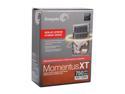
Seagate Momentus XT STBD750100 750GB 7200 RPM 32MB Cache 2.5" SATA 6.0Gb/s Solid State Hybrid Drive -Retail kit
Pros: SATA 6. 8 GB of Flash.
Cons: Seagate refers to this product as a "kit". I was expecting something in the box besides a warranty slip and some packing material. I was wrong (unless you count the inventory-control tags inside the box). Speaking of the box, it is printed in 4 colors and the technical specifications on the outside are printed in 4 languages. If you are the sort of person who values that sort of thing, then you should go for this version of the product. Otherwise, I'd recommend buying the bare drive.
Overall Review: Seagate does not supply this "kit" with a CD, mounting hardware, cables, or instructions. You get is nothing beyond the drive and a warranty slip (which, unlike this web site, claims to be a limited 5 year warranty) You can find the Seagate cloning software and a user manual on the Seagate site if you hunt around. No mention that these exist or where to find them in this "kit", either. I really don't see the advantage of buying this version over the bare drive. Next time I'll know better.
8/25/2012See more detail
Great HTPC
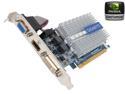
GIGABYTE HD Experience Series GeForce 210 1GB DDR3 PCI Express 2.0 Low Profile Ready Graphics Card GV-N210SL-1GI
Pros: I'd rate myself higher on Tech Knowlege, but I had no idea that PCI x16 had progress so fast in the short time I put together my HTPC. I needed a fanless video card with an HDMI port that would work with my PCI x16 V1 motherboard. This one is V2, but it's compatible. Works great with WMC. Nice plastic protectors on the card connectors.
Cons: No rebate that other reviewers seemed to have found. OTOH, rebate checks take forever to arrive, and frequently, they don't.
Overall Review: I'm glad I didn't have to change out my motherboard, which would have entailed a new processor, and probably new memory as well.
6/21/2012See more detail