
Your Browsing History


Dane P.
Joined on 11/01/04
0
0
product reviews
- 9
Great, solid product!
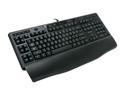
Logitech G110 LED Backlighting Gaming Keyboard
Pros: 12 programmable G-keys. Volume roller. Choice of any mixture of blue to red backlighting. The software is easy to use/configure. Onboard mic/earphone jack and USB 2.0 port. Solid feel, key presses feel good. Not too pricey.
Cons: Not really a con, but the backlight looks great in the dark but is a little dim under room lights (which could be expected).
Overall Review: I bought this for the office, and love it. It doesn't have the flashy G15/G510 look, so it blends in well on my desk. At a glance it looks like a regular keyboard which is what I want. For those who say the keys are smashed together: I measured 7 or more keyboards from left to right shift (mac and pc). Results: They all measured slightly larger than 11". Conclusion: The G110 also measures slightly larger than 11" from left to right shift.
8/23/2010See more detail
Worst PCIe WIFI card experience ever!
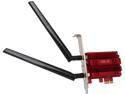
ASUS PCE-AC56 2x2 802.11ac WiFi AC1300 PCIe Adapter
Pros: Drivers are included with Windows 10. It looks really cool?
Cons: Broadcom? One-year warranty? Really, ASUS? It worked fine for about a year, then just started dropping and refusing to connect. I tried everything else first because I never thought the card was the issue. I replaced my modem, updated drivers (or tried anyway! Broadcom driver support is next to nil) tried Windows updates, spent hours pulling out hair and I should have been pulling out this card! I ended up just using a USB WIFI solution. What a bummer! The machine is running Windows 10 64bit.
9/11/2017See more detail
Great find!
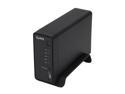
ZyXEL NSA310 Diskless System 1-Bay Media Server
Pros: Easy to setup, intuitive web interface with many options, Twonky media server, use any hard drive you want, fast transfer speeds, Gigabit Ethernet, small, quiet, inexpensive. I didn't even need to use the software, just the web interface.
Cons: I haven't found any cons.
Overall Review: I had a WD MyBook World 2TB that bit the dust. The WD web interface said that the 2TB HDD was having SMART errors. So I removed the drive and ran WD Data Life Guard and confirmed that the drive had issues. I wiped the drive and used a hack tutorial to install Debian and put it back together. It worked for about 3 months and stopped. This time the MyBook World controller board must have died because it wouldn't boot up anymore. That's when I found this awesome NAS enclosure. I threw the 2TB drive in and got it all set up. It has been running great for 2 months now. Zyxel's web interface says the drive is healthy, so it must not care about SMART errors. I really could care less if the drive fails, because I use it only as a backup for my desktop computer. I have GoodSync setup to backup my entire user folder and synchronize changes hourly. Now I can eek out all life left in the drive and delay purchasing a new drive while prices come down. It's the perfect setup. To sweeten the deal, the built-in Twonky media server finds all my media and using BubbleUPnP I can stream anything to my Android tablet and Galaxy S3. I've even taken it over to friend's and relative's homes to stream stuff there since it has a copy of everything.
12/26/2012See more detail
Best all-in-one solution!
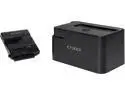
ICY DOCK 2.5 Inch & 3.5 Inch SATA/IDE USB 3.0 Hard Drive Adapter with Docking Station - EZ-Dock Lite MB981U3-1SA
Pros: It handles any type of drive, comes with all cables necessary, USB 3, has a power button with LED activity light, has a 3-YEAR WARRANTY! What's not to like? This thing is awesome!
Cons: I really haven't found any cons.
Overall Review: A customer brought me an 8-year-old Dell that needed reinstallation of the OS on a larger HDD. My test machine only has one IDE port, so connecting two IDE drives is a pain. After I got Windows on the larger drive I used the Icy Dock to connect the other drive and transfer data over. It transfered 55GB in less than an hour. Easy, simple, DONE! To all of those who left bad reviews because of a problem with the device, it has a 3-year warranty. Contact Icy Dock and give them a chance to work things out with you.
11/20/2012See more detail
Just what I was looking for!
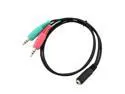
Smartphone Headset to PC Adapter - Use 3.5mm iPhone®/Smartphone Headset With PC. Converts 3.5mm Plug to Dual Mic/Audio 3.5mm (18 Inch) – Black
Pros: Works great! Lets you convert a smartphone headset into a headset that can be used on your PC for gaming, Skype, etc. It's not too long and not too short.
Cons: It can't double as shoelaces?
Overall Review: I use this with my Logitech G510 keyboard and my SONY MDR-EX38iP/BLK headset.
11/23/2011See more detail
"Claw Grip" friendly
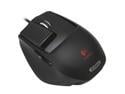
Logitech G9x Black Two modes scroll USB Wired Laser Gaming Mouse
Pros: I love this mouse! Oh-so-smooth gliding. Nice large Polytetrafluoroethylene feet. A braided cable. Well placed buttons. Onboard memory for profile storage. I like the customizable grips; the "wide-load" grip has a nice rest for your thumb. I really like the customizable LEDs because they indicate the current profile and DPI level. Weights are a nice touch.
Cons: Nothing that would take away an egg, but worth the mention. The button to switch scrolling modes is under the mouse, it makes sense to me to have it on top.
Overall Review: I tried the G500 first because I have big hands. I used it for a day and it just wasn't comfortable to me, so I returned it. This helped confirm that I lean to the "claw grip", so I tried the G9x. After minutes of use I could tell the G9x was right for me. I wish Logitech would put buttons on the right side too. I was a big fan of the five-button Microsoft Optical Intellimouse and for that matter Logitech's own MX310 mouse. I really got used to having a button on the right side.
8/23/2010See more detail