

Your Browsing History


Joseph B.
Joined on 08/17/07
0
0
product reviews
- 7
The perfect replacement keyboard
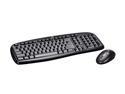
Logitech Cordless Desktop EX 100 Black 102 Normal Keys USB RF Wireless Standard Keyboard and Mouse
Pros: I have tried dozens of keyboards and mice, and found most of them cost more than they are worth, and none of them do anything remarkable. This one is the exception. It is so inexpensive that I thought it would be a throw away after a week or two. Not so! It is durable and very well put together, unlike many other poorly thought out designs. Logitech thoughtfully even included nice copper-top batteries for both devices (keyboard and mouse). I just replaced them (after three months of use) with some rechargeables I had laying around. I thought losing the wires from my old mouse and keyboard would be a trivial improvement. But this set has so substantially improved how I work with my computer, that now I have to get another set for my other box. I've had no dropped keystrokes, no loss of connection to the wireless hub. It has operated flawlessly, and I can't believe it is so inexpensive. And it is a pleasure to type on.
Cons: Inexpensive (not a con, just misleading). I would have preferred the wireless hub were integrated into a USB dongle. But I just stick the little receiver hub behind the monitor, or even under the desk and it's fine.
Overall Review: Keyboard takes 2 AA batteries, and the mouse 2 AAA's, both sets included.
4/10/2009See more detail
Warranty?
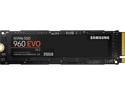
SAMSUNG 960 EVO M.2 250GB NVMe PCI-Express 3.0 x4 Internal Solid State Drive (SSD) MZ-V6E250BW
Pros: Fast. I use it as a boot drive in a new motherboard under Linux. And it's blazing fast.
Cons: - Not too expensive when I bought it, though it is already much cheaper everywhere else. But, oddly, it is even more expensive now from the seller where I bought it (3C Expert). - And if I need to make a warranty claim, there isn't a clear way to do that. Warranty service via the Samsung-US site seems easy to obtain, but the Samsung website says the serial number of my unit is not a US model and "if the model ever fails you would need to contact Samsung Korea directly or the point of purchase." I haven't found any method of obtaining warranty service via Samsung Korea or via 3C Expert. I hope I never need it. If I had known these warranty details when I bought it, I would have chosen a different product with a US serviceable warranty.
12/12/2017See more detail
Tiny, amazing
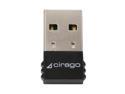
cirago BTA-6210 Micro Bluetooth Dongle support Bluetooth 2.1 USB 2.0
Pros: Tiny. I mean itsy-bitsy tiny. I think it is as big as it is just to give you something to grab onto when it is in the USB port. Range is excellent; can't test it scientifically, but the range is much better than my other (older and much larger) bluetooth dongle.
Cons: Easy to suck up when vacuuming?
Overall Review: Trivial I know, but its blue led matches everything else about my main system, an Antec case named bluebox. :)
1/5/2011See more detail
give away gigabytes
Seagate ST3640323AS 640GB 7200 RPM 32MB Cache SATA 3.0Gb/s 3.5" Internal Hard Drive Bare Drive
Pros: Inexpensive. Seems dependable, fast, no glitches. Installed easily in a Linux system (Ubuntu 8.04). It came with no paraphernalia--no box, no CD, no excessive packaging--none of which I wanted anyway.
Cons: It's not 2 terabytes. Too inexpensive. I wasn't even looking for a drive, and I bought this because it was so cheap. Now the house is cluttered with 'little' drives (all under 50 gigs--and I thought 2 GB was ginormous once upon a time!) that I have no more use for. They just seem too small to use, and I'm wishing I got a really beeg one instead, like 2 TB. I guess if getting a 640 GB drive for 69 bucks makes me want more, then that's not a con, at least not from NewEgg's perspective.
Overall Review: If your MoBo is parallel-ATA only (no neat little SATA connectors) then be sure to get an ATA to SATA adapter like Item#:N82E16812156010. If you're good to go with SATA already, then go with the impulse and get this one now, and think about which really beeg drive you'll get later.
4/28/2009See more detail
perfect
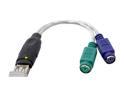
BYTECC BT-2000 USB (Male) to PS2 (Female) Adapter
Pros: Neat, simple solution. Inexpensive. Well made. Looks good. Worked perfectly the whole time I used it. Essential remedy for combining a ShuttlePC and a classic IBM clicky keyboard.
Cons: None other than it is not indestructible. When moving my PC, I caught the PS2 end of this adapter on the desk corner, pulling the USB end apart. If this part didn't break, the damage may have been to my PC's USB port/motherboard, and far more expensive.
4/21/2009See more detail
Just works
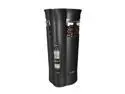
MR. COFFEE IDS77 Black Coffee Grinder
Pros: The thing just works. Simple as can be. Nice removable chamber. Small, but it is not intended for major grinding operations, just grinds enough beans for a pot or less.
Cons: I'm new to grinding beans, but I've settled on grinding only enough for one cup at a time, and it seems this grinder has no settings for less than 4 cups. I get around that by setting its grinding option to 'coarse'. This way, two scoops of beans grind out medium to medium-fine.
Overall Review: Clean it when you feel like it, not everytime like it suggests.
4/10/2009See more detail