

Your Browsing History


Dwight I.
Joined on 03/08/12
0
0
product reviews
- 11
Worked out of the box
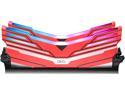
OLOy WarHawk RGB 32GB (2 x 16GB) 288-Pin Intel/AMD Ready DDR4 3200 (PC4 25600) Desktop Memory Model MD4U163216BCDA
Pros: This came up priced the same as 4 sticks of DDR4 3000 I was looking at. Faster for the same price and only two sticks. Worth it for me.
Cons: Each stick has outer casings that came loose while installing into the board. Was put it back in place with just some light pressure. Shouldn't be coming apart like that at first install I feel.
Overall Review: So far so good, only been running around 12 hours now. Not on the AMD list, but no issues when I OC'd it to 3200 on the MB. Worth the money I spent.
8/11/2019See more detail
Doesn't work in my setup.
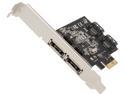
StarTech.com PEXESAT322I PCI-Express x1 Low Profile Ready SATA III (6.0Gb/s) 2 Int/2 Ext SATA Controller Card
Pros: Two ESATA ports with multiple capability.
Cons: System hangs at BIOS post screen when any SATA 3 device is powered on and connected to the card at boot time.
Overall Review: Read around the web, and found a couple of vague references with problems with this card, but no resolutions were posted. Downloaded most recent drivers, same issues. No firmware updates appear to be available. Configured to use internal SATA ports and connected a SATA to ESATA cable with the same results. I have a couple enclosures, two Vantech, and one StarTech, and the hard drive SATA drives consistently cause the system to hang at POST. I have a Vantech enclosure with a SATA 1 CD drive in it, and the system boots with no problem when it's connected and powered on. If I leave the SATA 3 devices powered off at boot up and then power them up everything works fine. Having to make sure everything is powered off before booting is inconvenient as the system is not physically in the room with me.
9/9/2019See more detail
No screws included?
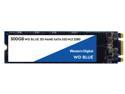
WD Blue 3D NAND 500GB Internal SSD - SATA III 6Gb/s M.2 2280 Solid State Drive - WDS500G2B0B
Pros: Worked brand new out of the box.
Cons: Shipped without screws to mount into place.
Overall Review: Don't know if the screw was overlooked or they actually don't include them with the drive. Fortunately I had a spare from another M2 SSD I bought recently.
12/8/2019See more detail
Excellent once set up. I like this board.
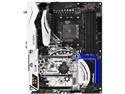
ASRock X370 Taichi AM4 AMD Promontory X370 ATX AMD Motherboard
Pros: Solid, well build, laid out well, power connectors and headers easy to reach and connect. It comes with 8 SATA connections available with onboard M2 SSD's connections. The WiFi is a nice to have, but in my case wasn't a major point for me.
Cons: Took me over 6 hours to get it to boot consistency (more on that later). Manual included is complete though a little hard to understand. Mother board doesn't clearly show some key information (RAM header order doesn't appear to be marked on the board, pin-out orientation isn't clearly marked on the board, but it is in the manual). The case that covers the back-plane is a touch too large to allow some cards to fit into the PCIE1 slot. The StarTech PEXESAT322i uses a slightly overlarge bolt to attach the mounting plate to the card, and won't fit into this slot. When I installed the card into the PCIE4 slot, the mounting plate doesn't quite match the slot for it in the case, but I can't say if this is because of the case, the card, or the motherboard. I'm reusing this case and did not have this issue before. The system hangs at the POST screen if I have anything plugged into the ESATA card. Not sure if this is an issue with the card or the motherboard.
Overall Review: I paired this with a Ryzen 7 8 core and 32GB OLOy 3200 memory. At first, it wouldn't post, and the debug LED didn't consistently show the same error code. After a lot of trouble shooting, I finally stripped the machine down to a single piece of memory, the video card, and nothing bootable (M2 removed, no USB in drive), and I was able to POST into the BIOS reliably each time. At this point, I found the BIOS to be a number of versions behind, so updated to the current version. After this the machine POSTed to the BIOS screen reliably. The BIOS flash utility is a snap, and was smart enough to figure which update had to be applied first (I needed 2 to get current). I used a thumbdrive, not their network utility. If you get this board, do as I did, install a single stick of memory, a video card, nothing even vaguely bootable in the USB's or M2 slots, and immediately flash the BIOS to current. Read their directions carefully at the site, some updates need to be done before others and in the correct order. If it hangs up, remove the CMOS jumper, wait a few minutes, and try again. Also, make sure you install the memory in the correct slots for correct performance. It's a little counter intuitive, but the manual explains it.
8/27/2019See more detail
They're In There
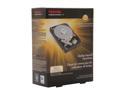
TOSHIBA PH3300U-1I72 3TB 7200 RPM 64MB Cache SATA 6.0Gb/s 3.5" Internal Hard Drive Retail Kit
Pros: Competitive price, good spec's, better rated than most of the other 3 TB drives.
Cons: See other thoughts.
Overall Review: Drives are too new to really say anything about them one way or the other. Bought them for a simple raid mirror. My SSD crashed and then was unbootable after installation (this happened twice). Replaced the SSD, and didn't have anymore issues.
5/19/2015See more detail
Exactly what I expected
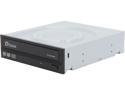
PLEXTOR Duplication Grade DVD/CD SATA Burner Drive PX-891SAW - OEM
Pros: Reasonably priced, solid performance for digital audio extraction (aka ripping).
Cons: None
Overall Review: Plextors have been the finest drives I've owned over the years. I purchased this one to augment my selection of optical drives, and it consistently matches the check-sums provided by the accuraterip database.
2/10/2014See more detail