
Your Browsing History


Luke H.
Joined on 12/12/09
0
0
product reviews
- 5
Great Value
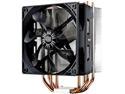
Cooler Master Hyper 212 Evo CPU Cooler, 4 CDC Heatpipes, 120mm PWM Fan, Aluminum Fins for AMD Ryzen/Intel LGA1200/1151
Pros: Cools it off.
Cons: None of which I can think.
Overall Review: I have an i7-870 and I used my stock Intel cooler for 2.5 years. My idle temps hovered around 41°C, gaming load around 65°C, and full load... well, I never actually got there because I got nervous around 85°C and shut it down. After the EVO, my idle is 30°C, gaming load at 45°C, and full load (Prime 95) hovers at 50-51°C constant. No overclock. I added a second CM fan, which only helped about 2°, so you can decide if you need that. Highly recommended at the price point.
4/12/2013See more detail
Good, not perfect
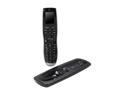
Logitech Recertified Harmony 900 Universal RF Remote Control
Pros: Reduces the remotes on my coffee table Ergonomic Build quality seems high
Cons: Dead AC adapter Cumbersome "soft" keys VERY outdated software
Overall Review: After reading the negative reviews on this "refurb" unit, I almost didn't buy it, but the price was good and I very much wanted to scale down the six remotes on my coffee table. I thought it would be appropriate for me to post that contrary to several of the reviews, my experience was mostly a positive one. Several of the reviews have said that instead of “refurb” this should be called “used”. I did not find that to be the case. My unit showed up in the original box, with all the included equipment, and most of it was wrapped in plastic. The remote and charging cradle both looked brand new, and there was even an extra, new battery thrown in for good measure. The only thing not wrapped in plastic was one of the AC adapters. More on that later. I like to fully charge before I start to play with new electronics, so I unpacked the remote, cradle, “old” battery, and AC adapter, assembled, and plugged in. Nothing happened. I wiggle the connections and re-insert the battery. Nothing. I try the new battery. Nothing. I notice that there seems to be a light on the cradle that isn’t lit and wonder if I have a bad cradle. I didn’t want to crack open the cradle so I swap the AC adapter (meant for the RF receiver) and Voilà! The light comes on and the remote starts to charge. I try the first adapter on the RF receiver and get nothing. Dead AC adapter. -1 The remote itself is pretty intuitive, but the software isn’t… at all. Actually, Logitech should hire someone to make some software that doesn’t suck. You have the ability to change the soft key order and content, but it’s a long process. When I try to change the hard keys, it never takes. -1 This is my first Harmony remote, so the “sequences” that everyone is griping about, I don’t have experience with. However, I will say that the “activities” buttons only work most of the time. Kind of annoying. I can switch over to “Devices” and make the changes, but I don’t think that’s supposed to be the point. Overall, it controls my devices pretty well, and the device database does indeed contain the commands for even the more obscure buttons. However, it’s not perfect and will likely take a considerable setup time if you’re anywhere as particular as I am.
5/28/2013See more detail
Solid
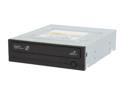
SAMSUNG 22X Half-Height DVD Writer 22X DVD+R 8X DVD+RW 16X DVD+R DL 22X DVD-R 6X DVD-RW 16X DVD-ROM 48X CD-R 32X CD-RW 48X CD-ROM Black SATA Model SH-S223L LightScribe Support
Pros: Inexpensive Fast Reliable
Cons: Loud. Sounds like a hairdryer when at max speed.
Overall Review: I've had this drive for 2.5 years and haven't had a single functional problem. However, since the product is discontinued, I'm not really sure why i'm writing this review. Oh, well.
3/21/2013See more detail
Works, but noisy
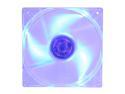
Antec 761345-75024-0 Blue LED 3-Speed Case Cooling Fan
Pros: Moves air Adjustable speed
Cons: Noisy Bright!
Overall Review: I ordered this fan for the side of my Antec 300 case (which came with four adjustable Antec fans) and I wanted to match what I already had. It is installed facing inward, blowing on my video cards. The first thing that I noticed was that this sucker is BRIGHT! I'm glad my side fan faces my desk, because if it was shining on me it would make me crazy. The next thing I noticed is that it makes noticeably more noise than the other fans. Maybe it's a fluke. I run all fans on low and you can hear this one over the other four. However, it's not as impressively loud as my stock Intel fan. Anyway, it does the job. Both my CPU and GPU's operate about 2° cooler. A bid deal? nah. But a little more airflow never hurts.
3/1/2013See more detail
Outstanding card for the price
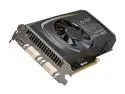
EVGA GeForce GTX 460 (Fermi) 1GB GDDR5 PCI Express 2.0 x16 SLI Support Graphics Card 01G-P3-1370-RX
Pros: Speed for the dollar Ease of use (SLI setup was a breeze) Runs cooler than my other GTX 460
Cons: Not stable on a couple of my games Fan noise (minor)
Overall Review: When I built my rig a couple of years ago, I did so with anticipation of running SLI "at some point" (motherboard and power supply). I bought this card to do just that, and it runs like a champ. It’s a slightly different build version than my other EVGA 460, and has a different fan setup, but otherwise is the same. (RAM, clock speed, and bit interface). Installation was a breeze and was automatically detected by both Windows 7 64bit and the nVidia driver. My 3DMark "graphics" score increased by 92%, and every game that I own with a benchmark feature is completely pegged at max. Truth told, two GTX 460's is probably more than I even need, but they look and run fantastically. I run EVGA Precision just to watch how the cards perform and this one runs about 8°C cooler than my older one. Not sure why. My only negative comments are that a couple of my games aren’t stable with the 460’s. Half-life 2: Episode 2 will crash, and Batman: Arkham Asylum will freeze but release. FarCry 3 and Mass Effect 3 run well and look great. I’ve also noticed more heat coming from my exhaust fans… not really a negative, just something that needs to be addressed. A final thing is that I’ve noticed additional fan noise. Some people get all up in arms about fan noise, but I’m not one of them. It is noticeable, though. In conclusion, I think that the GTX 460 is still one of the best values on the market right now, and when run in SLI will handle just about anything you can throw at it.
2/7/2013See more detail