
Your Browsing History


David C.
Joined on 02/11/10
0
0
product reviews
- 26
Effortless raid zero install

SYBA SY-PEX40013 PCI Express SATA RAID Controller Card
Pros: Affordable raid controller for a beginner (me). No difficulty with drivers. Has its own BIOS for setting up the array. I used two new, never-been-touched WD 320s and a Tom's Hardware article entitled "Switching Storage Controllers w/o Reinstalling Windows." Flawless, smooth experience - and I'm a novice.
Cons: The included instructions are spartan in the extreme. You must do your own homework first (see the above mentioned article) in order to have a good outcome. I was fastidious because I had the dicey ambition of moving my OS to the raid once the array was set up, and I didn't want to reinstall anything, least of all Windows XP. I also wanted to avoid driver hassles involving floppy drives or slipstreaming. In short, I got my wish.
Overall Review: A few simple rules are crucial. Install the card but please do not connect your hard drives. Start up, follow the "Found New Hardware" wizard. Then find "Device Manager" and verify the introduction of a raid controller called "JMicron JMB 36X". You're good now. Shut down, connect HDDs, power up, and follow directions to enter raid bios (cntrl-J). Format drives, setup array, Bob's your uncle. With my OS and all my applications residing on the raid, there is a noticeable speed increase. For fault tolerance, I have Acronis True Image make a sector-by-sector back up of my new c: drive twice per week onto a separate, third drive (safety first).
5/25/2010See more detail
Fast, no doubt, but beware the stutter.
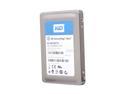
Western Digital SiliconEdge Blue 2.5" 64GB SATA II MLC Internal Solid State Drive (SSD) SSC-D0064SC-2100
Pros: I bought one for my Windows 7 OS. Yes, this was really quite speedy, huge improvement. Noticeable difference in opening and closing apps, opening and closing windows, and web surfing.
Cons: Frequently, as many as four or five times per hour, the pointer freezes and my music blurs. I didn't realize the SSD was at fault (on balance, it's my fault for putting the OS on there) until I found people discussing the stutter (I call them seizures) all over the internet. This is very disappointing but apparently inherent to the technology at this point in its development.
Overall Review: I bought a second drive with two thoughts. I could RAID 0 them and see whether this would space the seizures apart, or make them more frequent or perhaps shorer or longer in duration. I could also simply try putting the OS on the new SSD and see if it's stutter free. Like a typical greedy gearhead I RAIDed them. You can't say fast here. The thing is just plain mean. I have 16 thousand songs in my iTunes music library - iTune launches in less than three seconds. Word is simply instant, like Chrome. While surfing, you only ever wait for the other party's server. So, if you can live with the stutter, go for it. I'm going to live with it for a while and see if I can overlook it. Sad to say, I'm afraid this would be a total deal breaker for gaming. Ah well, life on the technology cusp.
9/1/2010See more detail
Temperature Spikes Solved
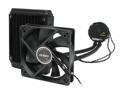
Antec Kuhler H2O 620 Liquid Cooling System
Pros: My cpu temperature is now 41-43c at idle and 48c max under load. No variations from these two states.
Cons: Installation required some labor because my board is not accessible from behind while in the case. While the directions are not the best, here's a big hint: bolts and other small hard parts come in two baggies. Parts with interralated purposes come in the same baggy so don't just cut them open and empty them out. Look at the contents first and see if a couple answers present themselves. If you lack patience at crucial moments, try reading the instructions from the Antec website while your kit is still on its way to you in the mail. You'll have them memorized by the time it arrives and several wrong ideas will have sorted themselves out.
Overall Review: If my original intel fan had been able to keep temps between 40c and 65c I probably would have been content to do nothing. But, my e8400's max temp is 72c and routine backup tasks were pegging the temperature at 78 degrees, often causing the machine to spontaneously shut off. So I'm happy now, though I took one egg because so many people reported miracle temps in the 20s and 30s and I had hoped for that too. I'm only using the one supplied fan in the exhaust direction (pull). Maybe temps would drop with a second, pushing fan.
2/16/2012See more detail
WD 300GB VelociRaptor
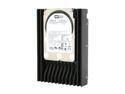
Western Digital 3.5" VelociRaptor 300GB 10000rpm SATA HDD 3Gbs 16MB Cache 7 pin Internal Hard Drive for PC, WD3000GLFS
Pros: I'm developing a habit of using these as OS drives when tuning up my friends' computers. The difference in everyday quality of life is often astonishing; navigating through Windows and surfing the internet are pleasingly fast. I take the client's original c: drive and turn it into a file server for movies, music, and files. The Raptor drives cannot be beat for performance and longevity; you won't regret owning one for three fifths the price of an SSD.
Cons: It's only a few bucks less than a 60-64GB solid state drive, but sometimes that's what the customer wants to pay.
Overall Review: In retrospect, for OS use only, I could have saved this customer $30-40 by using a 74GB VelociRaptor and instructing them to avoid saving or downloading anything to the Raptor. I'll do this in the future.
5/18/2011See more detail
G.Skill 1GB Memory Sticks
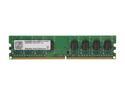
G.SKILL 1GB DDR2 800 (PC2 6400) Desktop Memory Model F2-6400CL5S-1GBNT
Pros: Great G.Skill quality; delivers as advertised. I bought four of these to max out a Dell Inspiron 530. All four recognized immediately on start up.
Cons: None
Overall Review: Plug and play.
5/18/2011See more detail
Arc Touch Mouse

Microsoft Arc Touch Mouse RVF-00001 Black 2 Buttons Touch Scroll USB RF Wireless BlueTrack Mouse
Pros: This is a neat evolution of the original Arc mouse. Tracking is spot on. Scrolling produces a cool tactile snicking beneath your finger. The rubber half of the mouse has a pleasing velvety feel. Folds completely flat and goes easily in a breast or jacket pocket.
Cons: Scrolling takes some getting used to; by feel, the touch sensitive strip blends in with the left and right buttons so, sometimes, you have to break your focus to properly locate the strip. Left and right button travel is less than the original Arc mouse. Attaching the transmitter to the mouse magnetically (for travel) makes me nervous that I might lose the transmitter and render the mouse useless.
5/18/2011See more detail
seller reviews
- 6
Very handsome set of cufflinks
These links are very good looking. The construction of the moving parts are not highend, but they work fine and I don't think they will rust.
On-time
Delivery
Product
Accuracy
Customer Service
Satisfactory
8/11/2018See more detail
Nice inexpensive cufflinks
These are not fancy or expensive but, if you're new to wearing cufflinks, they make a great pair of starter links. One order is for two pair.
On-time
Delivery
Product
Accuracy
Customer Service
Satisfactory
8/1/2018See more detail
Even better than the advertisement photo
This is a good quality item from a good seller. I can't believe these cuff links were $3.99! After examining them I'm sure that I would have paid $15-$20. They have a satisfying weight and they're beautiful.
On-time
Delivery
Product
Accuracy
Customer Service
Satisfactory
7/27/2018See more detail