


Your Browsing History


M. G.
Joined on 05/23/07
0
0
product reviews
- 10
Turned my older MBP into a speed demon!!!
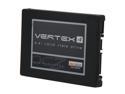
OCZ Vertex 4 2.5" 256GB SATA III MLC Internal Solid State Drive (SSD) VTX4-25SAT3-256G
Pros: The Vertex 4 SSD made my 2007 3,1 C2D MacBook Pro (OS 10.6.8) a new notebook all over again! My boot ups went from 1 minute 27 seconds with the 320GB WD platter drive to a blazing 12 seconds with the SSD! Opening applications happen as soon as I double click an icon. No more long waiting for app execution and spinning pinwheels for me! Also, shutting down my MBP is now instantaneous... well ok... 2 seconds but it's better than 48 seconds with a platter HD. lol I researched for months and visited just about every SSD and Mac forum/blogs to find a reliable SSD but there hardly any info out there for the older Mac notebooks. I found a bunch nay sayers and as well as praisers about the OCZ brand. I for one will be a long time consumer of OCZ products from my first and best experience. At first I was hesitant about installing an SSD with SATA III 6Gbit/s speed in a SATA 1.5GBit/s connection to the motherboard (Logic board) but all is still working great and faster than the older WD 5400RPM HD.
Cons: Updating the firmware. Not so much a con, but make sure you update the firmware (1.5) for the Vertex 4 SSD before you start to format the drive. There is excellent step-by-step info on the OCZ forum about doing this.
Overall Review: If you are going to add your first SSD to your Mac, follow these steps by Googling for the correct procedures in Terminal: - turn off time machine snap shots - turn off hibernation - turn off the sudden motion sensor - turn off hard drive sleep - deletedsleepimage file (I freed up 6GB) - secure delete everything in the Trash (I've always done this even with the platter HD) I'm still on the fence about enabling TRIM for the SSD. On other forums/blogs, some people say to do it and others say not to do it. I tried with and without TRIM and haven't really noticed any differences. There are donationware apps on the web to help you to enable TRIM on your Mac.
10/4/2012See more detail
Perfect for 2007 3,1 MBP!
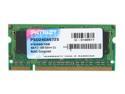
Patriot 4GB 200-Pin DDR2 SO-DIMM DDR2 667 (PC2 5300) Laptop Memory Model PSD24G6672S
Pros: My MacBook Pro is now maxed out at 6GB with this 4GB RAM stick. It was easy to install. I was going to purchase the "Patriot Signature 4GB 200-Pin DDR2 SO-DIMM DDR2 800 (PC2 6400) Laptop Memory Model PSD24G8002S" but didn't know if this PC2 6400 RAM would be any better than the older suggested PC2 5300 RAM. I went ahead and bought the suggested PC2 5300 RAM and all is good. I don't really notice much of difference other than less pinwheels when working on Logic 9 projects.
Cons: None at all.
Overall Review: Prices are coming down on RAM but this was the cheapest I could find on the net for an older Mac.
10/4/2012See more detail
Still going strong after 5 yrs!
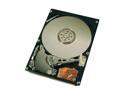
Hitachi GST Travelstar 7K100 HTS721080G9AT00 (0A25023) 80GB 7200 RPM 8MB Cache IDE Ultra ATA100 / ATA-6 2.5" Notebook Hard Drive Bare Drive
Pros: I bought 2 of these back in '07 for $80 a piece. I used one HD for my Older VAIO PCG-V505DC2 laptop and the other I modded and threw into my Roland MV-8000 sampler. Big difference from using 4200 RPM drives. Both HD's still work to this day (touch wood)! Low Noise, low heat and fast due to 7200 RPM speeds.
Cons: None. No problems at all with Hitachi.
Overall Review: I should have gotten the 160GB HD's when I had the chance but these are great even after 5 yeasr of use.
9/9/2012See more detail
Works well
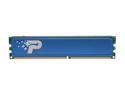
Patriot Signature 1GB DDR 333 (PC 2700) Desktop Memory Model PSD1G333H
Pros: Worked well with older MSI Motherboard. Cheap price for 1 GB sticks.
Cons: None. No issues.
9/9/2012See more detail
3 yrs later and still works for DJing!
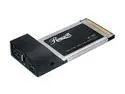
Rosewill RC-603 USB / IEEE 1394 PCMCIA Card 2 x USB 2.0 2 x IEEE 1394
Pros: This card was originally used on my Sony VAIO laptop with Windows Vista for connection to an external Firewire 400 harddrive with all my music. While DJing with Traktor Pro 2 software, it was a valuable asset due to the extremely fast read and write times while not bogging down the laptop's processor.
Cons: No power adapter came with it.
Overall Review: I have no use for it anymore since purchasing a Mac for DJing. It still continues to work well when other computer peripherals when connnected to the USB and Firewire ports.
9/9/2012See more detail
3 yrs later and it still works!
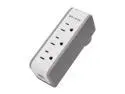
BELKIN BZ103050V-TVL 5 Outlets 918 Joules Mini Surge Protector with USB Charger
Pros: I use this mainly when I go on business trips as extra security for my aging 2007 MacBook Pro. It keeps it protected.
Cons: None. Works great!
9/9/2012See more detail