

Your Browsing History


Greg T.
Joined on 01/10/05
0
0
product reviews
- 8
A nice addition for PS3 owners
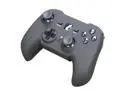
NYKO Raven Wireless PS3 Controller (offset sticks)
Pros: * Offset sticks * Feels good in my hands (right weight, curvature, material) * Sixaxis (for games that still require it) * Smaller than normal face buttons make combos a bit easier * Triggers feel more comfortable and are easier to use
Cons: * A few dead zones, though very few and very minor * Indented stick faces take a bit of getting used to
Overall Review: This is my third third-party controller, as I'm just not a fan of the regular DualShock 3 because I have difficulty using it. I've used many alternatives and this is by far my favorite, despite a bit of a learning curve regarding smaller buttons. In the end, this is a much better option than the standard PS3 controller, in my own opinion. I've tested this on nearly every type of game except pure FPS (I'm a PC guy when it comes to those), and I think the Raven responds very well. FPS sniping sections in games like Uncharted 2 played fine even with the smallest stick movement. First controller would brick every 3-15 minutes of use, but Newegg quickly replaced with a working unit.
2/27/2011See more detail
Absolute garbage
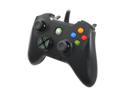
Razer Onza Tournament Edition Professional Gaming Controller
Pros: The Onza TE worked great out of the box with its plug-and-play drivers. The design and rubberized texture feels comfortable in my hands and the buttons and sticks are super responsive.
Cons: After less than a year of ownership and not a ton of use, my Razer Onza Tournament Edition seems to have broken. For nearly a month now the controller will either turn its lights off and just stop responding mid-game; shrink the game to the desktop whenever a button is pushed; or fail to be recognized by Windows 7 (64-bit) as soon as it's plugged in (shows up as USB Device Not Recognized error after the driver fails). Installing the Microsoft Xbox controller driver as Razer's website recommends doesn't fix these problems. Trying to manually select a driver from the Device Manger as Razer's website recommends also doesn't fix the issue. The Onza either shows up in Device Manager as a generic Microsoft Xbox controller that says its security certificate is no longer valid, or as a Generic USB Device that also has an invalid certificate. After telling Device Manager to ignore the certificate and manually choose a driver as Razer's website recommends, there is no Xbox controller driver listed to select, again as Razer's tech support states. The short: Nothing can get the controller working again once it dies. Although the above paragraph was about drivers, which could seem like it's just Windows' fault, I've plugged the Onza into three different computers running Windows 7 (64-bit) and had the exact same problems as listed above. It seems like something within the controller has broken or expired.
Overall Review: I paid $60 for this on July. 17, 2012. When it's not being used it's kept in a canvas box. It's never been dropped or thrown. My playtimes usually last 2-3 hours. The first few months I had the Razer Onza Tournament Edition I recommended it to all my gamer friends. Now I would not since it seems like lasting quality was not on Razer's mind. It's my first Razer product and probably my last (so long Razer DeathAdder dreams). The price, coupled with the short life span and lack of meaningful FAQ, troubleshooting and phone/email/contact options on Razer's website is really insulting.
2/13/2013See more detail
Nice find
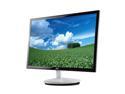
AOC e2343F Black & White 23" 5ms LED BackLight LCD Monitor Slim Design 250 cd/m2 50,000,000:1
Pros: * Beautiful design * Very thin, which makes it nice for those who move a lot or need desk space * Pretty good color calibration right out of the box * Matte screen rather than glossy
Cons: * For some reason, on random occasions, the monitor won't allow my computer to boot (running Windows 7 x64). Screen and CPU just sit on the BIOS screen and never goes further, requiring a hard reboot. Never had this problem before connecting this monitor. * Viewing the monitor at any angle rather than straight on blows out the colors and makes the monitor hard to see. Odd considering the Dell monitor of 7 years that the AOC replaced wasn't this bad. * 16:9 aspect leaves something to be desired, having come from (and using at work) a 16:10 monitor.
Overall Review: As noted in another review, the install disk's autorun doesn't work. The links to the program installs are broken. All the programs can be installed by exploring the disk, though. These programs, except for the one which emulates the touch base buttons, are worthless, so might be for the best. Monitor can't push beyond 1920x1080. Not really a ding on the monitor but more to manufacturers in general. Before this 'HD for the layman' movement, a 23" monitor like this could have easily pushed past this resolution. Overall I have minor niggles with this monitor. It's replacing a 7 year old monitor which Win7 didn't support (couldn't adjust brightness or contrast). I don't see myself keeping it for more than 3 years, but I recommend it to anybody thinking of getting a new monitor, especially if you find it for ~$150.
2/27/2011See more detail
Great idea!
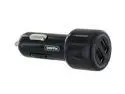
Griffin PowerJolt Dual Universal 7266-PJLTUN2B
Pros: Allows for two USB cords to be plugged in and charging at the same time.
Cons: None.
Overall Review: Great idea that I can't believe wasn't thought of earlier. Between an iPod and TomTom both needing to be charged for long car trips, I use this thing like crazy. Well worth the investment.
2/22/2010See more detail
Excellent design, just to be sure to use external speakers
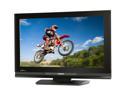
Toshiba 32" 1080p 60Hz LCD HDTV
Pros: Extremely sharp picture! The TV looks so good out of the box that it really doesn't need calibrating. Also, three HDMI ports are very generous in a set this size. The remote is well laid out and can be used as a universal. The navigation menu layout is simple, yet logical. You won't find yourself referring to the manual during setup. All of the plug-ins are located in the back and are easy to access. When shopping for TVs, I found that too many had the plug-ins at the bottom of the set, angled, under a panel or something else inconvenient. The additional video and audio in jacks on the side are a nice touch.
Cons: Speakers are really awful as other reviewers have mentioned. It's just surprising at how bad they are though. Any sounds other than mids make the speakers sound like sound like they're blown. Adjusting the bass levels in the menu don't help much. Though the piano black finish looks great, it's a fingerprint magnet. Thankfully Toshiba included a cloth for that.
Overall Review: There are a few quirks, like to fully mute the TV, the mute button needs to be pushed twice, since the first push takes it to half volume. While the PC monitor connection is nice, it's not an HD connection, which just seems odd since it's a full 1080p set. There's no headphone jack. The Toshiba logo lights up when the set's on, but can be easily disabled from the menu. An HDMI port in the side would have been nice to quickly connect a laptop. With Newegg finally lowering the price again, this TV is a steal. Just remember to hook it up to a receiver or an external pair of speakers though.
2/22/2010See more detail
No flash, all substance
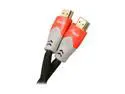
Rosewill - A/V High Speed HDMI Cable - 10 FEET
Pros: Gold tipped. Nice chain male like protection around the body. Inexpensive.
Cons: None.
Overall Review: No frills packaging, as it comes in a plastic bag rather than a hardshell plastic case like more expensive brands. Makes me think I'm paying for the packaging rather than the product with competitors.
2/22/2010See more detail