here!
here!
I’m your shopping assistant for PC builds, upgrades, and everything tech.
Got questions? Ask away!
Start a conversation
here!
I’m your shopping assistant for PC builds, upgrades, and everything tech.
Got questions? Ask away!
Start a conversation















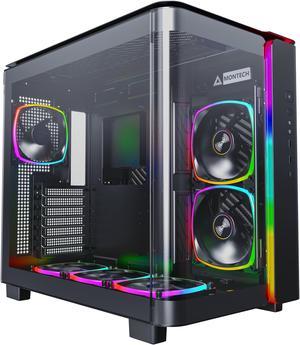
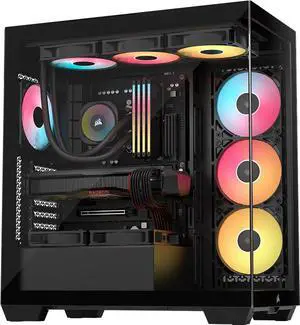
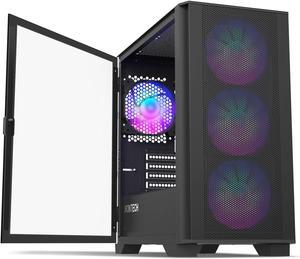
Step into the future with Montech's KING Series – the epitome of premium materials and cutting-edge design. KING is the result of our relentless pursuit of quality and innovation, seamlessly blending top-tier materials with distinctive aesthetics. Whether you're a trend-setting gamer or a visionary creator striving for excellence, KING Series is designed to meet and exceed your every tech component desire.
+ $5 off w/ promo code BKMZV, limited offer
Explore a wide selection of computer and gaming PC cases designed for building, upgrading, or housing your desktop or server setup. Find the right case to fit your needs with options for airflow, size, and style all in one place.
Among all features, airflow is the cornerstone of a healthy, stable computer build. Effective ventilation prevents overheating, prolongs component life, and allows for higher performance under load. Look for cases with mesh front panels or multiple fan mount points, including options for top and rear exhausts. Positive pressure airflow setups—where intake fans slightly outnumber exhaust—help minimize internal dust buildup. Additionally, consider cases designed around advanced cooling architecture such as larger fan support or radiator mounts for liquid cooling solutions. Investing in a case with superior airflow characteristics will save you trouble later when your GPU or CPU starts hitting thermal limits during gaming or production tasks.
For professionals pushing multiple GPUs, storage drives, or specialized expansion cards, workstation cases make all the difference. These chassis prioritize extended compatibility and robust cooling solutions to maintain performance over prolonged workloads. Check out the Workstation Case category to discover designs tailored for these demanding configurations. Many include modular interiors, sound dampening, and enhanced power supply support. Combining these cases with high-quality Case Accessories further improves maintenance and adaptability for professional environments.
Newegg shopping tip: When picking a computer case, check the size compatibility with your motherboard and ensure there’s enough room for your graphics card and cooling system. Also, think about airflow and front-panel connectivity to suit your daily use and build needs.
Show off your build with edge-to-edge tempered glass panels, designed to highlight your components while providing sturdy, scratch-resistant protection.
Get everything you need in one box—case, fans, and sometimes even power supplies—perfect for streamlined assembly or upgrading your setup effortlessly.
Light up your rig with RGB fan cases featuring addressable LEDs and customizable lighting zones to create truly unique color effects.
Stepping into the world of PC building or upgrading can feel overwhelming, but your choice of computer case doesn't have to be. Start by considering the size of your motherboard—ATX, Micro-ATX, or Mini-ITX—as this determines the case size you’ll need. If you're keen to showcase your build or enjoy a stylish setup, check out Tempered Glass Cases. They blend aesthetics with functionality, letting your components shine while staying protected. Also, consider cases that come with pre-installed fans to simplify your cooling solutions and assembly.
Gaming PC builders look for cases that combine superior airflow, ample space for graphics cards, and room for multiple cooling options. Many gaming cases are optimized to manage heat effectively, keeping your FPS locked in by maintaining cooler components. If you want to add flair to your rig, RGB Fan Cases allow you to customize lighting zones and make your setup uniquely yours. For proven builds that optimize airflow and ease assembly, Find out more about Montech KING Series Cases offers a great combination of cooling efficiency and modular design, perfect for demanding gaming setups.
For content creators, engineers, or professionals managing heavy workloads, workstation cases provide the space and compatibility needed for multi-GPU configurations and advanced cooling systems. Designed to handle extended hardware setups, these cases often include enhanced cable management options and extra drive bays to support large storage arrays. If your productivity depends on system stability and expansion options, explore the Workstation Case selection tailored to demanding professional environments.
Research more: Choosing the right computer case depends on your needs for airflow, size, and compatibility with your components. Check out Newegg Insider buying guides for detailed advice on picking cases that fit everything from compact builds to high-performance gaming rigs.
Last Updated: October 2026 | Newegg Computer Case Buying Guide
Mid-tower cases are more compact and budget-friendly, fitting most standard gaming builds. Full-tower cases offer extra space for advanced cooling and multiple GPUs but are bulkier and usually cost more.
Both brands make solid cases, but Corsair tends to focus on extensive cooling options and RGB lighting, while NZXT emphasizes sleek design and ease of build. It mostly comes down to your style preference and what features you prioritize.
Computer cases usually come in full tower, mid tower, and mini tower sizes. You should check your motherboard’s form factor, like ATX or Micro-ATX, and pick a case that supports it to ensure proper fit and ventilation.
Tempered glass panels mainly enhance the aesthetic by showing off your build, but they don’t affect cooling much compared to mesh panels. If airflow is a priority, cases with breathable side panels might be a better choice.
Start by checking the motherboard size (ATX, Micro-ATX, Mini-ITX) you plan to use and make sure the case supports it. Also, consider clearance for your GPU and CPU cooler to avoid any fitting issues.
You can usually add fans later, but buying a case with good airflow and included fans will save you hassle and reduce overheating risks from the start. It’s often worth spending a bit more upfront for proper ventilation.
Look for cases made with sturdy materials like steel or aluminum and check user reviews specifically mentioning durability. Avoid models with a lot of plastic panels, as those tend to crack or warp over time.
Pay attention to complaints about poor airflow, difficult cable management, or panels that don’t fit well. These issues can make building or cooling your PC frustrating and might mean the case wasn’t designed with practical use in mind.
Check the case’s specifications for supported motherboard sizes, GPU length, and CPU cooler height, then compare those with your parts’ dimensions to ensure compatibility.
Use regular compressed air to blow out dust from vents and fans, and consider installing dust filters if your case doesn’t have them to help minimize buildup.
“ This PC case is an awesome buy, even full priced valid BUT especially on sale my goodness buy it. ”
Antec Performance Series P20C, Massive Metal Mesh Front Panel, 3 x 120mm PWM Fans, Type-C 3.2 Gen2 Ready, 2 x 360 mm Radiator Simultaneously, GPU Bracket, Mid-Tower E-ATX PC Case“ this pc case has a lot of space with the psu also having a lot of space for cable management and it also is really cheap and comes with 4 fans. ”
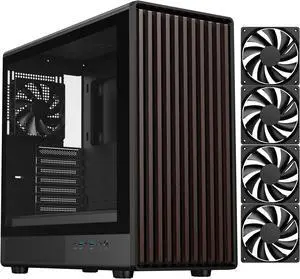
Phanteks XT Pro Ultra, Mid-Tower Gaming Chassis, 4x M25-140 Fans Included, High Airflow Performance Mesh, Tempered Glass Window, USB-C 3.2 Gen2, Black“ Name me a better looking PC case. ”
DIYPC ARGB-N3-W White USB3.0/ Type C Tempered Glass E-ATX /ATX Dual Chamber Gaming Computer Case w/ 3 x Tempered Glass Panel and 4 x ARGB PWM Fans (Pre-Installed).“ Great budget PC case that offers a lot of features found in more expensive cases. ”
Montech AIR 100 ARGB MICRO-ATX Tower with Four ARGB Fans Pre Installed, Ultra-Minimalist Design, Fine Mesh Front Panel, High Airflow, Unique Side Swivel Tempered Glass, Dust Protection, Black“ It's all here, pretty good PC case, only flaw is how bulky it is ”
Phanteks NV5 MK2, Showcase Mid-Tower Chassis, Rear-Connect MB Support, Integrated D/A-RGB Lighting, Seamless Tempered Glass Design, 8x Fan Positions, Black“ The aesthetic PC case you could find ”
LIAN LI O11 Vision Black Aluminum / Steel / Tempered Glass ATX Mid Tower Computer Case ----- O11VX“ Overall, the SAMA SV02 ATX Computer Gaming PC Case Mid Tower is a fantastic choice for gamers looking for a stylish and functional case with excellent cooling capabilities and cable management features. ”
SAMA SV02 ATX Computer Gaming PC Case Mid Tower Black with 3 ARGB Fans Pre-Installed, Tempered Glass Transparent Side Panel,BTF Back Plug Motherboard Design“ This is one of the best PC cases you can buy. ”
Phanteks XT Pro, Mid-Tower Gaming Chassis, High Airflow Performance Mesh, Tempered Glass Window, 1x M25-120 Black fan included, Black