
Your Browsing History



Any questions? Our AI beta will help you find out quickly.
Designed for departments and small businesses, the BarTender® Professional Edition offers the same easy interface as the Basic Edition while enabling RFID encoding and more sophisticated label and card designs that leverage content from databases, spreadsheets and other files.
BarTender® 2016 is one of the most significant releases in the product's history, delivering new and improved capabilities that enhance your design and printing experience and make it easier than ever to manage and administer your operations. Here are just a few of the important features in BarTender 2016.
BarTender® Professional includes even more label and card design capabilities, and adds access to external data and support for RFID tags and labels.

BarTender Professional offers all the design features of the Basic Edition:
And BarTender Professional includes even more powerful design tools:

The new BarTender Integration Builder replaces the Commander companion application, enabling you to seamlessly integrate BarTender's printing capabilities with virtually any enterprise business operation:
(All Integration Builder features are available in the Enterprise Automation Edition. Integration Builder is also available in the Automation Edition without TCP, web services, XML/XSL transforms, and SAP/Oracle integration.)

The VB Script Editor is a dynamic tool that makes it possible for users to script data sources. Easily navigate between different scripts in your document, access supported code snippets to help you when writing custom code, and access application-specific VB Script objects, properties.
All editions of BarTender 2016 are now available as 64-bit and 32-bit applications.

BarTender 2016 brings significant and powerful improvements to the creation and use of data entry forms. Now you can include data entry prompts, query prompts and record selectors on the same form, allowing a user to enter information, query the database and filter database records from the same location. Design multiple forms for a single template, place multiple prompts on the same form, use multiple forms in the same document, and leverage new data entry controls. In addition, new Record Picker controls allow you to display and choose which records to print directly from your form.
(Data entry forms are available in all editions. Database connectivity is available in the Professional Edition and higher.)
BarTender 2016 greatly expands its support for RFID encoding, including added support for EPC URI syntax and the ability to specify RFID security settings per document.
(Available in the Professional Edition and higher.)
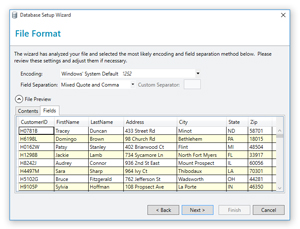
Minimize print-time data entry by letting BarTender pull data from Excel files, text files and a wide variety of databases.

BarTender Print Portal, formerly Web Print Server, provides a browserbased interface for selecting and printing BarTender documents. Print Portal is included with the BarTender Enterprise Automation Edition and features a more intuitive interface, support for all modern browsers, support for tablets and smart phones, the ability to print via the cloud, and more.
(Available in the Enterprise Automation Edition.)

BarTender 2016 introduces improved database support using ADO.NET drivers to natively connect to your database. The updated Database Setup dialog is more intuitive and allows for many more database options. (Available in the Professional Edition and higher.)
The new BarTender Administration Console includes the features of the previous Security Center, enabling administrators to not only control security but also manage integrations, monitor BarTender-related services and administer the BarTender System Database from the same application.
(All Administration Console features are available in the Enterprise Automation Edition. Some features are available in the Automation edition.)