
Your Browsing History



Any questions? Our AI beta will help you find out quickly.
| Brand | SONY |
|---|---|
| Model | VN-CX1/B |
| Accessory Type | Mouse |
|---|---|
| Specifications | Microsoft Windows XP Compatible. 800 dpi optical mouse for precise navigation. Blue LED indicator for incoming calls. Rotating Wheel (use as scroll for mouse or as volume and muting for phone). Convenient push button opens phone to enable speaker phone functionality. USB Interface. Dimensions: 1.8"(W) x 0.9"(H) x 3.5"(D). Weight: 0.15 lbs. Color: Black |
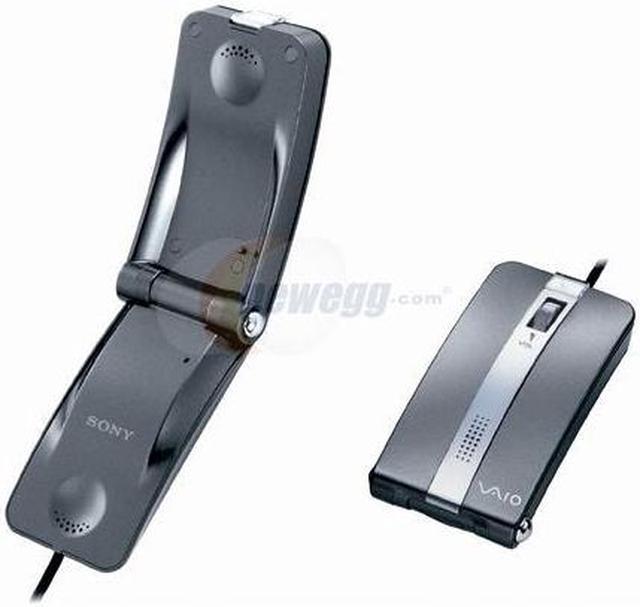
| Features | A Hybrid Mouse and VOIP Phone The VAIO Mouse Talk is designed to control desk clutter while adding a touch of style and ingenuity to your workspace. The Mouse Talk looks and functions like a typical mouse but opens to unveil a stylish, clamshell-style phone - ideal for VoIP conversations with friends and family around the world. An eye-pleasing, practical accent to your workplace, the Mouse Talk is available in a number of cool colors and is contoured to fit comfortably both under your hand (when used as a mouse) and against your ear (when used as a phone). With a 2 in 1 mouse and phone, there is no need to use an additional headset to take advantage of VoIP. A Compact and Mobile Mouse The VAIO Mouse Talk works just like any other optical mouse with a convenient scroll wheel, letting you navigate documents and web pages without using the on-screen scroll bar. An excellent tool for mobile professionals, the VAIO Mouse Talk is small, lightweight, and works great on most surfaces. With 800 dpi resolution, it is twice as accurate as standard mice and ideal for those who demand pinpoint accuracy. An Innovative Internet Phone Featuring echo-cancellation technology for crystal-clear call-quality, the Mouse Talk is the ideal telephone for VoIP users. When connected via USB to any notebook capable of making internet-based phone calls, the VAIO Mouse Talk clamshell opens to reveal a fully-functional VoIP phone. During a call, the mouse wheel (typically used for scrolling) can be used to mute a conversation, raise and lower volume, or select numbers to dial. Soft, blue LED lights flash to indicate an incoming call or the Mouse Talk can also be set to ring if desired. For those who prefer hands-free conversations, Mouse Talk can also be left open on the desk to be used a speakerphone. |
|---|
| First Listed on Newegg | April 12, 2007 |
|---|