



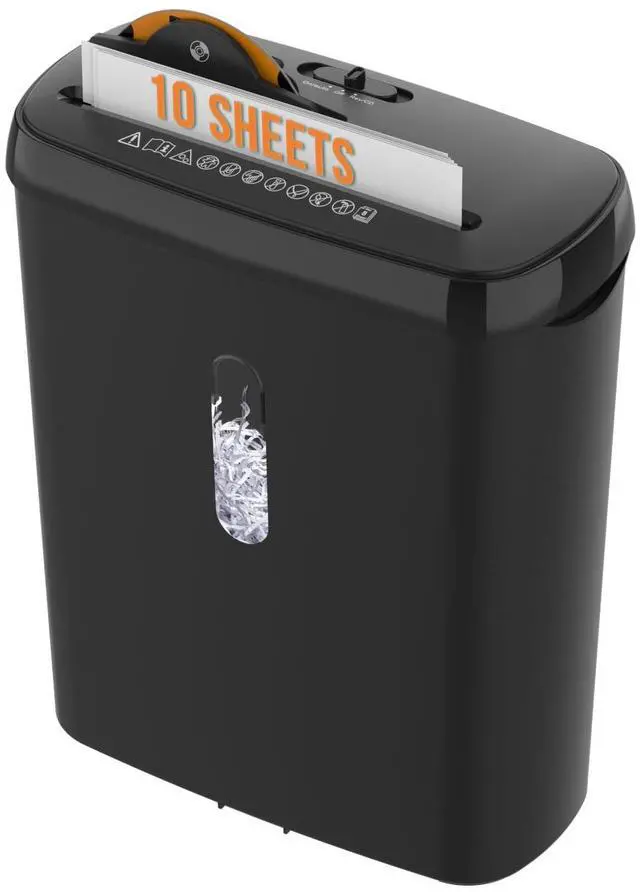


10-Sheet Strip Cut Paper Shredder for Home Office Use


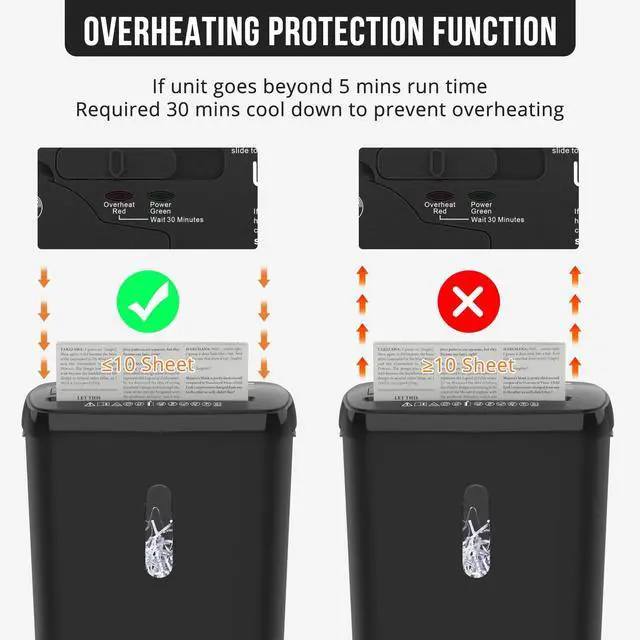
Why does the machine emit an unusual odor after overheating?
1.When the shredder enters overheat protection mode, the machine has generated a significant amount of heat due to the load. The motor is coated with oil, which emits a mild odor as the temperature rises. Do not be concerned; this is a normal occurrence.
After use
5. Do not spray or store any aerosol products inside the shredder.
6.To ensure prolonged use of the shredder, empty the paper bin promptly. A full bin may cause paper fragments to accumulate around the cutting blades, leading to paper jams.
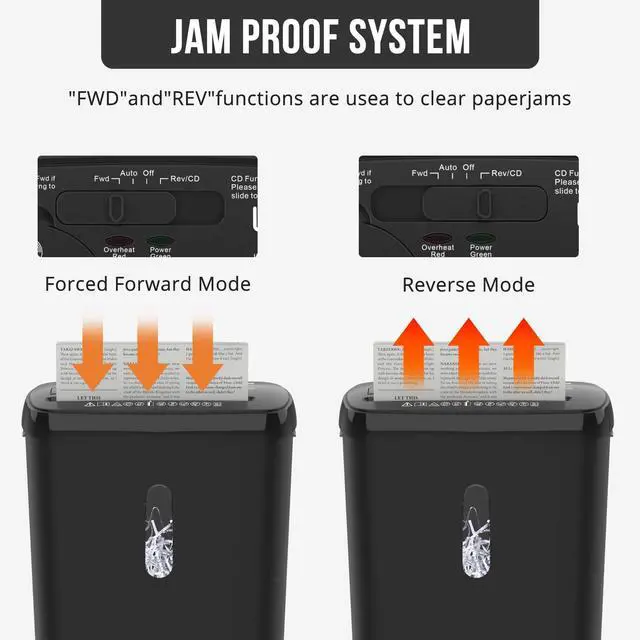
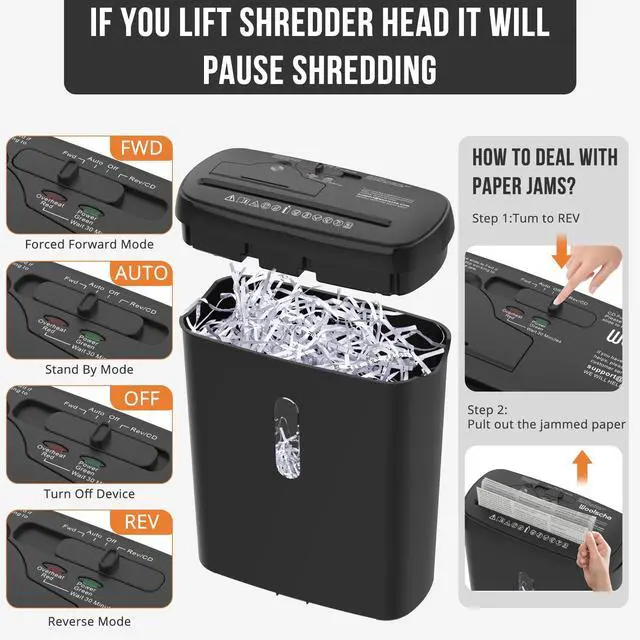
7.When shredding credit cards or CD/DVDs, set the button to the Reverse mode and ensure the paper bin is emptied. This prevents shredded fragments from being pushed back upward during reversal, which could cause jams.

Effectively prevent paper jams
1. Know Shredder's Limits (The Golden Rule)If it says "10 sheets," don't try 11. When in doubt, feed fewer sheets.( "sheet" rating is for standard 70g/m² bond paper. Thicker paper always feed these in smaller quantities or singly).
2. Prepare Your Documents Properly
If the document contains numerous staples, paper clips, or binder clips, please remove them first: These are the cause of damage and jams. Make it a habit to check every document.
3.Remove Adhesive Materials: Peel off sticky notes, tape, and labels if possible. Adhesive can gum up the cutting blades.

Use the Correct Feed Technique
1.Fan the Stack: Before feeding, tap the stack of papers on its edge to separate the sheets. This prevents them from sticking together and overfeeding.
2.Feed Evenly: Place the paper centered in the feed opening. Don't try to shred only one corner of a large sheet.
3.Let the Shredder Pull: Gently guide the paper, but don't force it. If it struggles, reverse immediately and remove some paper.
4.Shuffle Different Sizes: If shredding a mix of small receipts and large documents, shred the small items in the middle of a standard sheet. Fold the large sheet over the small items to create a "carrier." This prevents small pieces from falling sideways.

Watch for "Problem Papers"
1.Glossy/Coated Paper:(Causes blockages)
2.Cardstock & Laminated Paper: Causes blockages)
3.Carbonless Paper (like NCR forms): The chemical coating can create dust and friction. Shred in small batches.
4.Shredded Paper: Never re-shred already shredded paper. The small pieces can fall into the mechanism and cause serious jams.

Regular Maintenance is Key
1.Clean the Cutters: Use a can of compressed air to blow out paper dust from the cutting head periodically (unplug the shredder first).
2.Keep it Cool: Don't run the shredder continuously for longer than the "run time" specified (e.g., 3-5 minutes on, 30 minutes off). Overheating weakens motors and misaligns blades.
3.Empty the Bin Before it's Overfull: An overfull bin can block the cutting path and cause the shredded paper to back up into the blades, causing a jam.
 SD108P |  C503P |  C503P-W |  C218P |  CD210P-14 |  CS522S | |
|---|---|---|---|---|---|---|
| Customer Reviews | — | — | — | — | — | — |
| Price | — | — | — | — | — | — |
| Cutting Capacity | 10 Sheets | 5 Sheets | 5 Sheets | 12 Sheets | 14 Sheets | 6 Sheets |
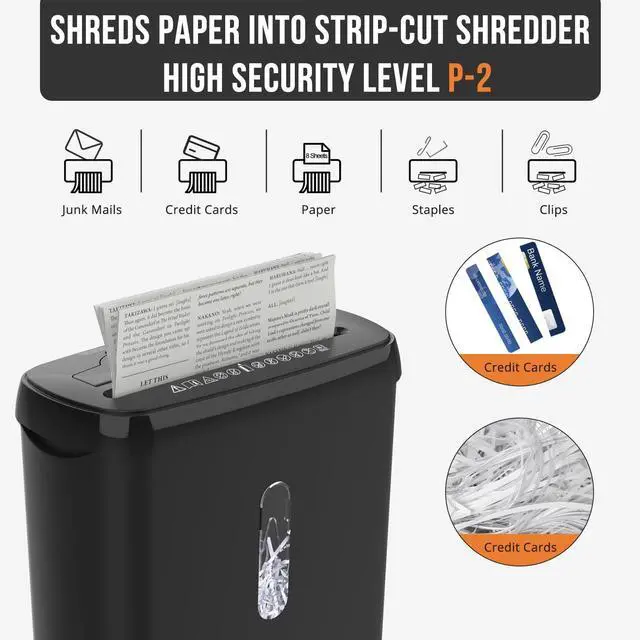
| Cutting Type | Strip-cut | Cross-cut | Cross-cut | Cross-cut | Cross-cut | Strip-cut |
| Security Level | P-2 | P-4 | P-4 | P-4 | P-4 | P-1 |
| Noise Level | 70dB | 70dB | 70dB | 70dB | 68dB | 70dB |
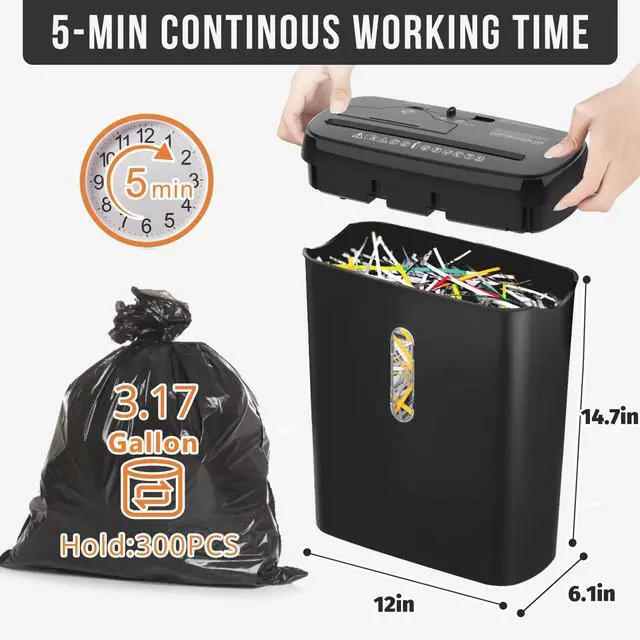
| Bin Capacity | 3.17 Gallon | 2.38 Gallon | 2.38 Gallon | 5.5 Gallon | 6.6Gallon | Without Basket |
| Shred Functions | Paper/credit cards/CD/DVD | Paper/credit cards/clips | Paper/credit cards/clips | Paper/credit cards/clips/staples | Paper/credit cards/clips/staples/CD/DVD | Paper/credit |
| Cutting Size | 12*6.1*14.68inch | 12*6.1*10.2inch | 12*6.1*10.2inch | 12.8*8.9*16.4inch | 14.2*9.6*18.2inch | 11.69*5.7*10.9inch |
10-Sheet Strip Cut Paper Shredder for Home Office Use
Why does the machine emit an unusual odor after overheating?
1.When the shredder enters overheat protection mode, the machine has generated a significant amount of heat due to the load. The motor is coated with oil, which emits a mild odor as the temperature rises. Do not be concerned; this is a normal occurrence.
After use
5. Do not spray or store any aerosol products inside the shredder.
6.To ensure prolonged use of the shredder, empty the paper bin promptly. A full bin may cause paper fragments to accumulate around the cutting blades, leading to paper jams.
7.When shredding credit cards or CD/DVDs, set the button to the Reverse mode and ensure the paper bin is emptied. This prevents shredded fragments from being pushed back upward during reversal, which could cause jams.

Effectively prevent paper jams
1. Know Shredder's Limits (The Golden Rule)If it says "10 sheets," don't try 11. When in doubt, feed fewer sheets.( "sheet" rating is for standard 70g/m² bond paper. Thicker paper always feed these in smaller quantities or singly).
2. Prepare Your Documents Properly
If the document contains numerous staples, paper clips, or binder clips, please remove them first: These are the cause of damage and jams. Make it a habit to check every document.
3.Remove Adhesive Materials: Peel off sticky notes, tape, and labels if possible. Adhesive can gum up the cutting blades.

Use the Correct Feed Technique
1.Fan the Stack: Before feeding, tap the stack of papers on its edge to separate the sheets. This prevents them from sticking together and overfeeding.
2.Feed Evenly: Place the paper centered in the feed opening. Don't try to shred only one corner of a large sheet.
3.Let the Shredder Pull: Gently guide the paper, but don't force it. If it struggles, reverse immediately and remove some paper.
4.Shuffle Different Sizes: If shredding a mix of small receipts and large documents, shred the small items in the middle of a standard sheet. Fold the large sheet over the small items to create a "carrier." This prevents small pieces from falling sideways.

Watch for "Problem Papers"
1.Glossy/Coated Paper:(Causes blockages)
2.Cardstock & Laminated Paper: Causes blockages)
3.Carbonless Paper (like NCR forms): The chemical coating can create dust and friction. Shred in small batches.
4.Shredded Paper: Never re-shred already shredded paper. The small pieces can fall into the mechanism and cause serious jams.

Regular Maintenance is Key
1.Clean the Cutters: Use a can of compressed air to blow out paper dust from the cutting head periodically (unplug the shredder first).
2.Keep it Cool: Don't run the shredder continuously for longer than the "run time" specified (e.g., 3-5 minutes on, 30 minutes off). Overheating weakens motors and misaligns blades.
3.Empty the Bin Before it's Overfull: An overfull bin can block the cutting path and cause the shredded paper to back up into the blades, causing a jam.
SD108P | C503P | C503P-W | C218P | CD210P-14 | CS522S | |
|---|---|---|---|---|---|---|
| Customer Reviews | — | — | — | — | — | — |
| Price | — | — | — | — | — | — |
| Cutting Capacity | 10 Sheets | 5 Sheets | 5 Sheets | 12 Sheets | 14 Sheets | 6 Sheets |
| Cutting Type | Strip-cut | Cross-cut | Cross-cut | Cross-cut | Cross-cut | Strip-cut |
| Security Level | P-2 | P-4 | P-4 | P-4 | P-4 | P-1 |
| Noise Level | 70dB | 70dB | 70dB | 70dB | 68dB | 70dB |
| Bin Capacity | 3.17 Gallon | 2.38 Gallon | 2.38 Gallon | 5.5 Gallon | 6.6Gallon | Without Basket |
| Shred Functions | Paper/credit cards/CD/DVD | Paper/credit cards/clips | Paper/credit cards/clips | Paper/credit cards/clips/staples | Paper/credit cards/clips/staples/CD/DVD | Paper/credit |
| Cutting Size | 12*6.1*14.68inch | 12*6.1*10.2inch | 12*6.1*10.2inch | 12.8*8.9*16.4inch | 14.2*9.6*18.2inch | 11.69*5.7*10.9inch |