
Your Browsing History









Any questions? Our AI beta will help you find out quickly.
Durable, compact rackmount NAS server for SMB
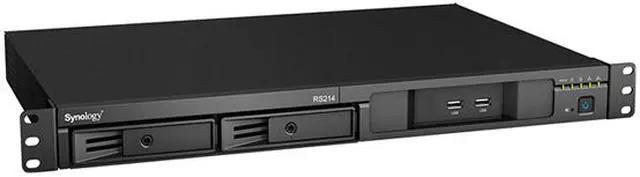
Designed to serve growing businesses of any size and dedicated to enhance working experience and productivity, RS214 is a 1U 2-bay rackmount NAS featuring easy data sharing and management.


RS214 is equipped with the built-in floating-point unit which enhances the overall capability of the main CPU, enabling higher working efficiency. RS214 delivers an average of over 69.33 MB/sec writing speed under RAID 1 configuration in a Windows® environment, and over 132.27 MB/sec reading.1 With RAM twice the size of its predecessor, RS214 exhibits an optimal boost in multi-tasking performance.
Coming with dual LAN for failover and Link Aggregation support, RS214 ensures continual network service in case of LAN failure, while the hot-swappable design facilitates easy and risk-free hard drive replacement. The hard drive tray lock further secures your hard drives from unauthorized or accidental withdrawal.

RS214 optimizes your working experiences by enabling faster and more efficient data transfers. To ensure scalability, RS214 provides an eSATA and two USB 3.0 interfaces in the back, alongside two USB 2.0 interfaces in the front panel for quick access.

RS214 fits perfectly into 2-position racks and wall mount racks without additional rail kits. It is also resilient enough to withstand operating temperature of up to 45°C/110°F, offering high reliability under extreme conditions. The compact design offers an affordable solution for both industrial standard environments and smaller server rooms with limited space.

Synology DiskStation Manager (DSM) is a sleek, browser-based operating system running on every DiskStation and RackStation, which makes managing your Synology NAS a breeze. Featuring an intuitive user interface, DSM makes accessing and sharing your data smarter and simpler. Synology's Package Center lets you download and install useful add-on packages designed specifically for individual or business needs, meaning you can enjoy more entertainment in your life or better productivity at work.

File Station is a fast and secure feature for sharing and managing your files stored on RS214. Just drag-n-drop and upload data from Mac or PC. Advanced filters make it easy to search for documents, photos, or videos. With built-in FTP or email clients, RS214 lets you organize and share files through an advanced web application effortlessly. You can even share files and folders with others by simply sending a link. Files can be reached on mobile devices via the companion mobile app DS file. HTTPS, SSL/TLS encryption, and link expiry dates also ensure file sharing over the Internet is highly secure.

Synology aims to provide you the most convenient way to enjoy all services on RS214. With Synology QuickConnect, you don't have to deal with difficult DDNS setup. QuickConnect frees you from complicated router configuration and port-forwarding, so your entertainment and work files can be accessed on any computer, laptop, or mobile devices instantly without extra charge.
| 5 great reasons you will love Synology QuickConnect | QuickConnect | DDNS |
| Customizable ID |  | |
|---|---|---|
| Skip network configuration | |  |
| Eliminate port forwarding | | |
| Open to all users | | |
| Works without public IP address | | |
Synology RS214 can serve as a centralized backup target. Whether you are a Windows or Mac user, you can back up everything on your computer directly to Synology NAS using Cloud Station. Whenever you modify a file, the changes are backed up to RS214 automatically. Mac users also enjoy native Apple® Time Machine support. You can also back up data from your RS214 to another DiskStation, rsync servers, external drives, or even Amazon® S3, Glacier cloud service, Microsoft Azure, SFR, and hicloud. "Backup & Replication" allows you to schedule backup tasks and restore the server to any particular point in time, while minimizing storage consumption and processing time by saving only the specific data block that has been changed between versions.

RS214 brings you comprehensive cloud service. Cloud Station lets you sync files among DiskStations and multiple devices, including Windows PC, Mac, Linux, iOS, Android, as well as Windows mobile devices, whereas 2-way sync allows file synchronization among different DiskStations. You can even sync your DiskStation with Google Drive, OneDrive, Dropbox, Box, hubiC, and Baidu Cloud — establish your hybrid cloud to enjoy more storage flexibility and prevent data loss.


Enjoy seamless files sharing across Windows®, Mac®, and Linux® platforms as RS214 offers comprehensive network protocol support including FTP, SMB2, AFP, NFS and WebDAV. With Windows AD and LDAP integration, RS214 can fit effortlessly into any existing network environment - there is no need for IT administrators to maintain two sets of credentials. You also won't worry about missing files with the Recycle Bin feature which is supported on AFP, CIFS, File Station, and WebDAV. All files deleted in a shared folder will be automatically moved into the Recycle Bin.
With the support of Windows AD, LDAP, and Domain Trust, RS214 enables seamless account integration. The User Home feature can automatically create a "home" folder for every user account to minimize the administrator's effort in repeatedly creating "home" folders for all accounts. Windows ACL support on RS214 allows IT administrators to fine tune access controls and set up privileges to files and folders on RS214 through the familiar Windows user interface. With compatibility for major protocols, RS214 can eliminate server configuration overhead and enhance IT administrators’ efficiency.

Offering rich office applications, RS214 can serve as your multi-function server. With add-on packages Mail Server and Mail Station, RS214 can become a dedicated mail server, and let you enjoy complete webmail service. RS214 can become a VPN server or VPN client. The comprehensive VPN service let you access resources remotely while maintaining security protocols. As a printer server, RS214 minimizes businesses' operating costs by sharing printing resources throughout the office. Administration and network tools, such as DNS Server, Directory Server, RADIUS Server, DHCP Server, and Log Center help you manage IT deployment and policies more efficiently. Maximize resource utilization with RS214!


All Synology NAS is designed with energy efficiency in mind. RS214 only consumes 12.43W in HDD Hibernation and 19.58W in access. The support of Wake on LAN/WAN and scheduled power on and off can further reduce power consumption and operation cost. Synology acknowledges the responsibility as a global citizen, so all Synology products are produced with RoHS compliant parts and packed with recyclable packing materials.
* The power consumption figures may vary on different environments.