




 here!
I’m your shopping assistant for PC builds, upgrades, and everything tech.
Got questions? Ask away!
Start a conversation
here!
I’m your shopping assistant for PC builds, upgrades, and everything tech.
Got questions? Ask away!
Start a conversation


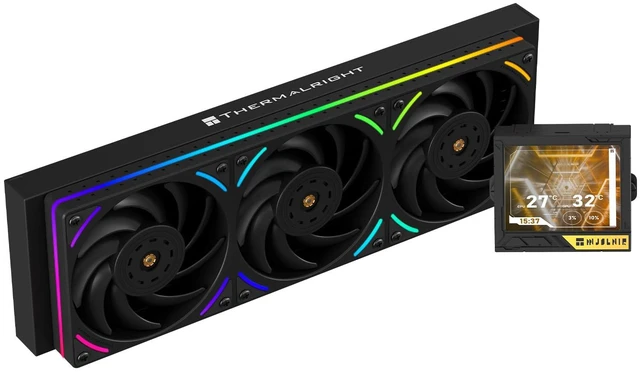
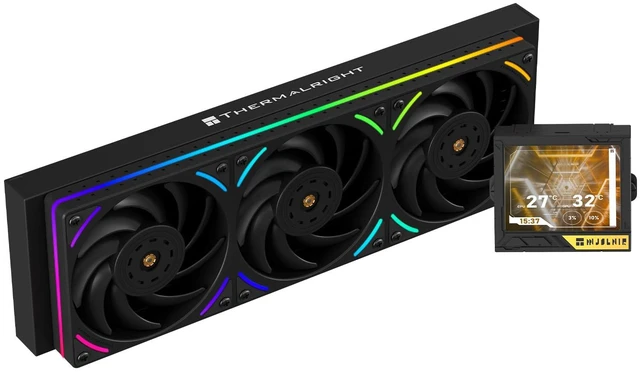
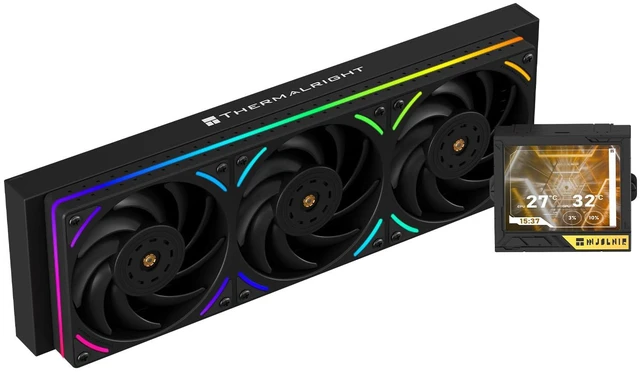
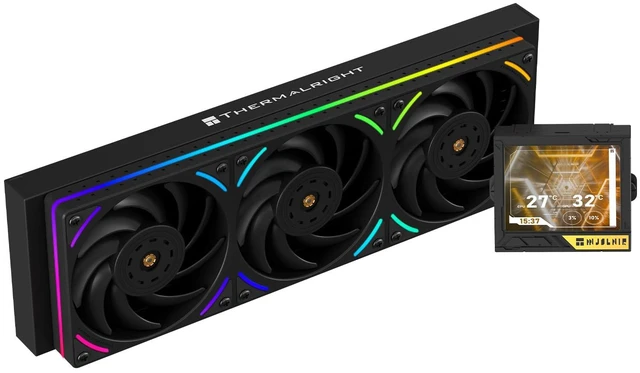
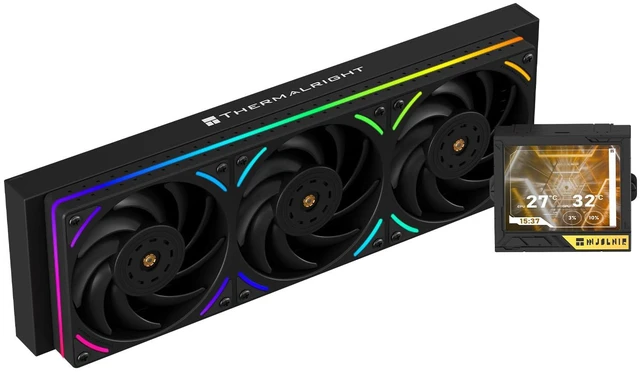
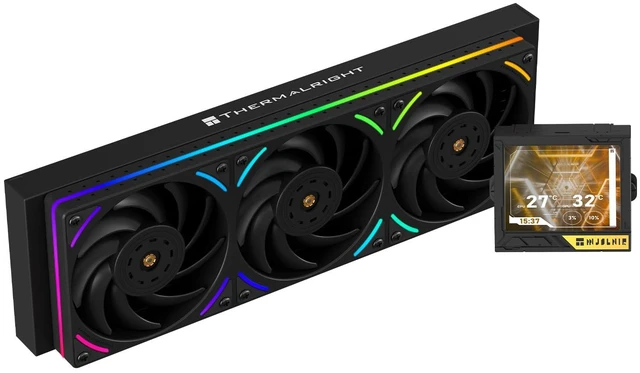
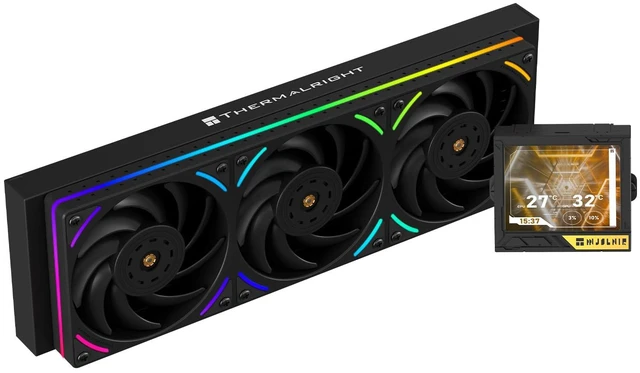



Any questions? Ask CelesteSM will help you find out quickly.


Parameter
Water cooling radiator model: Mjolnir Vision 360 UB PRO ARGB Black
Cold row size: 397x120x27mm
Cold head size: 85x74x65mm
Pump speed: 3000RPM ± 10%
Water pump interface: 4pin PWM
Screen size: 3.5 inches
Resolution: 640x480
Fan model: TL-UB36
Fan size: 360x120x25mm
Fan speed: 2150RPM ± 10%
Fan pressure: 2.87mm H2O
Fan air volume: 69CFM * 3
Operating noise 27DBa
Fan power supply interface: 4pin PWM
Fan light interface: 5V 3pin ARGB
Fan bearing: S-FDB
The Thermalright Mjolnir Vision 360 UB PRO ARGB is a 360mm all-in-one liquid CPU cooler for Intel and AMD desktop processors, combining a 3000RPM PWM pump, three pre-installed TL-UB36 ARGB fans, and a 3.5-inch 640x480 magnetic LCD. It suits performance-focused PC builders who want strong cooling and integrated system monitoring.
| Attribute | Value |
|---|---|
| Best For | Desktop CPU liquid-cooling setups that support a 360mm water-cooling unit in a black finish |
| Cooling Platform | Water-cooling design with a 397 x 120 x 27mm aluminum radiator and an aluminum block measuring 85 x 74 x 65mm |
| Fan And Acoustic Specs | 360mm fan assembly measuring 360 x 120 x 25mm, rated up to 2150 RPM with 207 CFM airflow; the fan and pump are each listed at 27 dB |
| Connections And Control | 4-pin fan power and PWM control connection |
| Physical Details | Black finish with an item weight of 5.29 pounds |
| Model Identifiers | Thermalright Mjolnir Vision 360 UB PRO ARGB Black, also identified as Mjolnir Vision UB PRO; part number Mjolnir Vision 360 UB PRO ARGB BLACK |
Q: Thermalright Mjolnir Vision 360 UB PRO vs Arctic Liquid Freezer III 360: which should I buy?
A: Choose the Mjolnir Vision 360 UB PRO when you want an integrated 3.5-inch 640×480 LCD, ARGB lighting, broader socket support, and a cleaner single-block fan installation. Choose the Arctic Liquid Freezer III 360 when your priority is independently tested cooling performance and a display-free design. Professional testing shows the Arctic is a strong value for gaming and GPU-heavy workloads, while its maximum CPU-only results vary by test methodology. ([thermalright.com](https://www.thermalright.com/product/mjolnir-vision-360-ub-pro-argb-white/))
Q: Is the Mjolnir Vision 360 UB PRO worth choosing over a cheaper Thermalright 360mm AIO without an LCD?
A: Choose the Mjolnir Vision 360 UB PRO if the LCD, system monitoring, ARGB presentation, and reduced cable clutter are important to your build. Choose a lower-tier Thermalright 360mm model such as the Frozen Notte if you mainly need a 360mm radiator for CPU cooling and do not need a pump display. The Mjolnir adds display hardware and TRCC control, while the basic model keeps the same general 360mm AIO format with fewer presentation features. ([thermalright.com](https://www.thermalright.com/product/mjolnir-vision-360-ub-pro-argb-white/))
Q: Thermalright Mjolnir Vision 360 UB PRO vs Wonder Vision 360 UB: what is the upgrade?
A: Choose the Mjolnir Vision 360 UB PRO for a more compact screen-focused design with a 3.5-inch 640×480 display and a simpler 360mm installation. Choose the higher-tier Wonder Vision 360 UB when you want a much larger detachable display and higher tested cooling capacity for demanding CPUs. Tom's Hardware measured the Wonder Vision handling more than 255W in its Ryzen 9 9950X test, but also recorded substantially higher maximum noise than the Mjolnir's rated 27 dBA fan specification. ([thermalright.com](https://www.thermalright.com/product/mjolnir-vision-360-ub-pro-argb-white/))
Q: Is the Mjolnir Vision 360 UB PRO suitable for a compact or portable PC build?
A: Choose the Mjolnir Vision 360 UB PRO for a performance-first desktop case that supports a roughly 397×120×27mm radiator. Choose a 240mm AIO, low-profile cooler, or tower air cooler for a compact or frequently moved system. The Mjolnir is a full-size 360mm liquid cooler, so radiator clearance and transport stability matter more than the detachable nature of its magnetic LCD. ([thermalright.com](https://www.thermalright.com/product/mjolnir-vision-360-ub-pro-argb-white/))
Q: Is the Thermalright Mjolnir Vision 360 UB PRO compatible with AM5 and newer Intel sockets?
A: Yes. It supports AMD AM4 and AM5, plus Intel LGA115X, LGA1200, LGA1700, LGA1851, LGA2011, and LGA2066. Confirm that the required mounting hardware is included before installation.
Q: Will this 360mm AIO fit in my PC case?
A: It requires a case with a compatible 360mm radiator mount and enough clearance for a 397 x 120 x 27 mm radiator plus 25 mm-thick fans. Allow additional room for tubing, motherboard heatsinks, memory, and other nearby components. Case-specific compatibility cannot be confirmed without the case model.
Q: Can I control the LCD display, fan speed, and ARGB lighting?
A: Yes. The LCD display is controlled through Thermalright TRCC software, which supports display settings and system monitoring. The fans use 4-pin PWM control, while the lighting uses a 5V 3-pin ARGB connection. The motherboard must provide compatible headers for direct control.
Q: How loud is the Thermalright Mjolnir Vision 360 UB PRO?
A: The listed maximum noise level is 27 dBA for the pump and fans. Actual noise depends on CPU temperature, fan and pump speeds, case airflow, mounting position, and motherboard control settings. The 2150 RPM fans and 3000 RPM PWM pump prioritize cooling capacity over completely silent operation at full speed.
Q: Who is the Thermalright Mjolnir Vision 360 UB PRO best suited for?
A: It is best suited for desktop builders who want a large 360mm liquid-cooling platform, an integrated 3.5-inch system-monitoring display, PWM fan control, and ARGB lighting. It is less suitable for compact cases, builds without 360mm radiator clearance, or users who prefer a simpler air cooler with fewer cables and software requirements.
Q: Is the Thermalright Mjolnir Vision 360 UB PRO worth buying for a 360mm LCD AIO?
A: It is a reasonable choice for buyers who want a 360mm cooler with a built-in 3.5-inch LCD without moving to a higher-priced premium brand. Community discussions generally describe its cooling and value positively, but the LCD software and occasional display or USB-related issues are important trade-offs.
Q: Is the Mjolnir Vision 360 suitable for high-end AMD CPUs such as the Ryzen 9 7900X?
A: Yes, it supports AMD AM4 and AM5 processors and uses a 360mm radiator, making it suitable for high-power CPUs when the case supports a 360mm radiator. Reddit users report successful use with Ryzen 9 7900X, 7800X3D, and 9800X3D systems, although results depend on CPU settings, mounting, case airflow, and fan curves.
Q: Is the Thermalright Mjolnir Vision 360 quiet enough for a gaming PC?
A: Noise levels are variable. The included TL-UB36 fans are rated at up to 27 dBA, and some users report quiet operation, but others mention audible pump buzzing or fan noise depending on mounting position and settings. A custom PWM pump and fan curve may reduce noise, but buyers seeking consistently silent operation should treat acoustics as a potential trade-off.
Q: Are the LCD display and TRCC software reliable on the Mjolnir Vision 360?
A: The display supports custom images and system monitoring through TRCC, but software and hardware reliability are mixed in community reports. Users mention software limitations, occasional USB-C connection failures, and LCD disconnect or shutdown problems. This cooler is better suited to buyers who value the display and can tolerate some troubleshooting than to buyers who want a simple maintenance-free experience.
Q: What are the main trade-offs of choosing the Mjolnir Vision 360 over a standard AIO?
A: The main benefit is the 3.5-inch 640x480 magnetic LCD with custom content and monitoring. The trade-offs are the added USB and software dependency, possible display-related troubleshooting, a 360mm radiator requirement, and reported variation in pump noise. Buyers who do not need an LCD may get a simpler setup from a standard 360mm AIO.


