






* Update your Xbox Seires S/X controller to the latest version if you have any issues connecting with Xbox controllers.
* Update the adapter to the latest firmware from Mayflash web site if you have any issues with PS5 Dualsense Edge Controller.
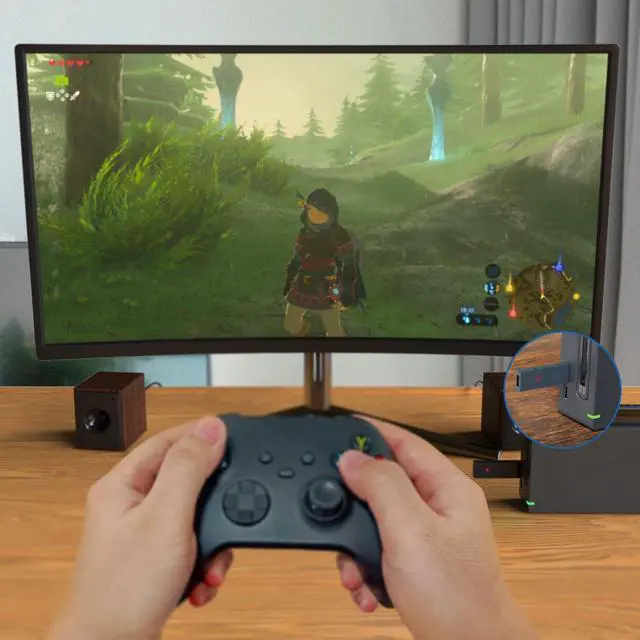
* Reboot your Switch game console twice if you have any issues using on Switch.
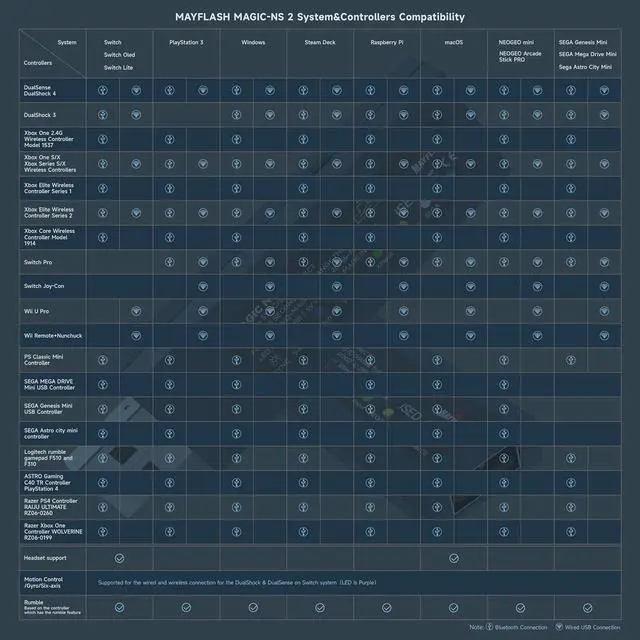
System Compatibility
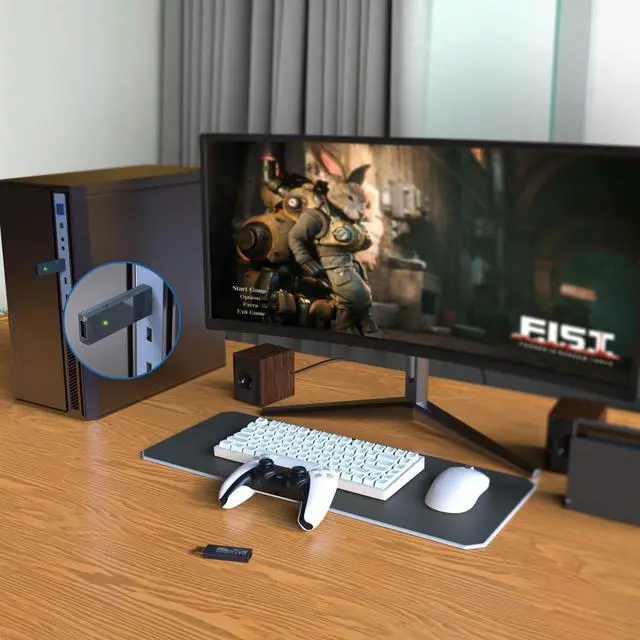
Switch . PlayStation 3 . Windows . Steam Deck, Raspberry Pi. macOS . NEOGEO mini . SNK NEOGEO Arcade Stick PRO . SEGA Genesis Mini . SEGA Mega Drive Mini . Sega Astro City Mini
Controller Compatibility
Bluetooth Controllers: PS5/PS4/PS3 Bluetooth Controller, Xbox Series X/S, Xbox One Bluetooth controllers, Xbox Elite Wireless Controller Series 2, Switch Pro, Switch Joy-Con, Wii Remote, Wii U Pro.
Wired USB Controllers: PS5/PS4/PS3 Controller, Xbox Bluetooth Controller, Switch Pro, ASTRO Gaming C40 TR Controller PlayStation 4, PlayStation 4 SCUF Vantage 2 Controller, SEGA MEGA DRIVE and SEGA Genesis Mini USB Controller Pads, Logitech rumble gamepad F510 and F310, PS Classic Controller, Switch Taiko Drum, PS4 Taiko Drum.
The wireless controller that comes from your console will become a wired controller by simply connecting a standard USB cable (with exception of Xbox 360 which requires an official Microsoft wired Xbox 360 controller). For best results, it is recommended that you use original SwitchControllers, or genuine Xbox or PlayStation controllers and quality certified USB cables.
Special Features
- Supports 6-axis motion on Switch and Vibration on Switch, Xinput and PS3.
- The vibration intensity and dead zone can be adjusted. 7 levels of the vibration intensity and deadzone.
- Supports Turbo and Auto Fire. There are 3 turbo speeds.
- Supports Bluetooth headset on Switch (LED Red).
- The buttons A, B, X, Y can be exchanged.
- Lag – free.
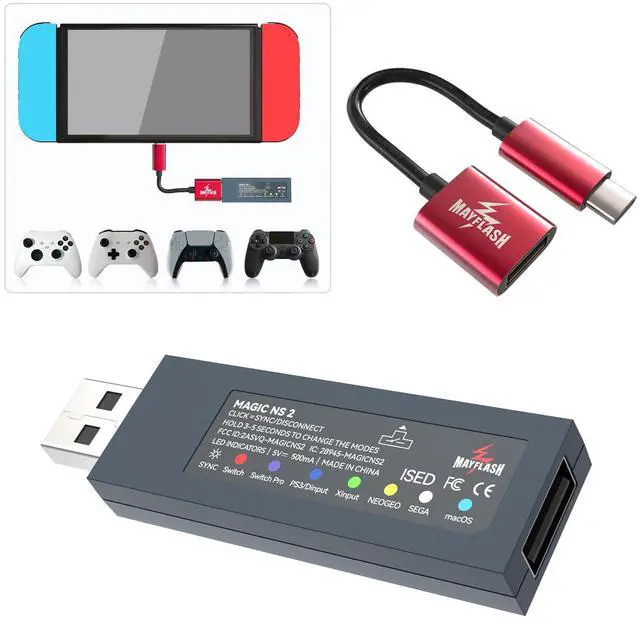
- A customized high quality USB Type-C Cable included.
- Update to latest firmware at mayflash.com.
Dimensions and Weight
- 73*21*8.7mm
- 11g
Includes
Magic NS 2 Adapter . USB Type C Cable . Manual
LED Indicators

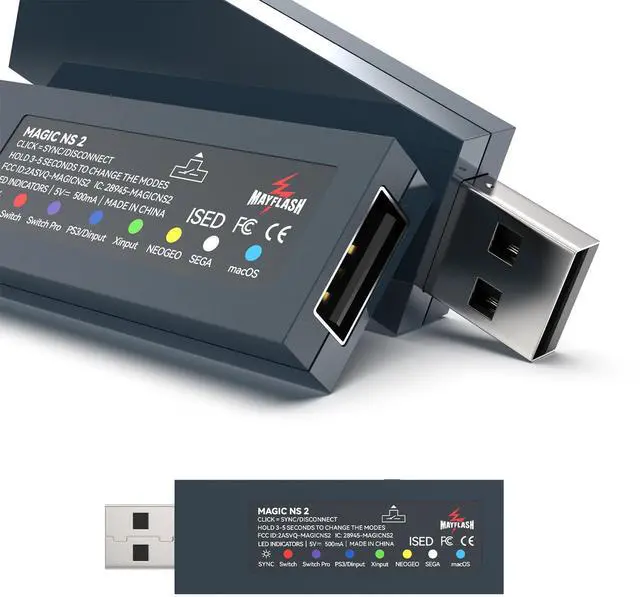
USB Port and the Button on the side
USB A-Female:
- Connect the wired PS5,PS4,PS3,Switch Pro, XboxOne X/S, Xbox Series X/S, Xbox 360 controllers or fightsticks, or standard wired USB controllers to the adapter.
Button on the side of the adapter:
- Used for the modes switching and Bluetooth pairing

LED Indicator
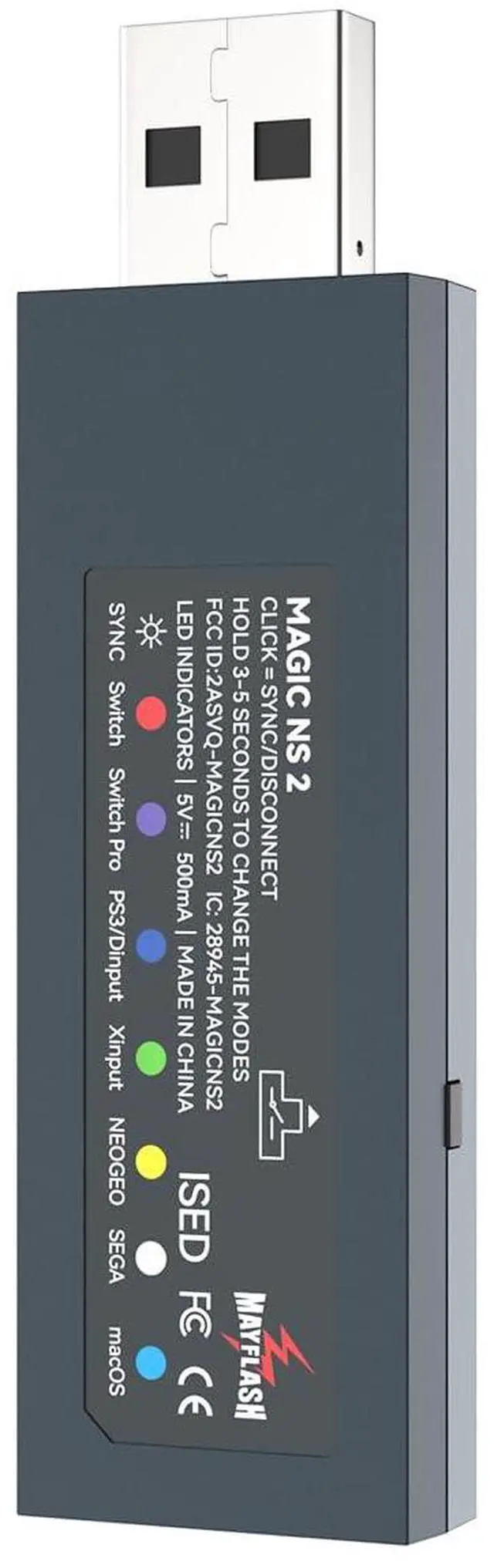
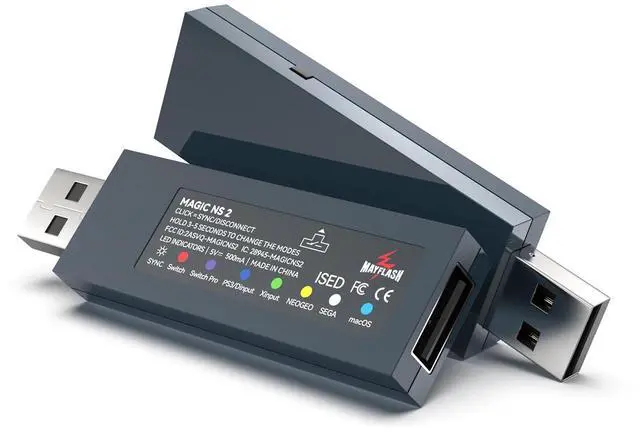
There are seven colors of this LED indicator to show seven different working modes.
Note: Please make sure "Pro Controller Wired Communication" is "ON" in the System Setting on Switch Pro mode (LED is Purple).

LED Indicators and Modes
- LED Indicator in Red: Switch mode
- LED Indicator in Purple: Switch Pro mode
- LED Indicator in Blue: PS3 or PC Dinput or Raspberry Pi mode
- LED Indicator in Green: PC Xinput, Steam Deck or Raspberry Pi mode
- LED Indicator in Yellow: NEOGEO mode
- LED Indicator in Cyan: macOS mode
- LED Indicator in White: SEGA mode
Turbo, Auto Fire, Gyroscope

Turbo and Auto Fire
The 8 functional buttons on your controller can be set for Turbo and Auto Fire. You can get more detailed settings from MAYFLASH web.

3 Turbo Speeds
The default speed of Turbo is 15 times/second.
You can set the speed to 5 times/second or 20 times/second.

6-Axis Motion (Gyroscope)
Supports 6-axis motion (gyroscope) on Switch.
Adjust the vibration and dead zone

Mapping
Button remapping for ABXY.

Dead Zone
Adjust the dead zone by 7 different levels.

Vibration
Modify the vibration intensity by 7 different values.
A Customized USB C Cable Included

 MAGIC-NS 1 |  MAGIC-NS 2 |  MAGIC-NS Lite | |
|---|---|---|---|
| Customer Reviews | — | — | — |
| Price | — | — | — |
| System Compatibility | Switch . Switch OLED. Windows . Raspberry Pi. macOS . PlayStation 3. NEOGEO mini . SNK NEOGEO Arcade Stick PRO . SEGA Genesis Mini . SEGA Mega Drive Mini . Sega Astro City Mini | Switch . Switch OLED. Windows . Raspberry Pi. macOS . PlayStation 3. NEOGEO mini . SNK NEOGEO Arcade Stick PRO . SEGA Genesis Mini . SEGA Mega Drive Mini . Sega Astro City Mini | Switch . Switch OLED. Windows . Raspberry Pi. macOS . PlayStation 3. NEOGEO mini . SNK NEOGEO Arcade Stick PRO . SEGA Genesis Mini . SEGA Mega Drive Mini . Sega Astro City Mini |
| Bluetooth Controller Compatibility | DualSense, DualShock 4, DualShock 3, Switch Pro, Switch Joy-Con, Wii Remote, Wii U Pro, Switch Joy-Cons, Switch Pro.(Not compatible with Xbox Bluetooth Controllers) | DualSense, DualShock 4, DualShock 3, Xbox Series X/S, Xbox One Bluetooth controllers, Xbox Elite Wireless Controller Series 2, Switch Pro, Switch Joy-Con, Wii Remote, Wii U Pro. | DualSense, DualShock 4, Xbox Series X/S, Xbox One Bluetooth controllers, Xbox Elite Wireless Controller Series 2, Switch Pro, Switch Joy-Con, Wii Remote, Wii U Pro.(Not compatible with DualShock 3) |
| DualShock 3 | ? | ? | N/A |
| Wired USB Controllers | ? | ? | N/A |
| A USB Type C Cable included | ? | ? | N/A |
| Using Headsets on Switch | N/A | ? | ? |
| Vibration Intensity Modifying | ? | ? | ? |
| Dead Zone Adjusting | ? | ? | ? |
* Update your Xbox Seires S/X controller to the latest version if you have any issues connecting with Xbox controllers.
* Update the adapter to the latest firmware from Mayflash web site if you have any issues with PS5 Dualsense Edge Controller.
* Reboot your Switch game console twice if you have any issues using on Switch.
System Compatibility
Switch . PlayStation 3 . Windows . Steam Deck, Raspberry Pi. macOS . NEOGEO mini . SNK NEOGEO Arcade Stick PRO . SEGA Genesis Mini . SEGA Mega Drive Mini . Sega Astro City Mini
Controller Compatibility
Bluetooth Controllers: PS5/PS4/PS3 Bluetooth Controller, Xbox Series X/S, Xbox One Bluetooth controllers, Xbox Elite Wireless Controller Series 2, Switch Pro, Switch Joy-Con, Wii Remote, Wii U Pro.
Wired USB Controllers: PS5/PS4/PS3 Controller, Xbox Bluetooth Controller, Switch Pro, ASTRO Gaming C40 TR Controller PlayStation 4, PlayStation 4 SCUF Vantage 2 Controller, SEGA MEGA DRIVE and SEGA Genesis Mini USB Controller Pads, Logitech rumble gamepad F510 and F310, PS Classic Controller, Switch Taiko Drum, PS4 Taiko Drum.
The wireless controller that comes from your console will become a wired controller by simply connecting a standard USB cable (with exception of Xbox 360 which requires an official Microsoft wired Xbox 360 controller). For best results, it is recommended that you use original SwitchControllers, or genuine Xbox or PlayStation controllers and quality certified USB cables.
Special Features
- Supports 6-axis motion on Switch and Vibration on Switch, Xinput and PS3.
- The vibration intensity and dead zone can be adjusted. 7 levels of the vibration intensity and deadzone.
- Supports Turbo and Auto Fire. There are 3 turbo speeds.
- Supports Bluetooth headset on Switch (LED Red).
- The buttons A, B, X, Y can be exchanged.
- Lag – free.
- A customized high quality USB Type-C Cable included.
- Update to latest firmware at mayflash.com.
Dimensions and Weight
- 73*21*8.7mm
- 11g
Includes
Magic NS 2 Adapter . USB Type C Cable . Manual
LED Indicators
USB Port and the Button on the side
USB A-Female:
- Connect the wired PS5,PS4,PS3,Switch Pro, XboxOne X/S, Xbox Series X/S, Xbox 360 controllers or fightsticks, or standard wired USB controllers to the adapter.
Button on the side of the adapter:
- Used for the modes switching and Bluetooth pairing
LED Indicator
There are seven colors of this LED indicator to show seven different working modes.
Note: Please make sure "Pro Controller Wired Communication" is "ON" in the System Setting on Switch Pro mode (LED is Purple).
LED Indicators and Modes
- LED Indicator in Red: Switch mode
- LED Indicator in Purple: Switch Pro mode
- LED Indicator in Blue: PS3 or PC Dinput or Raspberry Pi mode
- LED Indicator in Green: PC Xinput, Steam Deck or Raspberry Pi mode
- LED Indicator in Yellow: NEOGEO mode
- LED Indicator in Cyan: macOS mode
- LED Indicator in White: SEGA mode
Turbo, Auto Fire, Gyroscope
Turbo and Auto Fire
The 8 functional buttons on your controller can be set for Turbo and Auto Fire. You can get more detailed settings from MAYFLASH web.
3 Turbo Speeds
The default speed of Turbo is 15 times/second.
You can set the speed to 5 times/second or 20 times/second.
6-Axis Motion (Gyroscope)
Supports 6-axis motion (gyroscope) on Switch.
Adjust the vibration and dead zone
Mapping
Button remapping for ABXY.
Dead Zone
Adjust the dead zone by 7 different levels.
Vibration
Modify the vibration intensity by 7 different values.
A Customized USB C Cable Included
MAGIC-NS 1 | MAGIC-NS 2 | MAGIC-NS Lite | |
|---|---|---|---|
| Customer Reviews | — | — | — |
| Price | — | — | — |
| System Compatibility | Switch . Switch OLED. Windows . Raspberry Pi. macOS . PlayStation 3. NEOGEO mini . SNK NEOGEO Arcade Stick PRO . SEGA Genesis Mini . SEGA Mega Drive Mini . Sega Astro City Mini | Switch . Switch OLED. Windows . Raspberry Pi. macOS . PlayStation 3. NEOGEO mini . SNK NEOGEO Arcade Stick PRO . SEGA Genesis Mini . SEGA Mega Drive Mini . Sega Astro City Mini | Switch . Switch OLED. Windows . Raspberry Pi. macOS . PlayStation 3. NEOGEO mini . SNK NEOGEO Arcade Stick PRO . SEGA Genesis Mini . SEGA Mega Drive Mini . Sega Astro City Mini |
| Bluetooth Controller Compatibility | DualSense, DualShock 4, DualShock 3, Switch Pro, Switch Joy-Con, Wii Remote, Wii U Pro, Switch Joy-Cons, Switch Pro.(Not compatible with Xbox Bluetooth Controllers) | DualSense, DualShock 4, DualShock 3, Xbox Series X/S, Xbox One Bluetooth controllers, Xbox Elite Wireless Controller Series 2, Switch Pro, Switch Joy-Con, Wii Remote, Wii U Pro. | DualSense, DualShock 4, Xbox Series X/S, Xbox One Bluetooth controllers, Xbox Elite Wireless Controller Series 2, Switch Pro, Switch Joy-Con, Wii Remote, Wii U Pro.(Not compatible with DualShock 3) |
| DualShock 3 | ? | ? | N/A |
| Wired USB Controllers | ? | ? | N/A |
| A USB Type C Cable included | ? | ? | N/A |
| Using Headsets on Switch | N/A | ? | ? |
| Vibration Intensity Modifying | ? | ? | ? |
| Dead Zone Adjusting | ? | ? | ? |