• $289.99
  • Free 30-day Returns
  • Sold by Direct from manufacturerv AV Access
    Hot Seller
    5 (5 seller ratings)

    Shipped by Direct from manufacturerv AV Access

    Price alert
    Shop it at NeweggBusiness.

    Meet Your Seller

    AV Access KVM Switch 2 Monitors 2 Computers, KVM Dock for MacBook & PC | Dual 4K@60Hz, 100W PD, 1G Ethernet, 10Gbps USB, EDID Emulation, Plug & Play KVM Docking Station for Dual-Monitor Workspaces

    • for 1Laptop 1Desktop
    • for 1MacBook 1Desktop
    • Dual 4K@60Hz Outputs
    • Dual 8K@60Hz Outputs
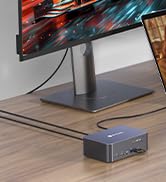
    • Run Your MacBook and PC on One Dual-Monitor WorkspaceThis KVM docking station brings one MacBook and one desktop pc into a single dual-monitor workspace. Share two HDMI displays, a keyboard, mouse, network, audio, and other USB peripherals between both computers, then switch the displays and shared peripherals using the top-mounted button or included wired remotewithout repeatedly unplugging cables or maintaining two separate desk setups. For desktop dual-monitor use, HDMI, DisplayPort, and USB Host connections are all required.
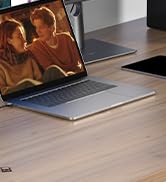
    • Dual 4K Displays for a More Productive WorkflowExpand your workspace across two 4K HDMI monitors for easier multitasking, sharper visuals, and more room to work. Keep documents, creative tools, communication apps, or reference materials visible across both screensideal for office work, education, design, content creation, and light gaming.
    • True Plug-and-PlayNo DisplayLink RequiredThis KVM dock is truly plug and play no DisplayLink software, no drivers, no setup required. It eliminates installation hassles and compatibility worries, letting you connect your Macbook and start using dual screens instantly and reliably, saving time and avoiding technical frustration.
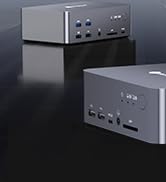
    • More Than a KVM SwitchA Complete Docking SolutionGo beyond basic computer switching with display, peripheral, network, storage, and audio expansion integrated into one device. This USB C KVM docking station combines 2 HDMI ports, 2 USB 3.2 ports, 2 USB 3.0 ports, an SDXC card re
    +
    +
    Overview
    Specs
    Reviews
    See all Q & A

    Any questions? Ask CelesteSM will help you find out quickly.

    KVM switch docking station for macbook and PC 2 monitors, plug and play
    KVM switch docking station for macbook and PC 2 monitors, plug and play
    KVM switch docking station for macbook and PC 2 monitors, plug and play
    • Intel / M1 or M2 (non-Pro/Max): iDock M10 can extend to only one external display.

      M3 (non-Pro): up to two extended displays when the lid is closed; lid open supports mirroring only.

      M4 or any Pro/Max chip: supports two extended displays.

    • No, this product doesn’t use DisplayLink. No software or drivers are needed—just plug and play. It connects to your MacBook using the included dual-head USB-C cable, or you can use two separate USB-C cables of your own.

    • Yes. To connect a MacBook + Mac mini/Mac Studio:

      1. Both devices must have a Pro chip or M3 (or newer).

      2. The Mac mini/Mac Studio needs enough ports (adapters allowed) to connect to the HDMI, DP, and USB-C ports labeled “? Desktop” on iDock M10.

    • If you connect the docking station and iDock to separate USB ports on your laptop, they work normally. But if you plug the iDock into the docking station instead of the laptop, compatibility issues may occur.

    • 1. iDock M10 is fully plug-and-play with no software needed, so it works freely and poses no security risk.

      2. iDock M10 sends DP Alt video signals directly over USB-C without compression, ensuring stable and reliable video quality.

    KVM switch docking station for macbook and PC 2 monitors, plug and play
    KVM switch docking station for macbook and PC 2 monitors, plug and play
    KVM switch docking station for macbook and PC 2 monitors, plug and play
    • Intel / M1 or M2 (non-Pro/Max): iDock M10 can extend to only one external display.

      M3 (non-Pro): up to two extended displays when the lid is closed; lid open supports mirroring only.

      M4 or any Pro/Max chip: supports two extended displays.

    • No, this product doesn’t use DisplayLink. No software or drivers are needed—just plug and play. It connects to your MacBook using the included dual-head USB-C cable, or you can use two separate USB-C cables of your own.

    • Yes. To connect a MacBook + Mac mini/Mac Studio:

      1. Both devices must have a Pro chip or M3 (or newer).

      2. The Mac mini/Mac Studio needs enough ports (adapters allowed) to connect to the HDMI, DP, and USB-C ports labeled “? Desktop” on iDock M10.

    • If you connect the docking station and iDock to separate USB ports on your laptop, they work normally. But if you plug the iDock into the docking station instead of the laptop, compatibility issues may occur.

    • 1. iDock M10 is fully plug-and-play with no software needed, so it works freely and poses no security risk.

      2. iDock M10 sends DP Alt video signals directly over USB-C without compression, ensuring stable and reliable video quality.


    Overview

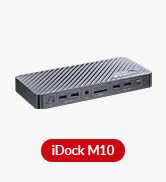
    This product is a dual-computer, dual-monitor KVM switch docking station designed specifically for MacBook laptops and desktop PCs.

    For MacBook users, it features a dedicated dual USB-C input that connects to the two Thunderbolt ports on the left side via the included dual-head USB-C cable. This enables dual 4K video output, USB 3.2 Gen 2 (10Gbps) data transfer, 1Gb Ethernet connectivity, and up to 100W power delivery.

    For desktop PCs, the docking station offers a combined DP + HDMI + USB Host input, allowing seamless integration and easy switching between systems.

    Beyond switching functionality, the device also serves as a 10-in-1 docking station, offering a wide range of expansion ports, including:

    1. 2 × HDMI video outputs;
    2. 2 × USB 3.2 Gen 2 (10Gbps) Type-A ports;
    3. 1 × USB 3.2 Gen 2 (10Gbps) Type-C port;
    4. 2 × USB 3.2 Gen 1 (5Gbps) Type-A ports;
    5. 1 × SD card slot;
    6. 1 × Gigabit Ethernet port;
    7. 1 × 3.5mm headset jack.

    The KVM supports EDID emulation to maintain continuous power, display, and network connections during switchingensuring a stable and uninterrupted desktop experience.

    Features

    1. 2x1 4K KVM switch docking for MacBook, switch between one MacBook and one desktop for two monitors and share a series of peripheral devices.
    2. Support switching inputs between two combined USB-C inputs for the MacBook and one set of HDMI+DP+USB-C 3.2 host input for the desktop:
    3. Two combined USB-C inputs: USB-C InA supports 4K@60Hz 4:4:4 8bit video transmission, USB 3.2 data (up to 10Gbps), 100W charging and 1G network connection and USB-C InB supports 4K@60Hz 4:4:4 8bit video transmission only;
    4. One set of HDMI+DP+USB-C 3.2 host input: one HDMI 2.0b input and one DP 1.2a input, each supports transmission of 4K@60Hz video signals. One USB-C host port, supports USB 3.2 data transmission up to 10Gbps and 1G network connection.
    5. Two HDMI 2.0b output ports support resolution up to 4K@60Hz 4:4:4 8bit and HDCP 2.2.
    6. Provide multiple peripheral ports, including:
    7. 2x USB 3.0 type-A ports on front panel, support 5V/1A power output and 5Gbps data transfer;
    8. 2x USB 3.2 type-A ports on front panel, support 5V/1A power output and 10Gbps data transfer;
    9. 1x USB 3.2 type-C port (USB data only), supports 10Gbps data transfer rate, and 1.5A current output;
    10. 1x SDXC card slot, supports up to 2TB SDXC card inserted, and maximum data transmission is 104MB/s;
    11. 1x LAN port, support for 1Gb Ethernet performance;
    12. 1x 3.5mm TRRS (stereo + microphone) headset port.
    13. Supports high refresh rates such as 240Hz, 165Hz, and 144Hz.
    14. Support automatic wake-up function, when switch to the standby computer, it will be automatically waken up.
    15. Support CEC trigger on HDMI outputs. When the current channel detects an input signal, it sends a CEC Power-ON command to the HDMI output port.
    16. Support connecting to the Wired Remote Controller (EXB01) for remote switching.

    Package Contents

    Before you start the installation of the product, please check the package contents:

    1. KVM Dock Switcher x 1
    2. Power Adapter (DC 20V/6A) x 1
    3. HDMI 2.0 Cable (L = 1.5m) x 1
    4. DP 1.2a Cable (L = 1.5m) x 1
    5. Dual USB Type-C to Dual USB Type-C Cable (USB 3.2 Gen 2, L = 0.8m) x 1
    6. USB Type-A to USB Type-C Cable (L = 1.8m) x 1
    7. Wired Remote Controller (EXB01) x1
    8. User Manual x 1

    Warranty & Returns

    Warranty, Returns, And Additional Information

    Warranty

    • Please contact the Seller directly for warranty information. Warranty information may also be found on the Manufacturer's website.
    • CONTACT

    Return Policies

    Manufacturer Contact Info

    LOADING...

    The AV Access iDock M10 is a USB-C KVM docking station for MacBook users who want to switch one laptop and one desktop between two HDMI monitors, with up to 100W laptop charging, Gigabit Ethernet, and shared USB peripherals.

    Recommended For

    • People who regularly switch between a compatible MacBook and a desktop PC on the same desk and want to share two monitors, a keyboard, a mouse, and other peripherals without swapping cables.
    • MacBook users with a compatible chip who keep the laptop at a desk—possibly closed in a stand—and want to work across two external monitors while switching to a desktop computer.
    • Home-office users who alternate between a Mac and a desktop but want shared wired peripherals and Ethernet in one fixed workstation, with switching handled by a button or wired remote.

    Spec Summary

    AttributeValue
    Best ForSwitching between one laptop and one desktop while sharing two HDMI displays and connected peripherals
    Ports And ConnectivityTwo HDMI video outputs, two USB 3.2 Gen 2 Type-A ports (10Gbps), one USB 3.2 Gen 2 Type-C port (10Gbps), two USB 3.2 Gen 1 Type-A ports (5Gbps), an SD card slot, Gigabit Ethernet, and a 3.5mm headset jack
    Model IdentifiersAV Access iDock M10