

Your Browsing History

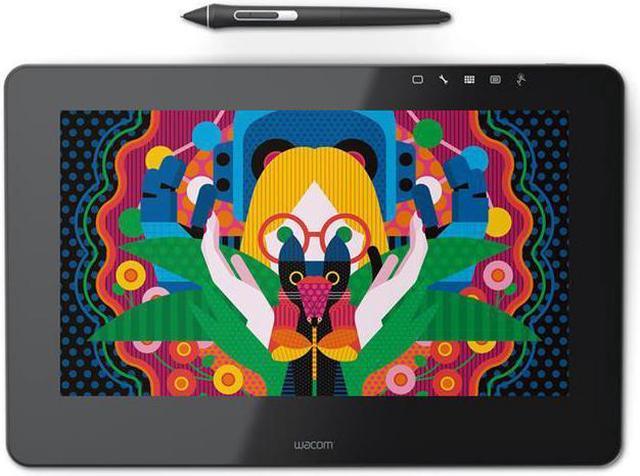
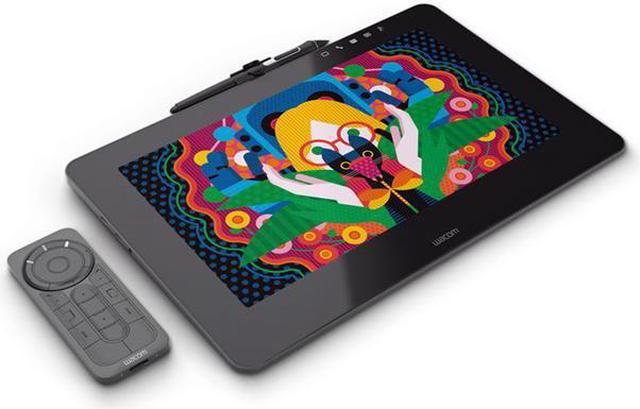


Wacom DTH1320K0 Cintiq Pro 13.0" Creative Pen Display, HD LCD Graphics Monitor, Dark Gray
- Wacom's most natural and advanced pen performance with 4x greater accuracy and pressure sensitivity and virtually lagfree tracking
- Remarkable clarity with highresolution displays and superior color quality (87% Adobe RGB)
- Multitouch gestures, customizable Express keys (available with optional Express key remote), radial menus and onetouch shortcuts to speed your workflow
- The authentic feel and artistic control of the Pro pen 2 on the etchedglass screen
- Integrated stand for working at an inclined angle,Connect to any Mac or PC with a single USBC cable (included) to a USBC port for both video and data
Overview
Specs
Reviews

Any questions? Our AI mode will help you find out quickly.
Try me now

Create directly on screen with our most natural pen experience ever
Wacom Cintiq Pro is designed for professional artists and designers who demand an intuitive, pen-on-screen connection to their work. Whether you work on Mac or PC, Wacom Cintiq Pro featuring Wacom Pro Pen 2 is our most advanced creative pen display ever.
Live. Dare. Create.
Designed for the way you create

Match your creative style:
Available in 13.3” and 15.6” sizes. Choose the one that suits where and how you want to work.

Sharper detail, richer color:
Dazzling displays with up to 4K resolution and the color fidelity to render 94% of Adobe® RGB.

Our best pen yet:
Wacom Cintiq Pro comes with our new Wacom Pro Pen 2 – more accurate, sensitive and responsive than ever.


New Wacom Pro Pen 2: natural and precise
Our new Wacom Pro Pen 2 will instantly become your favorite creative tool. It’s more sensitive, more accurate and more responsive than any pen we’ve ever made.

Wacom Pro Pen 3D

Taking creativity to another dimension
Designed with 3D creativity in mind, the Wacom Pro Pen 3D provides full navigational control in 3D.

Control at your fingertips
Three fully customizable pen buttons let you tumble objects, pan, zoom, model, sculpt or modify creative tools in 3D and 2D applications.

Wacom Pro Pen 2 performance included
4x greater pressure sensitivity*, exceptional tilt-response and lag-free tracking provide greater creative control.

Ready to Create
Works with Wacom MobileStudio Pro, Wacom Cintiq Pro or Wacom Intuos Pro (2017 model) and with any Windows or Mac application.

A display that looks – and feels – incredible
With a resolution of up to 4K and a wide-gamut display (color accuracy up to 94% of Adobe® RGB), you’ll be able to see your work in life-like detail. Drawing on the etched-glass surface gives you a natural pen-on-paper feel with the perfect amount of pen tip friction. It’s so natural that you’ll almost forget you’re drawing on a screen.


Two sizes. Endless possibilities.
One size doesn’t fit all – everyone’s got their own way of working, which is why we offer Wacom Cintiq Pro in two sizes. If you’re often on the road or are short of desk space, the more compact Wacom Cintiq Pro 13 can fit alongside your laptop, while its HD (1920 x 1080px) resolution and 89% Adobe® RGB color accuracy make it the ideal tool for sketching and drawing.
If you want more space to create, Wacom Cintiq Pro 16 has up to 4K (3840 x 2160px) resolution and 94% Adobe® RGB color accuracy – perfect for the most demanding painting and retouching jobs.
Both models come with fold-out legs for a comfortable drawing angle.
Designed for the way you create
As a creative professional, time’s rarely on your side. That’s why Wacom Cintiq Pro puts productivity solutions right at your fingertips.

Connect your way
Connect to any Mac or PC with a single USB-C cable (included) to a USB-C port for both video and data. Or use the included Wacom Link adaptor to connect to a mini DisplayPort (video) and standard USB port (data).

Make it match you
Customizable ExpressKeys™* and Radial menu's* mean that Wacom Cintiq Pro can be quickly configured to fit seamlessly into your workflow.

Navigate with a swipe
Pan, zoom or rotate your work with multi-touch gestures - as simple as using your smartphone.
Warranty & Returns
Warranty, Returns, And Additional Information
Return Policies
- Return for refund within: 30 days
- Return for replacement within: 30 days
- This item is covered by Newegg.com's 30-Day Return Policy.
- Read full return policy for details.
Manufacturer Contact Info
- Manufacturer Product Page
- Manufacturer Website
- Support Phone: 1-800-922-6613
- Support Website
- View other products from Wacom
LOADING...
LOADING...