here!
here!
I’m your shopping assistant for PC builds, upgrades, and everything tech.
Got questions? Ask away!
Start a conversation
here!
I’m your shopping assistant for PC builds, upgrades, and everything tech.
Got questions? Ask away!
Start a conversation






Any questions? Ask CelesteSM will help you find out quickly.

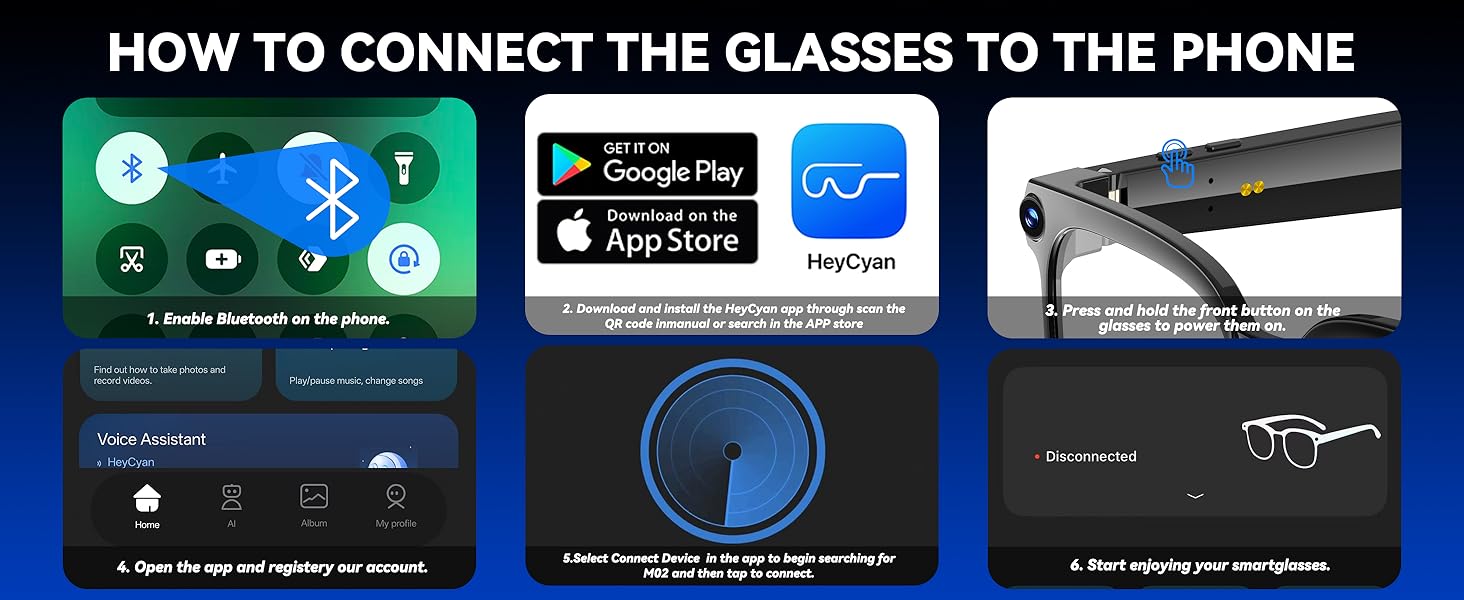
Bluetooth not connecting?
1.Delete the device from your phone's Bluetooth history (remove old devices in settings)
2.Restart both your phone and the device
3.Try connecting with another phone to identify whether the issue is with the device or phone
4.Perform a factory reset
Which app version should I download? Compatibility?
1.For the best user experience, please download the latest version of the app
2.The app requires Android 9.0 or above, or iOS 13.0 and above
Wi-Fi connection fails when importing photos/videos/audio?
1.Ensure your phone’s Wi-Fi is turned on and connected to the device’ Wi-Fi when importing
2.Check that both the device and Wi-Fi firmware are up to date
3.Restart the device and the app
Where are photos/videos/audio saved?
1.They are stored in the device’ local memory by default (temporary storage)
2.Once connected, files can be transferred to the app
What if the local storage is full?
It is recommended to regularly sync data to the app. After syncing:Content is uploaded to the app and local storage on the device will be automatically cleared to free up space.







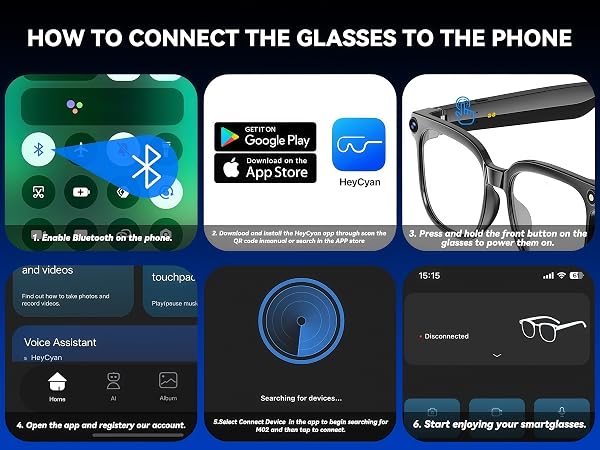
Bluetooth not connecting?
1.Delete the device from your phone's Bluetooth history (remove old devices in settings)
2.Restart both your phone and the device
3.Try connecting with another phone to identify whether the issue is with the device or phone
4.Perform a factory reset
Which app version should I download? Compatibility?
1.For the best user experience, please download the latest version of the app
2.The app requires Android 9.0 or above, or iOS 13.0 and above
Wi-Fi connection fails when importing photos/videos/audio?
1.Ensure your phone’s Wi-Fi is turned on and connected to the device’ Wi-Fi when importing
2.Check that both the device and Wi-Fi firmware are up to date
3.Restart the device and the app
Where are photos/videos/audio saved?
1.They are stored in the device’ local memory by default (temporary storage)
2.Once connected, files can be transferred to the app
What if the local storage is full?
It is recommended to regularly sync data to the app. After syncing:Content is uploaded to the app and local storage on the device will be automatically cleared to free up space.