Are you an E-Blast Insider?
Make informed decisions with expert advice. Learn More

Shop without retyping payment details. Secure shopping made faster.
Check out with PayPal.


Learn more about the XIGMATEK ACK-I7751
| Brand | XIGMATEK |
|---|---|
| Model | ACK-I7751 |
| Type | Accessories |
|---|
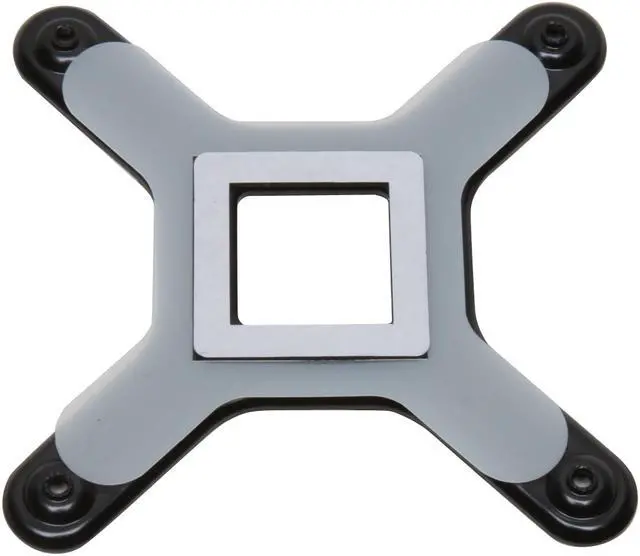
| Features | Appropriately increase the fasten force of cooler and CPU Provide more options of installation Protect and prevent the MB from binding Able to extend MB lifetime Ensure installation when MB moved |
|---|
| Date First Available | May 22, 2008 |
|---|
Pros: See "other thoughts".
Cons: See "other thoughts".
Overall Review: A few people have mentioned that you are "required" to use the adhesive to mount this to the mobo. NO YOU AREN"T! Just lay your mobo on 2-3 pieces of cardboard and lay the mount under the mobo, align the holes and attach HSF, the adhesive isn't necessary...at all. And then later you can remove the mount without worrying that it's welded to the board. Also, with the screws, it's best to screw them in very similarly to how you would do the lugs on your cars tires....tighten each screw little by little, alternating between scews on the opposite side, and criss-cross from each other. This helps ensure even pressure between the HSF and the CPU.
Pros: Lined up perfect on a GIGABYTE GA-EP45-DS3R Motherboard. Has stops on the screws to prevent over tightening. Works with any of the other CPU coolers that use the reference Ximatek design and then some.
Cons: The sticky material on the plate is mighty sticky and combined with the heat is liable to become permanently attached to any motherboard you use it on. I peeled off one corner of the paper on the sticky to test it out and nearly had it permanently attach itself to a finger, so Buyers beware.
Overall Review: The trick of getting around the sticky stuff is to not remove the paper layer on it, which still allows it to act as a cushion on the back of the motherboard. Used this product with 2 builds so far and would recommend it over the push pin method any day.
Pros: Excellent device, a must have for the Ximgatek cooler owners. My heatsink is now securely attached to the motherboard, I did not dare to use the push-pins that came with cooler given the weight of the heatsink.
Cons: It sucks to pay for something that should have been included with the heatsink and shipping fee equal to the price was really painful (hey, the item is not that heavy; I paid the same shipping for a power supply)
Overall Review: This will only fit the Xigmatek coolers that have 3 heat pipes. IT WILL NOT WORK WITH 4-pipe coolers (sorry to yell, trying to get my point across).
Pros: Cheap Easier (if you don't have the fan already on...) Actually made my core have more even temps, and a little bit colder than with the push pins.
Cons: Should of came with the s1283 in the first place.
Overall Review: my lowest core use to idle 34c now it idles 31c, and my load dropped 4c.
Pros: Not only does this retention bracket increase thermal performance of the CPU Heatsink, it secures heavy heat sinks for shipping a pre-built system. Normal push-pin mounted heatsinks tend to fall off while the shipper plays football and soccer with the package.
Cons: I installed this bracket on many systems- out of all of them I had only 1 problem. One time the threading was stripped so the screws couldn't screw in. Had to replace it.
Pros: Very good product, the most value you get out of it is the peace of mind your big heatsink isn't going to take a nose dive onto your video card.
Cons: None
Overall Review: Must have
Pros: Well made. Great design - much better than original Intel. By using this mounting bracket system you may be able to avoid warping your MB to mount the CPU cooling fan. I used on an Intel LGA 775 CPU (Biostar TPOWER) to mount a Roswell RCX-Z300 92 MM double ball fan, copper core cooler, whose mounting system was identical to the Intel fan & heatsink included with my 3.0 Ghz Wolfdale CPU.
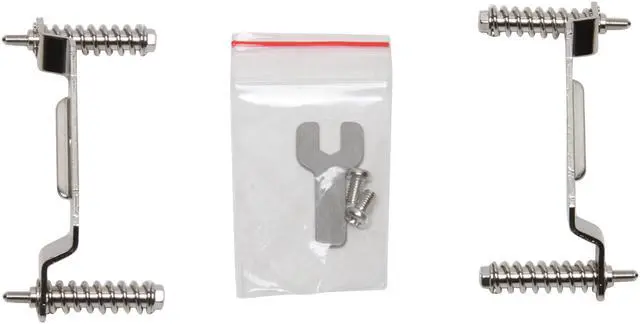
Cons: Only that some modification has to be made to use this bracket system on other coolers. Also cannot say that it will fit all other coolers or MB's either. If you have the original Intel Push-pin design for the CPU cooler it is likely warping your MB due the high stress it puts on it. This Xigmatek bracket may provide you with a much better solution - but you will have to ensure there are no clearance or shorting issues of this "crossbow" under your MB, you will have to permanently remove the original push-pins, and you will have to move the special spring-loaded screws from the Zigmatek brackets to those on you CPU cooling fan heatsink. It worked great for me. Here's what I did - -
Overall Review: 1st- MB disconnected & removed from case. Ensured "crossbow" fit to MB bottom under CPU w/o interfering with any circuits & that mounting holes lined-up(very important!). Fit fine so I cut off 4 push-pins from Rosewill metal mounting brackets. Removed 4 springs/special screws from Xigmatek brackets by easing off circlips with small flat blade screwdriver & re-installed them onto the Rosewill brackets, where push-pins used to be. Cleaned CPU & copper core surfaces, reapplied Artic Silver. Carefully set MB over "Crossbow" (wearing anti-static strap included with this Rosewill combo), lining up mounting holes. Tightened up the 4 screws, working diagonally & only tightening each 2 turns until the screw shoulders were snug against the top of the MB. Checked fit of cooler against CPU to ensure tight, flat fit. Result: MB no longer warped- mounting force supported by "crossbow" & CPU/cooler were tight from spring-loaded screws. Works Great!
Warranty & Returns
Warranty, Returns, And Additional Information
Return Policies
- Return for refund within: 45 days
- Return for replacement within: 1 year
- This item is covered by Newegg.com's 45/1 Return Policy
Manufacturer Contact Info
- Manufacturer Product Page
- Manufacturer Website
- Support Phone: 1-631-343-7232
- Support Email: info.usa@xigmatek.com
- Support Website
- View other products from XIGMATEK


Pros: It's definitely a more solid alternative to the LGA 775 push-pins if you move your case around a lot and/or get nervous about that kind of thing. There's a nice plastic pad between the metal and the PCB that prevents shorting.
Cons: It's a one time installation. The adhesive is excessively sticky; it's like super glue. Do NOT use this unless you know for an absolute fact that you'll never want to use anything other than a Xigmatech cooler on the motherboard you're installing it on.
Overall Review: I ended up doing a motherboard swap post installation. Removing the back plate was not pretty, it took the better part of a day and is effectively destroyed. The adhesive is still stubbornly attached to the motherboard (which is in the family computer now), but it's not hurting anything. I also chipped some of the PCB off one of the mounting holes, but thankfully that did no (functional) damage either. My Xigmatech cooler is now installed with the push pins, which is how I'll be leaving it for a while. I blame this on my own indecisiveness, not Xigmatech. I just want to stress that this thing is quite permanent.