Who says cutting edge cool has to be expensive? Thermaltake's VA3000BWA begs to differ. This affordable case doesn't need any fancy words to show its edge of cool, one picture is more than enough. But don't think this is just another pretty face. With four external 5.25" drive bays, two 3.5" external drive bays, and five internal 3.5" drive bays, this case has room for whatever you need of it.
The side panel window has a 90mm blue LED fan for max light and cooling. It has two 120mm fans: one in the rear and one in the front, with an innovative mesh design for improved air flow to make sure the heat from this system is just from its looks. With all this, what more could be asked of it? How about the durability of steel to protect your investment? This is indeed the total package you’ve been looking for.
Who says cutting edge cool has to be expensive? Thermaltake's VA3000BWA begs to differ. This affordable case doesn't need any fancy words to show its edge of cool, one picture is more than enough. But don't think this is just another pretty face. With four external 5.25" drive bays, two 3.5" external drive bays, and five internal 3.5" drive bays, this case has room for whatever you need of it.
The side panel window has a 90mm blue LED fan for max light and cooling. It has two 120mm fans: one in the rear and one in the front, with an innovative mesh design for improved air flow to make sure the heat from this system is just from its looks. With all this, what more could be asked of it? How about the durability of steel to protect your investment? This is indeed the total package you’ve been looking for.
 Mirror-Coated Lightweight Aluminum CaseThe lightweight, sturdy, all-aluminum Thermaltake Tsunami VA3000BWA with mirror coating surface weighs only up to 6.0 kg and fits into virtually any space.
 Maximum Expandability with 11 Drive BaysThe Thermaltake Tsunami VA3000BWA boasts four external 5.25" drive bays, two external and up to five internal 3.5” drive bays for peerless expandability.
 Highly Efficient VentilationA 9cm side fan delivers effective cooling for the CPU and graphics card while dual 12cm fans in the front and at the rear provide great airflow and heat dissipation throughout the case.
 Easy InstallationThe Thermaltake Tsunami VA3000BWA features 5.25" sliding rails and slide-in cages for convenient hard drive mounting. Screwless expansion slots for quick PCI card installation and thumb-screws for tool-less access using the side panel, plus a washable dust filter for easy cleanup and replacement all add up to an extremely easy chassis to work with!
 Maximum SecurityThe security locks on the front bezel and side panel prevent unauthorized access for maximum security.
 Convenient Top I/O PanelThe convenient top I/O panel ensures easy access to dual USB 2.0 ports, an IEEE 1394 Firewire port and two Audio & Speaker ports.




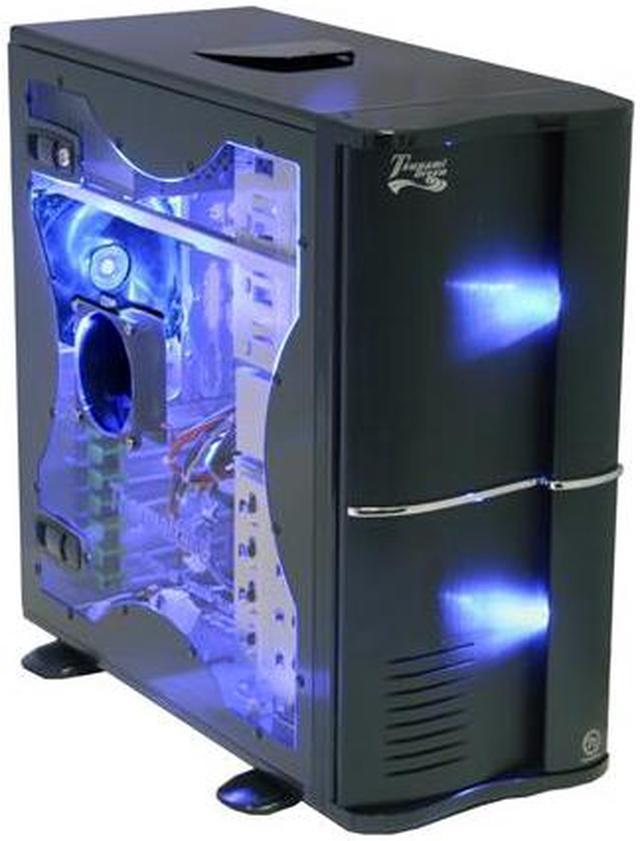





 Mirror-Coated Lightweight Aluminum CaseThe lightweight, sturdy, all-aluminum Thermaltake Tsunami VA3000BWA with mirror coating surface weighs only up to 6.0 kg and fits into virtually any space.
 Maximum Expandability with 11 Drive BaysThe Thermaltake Tsunami VA3000BWA boasts four external 5.25" drive bays, two external and up to five internal 3.5” drive bays for peerless expandability.
 Highly Efficient VentilationA 9cm side fan delivers effective cooling for the CPU and graphics card while dual 12cm fans in the front and at the rear provide great airflow and heat dissipation throughout the case.
 Easy InstallationThe Thermaltake Tsunami VA3000BWA features 5.25" sliding rails and slide-in cages for convenient hard drive mounting. Screwless expansion slots for quick PCI card installation and thumb-screws for tool-less access using the side panel, plus a washable dust filter for easy cleanup and replacement all add up to an extremely easy chassis to work with!
 Maximum SecurityThe security locks on the front bezel and side panel prevent unauthorized access for maximum security.
 Convenient Top I/O PanelThe convenient top I/O panel ensures easy access to dual USB 2.0 ports, an IEEE 1394 Firewire port and two Audio & Speaker ports.


