Skip to: |

Newegg.com - A great place to buy computers, computer parts, electronics, software, accessories, and DVDs online. With great prices, fast shipping, and top-rated customer service - once you know, you Newegg.

If you are reading this message, Please click this link to reload this page.(Do not use your browser's "Refresh" button). Please email us if you're running the latest version of your browser and you still see this message.

Newegg.com - Computer Parts, Laptops, Electronics, HDTVs, Digital Cameras and More!

  • | Wish List
  • Help
Home
Home > 
Computer Hardware > 
Computer Cases > 
HTPC / Media Center Cases > 
NMEDIAPC > 
Item#: N82E16811204032

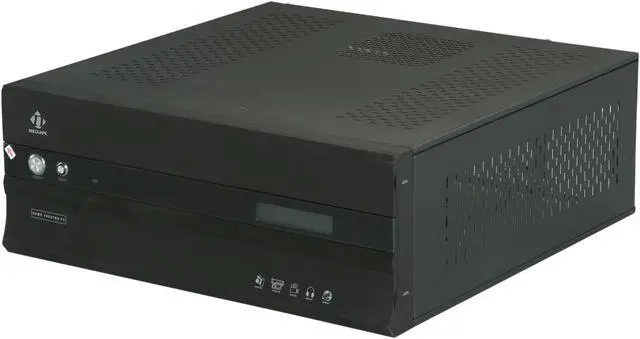
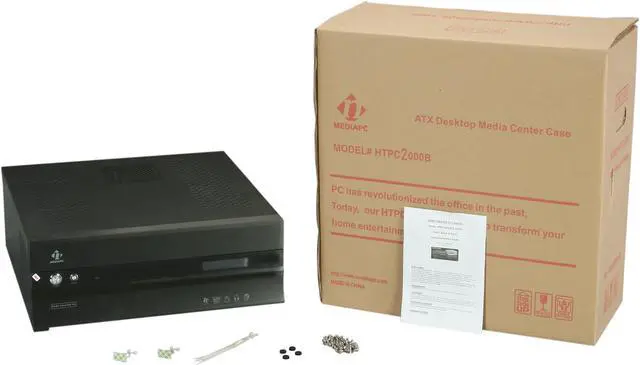
nMEDIAPC Black Aluminum / Steel HTPC 2000B ATX Media Center / HTPC Case

  • Aluminum panel & Steel
  • USB 2.0 x 2, Card Reader
  • 2 x 80mm fans, 1 x 120mm fan
  • Pin It
  • Email this page
ICON Loading...

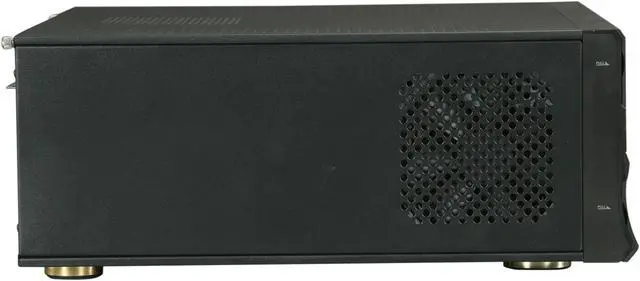
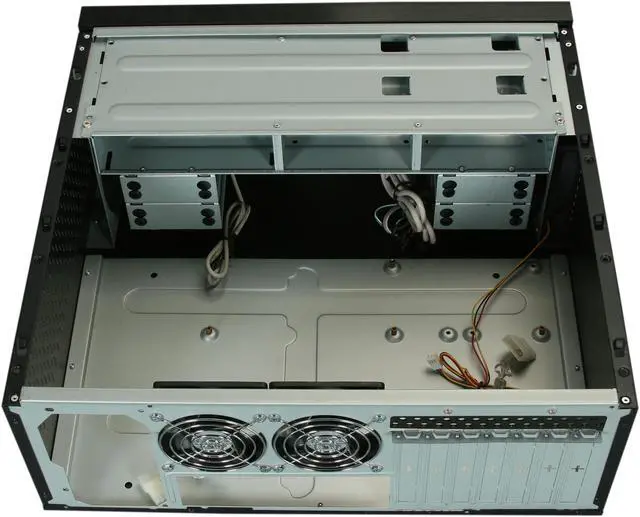
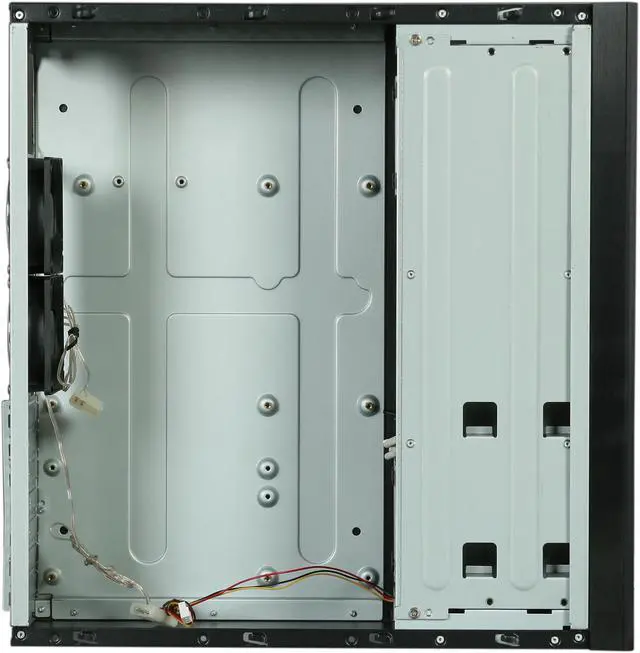
The nMediapc HTPC 2000 Series let you build an HTPC that won't look out of place when you put it with the rest of your A/V equipment. It supports all standard form factor ATX/Micro ATX/ITX components and allows six HDDs in this case to meet your media center storage needs. So, with the right choices in components this one box can eliminate a number of standard AV components. Keeping all the components cool it comes with two 80mm case fans and one 120mm HDD fan. Top and side vents are included to help with air flow.

  • newegg Usable Expandability with 7 Drive Bays The nMEDIAPC HTPC 2000B provides usable expandability with one external 5.25" and four 3.5" drive bays (one external and six internal).
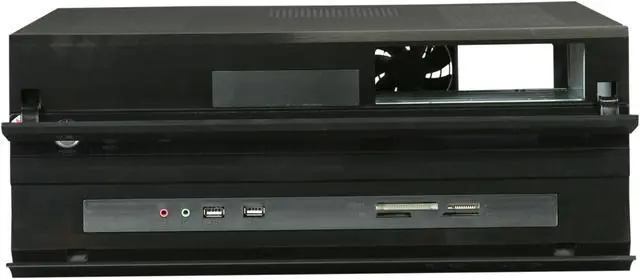
  • newegg Convenient Front I/O Panel The nMEDIAPC HTPC 2000B features a convenient front I/O panel for easy access to two HD Audio ports, one SDHC 2.0 Card Reader and two USB 2.0 ports. It enables you to serve all your new digital media needs upfront (without having end users to turn around the entire case to find connection ports on the back).
  • newegg LCD Module (Optional) The front panel LCD module provides media center PC display functions (i.e. Movie, TV program, Song title etc.) and surveillance of CPU and case temperatures as well as control of CPU fan speed.
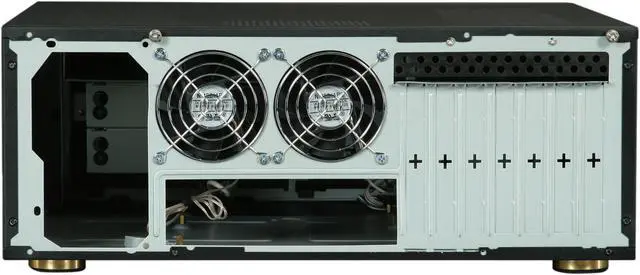
  • newegg Excellent Ventilation The nMEDIAPC HTPC 2000B case features one 120mm Case Fan and two 80mm Silent Case fans for excellent ventilation.

Learn more about the NMEDIAPC HTPC 2000B

General

Brand
nMEDIAPC
Model
HTPC 2000B

Spec

Type
ATX Media Center / HTPC Case
Color
Black
Case Material
Aluminum / Steel
Power Supply
No
Motherboard Compatibility
ATX, Micro ATX

Expansion

External 5.25" Drive Bays
1
Internal 3.5" Drive Bays
6
Expansion Slots
7

Front Ports

Front USB Ports
USB 2.0 x 2
Front Audio Ports
High Definition Audio (AC 97 compliance also)
Front Card Reader
All in one Card Reader (SDHC 2.0 compliance - high capacity & speed)
Front Display
20X2 Programmable LCD display module (Optional, not included)

Cooling System

80mm Fans
2
120mm Fans
1

Features

Features
Easy upfront access digital connection interfaces (behind door)

Support full height PCI cards

Stylish aluminum panel

Compact size and feel

Optional upgrade on 20x2 programmable MCE LCD module

Innovated architecture makes your installation easy

Dimensions&Weight

Height
6.6"
Width
17"
Depth
16.4"

Manufacturer Warranty

Parts
1 year limited
Labor
1 year limited

Quick Info

Warranty

  • Limited Warranty period (parts): 1 year
  • Limited Warranty period (labor): 1 year


Customer Reviews of the NMEDIAPC HTPC 2000B

Do you own this product? Write a Review

Filter Results

Go
  • DAL88
  • 4/18/2013 12:53:14 PM
  • Tech Level: Somewhat High
  • Ownership: 1 month to 1 year
  • Verified Owner

4 out of 5 eggsGreat Case - but plan ahead

Pros: Aluminum front panel, plenty of build room, holds multiple hard drives, great looks, sturdy construction

Cons: poor design with regard to screw holes. Plastic grill for cards cheap and easy to break. instructions poor and not helpful

Other Thoughts: plan ahead for power supply installation, screws may not line up or you may have to reverse the direction. Flip down panel in front may not fit within media center for some, measure carefully. Get a usb IR reader for your remote that sits on top, easy to use. Overall, a great case for the money, I would buy again - it just needs some finesse to work.

1 out of 1 people found this review helpful. Did you? Yes No

  • PA-Guy
  • 4/16/2013 10:44:26 PM
  • Tech Level: Average
  • Ownership: 1 week to 1 month
  • Verified Owner

5 out of 5 eggsGreat HTPC Case!

Pros: Nice look (just like the rest of my a/v equipment).
Easy to install (one exception).
Nice front end options (USB ports, IEEE 1394, card reader).

Cons: No IR receiver. This is an HTPC case. Your going to want a remote. A receiver added just to the right of the reset button would have been great.
Adding expansion cards was tough because of the plastic grill. Mine snapped off while trying to get card installed.
The doors are a bit tough to open, but provide a sleek look.

Other Thoughts: I think the case has been around for a while, but a USB 3 port on the front would be a nice upgrade.

1 out of 1 people found this review helpful. Did you? Yes No

  • Ryan
  • 4/12/2013 11:16:51 AM
  • Tech Level: Somewhat High
  • Ownership: 1 day to 1 week
  • Verified Owner

2 out of 5 eggsNot the best

Pros: It looks nice in my rack. Solid all-metal construction. HDD and optical drive mounting was convenient as the unit swings out.

Cons: Where do I begin?

First, my PSU didn't quite fit as the fan grill would hit the rear 80mm fan on the case. Bending the grill on the PSU caused the 80mm fan to bind making it useless. The other fan is fine.

The built-in card reader doesn't work. I tried plugging it in every available USB header but failed to be recognized.

The HDD LED in the front isn't visible. You can see it working from behind the case but not visible from the front.

MANY SHARP CORNERS!!! Not only inside the case but the rear expansion slots.

Due to the front USB connectors being behind the lower door, it needs to be remained open for my infrared USB dongle to work. Would've been nice to have one built-in.

The optical drive doesn't mount flush in the front. Thankfully it sits behind the upper door so it's not visible but it also has sharp corners on the opening.

Some of the screw holes don't quite match up. They fit but are not straight. It is also missing some holes to fit my motherboard which makes plugging in cables a challenge. The board hangs on the right side and any pressure causes the board to flex.

While the included fans are a nice touch and are silent, they don't move much air.

Other Thoughts: This case could be an overall nice box for an ATX HTPC but fails in quality control.

Did you find this review helpful? Yes No

  • N/A
  • 3/15/2013 10:36:42 AM
  • Tech Level: High
  • Ownership: less than 1 day
  • Verified Owner

5 out of 5 eggsPleased with purchase

Pros: The motherboard offset screws lined up perfectly on my ATX board. I read reviews complaining of this. Case is very quiet too. Very pleased. Easy to put together too.

Cons: none to speak

1 out of 1 people found this review helpful. Did you? Yes No

  • Almost Great Case
  • 12/31/2012 4:40:47 AM
  • Tech Level: Somewhat High
  • Ownership: 1 month to 1 year
  • Verified Owner

4 out of 5 eggsMedia Center Computer

Pros: Nice looking case. Nice tilt open rack to install the hard drives. Can close the panel with a DVD/Blu-Ray disc in and not see the drive light blink while watching the movie, I also disconnect the HDD light for the same reason. Only the blue power light stays on steady.

Cons: After I opened the top front panel to open the Blu-Ray player, I cut my finger on the upper edge of the panel. This panel was machine with a very sharp edge. I took a file to all the edges (upper and lower panel). I notice while opening the case up that the screw holes does not line up, had to force it a little to get the screws back in. Installing the Blu-Ray drive the screw holes was too far off. Had to drill out the support bracket and move it over an 1/8" and pop rivet it back in place. No provision to mount a 2 1/2" SSD drive without an adapter, made for 3 1/2" drive only. Has more fan noise than I wanted, but watching Media Center you can't hear it. The tilt open rack should have the lower racks removable for easy repairs/upgrade.

Other Thoughts: I knew from the start the case was big, its bigger than my audio amp. Didn't expect a poor fitting case. Not enough quality control during manufacturing. This could have been a great case.

1 out of 1 people found this review helpful. Did you? Yes No

  • N/A
  • 12/14/2012 8:30:57 AM
  • Tech Level: Somewhat High
  • Ownership: 1 week to 1 month
  • Verified Owner

3 out of 5 eggsAcceptable

Pros: Case is very large and easy to work with. Had no issue fitting any of my parts inside it. This case my be larger than what you need for a HTPC. However it is one of the few good full ATX cases out their.

Cons: As others have stated this case workmanship could have been of a higher quality. Screw holes not quite matching up. You can make everything fit just need to will it into place.

Intake fan makes a clicking noise and is much louder than the two exhaust fans in the back. Brought a new fan have yet to install but again poor quality.

Hard drive bay I can see 4 hard drives easily fitting in. 6 drives? I agree with others heat and GPU may impact how many drives you can install. If you have less than 4 drives you are fine. More than that look elsewhere.

Other Thoughts: Just keep in mind the size. This will be by far the largest 'media device' you will have on your shelf.

This is the first and probably last time I will buy this brand based solely on the quality.

2 out of 2 people found this review helpful. Did you? Yes No

  • Micrometeor
  • 11/23/2012 9:00:53 AM
  • Tech Level: Somewhat High
  • Ownership: 1 week to 1 month
  • Verified Owner

5 out of 5 eggsVery Nice HTPC case

Pros: Does not look at all like PC case. FX-8120 runs very cool @ 8-22c in this case that has plenty of ventilation for typical restrictive HTPC areas. Very good and Quick tech support via email.

Cons: No variable resistors on HDD and Power LEDs instead nMedia paints a very thick black paint on HDD LED to the point it was not visible at all. No mention of removal of front panel to remove paint from HDD LED in supplied user guide.

Other Thoughts: My system:
This case
Asus M5A97 R2.0
FX-8120 8-core CPU
CoolerMaster Gemini II 120mm CPU Cooler
32G G.Skill Sniper 1866 RAM
Hauppauge HVR 2250 TV Tuner
Thermaltake 675W PS

2 out of 2 people found this review helpful. Did you? Yes No

  • jpkloes
  • 10/14/2012 3:13:02 PM
  • Tech Level: High
  • Ownership: 1 day to 1 week
  • Verified Owner

4 out of 5 eggsGood but not great

Pros: The case is built of solid steel, with some great thought behind the layout. It looks nice and has room for everything. It can hold 6 HDDs comfortably, and there's adequate cooling for a fairly hefty build.

Cons: Some of the screw holes don't line up just right. Again, it's solid steel, it didn't get bent a little in shipping. It was drilled (by machine) WRONG. I was able to get all my screws in with some coaxing. I had to get each one started then go back and tighten them. Regardless, it should be better than that.

Other Thoughts: A little better attention to detail on the part of the manufacturer would make this case 5 eggs without a doubt.

1 out of 1 people found this review helpful. Did you? Yes No

  • N/A
  • 10/11/2012 9:39:36 PM
  • Tech Level: Somewhat High
  • Ownership: less than 1 day
  • Verified Owner

4 out of 5 eggsAwesome case, some issues

Pros: Very clean streamlined look. Love the Aluminum front bezel. Power and reset buttons look and feel quality, Power button blue LED looks great. Plenty of room for 6 drives + DVD/Blu-Ray ROM, so says the manual.

Assmebling three ATX and one MicroATX version (1000B) into my audio component tower. The first one arrived today and it looks amazing, whisper quiet too after installing 120MM fans with (L/M/H) switch....set all fans to low.

This setup will look extremely nice next to my HDTV, when complete. These cases will house, One Smoothwall Express firewall (appliance), One MCE HTPC, One Ubuntu Server (FTP,SSH,VPN,Subsonic, etc. etc.) And last but not least a Windows 7 all purpose system for the house.

Can't wait for the rest of these cases to arrive.

Unfortunately there are some cons.

Cons: Misaligned screw fittings and warped drive cage.

PCI and PCIe cards don't fit properly when you try to tighten them down.

Small case "buldge" on top in rear of case, after closing it up. I can't see it in my audio rack, but I know its there.

Manual

Other Thoughts: Every screw fitting, and I mean every one is misaligned. I was able to get everything tightened down though. Just kind of pain. Also, the Hard Drive Cage (the manual calls this the "Bracket") was warped.

The Manual...heh, well this is kind of funny and bloody infuriating at the same time. Not only does the Manual refer to the removable drive cage as a bracket, but it mentions sliding the optical drive into a "Bracket, then locking the drive mount into the A or B position" I cant remember which right now. Whaa? I started looking for an additional optical drive mount/bracket and locking mechanism. I couldn't find any of these things and almost boxed everything up and RMA'd it thinking I would never lock down the optical drive. So I spent 15-20 minutes looking at every inch of the removable drive cage until I found two small screw holes underneath the optical drive slot labeled A & B.

Did you find this review helpful? Yes No

  • Aurelius
  • 8/16/2012 8:17:07 PM
  • Tech Level: Somewhat High
  • Ownership: 1 month to 1 year
  • Verified Owner

2 out of 5 eggsSome candid insight

Pros: The materials of the case are really solid. You do not have a plastic or thin aluminum front. The case seems well built and sturdy.

Cons: I would not recommend this case if you are using a larger graphics card, and an SSD because of the following reasons: 1. When mounting your SSD, at least in my case, it requires specific screws with its 3.5 bracket. This makes it difficult (but not impossible) to use with the rubber screw holes that use a specific screw with a buffer. The problem is that this screw is too large for my mounting bracket. 2. If you are using a graphics card that is longer than 9" forget about it mounting into your system WITH the optical drive. I ended up having to leave the case open and the optical drive hooked up and left on top of the case just to install windows and the drivers for my MB. I then unhooked the optical drive to finish my cable management and to seal the case.

Other Thoughts: The case fits nicely in my TV stand and even though I gave it a 2 egg review, I think its well built. However, BE ADVISED, if you are wanting to run a high end graphics card that has significant length to it look elsewhere.

Did you find this review helpful? Yes No

ICON Loading...
Are you an E-Blast Insider? Subscribe Newegg e-Blast

Buzz

Big Black Box

4 out of 5 eggs
Easy to build in if you read the instructions and notes from nMEDIAPC's web site. Four hard drive mounts have rubber ...
— Seawolfbronco 3/19/2011

Great Case!

5 out of 5 eggs
Very well built, Front panel is aluminum not plastic, fit and finish is very good. Interior design is well thought-out.
— Cam Man 12/2/2008


PayPal
Shop without retyping payment details. Secure shopping made faster.
Check out with PayPal.

Financing


Home
Home > 
Computer Hardware > 
Computer Cases > 
HTPC / Media Center Cases > 
NMEDIAPC > 
Item#: N82E16811204032
LOADING... LOADING...
Shop by Region: United States | Canada | China
Follow us:   RSS Feeds Youtube
VeriSign Reliability Seal1This site protected by Trustwave's Trusted Commerce program Inc500
Policy & Agreement | Privacy Policy  © 2000-2013 Newegg Inc.  All rights reserved.
If the Adobe Reader does not appear when you click on a link for a PDF file, you can download Adobe Reader from the Adobe web site. nassau