Skip to: |

Newegg.com - A great place to buy computers, computer parts, electronics, software, accessories, and DVDs online. With great prices, fast shipping, and top-rated customer service - once you know, you Newegg.

If you are reading this message, Please click this link to reload this page.(Do not use your browser's "Refresh" button). Please email us if you're running the latest version of your browser and you still see this message.

Newegg.com - Computer Parts, Laptops, Electronics, HDTVs, Digital Cameras and More!

  • | Wish List
  • Help
Search all
Search
Home
Home > 
Computer Hardware > 
Motherboards > 
Intel Motherboards > 
Intel > 
Item#: N82E16813121622

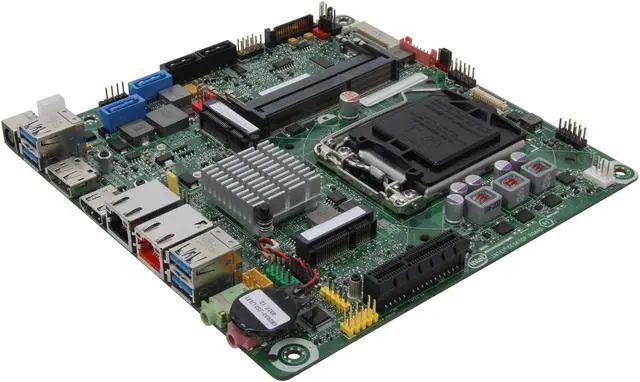
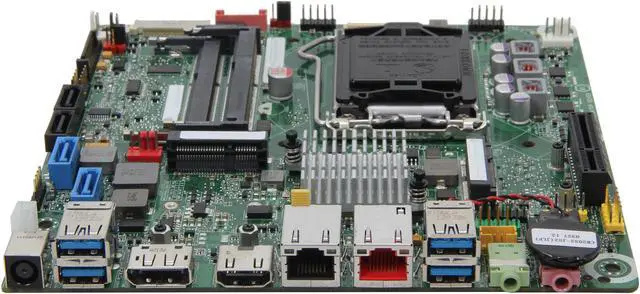
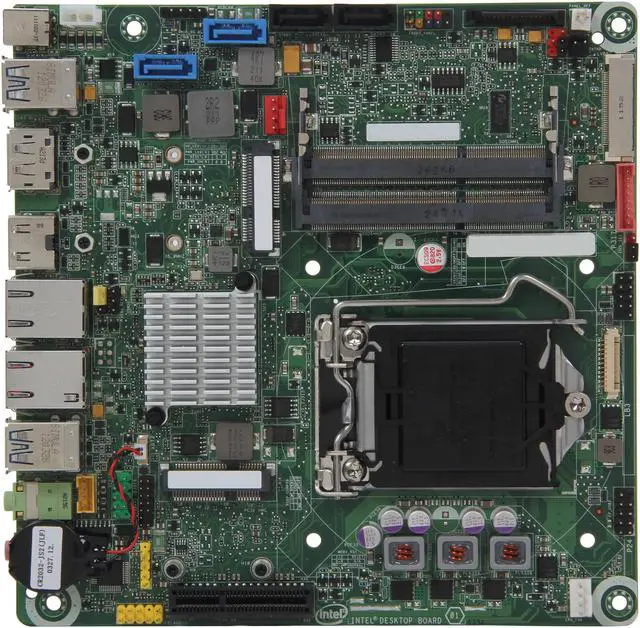
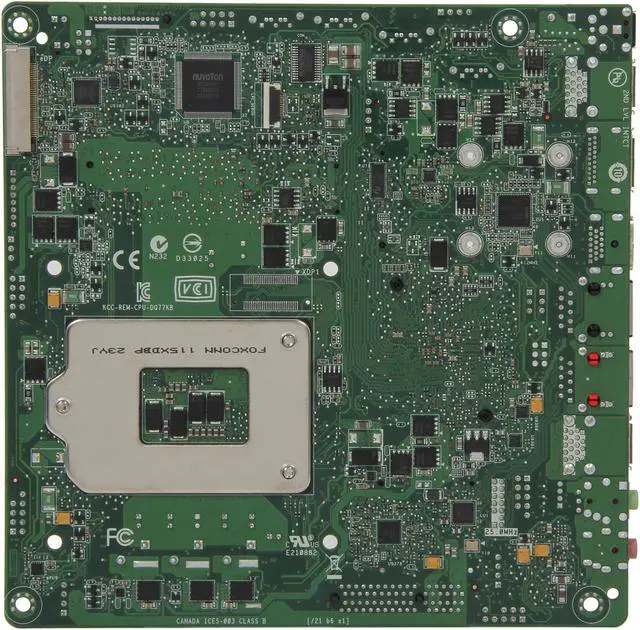
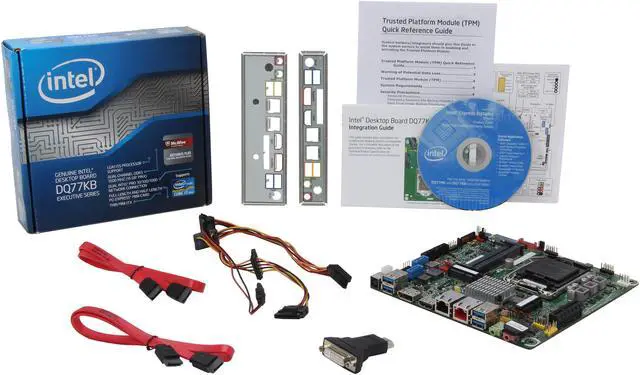
Intel BOXDQ77KB LGA 1155 Intel Q77 HDMI SATA 6Gb/s USB 3.0 Mini ITX Intel Motherboard

  • LGA 1155
  • Intel Q77
  • 2×204pin SO-DIMM DDR3 1600/1333/1066
  • Pin It
  • Email this page
ICON Loading...

Learn more about the Intel BOXDQ77KB

Model

Brand
Intel
Model
BOXDQ77KB

Supported CPU

CPU Socket Type
LGA 1155
CPU Type
Core i7 / i5 / i3 (LGA1155)

Chipsets

North Bridge
Intel Q77

Memory

Number of Memory Slots
2×204pin SO-DIMM
Memory Standard
DDR3 1600/1333/1066
Maximum Memory Supported
16GB
Channel Supported
Dual Channel

Expansion Slots

PCI Express x4
1
Mini Card Slots
2 x Mini PCIe

Storage Devices

SATA 3Gb/s
2
SATA 6Gb/s
2 x SATA 6Gb/s

Onboard Video

Onboard Video Chipset
Supported only by CPU with integrated graphic

Onboard Audio

Audio Chipset
Realtek ALC892
Audio Channels
6 Channels

Onboard LAN

LAN Chipset
Intel 82579LM
Second LAN Chipset
Intel 82574L
Max LAN Speed
Dual 10/100/1000Mbps

Rear Panel Ports

HDMI
1 x HDMI
DisplayPort
1 x DisplayPort
USB 3.0
4 x USB 3.0
Audio Ports
2 Ports

Internal I/O Connectors

Onboard USB
5 x USB 2.0

Physical Spec

Form Factor
Mini ITX
Dimensions
6.7" x 6.7"

Quick Info

Warranty

  • Limited Warranty period (parts): 3 years
  • Limited Warranty period (labor): 3 years


Customer Reviews of the Intel BOXDQ77KB

Do you own this product? Write a Review

Filter Results

Go
  • dstephens80
  • 6/18/2013 6:59:25 AM
  • Tech Level: High
  • Ownership: 1 day to 1 week
  • Verified Owner

5 out of 5 eggsLove it!

Pros: 2x GB NICs
small form factor
DC power connector

Cons: Price is a little high for what I am using it for.
the DC power connector (I should have researched more before purchasing)

Other Thoughts: Using this board with a G630T (35W) in a Habey case as a pfSense firewall. I absolutely love this setup. Only complaint was with myself and my lack of research on the power connector. I got luck and had a Dell power brick from a docking station that worked perfectly. Anyone having issues with this board and the Intel NICs on Linux, this is a known bug with an easy fix, search for "e1000e source code" and you will find it, after which the board works flawlessly.

Did you find this review helpful? Yes No

  • N/A
  • 6/17/2013 4:23:19 AM
  • Tech Level: Somewhat High
  • Ownership: less than 1 day

4 out of 5 eggsGreat for pfsense

Pros: I'm using this for a IDS/Firewall/router pfsense box. I really like the low profile board, fits into just about any case.

Cons: Not sure why they have an internel 2-pin atx power connector since there are no power suppy out there for it.

I'm using a 160 watt ac/dc (laptop) power supply for it.

Other Thoughts: Pfsense with 16gb of ram + Intel i3-2100 = overkill

Did you find this review helpful? Yes No

  • Dave Crowder
  • 5/30/2013 7:38:17 PM
  • Tech Level: Somewhat High
  • Ownership: 1 month to 1 year

5 out of 5 eggsFollow-up from Feb

Pros: form factor, low power use and great feature set for home use

Cons: None, yet

Other Thoughts: I now use 2 of the boards couple with 3225 proc at home and have now built 3 more similar rigs for neighbors. All love the smaller size and lower power usage. Will probably be doing more before yearend

Did you find this review helpful? Yes No

  • WayneS
  • 4/16/2013 6:45:18 PM
  • Tech Level: High
  • Ownership: 1 month to 1 year
  • Verified Owner

1 out of 5 eggsLinux users beware

Pros: low power, low profile, and looks really cool in a Lian Li PC-Q05B with custom heatsink.
This is an update to a previous review. Bios update latest is 51, and will flash from 49 using recovery mode.
Supposedly two ethernet ports, but see next, they don't work in Linux.

Cons: The ethernet chipsets are a disaster for Linux. Note several other MB's have same 82579LM and 82574L Intel chips. The ethernet EEPROM data needs to be fixed, or can hang the system for up to two minutes. Both my ethernet ports have the same mac address, a real pain to deal with. Have no fix for 82579LM yet.

Other Thoughts: UEFI booting is also a pain as the bios will not recognize a disk as bootable unless you put a loader in the boot partition at /EFI/boot/. Once a bootloader is there, it will then recognize NVRAM boot entries. In linux I tried efibootmgr and also ran shellx64 bcfg command to set the boot config, but only when a loader was put in /EFI/boot/ did the bios recognize the disk as bootable, then it would honor the actual NVRAM settings. Bios is still evolving.

The ethernet hangs make this MB useless for Linux unless there is a fix down the road to the ethernet chip or work around. Also random dropped packets. The Intel support forums response is "Intel motherboards do not support Linux."

If you want to run Linux on this board, it is not well supported and will be problematic. Just search "e1000e Linux detect hardware unit hang". Caution on other MB's that use this chipset like the Supermicro X8SIL-F.

3 out of 3 people found this review helpful. Did you? Yes No

  • Wayne S
  • 3/5/2013 6:01:25 PM
  • Tech Level: High
  • Ownership: 1 month to 1 year
  • Verified Owner

3 out of 5 eggsbios update madness

Pros: Lian Li PC-Q05B compatible for small size, but needs custom heat sink.
Dual ethernet. Compatible with many HP laptop PSUs which one can get from "auction site" for cheap.

Cons: Bios Update is full of problems. You can brick the device if not done properly. You have to downgrade the bios to the first version before you can upgrade to the latest, otherwise you get: DQ77KB - Bios update fails - error: FwUpdateFullBuffer. Seems the bios versions past he first, 38, does not leave enough room to properly update later bios versions > 14m. And you can only reliably update the bios using the "bios recovery mode", no F7 or IFLASH2 bootable media. Definitely search the Intel community for FwUpdateFullBuffer discussions to get the right procedure.

Other Thoughts: My system includes i3-3225 cpu and CORSAIR Vengeance 16GB (2 x 8G) memory. Neither the processor or the memory have a problem with this MB.

My initial Newegg board arrived but when powered on, did absolutely nothing, no post, only the cpu fan would spin on and off. I highly suspect Newegg probably shipped me a returned bricked MB, which is easy to do. Because I delayed 30 day I had to RMA with Intel. I received a new board from Intel and it was bios version 43. I had to down grade the bios to 38 before I could upgrade to latest version 49, which I require for a Linux UEFI boot capable board. Check the intel forums, only use the bios recovery mode, and disconnect the CMOS battery for 10-15min between updates.

Compatible with many 90W HP laptop PSUs which one can get from "auction" for cheap. Just make sure the connector is 7.4mm outer and 5-5.1mm inner, and the 90W (4.74A) is probably sufficient. The board provides power for sata drives, etc, so if you think you need more, I suggest the HP TouchSmart 310 135W AC Power Adapter.

3 out of 3 people found this review helpful. Did you? Yes No

  • Dave Crowder
  • 2/9/2013 9:01:31 PM
  • Tech Level: Somewhat High
  • Ownership: 1 month to 1 year

5 out of 5 eggsDQ77KB

Pros: Everything. Thin mini to fit in In-Win K-1. Glad that I DID MY research before planning these builds. Did 3 identical for wife, workmate and a neighbor. All identical with i3-3225, 16gb Gskill 1600 RAM and Samsung 830 SSD with 180 watt bricks for power and Intel Wi-Fi 6225 cards

Cons: None except for the negatives from people who don't research

Other Thoughts: Never have had issues with Intel boards. Have tried Giga, ASUS and ASRock-they are okay, but Intel last.

0 out of 1 people found this review helpful. Did you? Yes No

  • PicassoPC
  • 1/20/2013 9:23:55 AM
  • Tech Level: High
  • Ownership: 1 month to 1 year
  • Verified Owner

1 out of 5 eggsTotal dissapointment

Pros: Form factor, mSATA, flexibility (AIO), USB 3.0

Cons: Purchased 2 units for validation (kiosk project). One unit lasted almost 3 months and the second unit booted twice. Both are now dead.

Other Thoughts: Shocked at the lack of quality and longevity with the Intel name stamped on it (Foxconn build quality). Would have been perfect for our kiosk project, but we must go elsewhere - a 100% fail rate is not acceptable...

2 out of 4 people found this review helpful. Did you? Yes No

  • Wayne S
  • 1/17/2013 5:55:40 PM
  • Tech Level: High
  • Ownership: 1 day to 1 week
  • Verified Owner

2 out of 5 eggsconsider power supply

Pros: Low profile due to use of SO-DIMMs memory. Can't really comment on anything else until I figure out how to power the board.

Cons: Power supply is difficult. If you use external 19V you will have no problem, assuming you meet the "7.4 mm/OD (outer diameter) and 5.1 mm/ID (inner diameter)" 19v external connector requirement. The internal power supply connector is problematic, in that the technical documentation "dq77kb_TechProdSpec04.pdf" from Intel, on page 63 says you need 19V while on page 54 it says 12V. Hence, I assumed I could use the 12V from a common power supply, but that does not appear to be the case. Poor documentation.

Other Thoughts: This is a highly custom board. Do Not Purchase unless you also get the required support for power supply. It appears to be dedicated to the HTS1155LP cooler and the PC-Q05B case, for example. I purchased the "IN WIN BP-Series BP671.200BL", which contains a power supply, but is of no use without some sort of 19V DC-DC converter.

0 out of 4 people found this review helpful. Did you? Yes No

  • N/A
  • 12/20/2012 8:42:22 AM
  • Tech Level: Somewhat High
  • Ownership: less than 1 day
  • Verified Owner

4 out of 5 eggsQuirky, but fits the bill for an HTPC

Pros: Thin-mini-ITX
External power supply support
Ivy Bridge
Onboard HDMI and DisplayPort and included HDMI->DVI female adapter
Includes two back plates for standard mini-ATX/ITX cases and thin-mini-ITX.
4 USB 3.0 (another 4 USB 2.0 headers).
Excellent instructions! I normally don't even look at instructions, but Intel's fold out graphic instructions not only provided some useful hints on how to install the board (and HTS1155LP cooler, if also using that Which must be install before putting the board in the case!), but included a full color diagram showing all the available headers and their uses and pin purposes.

Cons: No stock S/PDIF, although apparently the line out jack doubles as mini-Toslink (I have not gotten an adapter to check yet).
No CIR, but I didn't need it.

OS Installation: Extremely difficult. I was unable to boot from USB because they are 3.0 and only support HID devices during boot. Even attaching USB 2.0 ports to the onboard headers did not fix the issue. I had to take out my boot drive and copy the installation files using another computer, set it as Primary, Active using Diskpart and then boot. This method then leaves all the installation media on the target drive, which is annoying and mildly difficult to remove. Most people are not going to hook this up to an ODD, so why does USB boot not work out of the box even though BIOS reports it as possible? I tried two different USB 2.0 drives and a 3.0. They all flickered showing they had been accessed, but then didn't load even though I have consistently used them on other machines.

The included SATA cables stick up too much for a Thin-Mini-ITX case like the Lian Li Q05. You MUST use 90 degree SATA cables.

Other Thoughts: Unlike some reviews I've seen, my DQ77KB came with a SATA power cable with 4 SATA power ports and floppy power for powering off the mobo SATA power header (which appears to be a regular SATA power port).
For an HTPC, I didn't need the two ethernet ports, but I could see how they would be useful.

It is really tiny.

Uses 7.4mm OD 5mm ID 19V +/ 10% external power supply or Pico-PSU. I used a Dell laptop PS rated at 90W and 19.5V which works fine. System with i3-3220T (35W TDP) and 2.5" HDD idles at 17W. Haven't stress tested it, but I would be surprised if it surpassed 50W.

I took off an egg for the USB boot difficulties, no 90-degree SATA cable, removal of S/PDIF and the limited compatibility. It's really more of a 4.5 egg product though, very happy!

7 out of 7 people found this review helpful. Did you? Yes No

  • N/A
  • 12/11/2012 4:46:06 PM
  • Tech Level: High
  • Ownership: 1 week to 1 month
  • Verified Owner

4 out of 5 eggsFirmware still evolving

Pros: Great board, has all the outputs I needed and supports both UEFI and TPM, Can be powered directly off of a DC transformer so fits in a very small case.

Cons: UEFI firmware still evolving. Seems to be updated every month. In latest firmware with UEFI boot and legacy BIOS disabled it has no video output. The board still boots and works in this case as long as you don't need video. BIOS mode still works as well but then PXE doesn't report the correct system architecture.

Other Thoughts: I would think for most people this would be a great board. I see pretty frequent firmware updates in the updates from July to Nov fixed a lot. I expect the few issues I've seen to be corrected.

2 out of 3 people found this review helpful. Did you? Yes No

ICON Loading...

Protect Your Investment!

    • (more options) read warranty details
Are you an E-Blast Insider? Subscribe Newegg e-Blast

Buzz

Quirky, but fits the bill for an HTPC

4 out of 5 eggs
Thin-mini-ITX
External power supply support
Ivy Bridge
Onboard HDMI and DisplayPort and included HDMI->DVI female ...
— 12/20/2012

Awesome

5 out of 5 eggs
This board is awesome! First, I'm using this as a KVM node, so it's small footprint, power, etc. is a real bonus. ...
— BillW 9/1/2012


PayPal
Shop without retyping payment details. Secure shopping made faster.
Check out with PayPal.

Financing


Home
Home > 
Computer Hardware > 
Motherboards > 
Intel Motherboards > 
Intel > 
Item#: N82E16813121622
LOADING... LOADING...
Shop by Region: United States | Canada | China
VeriSign Click for the BBB Business Review of this Computers - Supplies & Parts in Whittier CAThis site protected by Trustwave's Trusted Commerce program Inc500
Policy & Agreement | Privacy Policy  © 2000-2013 Newegg Inc.  All rights reserved.
If the Adobe Reader does not appear when you click on a link for a PDF file, you can download Adobe Reader from the Adobe web site. nassau