Special Offers
-
No interest for up to 12 months. Plus, New Preferred Account Customers: Save $20 off $100.
Subject to credit approval. Details
-
No Payments for up to 6 months. Minimum purchase required.
Subject to credit approval. Details
-
Manufacturer Contact Info
Return Policies
This item is covered by Newegg.com's Standard Return Policy.
- Return for refund within: 30 days
- Return for replacement within: 30 days
- Restocking Fee: Yes
|
-
- 5
-

- 66%
- 4
-

- 19%
- 3
-

- 3%
- 2
-

- 3%
- 1
-

- 9%
| Product Rating: |
   
|
| Total Reviews: |
144 |
Ive Used Better
- Pros: Great overclocking abilities and a good lay out. Ran good while it worked. All the hardware pluged into the mother board good.
- Cons: 1)First time I boot the computer the mb posts. It scans the dmi and says update the dmi which means theres a hardware problem. Computer runs ok, a little slugish but ok.
2)Checked all the hardware with a friends motherboard and it worked fine. 3)Contacted Gigabyte tech support. They said it had to be my hardware and not their motherboard. So i recheck all the hardware reinstall windows a couple more time and still the same problem. 4)The other day while surfing the web the sound goes out, then my cd rom drives go out, then the internal usb and fire wire ports go out, and to add insault to injusry the motherboard dies and wont start again. 5)So something on the board was bad when i recived. Then when it died i checked the capacitors and the tops where rounded which means they went bad. It shouldve taken longer than 2 1\2 months for the capacitors to go bad like that. But i have read online the gigabyte has had problems with their capacitors.
- Other Thoughts: Ok board when it worked. Gigabyte tech support sucked. It was never there motherboard, it was always my hardware is bad. Well it was there motherboard. Some people have luck with this board and others dont. Hope you feel lucky.
P.s. Ordered new ASUS board. Not going to order gigabyte for a while till that get their problems straighten out.
Very stable
- Pros: Plenty of SATA connectors, great price after rebate, stable, great design and placement, and enough PCI slots for my needs. :)
- Cons: No power/reset buttons on-board, but this wouldn't justify giving it less than 5 stars as everything else is awesome.
- Other Thoughts: I originally had my 945 Phenom II in an ASUS M4A79T Deluxe. I got sick of the issues I had with that board and also that board only have 5 SATA and 1 eSata... I couldn't believe it. That board wasn't a piece of junk, but I don't need crossfire, so I went for the "downgrade" to this Gigabyte board. It's actually an UPGRADE for me since I don't need 2x 16x lanes. Here's my specs:
-945 Phenom II @ 3.85ghz 1.50vcore w/Enzotech Sapphire block -OCZ Gold 2x2GB 1600 @ ~1450mhz 7-7-7-16 1T -HIS Radeon 4890 with an MCW60-4870 waterblock (still tweaking this, but I'm breaking 1000mhz gpu easily with a slight voltage increase) -2x 30GB OCZ Vertex in Raid 0 -Win 7 Pro 64-bit -Corsair 520W Modular (you don't need more than this!) -Creative Soundblaster X-Fi Elite Pro -2x Samsung DVD Burners -MCP350 pump modded w/Petra top and a 10w to 18w toggle switch :) -Panaflo HE120.3 Rad with 3x 152CFM 120x38 Deltas on a controller -More fans, more goodies...
The machine runs like a champ!!
Awesome with 955BE
- Pros: Very well built, gives higher stable overclock than an AMD SLI board like the Destroyer.
AM3 board, 2oz copper gigabyte, ddr3 with high overclockability. very stable out of the box, has NB, CPU, Memory, and HT multiplier. Some boards dont have the NB multi. Stable overclock of 3940Mhz@1.536v just by increasing the multi.
- Cons: You can't save your Overclock settings in the bios.
This sucks. When you are in the process of overclocking you have to try and remember all the settings or write them down, if she wont boot, and you need to clear_cmos. Thats the only con.
- Other Thoughts: My technical knowledge really is quite above average.
PhenomII x4 955BE Mugen-2 with a Delta 190cfm (perfect on low) OCZ Obsidian 4gb 2x2 PC3 12800 2 GTX 275's in SLI Corsair tx850w PSU Raid 10 w/ 4x 400GB 7200.11 DATA 300GB 7200.10 OS Thermaltake V9 black edition case
| Model |
| Brand |
GIGABYTE |
| Model |
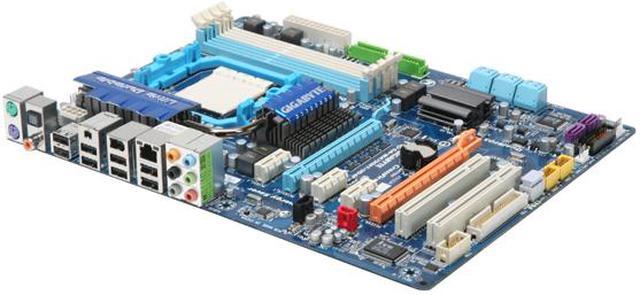
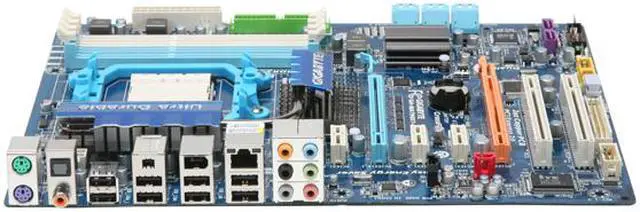
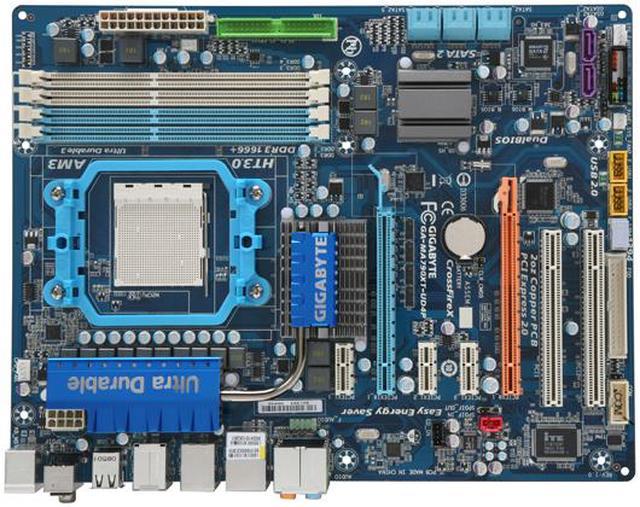
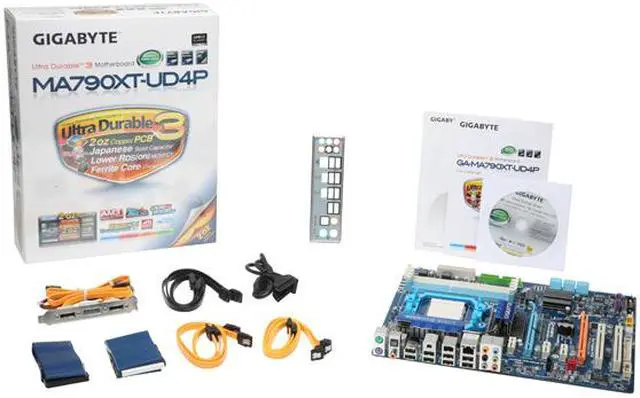
GA-MA790XT-UD4P |
| Supported CPU |
| CPU Socket Type |
AM3 |
| CPU Type |
Phenom II X4 / Phenom II X3 |
| FSB |
2600MHz Hyper Transport (5200 MT/s) |
| Chipsets |
| North Bridge |
AMD 790X |
| South Bridge |
AMD SB750 |
| Memory |
| Number of Memory Slots |
4×240pin |
| Memory Standard |
DDR3 1666(O.C.)/1333/1066 MHz |
| Maximum Memory Supported |
16GB |
| Channel Supported |
Dual Channel |
| Expansion Slots |
| PCI Express 2.0 x16 |
1 x PCI Express x16 slots, running at x16 (PCIEX16_1) 1 x PCI Express x16 slots, running at x8 (PCIEX8_1) |
| PCI Express x1 |
3 |
| PCI Slots |
2 |
| Storage Devices |
| PATA |
1 x ATA100 2 Dev. Max |
| SATA 3Gb/s |
8 |
| SATA RAID |
0/1/5/10/JBOD |
| Onboard Video |
| Onboard Video Chipset |
None |
| Onboard Audio |
| Audio Chipset |
Realtek ALC889A |
| Audio Channels |
8 Channels |
| Onboard LAN |
| LAN Chipset |
Realtek 8111DL |
| Max LAN Speed |
10/100/1000Mbps |
| Rear Panel Ports |
| PS/2 |
2 |
| USB 1.1/2.0 |
8 x USB 2.0 |
| IEEE 1394 |
2 x IEEE 1394a |
| S/PDIF Out |
1 x Optical, 1 x Coaxial |
| Audio Ports |
6 Ports |
| Onboard USB |
| Onboard USB |
2 x USB 2.0/1.1 headers |
| Onboard 1394 |
| Onboard 1394 |
1x 1394a |
| Physical Spec |
| Form Factor |
ATX |
| Dimensions |
12.0" x 9.6" |
| Power Pin |
24 Pin |
| Features |
| Features |
Support for @BIOS Support for Q-Flash Support for Virtual Dual BIOS Support for Download Center Support for Xpress Install Support for Xpress Recovery2 Support for EasyTune (Note 4) Support for Easy Energy Saver Support for Time Repair Support for Q-Share |

|
|