Skip to: |

Newegg.com - A great place to buy computers, computer parts, electronics, software, accessories, and DVDs online. With great prices, fast shipping, and top-rated customer service - once you know, you Newegg.

If you are reading this message, Please click this link to reload this page.(Do not use your browser's "Refresh" button). Please email us if you're running the latest version of your browser and you still see this message.

Newegg.com - Computer Parts, Laptops, Electronics, HDTVs, Digital Cameras and More!

  • | Wish List
  • Help
Motherboards
Search
Home
Home > 
Computer Hardware > 
Motherboards > 
AMD Motherboards > 
MSI > 
Item#: N82E16813130615

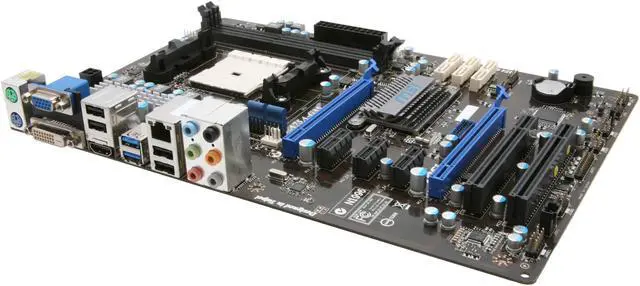
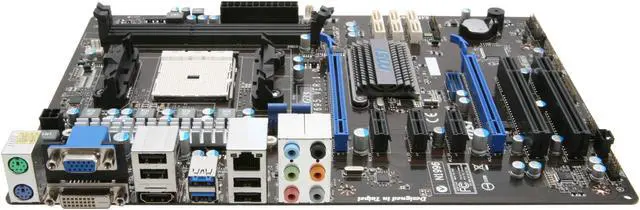
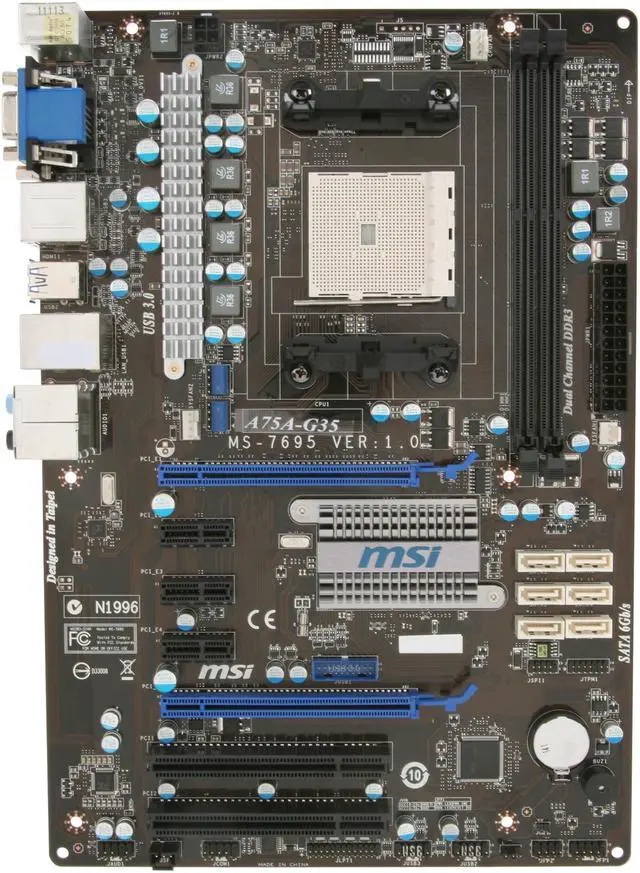
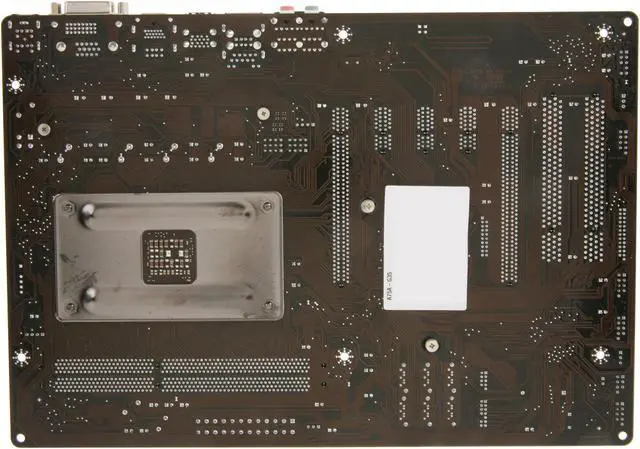
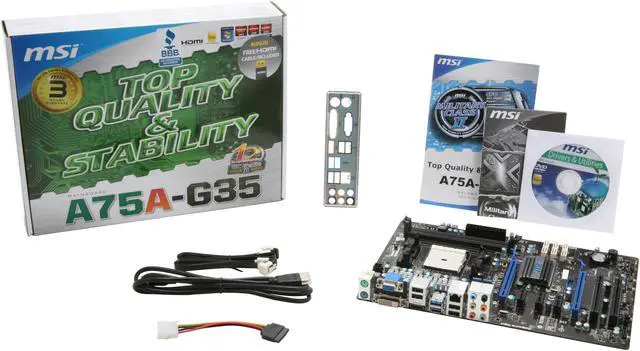
MSI A75A-G35 FM1 AMD A75 (Hudson D3) HDMI SATA 6Gb/s USB 3.0 ATX AMD Motherboard with UEFI BIOS

  • FM1
  • AMD A75 (Hudson D3)
  • 2×240pin DDR3 1066 / 1333 / 1600 / 1866
ICON Loading...

Learn more about the MSI A75A-G35

Model

Brand
MSI
Model
A75A-G35

Supported CPU

CPU Socket Type
FM1
CPU Type
A4 / A6 / A8 / E2 APU

Chipsets

North Bridge
AMD A75 (Hudson D3)

Memory

Number of Memory Slots
2×240pin
Memory Standard
DDR3 1066 / 1333 / 1600 / 1866
Maximum Memory Supported
16GB
Channel Supported
Dual Channel

Expansion Slots

PCI Express 2.0 x16
2 (x16, x4)
PCI Express x1
3
PCI Slots
2

Storage Devices

SATA 6Gb/s
6 x SATA 6Gb/s
SATA RAID
0/1/10

Onboard Video

Onboard Video Chipset
None

Onboard Audio

Audio Chipset
Realtek ALC887
Audio Channels
8 Channels

Onboard LAN

LAN Chipset
Realtek 8111E
Max LAN Speed
10/100/1000Mbps

Rear Panel Ports

PS/2
2
Video Ports
D-Sub + DVI
HDMI
1 x HDMI
USB 1.1/2.0
4 x USB 2.0
USB 3.0
2 x USB 3.0
Audio Ports
6 Ports

Internal I/O Connectors

Onboard USB
2 x USB 3.0 + 4 x USB 2.0
Other Connectors
1 x ATX 24-pin power connector
1 x ATX 4-pin 12V CPU power connector
CPU x 1 / System x 2 FAN connectors
1 x Front panel audio connector
1 x Front panel connector
1 x Serial port connector
1 x Parallel port connector
1 x Clear CMOS jumper
1 x Chassis Intrusion connector

Physical Spec

Form Factor
ATX
Dimensions
12" x 8.27"
Power Pin
24 Pin

Features

Features
OC Genie II: Auto OC to boost performance in 1 sec

ClickBIOS Concept: Easy-to-use UEFI BIOS interface

i-Charger: fast charge iPad/iPhone/smartphone

Support USB 3.0 & SATA 6Gb/s

Quick Info

Warranty

  • Limited Warranty period (parts): 3 years
  • Limited Warranty period (labor): 3 years


Customer Reviews of the MSI A75A-G35

Do you own this product? Write a Review

Filter Results

Go
  • networkman98
  • 5/22/2013 9:20:09 PM
  • Tech Level: High
  • Ownership: 1 month to 1 year
  • Verified Owner

4 out of 5 eggsGood Mobo, but unstable

Pros: Nice looking motherboard. Lots of SATA ports (6). Lots of USB ports including 2 x USB 3.0 ports. HDMI, DVI, and VGA ports. No external video card needed with AMD A8-3850!! Plays Steam games quite well without an external graphics card. Would be good for business use since no external video card is needed and you can still do dual screens.

Cons: slightly unstable since installation. On Windows 7 x64 it freezes without warning at random times. G.Skill 2 x 4GB RAM (F3-12800CL9D-8GBRL) at rated speed, no overclocking. Rosewill 600W Active PFC Power supply. All WHQL drivers from MSI's website.

Other Thoughts: Thought it was AMD OverDrive causing the problem, so I removed it, issue persists. There is no BSOD, nothing in the error logs...just a hard lock where video is lost and you have to press the reset button. There is no overheating happening...temps never go above 45C even when gaming.

I don't use Windows 8, so I haven't tried the newest BIOS since it's only recommended for Win 8. I have re-flashed the 1.7 BIOS via USB to see if the issue goes away. I would really like MSI to respond to help.

Did you find this review helpful? Yes No

  • toughacton
  • 4/23/2013 10:48:44 AM
  • Tech Level: Somewhat High
  • Ownership: 1 month to 1 year

4 out of 5 eggsGood general use FM1 board

Pros: HDMI out works great (when you set the jumpers correctly) I used M-Flash in the bios to update my bios to 1.7 Unlike those horror stories of people trying to use the update software, my bios flashed fine and its running super stable. The board is crossfire capable, solidly constructed, and looks great. Windows 7 got everything but the LAN drivers going, so i just got the drivers from it and windows did the rest. OC genie will work for a mild OC. Though mine added extra volts to my RAM when it didn't need it.

Cons: Easy to brick the board with bios updating software from all the horror stories I've read. So do yourself a favor and either do it in DOS mode or use the m-flash in bios. The SATA ports are a little loose. Make sure that you have a good fitting cable. The ones that would wiggle loose and my drive wouldn't show up. Took forever to troubleshoot that it was the cable not securely attaching to my dvd rom or the board.
Getting the dual graphics crossfire set up took quite a bit of trial and error. NOTE: It DOESN'T work in XP! Finally worked in win 7, but make sure to set primary graphics to IGD and enable the dual graphics mode. save, then power down. Finally put in the crossfire card and boot up. If i did it any other way I couldn't get picture through the HDMI on the board and had to plug in a monitor to the new card first and then set up crossfire and reboot switching cables back to the tv.
As others have stated, the board is picky about USB devices BEFORE you update the BIOS. Since I got 1.7 bios, all has been well.
This is not a good overclocking board if thats what you are looking for. It has all the features you'd want EXCEPT CPU voltage. You are stuck overclocking to what your chip can do at stock volts. I have junky low end boards that at least have cpu voltage if none of the rest. Really odd that its missing.

Other Thoughts: If you want a full featured and stable FM1 board and are comfortable updating bios without windows software, then this is a decent choice. I was a little disappointed in the OC capabilities, but I still managed a 3Ghz OC on my 2.7 GHz A4-3400. Every little bit helps right :)

Didn't get through the egg, but I wanted to post my experience with this board since if you update BIOS correctly it really is a decent board.

Running A4-3400 currently at 3Ghz
Gskill 2x2gig 1866 Ripjaws
2HDD 160 and 250
This A75A-35G motherboard
LG DVDWR
Xion 180 case with 5 fans
XFX HD6450 crossfired with the APU

Did you find this review helpful? Yes No

  • Arturo
  • 3/17/2013 11:30:31 AM
  • Tech Level: Low
  • Ownership: less than 1 day
  • Verified Owner

1 out of 5 eggs

Pros: This motherboard is garbage. nothing work good.

Cons: Please don't buy this motherboard. problems with bios and USB

Manufacturer Response:

Dear Valued Customer,

We apologize for the issues that you are having with this product.

If you have any questions, feel free to get in touch with our tech support team directly at 626.271.1004 for assistance during regular business hours from M to F, 9am to 6pm Pacific Time.
Or you can email us at usreview@msi.com, thank you.

Best Regards,
MSI Review Team | usreview@msi.com

Did you find this review helpful? Yes No

  • Auth
  • 3/1/2013 7:59:25 PM
  • Tech Level: Somewhat High
  • Ownership: 1 week to 1 month
  • Verified Owner

5 out of 5 eggsTrust MSI

Pros: Solid board. I was a little hesitant to buy due to negative reviews, but MSI's a solid brand so I pulled the trigger and I'm glad I did. Everything works as advertised, from all of its OC features to ram timing and beyond. Definitely a great, mod-friendly board for the price. Plus the rebate's nice.

Cons: The DVI/HDMI jumper is a little weird, but I have no need for DVI so it's a non-issue for me, though I see how it could be for others.

Other Thoughts: This is my second board. First one came DOA, but after a quick RMA I received another that worked flawlessly. Everybody wins.

Did you find this review helpful? Yes No

  • maiden504
  • 2/28/2013 1:03:29 PM
  • Tech Level: High
  • Ownership: 1 week to 1 month
  • Verified Owner

5 out of 5 eggsMSI are Good

Pros: Full ATX, almost everything you could ask for. MSI utilities are amazing

Cons: None

Did you find this review helpful? Yes No

  • JPG
  • 2/13/2013 12:21:24 PM
  • Tech Level: High
  • Ownership: 1 week to 1 month
  • Verified Owner

4 out of 5 eggsGreat mostly, but analog audio DOA.

Pros: Economical but lots of features

Cons: Analog audio DOA

Other Thoughts: Waiting for repair/replacement. Had to create a complete new installation of Windows 7 to convince support that it was the board and not the installation or me.

Did you find this review helpful? Yes No

  • Steve-a-Rino
  • 2/11/2013 4:10:02 PM
  • Tech Level: High
  • Ownership: 1 day to 1 week
  • Verified Owner

5 out of 5 eggsVery nice

Pros: Price - Durability - Easy Install

Installed in an old case with an old power supply and an A6-3560 proc. Super quick install and booted right up with 4 gigs of cheap Ballistic memory. The pc is overkill for running a Minecraft server however my son is really proud of it. It's been perfect for a week.

Cons: None -

Other Thoughts: Newegg service is awesome. I received this as a replacement when my MSI A75A-G35 FM1 AMD A75 board bricked after trying to update the bios to 1.7. Unrepairable . . . unable to boot . . . unable to back out. Had to return it. Newegg took care of me as they always do.

Did you find this review helpful? Yes No

  • JimR
  • 2/11/2013 9:22:53 AM
  • Tech Level: High
  • Ownership: 1 day to 1 week
  • Verified Owner

3 out of 5 eggsmeh...bios gets upset about usb devices

Pros: Got this and an A6-3650 CPU bundled to replace the CPU + mainboard in a system that has been unstable. Nice board, decent feature set, rock bottom price. Installed easily. Prior build was also AMD, so this is not a new OS install, just a hardware swap in an existing system.

Cons: One big one: BIOS has heartburn over USB devices, throwing code B4 during POST. Lots of comments in forums about this with USB mice. In my case it turns out that if I have my printer and/or scanner plugged into an external USB expander, I get this code. So I have to unplug devices to reboot. Not cool. Upgrading to latest BIOS didn't help.

Other Thoughts: Except for the USB problem, seems like a nice board! Hopefully they can come out with a BIOS rev so I can leave my devices plugged in.

Manufacturer Response:

Dear Valued Customer,

We apologize for the issues that you are having with this product.
Please kindly try the latest BIOS for your motherboard and see if it helps with the issue.
http://www.msi.com/product/mb/A75A-G35.html#/?div=BIOS

If possible, try another USB hub and see if it would help to resolve the issue.

If you have any questions or concerns regarding the product, please do not hesitate to contact us directly at usreview@msi.com and we will be more than happy to assist you, thank you.

Best Regards,
MSI Review Team | usreview@msi.com

Did you find this review helpful? Yes No

  • N/A
  • 2/5/2013 8:20:22 AM
  • Tech Level: Average
  • Ownership: 1 month to 1 year
  • Verified Owner

4 out of 5 eggsGood board, bad rebate

Pros: Fit and mounted easily in the case, and smooth enough loading the drivers and getting it going. Everything seems to work fine with XP SP3 except it was a bit flaky recognizing a PS2 mouse that works on another machine, but switching to a USB mouse solved that. Plenty of SATA ports.

Cons: Nothing against the board itself, but MSI stiffed me on the rebate when I mistakenly sent order confirmation instead of invoice even though they say the same thing, then wouldn't take a followup invoice. So I'm not buying their products unless it's a great deal without the rebate because they seem to use any nitpicky excuse to reneg.

Did you find this review helpful? Yes No

  • N/A
  • 2/4/2013 8:19:34 PM
  • Tech Level: Somewhat High
  • Ownership: 1 month to 1 year
  • Verified Owner

1 out of 5 eggsNever again

Pros: - Came in on time
- Packaged well

Cons: - Broke after 20 minutes of use. I installed windows, restarted and it wouldn't boot up again. All components were new, tested out each one of them and MB was the culprit.

Other Thoughts: I went through the MSI website to get it repaired. The technician would ask me to test a new thing each day as apposed to asking me to just check a list of possible fixes. At the end he asked me to go RMA. It's been now two weeks and its still "In Processing". What a disappointing experience.

Manufacturer Response:

Dear Valued Customer,

We apologize for the issues that you are having with this product.
Hopefully your next board will work as it's supposed to.

If you have any questions or concerns regarding the product, received the unit back from RMA but are still having issues, please do not hesitate to contact us directly at usreview@msi.com and we will be more than happy to assist you, thank you.

Best Regards,
MSI Review Team | usreview@msi.com

Did you find this review helpful? Yes No

ICON Loading...
Are you an E-Blast Insider? Subscribe Newegg e-Blast

Buzz

HDMI oversight

4 out of 5 eggs
Great layout
— Thumper 3/27/2012

Reply to myself. and to others

5 out of 5 eggs
Really good motherboard,

scared me out with the bios version thing, it came with bios version 1.0 which should not ...
— The MeDo Man 8/31/2012


PayPal
Shop without retyping payment details. Secure shopping made faster.
Check out with PayPal.

Financing


Home
Home > 
Computer Hardware > 
Motherboards > 
AMD Motherboards > 
MSI > 
Item#: N82E16813130615
LOADING... LOADING...
Shop by Region: United States | Canada | China
Follow us:   RSS Feeds Youtube
VeriSign Reliability Seal1This site protected by Trustwave's Trusted Commerce program Inc500
Policy & Agreement | Privacy Policy  © 2000-2013 Newegg Inc.  All rights reserved.
If the Adobe Reader does not appear when you click on a link for a PDF file, you can download Adobe Reader from the Adobe web site. nassau