Skip to: |

Newegg.com - A great place to buy computers, computer parts, electronics, software, accessories, and DVDs online. With great prices, fast shipping, and top-rated customer service - once you know, you Newegg.

If you are reading this message, Please click this link to reload this page.(Do not use your browser's "Refresh" button). Please email us if you're running the latest version of your browser and you still see this message.

Newegg.com - Computer Parts, Laptops, Electronics, HDTVs, Digital Cameras and More!

  • | Wish List
  • Help
Search all
Search
Home
Home > 
Computer Hardware > 
Motherboards > 
Intel Motherboards > 
ASUS > 
Item#: N82E16813131711

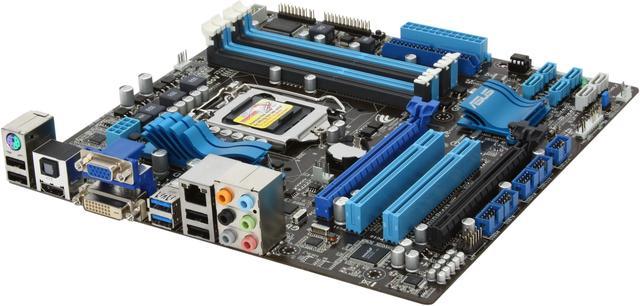
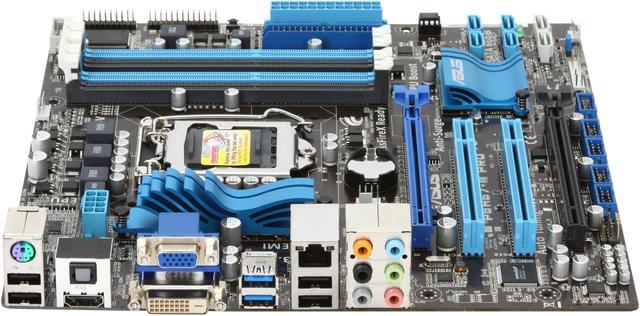
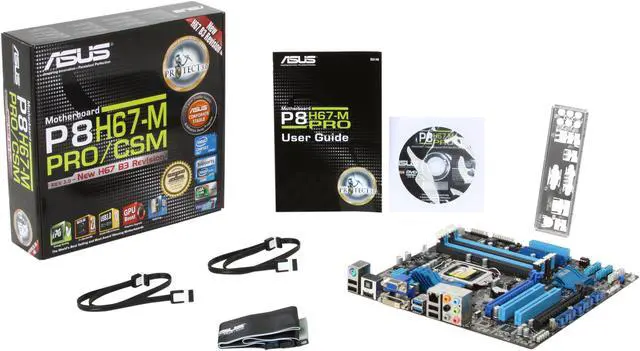
ASUS P8H67-M PRO/CSM (REV 3.0) LGA 1155 Intel H67 HDMI SATA 6Gb/s USB 3.0 Micro ATX Intel Motherboard

  • LGA 1155
  • Intel H67
  • 4×240pin DDR3 1333/1066
ICON Loading...


Learn more about the ASUS P8H67-M PRO/CSM (REV 3.0)

Model

Brand
ASUS
Model
P8H67-M PRO/CSM (REV 3.0)

Supported CPU

CPU Socket Type
LGA 1155
CPU Type
Core i7 / i5 / i3 (LGA1155)
Supported CPU Technologies
Turbo Boost Technology 2.0

Chipsets

North Bridge
Intel H67

Memory

Number of Memory Slots
4×240pin
Memory Standard
DDR3 1333/1066
Maximum Memory Supported
32GB
Channel Supported
Dual Channel

Expansion Slots

PCI Express 2.0 x16
2 (x16, x4)
PCI Slots
2

Storage Devices

PATA
1 x ATA133 2 Dev. Max
SATA 3Gb/s
4
SATA 6Gb/s
2 x SATA 6Gb/s
SATA RAID
Intel Rapid Storage Technology Support RAID 0,1,5,10

Onboard Video

Onboard Video Chipset
Supported only by CPU with integrated graphic

Onboard Audio

Audio Chipset
Realtek ALC892
Audio Channels
8 Channels

Onboard LAN

LAN Chipset
Realtek 8111E
Max LAN Speed
10/100/1000Mbps

Rear Panel Ports

PS/2
1
Video Ports
D-Sub + DVI
HDMI
1 x HDMI
USB 1.1/2.0
4 x USB 2.0
USB 3.0
2 x USB 3.0
S/PDIF Out
1 x Optical
Audio Ports
6 Ports

Internal I/O Connectors

Onboard USB
10 x USB 2.0

Physical Spec

Form Factor
Micro ATX
Dimensions
9.6" x 9.6"
Power Pin
24 Pin

Features

Features
Protect 3.0 Technology - Protect the Earth, Your Device & You!

GPU Boost – Go to the Limit with iGPU Level Up!

Auto Tuning & TurboV - Real-time O.C. Tools

EFI BIOS – Flexible and Easy BIOS Interface

AI Suite II – One-Stop Access to Innovative ASUS Features

USB 3.0 & SATA 6Gb/s Support – Let you experience the latest transfer technology!

Manufacturer Warranty

Parts
3 years limited
Labor
3 years limited

Quick Info

Warranty

  • Limited Warranty period (parts): 3 years
  • Limited Warranty period (labor): 3 years


Customer Reviews of the ASUS P8H67-M PRO/CSM (REV 3.0)

Do you own this product? Write a Review

Filter Results

Go
  • N/A
  • 5/19/2013 8:47:34 PM
  • Tech Level: High
  • Ownership: more than 1 year

5 out of 5 eggs VM Host

Pros: I bought this board so I could run VMware ESXi 5.0 on a white box,system. I have had it for over a year now with no problems. Running a core i7 with 32GB of RAM and 2.extra intel nics.

Cons: None

Did you find this review helpful? Yes No

  • N/A
  • 1/25/2013 5:49:04 PM
  • Tech Level: Somewhat High
  • Ownership: 1 month to 1 year
  • Verified Owner

2 out of 5 eggsWorks sometimes

Pros: It looks really cool and will fit in any case.

Cons: Sata ports get in the way of the GPU, SLI isn't supported with Nvidia, and the PCI express slots are impossible to use with dual GPUs. Now, after about 120 days of ownership, the unit will cause windows to blue screen and cause to reboot. Take note of please.

Other Thoughts: I like the heat sinks

Manufacturer Response:

Dear Valued Customer,

We're sorry to hear about the issue you had with the motherboard. Please try to use right-angled SATA cables so that there's clearance allowed for installation of discrete video card? This board supports AMD Xfire only, not nVIDIA SLI. We're apologize for the confusion. Blue screen could be caused by both software and hardware. Can you try loading the BIOS defaults (no overclocking) and doing a bare minimum hardware OS install or restore? You may also try running memtest (http://www.memtest.org) on your memory and Microsoft's Debugging Tools to help identify the cause of your BSOD. If you'd like to send the motherboard in for a test (RMA), please use the onlinel form at: http://vip.asus.com/eservice/usa_rmaserv.aspx or call us at 1-812-282-2787 at your earliest convenience and we would be happy to assist you. Thank you.

For support information, please visit http://support.asus.com. For service, visit http://service.asus.com. For motherboard warranty, visit http://www.service.asus.com/warranty.aspx#!Motherboard%20Warranty/c1c20. For RMA status, visit: http://am.eservice.asus.com/rmaweb/search/rmCustomerQueryAction.do?.

Regards,
Benson
ASUS Customer Loyalty
cl-benson@asus.com

1 out of 1 people found this review helpful. Did you? Yes No

  • N/A
  • 1/3/2013 3:10:39 PM
  • Tech Level: High
  • Ownership: more than 1 year
  • Verified Owner

4 out of 5 eggsUSB 2.0 Won't work in 3.0 slots

Pros: Tons of connections for extra USB slots, can hold 2 graphics cards, tons of expansion room, wide variety of CPUs it can handle.
Can handle most SATA hard drives, either @ 1.5GB, 3.5GB, or even 6GB speeds, its got the hookups for it!
BIOS software adds tons of customization possibilities.

Cons: USB 3.0 slots won't recognize any 2.0 devices I plug into the, be it mouse, keyboard, headsets, hard drives, etc.

Did you find this review helpful? Yes No

  • CyroProxy
  • 12/1/2012 1:53:50 PM
  • Tech Level: High
  • Ownership: 1 day to 1 week
  • Verified Owner

5 out of 5 eggsN82E16813131711

Pros: So far so good, It does what it's supposed to and I haven't had any problems yet. Worked on the first POST. I'm not using it for overclocking at this point. Just in a desktop home computer.

Cons: None so far.

Other Thoughts: Great for the price. Still nothing compared to my ASUS Z77 Sabertooth but there's a huge price difference. I'll only buy ASUS MB's from now on.

Did you find this review helpful? Yes No

  • CDizzle
  • 11/28/2012 2:34:30 PM
  • Tech Level: Somewhat High
  • Ownership: more than 1 year

2 out of 5 eggsIt was good at first... But...

Pros: It started out as a great motherboard for my PC build last year in mid 2011. Worked well with my 2500K and 16 GB of RAM of Gskill Ram. UEFI was great and RAID setup worked well.

Cons: Unfortunately, after about a year and a half, all I wanted to do is upgrade the RAM to 32 GB. I bought compatible RAM. Installed the new RAM gently with my ESD safe wrist strap, did everything properly, and got the "CPU Red Light of death". I did everything to troubleshoot it which included...

-Reinstalling the old RAM sticks, which didn't do the trick
-Reset the CMOS
-Removed the mobo battery and reinstalled it
-Different RAM configurations with both sets of RAM

No progress at all.

No Mem Check light, Drives and fans run fine, all connections were quadruple-checked and no video output or BIOS showing up. Just the red CPU light.

Other Thoughts: I thought this Mobo would last longer, but now I have to go through the tedious RMA process. Pretty disappointing

Manufacturer Response:

Dear Valued Customer,

We're sorry to hear about a problem The CPU_LED is related to the CPU. Please also try to remove the CPU from the socket, memory from the slots, CMOS battery, and performing one last CMOS clear. Wait roughly 30 minutes before re-installing the parts. If no change, please RMA the motherboard.

Regards,
Benson
ASUS Customer Loyalty

Did you find this review helpful? Yes No

  • N/A
  • 11/28/2012 9:32:09 AM
  • Tech Level: Average
  • Ownership: more than 1 year
  • Verified Owner

5 out of 5 eggsOddball of a Motherboard

Pros: Been working fine for over 2 years now. Has ran a crossfire radeon 5670/i3 build for over a year and a single radeon 6950 for a few months now.

Cons: Not necessarily a con, just an observation. Intel, ASUS, and every forum will tell you this motherboard's chipset naturally doesn't support any overclocking of any kind. ASUS site nor newegg claim that it is crossfire/sli ready yet I've ran several different setups with crossfire and it's worked fine. Also, it has the options for overclocking Ram(never tried it), and adjusting the cpu multiplier for K series(can't test it since i'm using a non-K cpu). I'm not keen on destroying my main gaming machine so I haven't touched those options but they are still there which is a bit confusing.

Other Thoughts: I was a novice when I was building my first gaming machine when I bought this so I didn't really know what I was buying at the time. In essence, it is a HTPC mobo designed to utilize onboard graphics which just happens to have multi-gpu capabilities, voltage control, ram frequency control, multiplier adjustments, and ASUS overclocking software/utilities. Bit of an odd consumer target if you ask me. Because of this, I can't think of a single reason to buy it when there's cheaper HTPC options out there. Enthusiasts will buy p67/z67's while HTPC seekers will buy the cheaper h61's for a better price. But out of all the h67's of the time 2 years ago, I'm glad I bought this oddball of the bunch.

1 out of 1 people found this review helpful. Did you? Yes No

  • KaBob
  • 10/14/2012 10:26:12 AM
  • Tech Level: Somewhat High
  • Ownership: 1 month to 1 year

5 out of 5 eggsFast, Smooth, No Problem...

Pros: Fast, Smooth, Reliable, Easy Build! Good .Net/Sql Ms Development box & HTPC all in one. Integrated Video is more than acceptable, runs Win 7 64, dual monitors perfectly, very quick with i5-2500/8G mem for web & database development, plus runs excelent as HTPC with Haupage DCR-2650 TV/Cable (CableCard) tunner/recorder and MediaCenter at the same time. Pushs 2 monitors, a 32" 1080p tv/monitoe and a 24" flat wide screen perfectly. Has been a rock solid powerful personal workstation and HTPC (thru WMC) perfectly for quite a while now...
Oh, and with onboard USB 3, usb3 devices are FAST!!! oh
same time ashtpc %Cor and e esp4

Cons: Can't overclock the h67 chip set... but with a 3.3+ clock, 8g memory and fast WD black's - its very zippy...

Other Thoughts: Rock solid, Fast, Reliable, HTPC, AllInOne - Pretty Nice...
About the only thing that might make a bit nice/faster would be SolidStade system disk - it might be gettin one soon (SAMSUNG 840 Pro Series MZ-7PD256BW 2.5" 256GB would make it super smooth - and FAST!!!!!)

For home/office setup, using a 32" hdtv as onea the dual monitors is Perfect... (can get rid a the extra needed tv and cable box(ratsnest), the haupage digital tv/cable/recorder integrates perfectly - clean, neat, fast, reliable, work, play, AllInOne, Wireless desktop - Nice!

Did you find this review helpful? Yes No

  • N/A
  • 9/20/2012 11:08:53 AM
  • Tech Level: Somewhat High
  • Ownership: 1 month to 1 year
  • Verified Owner

5 out of 5 eggsGreat value board for Ivy Bridge

Pros: Good layout. Top notch build quality for the price. Instructions easy to follow. Setup practically does itself. In combo with Win7 64bit and Crucial M4 SSD, this board cold boots quite rapidly. Onboard sound works fine as well. Would recommend for anyone not looking for overclocking or serious gaming based on feature set.

Cons: None.

Other Thoughts: I had no problems at all using this board with an i5-3570 and 2x4gb G.Skill DDR3 1333 dims. It seems to run well since I installed it and would highly recommend this for a computer build for someone who doesn't play games or have any heavy workloads. Perfect for general internet, video streaming and office document production in my opinion.

1 out of 1 people found this review helpful. Did you? Yes No

  • Task
  • 9/15/2012 12:51:31 AM
  • Tech Level: High
  • Ownership: 1 month to 1 year
  • Verified Owner

5 out of 5 eggsGreat deal for the money

Pros: For a microATX board this has just about everything you could want including a PATA port which is a bit harder to come by these days.
The Intel HD graphics were suprisingly adequate while I waited to get a real video card. I like that it has VGA, DVI, and HDMI on the rear panel.

Cons: Uses a new, mouse controlled BIOS. It's nice to see this kind of progress, but it was hard to find the options I needed like changing hard drive boot priority
No FireWire connections on the rear panel, nor any FireWire headers.

Other Thoughts: Got it with an Intel Core i5 2400 and 8GB of G.Skill Ripjaws RAM.
It was a tight squeeze with the CPU cooler almost touching the top of the RAM, but it all went together well enough.
I'm impressed with how much they managed to fit on such a small board.

2 out of 2 people found this review helpful. Did you? Yes No

  • N/A
  • 9/13/2012 6:53:13 PM
  • Tech Level: Low
  • Ownership: 1 week to 1 month

1 out of 5 eggsSTAY AWAY!!!!!!!!!!

Pros: There were no pros. Bummer can't give - rating.

Cons: Worst decision of my life was buying this boards. 1st board DOA. 2ns board had device mgr conflict. Took Asus four days to tell me that my board came from a batch with known defects. So I pay to send it back AGAIN. They send me the same board saying they fixed it. Not so. Now they claim to have sent me a 4th board but it's lost in transit and they have no tracking number. 6 wks of back and forth and they lost my replacement board which I'm told isn't even a new board to replace the new one that came from a known bad batch. Do they offer an upgrade for my client? Do they send another board immediately? No. They sit on the other end of the phone going. I'm sorry. I'm sorry. I'm sorry. I'm sorry. Every time I've asked to talk to their supervisor they've put me on hold and left me there. Never once did a supervisor pick up the phone. ASUS. You cost me a lot of money and I hope this review costs you ten times that.

Other Thoughts: Worst, least competent customer service I've ever experienced. This company just cost me an 8-9k a year customer. DON'T BUY ASUS IF YOU WANT ACTUAL QUALITY PARTS OR OUTSTANDING CUSTOMER SERVICE.

Manufacturer Response:

Dear Valued Customer,

We would like to investigate the issue you had with getting a replacement for this board. Can you tell me your RMA # so that we can look into it? Please email to cl-benson@asus.com reference #C1037-4426.

Regards,
Benson
ASUS Customer Loyalty

0 out of 4 people found this review helpful. Did you? Yes No

ICON Loading...
Are you an E-Blast Insider? Subscribe Newegg e-Blast

Buzz

Works great, easy install!

5 out of 5 eggs
Easy install, intel 2nd generatin processors, BIOS interface is really a nice change from the old BIOS menu styles (mouse ...
— rolfcm106 6/24/2011

GAMERS READ THIS

5 out of 5 eggs
Bios is the friendliest I have ever worked with
Easy to run RAID 1
— Phil McKRevice 1/28/2012


PayPal
Shop without retyping payment details. Secure shopping made faster.
Check out with PayPal.

Financing


Home
Home > 
Computer Hardware > 
Motherboards > 
Intel Motherboards > 
ASUS > 
Item#: N82E16813131711
LOADING... LOADING...
Shop by Region: United States | Canada | China
VeriSign Click for the BBB Business Review of this Computers - Supplies & Parts in Whittier CAThis site protected by Trustwave's Trusted Commerce program Inc500
Policy & Agreement | Privacy Policy  © 2000-2013 Newegg Inc.  All rights reserved.
If the Adobe Reader does not appear when you click on a link for a PDF file, you can download Adobe Reader from the Adobe web site. nassau