Skip to: |

Newegg.com - A great place to buy computers, computer parts, electronics, software, accessories, and DVDs online. With great prices, fast shipping, and top-rated customer service - once you know, you Newegg.

If you are reading this message, Please click this link to reload this page.(Do not use your browser's "Refresh" button). Please email us if you're running the latest version of your browser and you still see this message.

Newegg.com - Computer Parts, Laptops, Electronics, HDTVs, Digital Cameras and More!

  • | Wish List
  • Help
Home
Home > 
Computer Hardware > 
Motherboards > 
Intel Motherboards > 
ASUS > 
Item#: N82E16813131716

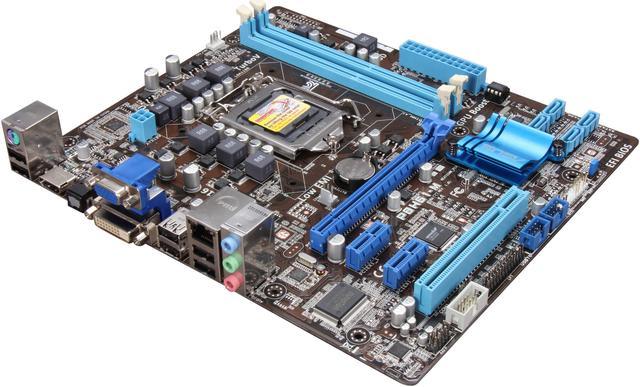
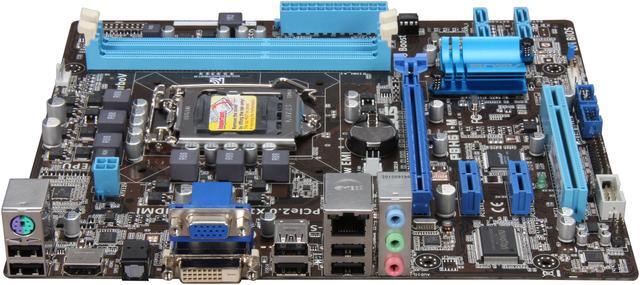
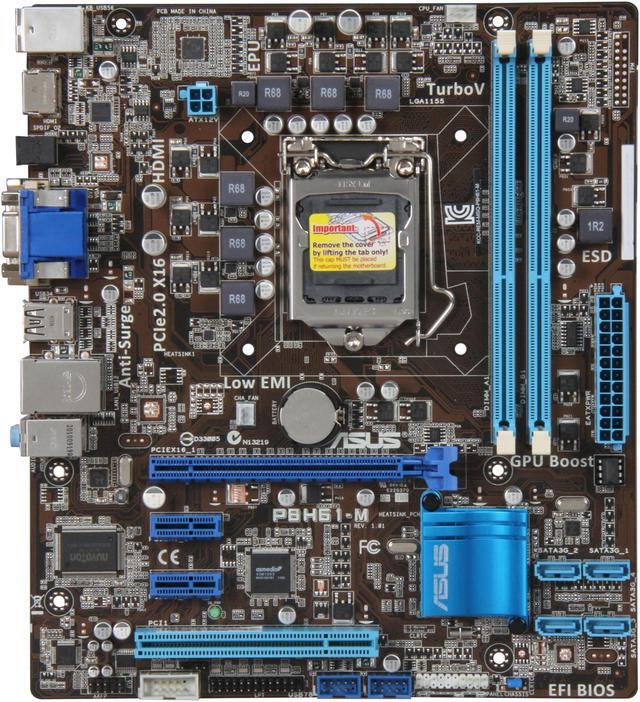
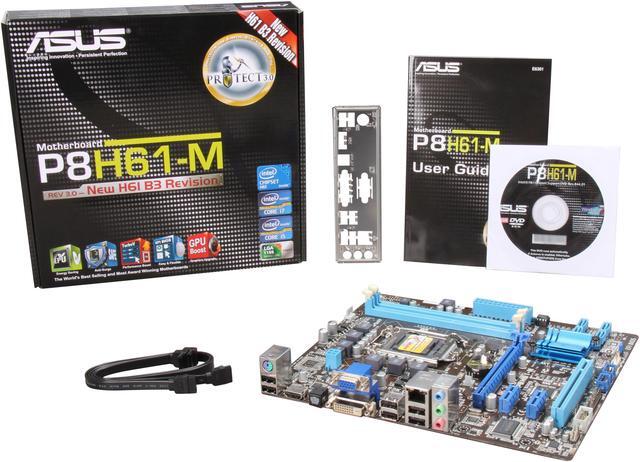
ASUS P8H61-M (REV 3.0) LGA 1155 Intel H61 HDMI Micro ATX Intel Motherboard

  • LGA 1155
  • Intel H61
  • 2×240pin DDR3 1333/1066
ICON Loading...

Learn more about the ASUS P8H61-M (REV 3.0)

Model

Brand
ASUS
Model
P8H61-M (REV 3.0)

Supported CPU

CPU Socket Type
LGA 1155
CPU Type
Core i7 / i5 / i3 (LGA1155)
Supported CPU Technologies
Support Enhanced Intel SpeedStep Technology (EIST)
Supports Intel Turbo Boost Technology 2.0

Chipsets

North Bridge
Intel H61

Memory

Number of Memory Slots
2×240pin
Memory Standard
DDR3 1333/1066
Maximum Memory Supported
16GB
Channel Supported
Dual Channel

Expansion Slots

PCI Express 2.0 x16
1
PCI Express x1
2
PCI Slots
1

Storage Devices

SATA 3Gb/s
4

Onboard Video

Onboard Video Chipset
Supported only by CPU with integrated graphic

Onboard Audio

Audio Chipset
Realtek ALC887
Audio Channels
8 Channels

Onboard LAN

LAN Chipset
Realtek 8111E
Max LAN Speed
10/100/1000Mbps

Rear Panel Ports

PS/2
1 x PS/2 Keyboard/Mouse Combo port
Video Ports
D-Sub + DVI
HDMI
1 x HDMI
USB 1.1/2.0
6 x USB 2.0
S/PDIF Out
1 x Optical
Audio Ports
3 Ports

Internal I/O Connectors

Onboard USB
4 x USB 2.0

Physical Spec

Form Factor
Micro ATX
Dimensions
9.6" x 8.4"
Power Pin
24 Pin

Features

Features
GPU Boost - Instant iGPU Level Up!

EPU - Energy Efficiency All Around

TurboV - Easy, Real-Time O.C. Tunings

Protect 3.0 - Protect the Earth & the system & you

EFI BIOS - EZ Mode - Flexible & Easy BIOS Interface

AI Suite II - One-stop Access to Innovative ASUS Features

Quick Info

Warranty

  • Limited Warranty period (parts): 3 years
  • Limited Warranty period (labor): 3 years


Customer Reviews of the ASUS P8H61-M (REV 3.0)

Do you own this product? Write a Review

Filter Results

Go
  • x86cam
  • 3/22/2013 10:21:03 PM
  • Tech Level: Somewhat High
  • Ownership: 1 month to 1 year
  • Verified Owner

3 out of 5 eggsOnly works with Core 2nd Gen

Pros: Made by ASUS, not defective. Everything it says on the box.

Cons: I put in my Core i5-3570K and it didn't start up. I had to get a BIOS chip, but sent to ASUS to get it fixed 2 times, ended up with the same problem. Started up for 1 sec then restarted, and the same cycle. Had to get a new motherboard.

Other Thoughts: I think it would be a great board if I could actually start it up with my 3rd gen.

Manufacturer Response:

Dear Valued Customer,

We're sorry to hear about your experience with this motherboard. The P8H61-M (Rev 3.0) supports Intel 3rd GEN CPU's (Ivy Bridge). For a complete list of CPU's supported, please visit: http://www.asus.com/Motherboards/P8H61M/#support_CPU. i5-3570K is supported with BIOS version 3605 or later. Please try updating to the latest version available. If you still have the motherboard or have purchased another ASUS motherboard, have questions or need support, please feel free to contact me below. Thank you.

For support information, please visit http://support.asus.com. For service, visit http://service.asus.com. For motherboard warranty, visit http://www.service.asus.com/warranty.aspx#!Motherboard%20Warranty/c1c20; Refurbished products/accessories: http://www.service.asus.com/warranty.aspx#!refurbished-warranty/c16us. For RMA status, visit: http://am.eservice.asus.com/rmaweb/search/rmCustomerQueryAction.do?.

Regards,
Benson
ASUS Customer Loyalty
cl-benson@asus.com

Did you find this review helpful? Yes No

  • Drew Chapin
  • 11/2/2012 10:26:15 AM
  • Tech Level: High
  • Ownership: 1 month to 1 year
  • Verified Owner

5 out of 5 eggsNo Issues

Pros: What can I say? I haven't had a single issue out of the board, not even during installation.

Cons: None.

Did you find this review helpful? Yes No

  • Ohio_Builder
  • 5/30/2012 7:42:31 AM
  • Tech Level: Somewhat High
  • Ownership: 1 month to 1 year
  • Verified Owner

5 out of 5 eggsWorking 24x7 after 3 months

Pros: The total lack of difficulty installing this MB kind of freaked me out. Usually something goes wrong and needs tweaked. This install was without any difficulty. It is in use as a media center PC which is on pretty much 24x7 - Media center + ceton tuners/cable card + 8gb ram. I was not happy with intel onboard graphics which would not correctly hold settings on several key video options - bought PNY Nvidia video card instead. Happy with number of PCIe slots.

Cons: I have no cons relating to this MB itself. But for those who are considering this board for a media center build, Intel's video drivers need fixed so that settings "stick" correctly. I could not get a good bd calibration using onboard video and arcsoft total media center 5.

Other Thoughts: Really a perfect build and an interesting experiment to create a media center PC. I have nice video output from BD, HD TV, and 5.1 Dolby/DTS via optical. My experience has been a media center PC build is a constant effort at tweaking. This PC is powerful enough to be retired to a desktop if I decide to abandon Media center use which was part of the plan in the first place.

1 out of 1 people found this review helpful. Did you? Yes No

  • N/A
  • 3/29/2012 11:44:49 AM
  • Tech Level: Somewhat High
  • Ownership: 1 day to 1 week
  • Verified Owner

5 out of 5 eggsNICE!

Pros: I love ASUS! Never a problem, (yet) and easy to install and configure!

Cons: None

2 out of 2 people found this review helpful. Did you? Yes No

  • Juice Nootun07
  • 3/27/2012 5:09:14 AM
  • Tech Level: High
  • Ownership: less than 1 day
  • Verified Owner

5 out of 5 eggsGood Asus motherboard.

Pros: This little motherboard by Asus is top drawer. It installs easily and feels sturdy. It runs good and is true to the Asus name.

Cons: no cons.

Other Thoughts: For me there is not need for 6 gig sata speed, since this is for internet browsing and email type stuff. The 2 ddr3 slots only is just fine for me, so i find this motherboard to be of the top class. Recommended.

1 out of 1 people found this review helpful. Did you? Yes No

  • N/A
  • 3/22/2012 9:28:30 AM
  • Tech Level: High
  • Ownership: 1 day to 1 week
  • Verified Owner

5 out of 5 eggsMore Troubelshooting needed.

Pros: Shiny blue! love the Asus color scheme.
Perfect for my HTPC build.

Setup:
i3 -2120
this MOBO
OCZ Vertex 2
3TB WD
CORSAIR XMS3 8GB (2 x 4GB)
APEX DM-387 Black Steel Micro ATX Media Center

Cons: SAPPHIRE 100326LP Radeon HD 6670 1GB 128-bit GDDR5 PCI Express 2.1 x16 is giving me no VIDEO with firmly pressed in pci-e slot.

I do receive the single OK POST BOOT. ON Board video works fine.
Have troubleshot the card it self works in other machines. Therefore I either Have a P/S that is not enough or a Bad PCI-E Slot.

I have read confirmed reports that this low energy low profile card can run off a 250 Watt P/S. I Currently have a 275Watt.

Will try a spare gfx card to eliminate if its an power issue. If another card doesn't work then Bad PCI-E Slot.

Troubleshooting in depth before returning for RMA .

I believe I may have a bad/malfunction PCI-E slot.

1 out of 1 people found this review helpful. Did you? Yes No

  • David
  • 2/21/2012 9:02:01 AM
  • Tech Level: High
  • Ownership: 1 day to 1 week
  • Verified Owner

5 out of 5 eggsgood board

Pros: - This motherboard has the features required for a basic HTPC - HDMI output (audio supported) and an optical S/PDIF port. I may upgrade to a discrete fanless low-profile GPU eventually, but this board combined with the Core i3 2100 I purchased at the same time seems to cope just fine with HD video.

- Came with two black SATA cables with right-angled connectors on one end. Perfect for a case with tight clearances!

- The BIOS supports the use of a mouse and the GUI isn't designed using text characters! I'm honestly surprised this feature wasn't available years ago. Why have we been using such a primitive keyboard-only BIOS interface all this time? Storage size constraints on the chip, I suppose.

Cons: - Only has two RAM slots. (see Other Thoughts)

- The CPU socket is a bit close to the RAM slots. It fits fine with a stock cooler (has about 1 cm to spare between cooler and the RAM stick), but I'd be concerned trying to fit any aftermarket cooler that has a base that's wider than stock onto this board. Since I'm using the stock cooler (which is dead silent as it is), and am not planning to overclock, this isn't an issue for me.

Other Thoughts: The lack of RAM slots isn't a huge deal, since you can still put quite a bit of RAM in two slots these days, so I wouldn't say this is really a con. Given this board isn't intended for high-performance use that would entail a large amount of high-performance RAM, I'd say two slots are just fine.

2 out of 2 people found this review helpful. Did you? Yes No

  • TheMaths
  • 2/17/2012 10:56:30 PM
  • Tech Level: Somewhat High
  • Ownership: 1 week to 1 month
  • Verified Owner

5 out of 5 eggsSo Far So Good

Pros: Good Price. Plenty of features for an average user.

Cons: none

Other Thoughts: Everything I plugged into it was recognized right away and working fine (so far). I have not yet tried any overclocking, nor did I install a graphics card on this board or any other peripheral that require an expansion slot.

System:
This Board
Intel i3-2100
GSkill 8GB DDR3 1333
Raidmax 530W Modular PSU
Crucial M4 64GB SSD
WD 1.5TB HD

1 out of 1 people found this review helpful. Did you? Yes No

  • N/A
  • 2/15/2012 9:30:31 AM
  • Tech Level: Somewhat High
  • Ownership: 1 day to 1 week
  • Verified Owner

5 out of 5 eggsAsus rocks

Pros: Cheap, works great, and drivers that it comes with install perfectly.

Cons: None.

1 out of 1 people found this review helpful. Did you? Yes No

  • nacho2k3
  • 2/7/2012 11:26:43 AM
  • Tech Level: Somewhat High
  • Ownership: 1 day to 1 week

5 out of 5 eggsCost effective, very useable for Gaming PC's.

Pros: POSTed on first try, UEFI BIOS Admin panel is a breeze to use compared to CUI-Based ones, has a memory check light on the PCB to see without a monitor attached if your memory is useable. AI Suite II is useful in monitoring motherboard stats without too much bloatware. System stays cool and stable. I live in the desert: even though it's winter, temperature extremes are normal out here -- daylight it may be 60-70 at noon, but at night, slips right into the 20's. One heck of a gradient. Electronics that aren't made well don't last for long out here. For that reason alone, I avoid overclocking... the ambient temperatures out here are enough. Why add more strain?

Cons: Some of the capacitors aren't solid state, which bugs me (see temperature yarn above in Pros.) SATA 3GB vs. SATA 6GB, USB 2.0, 2 DIMM slots (16GB ceiling), no PCI slots (bye bye old accessories). Yadda, yadda...

You get what you pay for, but it's manageable for the price and the fact that it works across the Core-i series lineup (Core i3, i5 or i7 processors with less than 110W.)

Other Thoughts: ASUS Mobo Driver DVD allows you to pick and choose apps, or offers to install all of them at once along with bloat and toolbars. I'll pick and choose, TYVM. (I get why HP/Dell/et al do this junk, but do third-party vendors really need to subsidize new Motherboards without a system?)

I've been a long time user of ASUS, and except for a cheap GeForce card I got 5 years ago from them, they don't disappoint on Motherboards IMO. My laptop is also from them (G72Gx) and it's been very reliable the last three years. But I baby the hell out of my stuff, so take that with a grain of salt.

1 out of 1 people found this review helpful. Did you? Yes No

ICON Loading...
Are you an E-Blast Insider? Subscribe Newegg e-Blast

Buzz

Good board, easy for this newbie to setup.

5 out of 5 eggs
Manual was nice and clear for this beginner, and a lot better than the manual for a competitors board I tried first and had ...
— Zathras 5/27/2011

NICE!

5 out of 5 eggs
I love ASUS! Never a problem, (yet) and easy to install and configure!
— 3/29/2012


PayPal
Shop without retyping payment details. Secure shopping made faster.
Check out with PayPal.

Financing


Home
Home > 
Computer Hardware > 
Motherboards > 
Intel Motherboards > 
ASUS > 
Item#: N82E16813131716
LOADING... LOADING...
Shop by Region: United States | Canada | China
Follow us:   RSS Feeds Youtube
VeriSign Reliability Seal1This site protected by Trustwave's Trusted Commerce program Inc500
Policy & Agreement | Privacy Policy  © 2000-2013 Newegg Inc.  All rights reserved.
If the Adobe Reader does not appear when you click on a link for a PDF file, you can download Adobe Reader from the Adobe web site. nassau