Skip to: |

Newegg.com - A great place to buy computers, computer parts, electronics, software, accessories, and DVDs online. With great prices, fast shipping, and top-rated customer service - once you know, you Newegg.

If you are reading this message, Please click this link to reload this page.(Do not use your browser's "Refresh" button). Please email us if you're running the latest version of your browser and you still see this message.

Newegg.com - Computer Parts, Laptops, Electronics, HDTVs, Digital Cameras and More!

  • | Wish List
  • Help
Home
Home > 
Computer Hardware > 
Motherboards > 
Intel Motherboards > 
ASUS > 
Item#: N82E16813131805

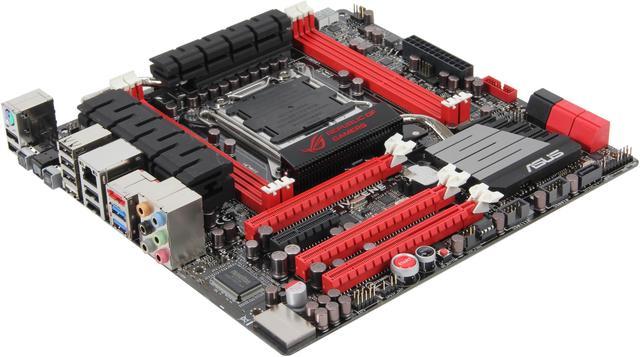
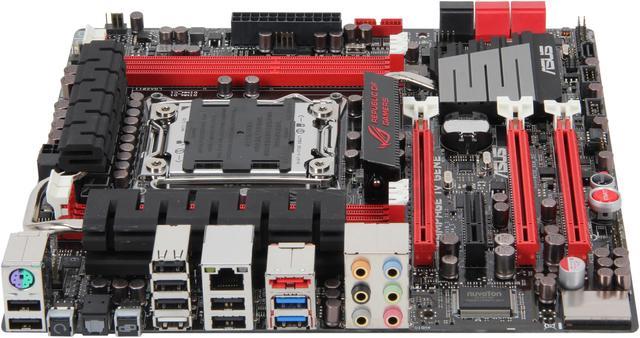
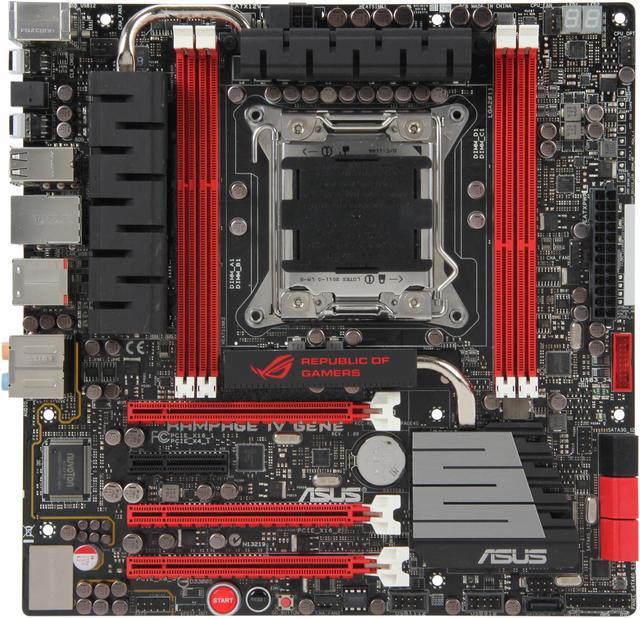
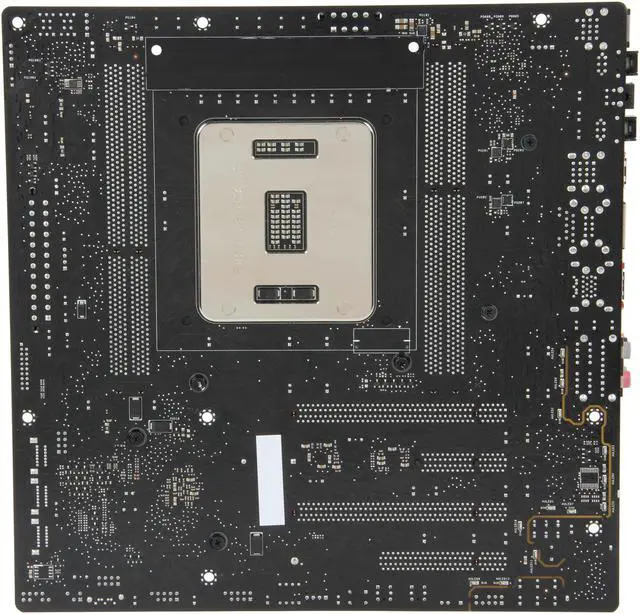
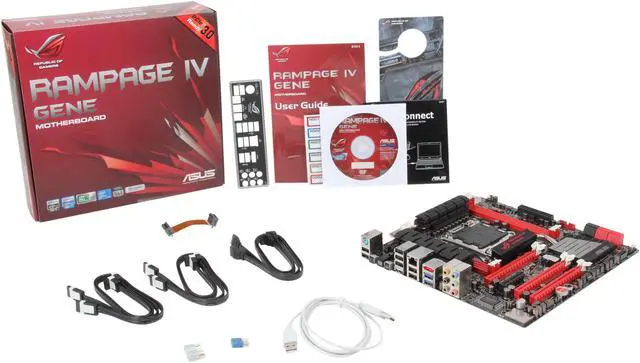
ASUS Rampage IV Gene LGA 2011 Intel X79 SATA 6Gb/s USB 3.0 Micro ATX Intel Motherboard

  • LGA 2011
  • Intel X79
  • 4×240pin DDR3 2400(O.C.)/2133(O.C.)/1866/1600/1333/1066
  • Pin It
  • Email this page
ICON Loading...

The Republic of Gamers consists only the best of the best. ASUS offers the best hardware engineering, the fastest performance, the most innovating ideas, and welcomes the best gamers to join in. In the Republic of Gamers, mercy rules are only for the weak, and bragging rights means everything.

Rampage IV GENE continues the legacy of Republic of Gamers motherboards by delivering gamers with enhanced performance that places a premium on fidelity and speed. This powerful  Intel X79-based mATX motherboard features tons of revolutionary overclocking features and supports the latest Socket LGA2011 2nd Generation Intel Core i7 Processors with ASUS’s new Extreme Engine Digi+ II, allowing you to achieve ultimate performance with adjustable CPU and memory power management frequencies. Support for up to 4-channel, 32GB of system memory maximizes the memory bandwidth to match the amazing CPU processing capability. 2-way SLI and CrossFireX support in combination with the PCIe 3.0 capabilities boosts the graphics performance to a new level.

ROG users will appreciate the exclusive features such as GameFirst, ROG Connect, CPU Level Up, and Mem TweakIt, and more. Also, ultra-real cinematic in-game surround sound is a must for gamers, and ASUS Rampage IV Gene 3 employs SupremeFX III to deliver incredible gaming audio experiences to ROG die hards. Join in the Republic of Gamers and become the king in the battles.  

  • newegg PCIe 3.0 Ready PCI Express 3.0 (PCIe 3.0) is the latest PCI Express bus standard with improved encoding schemes that provide twice the performance of current PCIe 2.0. Total bandwidth for a x16 link reaches a maximum of 32GB/s, double the 16GB/s of PCIe 2.0 (in x16 mode). As such, PCIe 3.0 provides users unprecedented data speeds, combined with the convenience and seamless transition offered by complete backward compatibility with PCIe 1.0 and PCIe 2.0 devices. PCIe 3.0 will become a must-have feature for users who wish to improve and optimize graphic performance, as well as have the latest technology available to them. (Actual PCIe speed depends on installed CPU type.)
  • newegg Extreme Engine Digi+ II The Extreme Engine Digi+ II has been upgraded and equipped with the finest Japan-made 10K Black metallic capacitors, while the digital VRM design allows you to achieve ultimate performance with adjustable CPU and memory power management frequencies. Precise adjustments create greater efficiency, stability, five times longer lifespan than solid capacitors* and performance for total system control. (*At operating temperature of 105°C).
  • newegg GameFirst Low Internet latency allows you to frag more, and get fragged less. That's why ROG has introduced GameFirst, a feature that manages the flow of traffic according to your needs so that you can still listen to online music, download and upload files, and engage in Internet chats without sacrificing the low ping times you need to pwn your opponents.
  • newegg ROG Connect Monitor the status of your desktop PC and tweak its parameters in real-time via a notebook—just like a race car engineer—with ROG Connect. ROG Connect links your main system to a notebook through a USB cable, allowing you to view real-time POST code and hardware status readouts on your notebook, as well as make on-the-fly parameter adjustments at a purely hardware level.

  • newegg Mem TweakIt When changing DRAM settings in BIOS, it always takes time for the system to reboot. Worry no more! With Mem TweakIt, you can do DRAM tuning in real-time and view your DRAM efficiency score.
  • newegg SupremeFX III The SupremeFX III onboard audio solution is an 8-channel HD audio equipped with a carefully selected 1500uF capacitor which provides clean, ripple-free audio power and – perfect for enveloping gaming environments. With a metallic EMI cover and special layout design on the PCB, advanced SupremeFX Shielding technology isolates analog audio signals from digital sources for exceptional clarity and high fidelity, while a gold-plated jack ensures rich notes reach your ears with minimal distortion. A bounty of industry standards are supported, including EAX 5.0 Advanced HD, Creative ALchemy and THX TruStudio PRO, so the same great audio experiences found in live performances, films and recording studios are reproduced faithfully right on the PC. When bundled with the Sound Blaster X-Fi MB2 suite, the SupremeFX III is the perfect choice to provide an exceptional gaming experience with realistic sound effects.

Learn more about the ASUS Rampage IV Gene

Model

Brand
ASUS
Model
Rampage IV Gene

Supported CPU

CPU Socket Type
LGA 2011
CPU Type
Core i7 (LGA2011)

Chipsets

North Bridge
Intel X79

Memory

Number of Memory Slots
4×240pin
Memory Standard
DDR3 2400(O.C.)/2133(O.C.)/1866/1600/1333/1066
Maximum Memory Supported
32GB
Channel Supported
Quad Channel

Expansion Slots

PCI Express 3.0 x16
3 (x16, x16, 8)
PCI Express x4
1

Storage Devices

SATA 3Gb/s
3
SATA 6Gb/s
4 x SATA 6Gb/s
SATA RAID
2 x SATA 6Gb/s (red) and 3 x SATA 3Gb/s (black) support RAID 0, 1, 5, 10

Onboard Video

Onboard Video Chipset
None

Onboard Audio

Audio Chipset
SupremeFX III
Audio Channels
8 Channels

Onboard LAN

Max LAN Speed
10/100/1000Mbps

Rear Panel Ports

PS/2
1 x PS/2 keyboard/mouse port
USB 1.1/2.0
8 x USB 2.0 (one port can be switched to ROG Connect)
USB 3.0
2 x USB 3.0
eSATA
1 x eSATA 3Gb/s
S/PDIF Out
1 x Optical
Audio Ports
6 Ports

Internal I/O Connectors

Onboard USB
2 x USB 3.0 + 4 x USB 2.0
Other Connectors
2 x CPU Fan connector(s)
3 x Chassis Fan connector(s)
1 x S/PDIF out header(s)
1 x 24-pin EATX Power connector(s)
1 x 8-pin ATX 12V Power connector(s)
1 x Front panel audio connector(s) (AAFP)
1 x System panel(s)
11 x ProbeIt Measurement Points
1 x Power-on button(s)
1 x Reset button(s)
1 x Go Button(s)

Physical Spec

Form Factor
Micro ATX
Dimensions
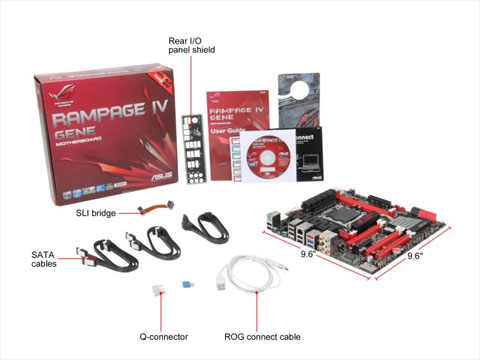
9.6" x 9.6"
Power Pin
24 Pin

Features

Features
2nd Generation Intel Core i7 processor family for the LGA 2011 Socket

Quad DDR3 2400 (O.C.)

SLI/CrossFireX – with x16/x16 (Gen 3.0) speed on a compact platform

Extreme Engine Digi+ II - Optimum power efficiency with premium components and intelligent digital design

SupremeFX III – Supreme sound

GameFirst with Intel Ethernet - The speed you need to pwn

Quick Info

Warranty

  • Limited Warranty period (parts): 3 years
  • Limited Warranty period (labor): 3 years


Customer Reviews of the ASUS Rampage IV Gene

Do you own this product? Write a Review

Filter Results

Go
  • N/A
  • 5/6/2013 10:57:58 AM
  • Tech Level: High
  • Ownership: 1 day to 1 week
  • Verified Owner

1 out of 5 eggsASUS Bad

Pros: Has very nice options, too bad I didnt get to enjoy them.

Cons: The board had a bent CPU pin. When I sent it back to NewEgg, because I didnt include the plastic cover, they blamed me. Well after reading all of this feedback, particulalry with the replacement ASUS board I bought. It seems ASUS quality is gone and these will be the last ASUS products I purchase. Should have bought the MSI or Intel boards.

1 out of 2 people found this review helpful. Did you? Yes No

  • ARod
  • 4/14/2013 4:18:07 PM
  • Tech Level: High
  • Ownership: 1 month to 1 year

5 out of 5 eggsBest X79 Value; not just a micro-ATX

Pros: This more than just X79 on a micro-ATX form factor. It's the entry-level into the ROG X79 boards. So, if you don't need anymore than 2 video cards, and 99.9% of us don't and you want X79 with good features then this is the board for you. Fits just fine in a full ATX chassis. Like the black and red scheme; easy to make it look good with red Gskill memory, ASUS GTX 680, Enermax fans & power supply.

Cons: Cheaper is always a plus, wish it would be less but you get what you pay for when it comes to ASUS's higher end line.

Other Thoughts: If they can make a mini-ITX version of this it would be awesome. You just wouldn't be able to do 4 DIMM slots.

1 out of 1 people found this review helpful. Did you? Yes No

  • N/A
  • 4/1/2013 10:34:40 AM
  • Tech Level: Somewhat High
  • Ownership: 1 month to 1 year
  • Verified Owner

1 out of 5 eggsDisappointing Board

Pros: Fast and Great for Overclocking, when it worked.

Cons: The board worked great for about 3 months. I RMA'd the original board back to ASUS after troubleshooting with a tech online. All they claimed to have done was flash the BIOS. I got the board back and it was in worse shape. I have to send the board back AGAIN. They are GLAD to take your board back because you are paying out of pocket every time to ship it back to them. I've been an avid fan of ASUS motherboards for over 15 years, but this board has put a very bad taste in my mouth and I probably won't use their boards again.

Manufacturer Response:

Dear Valued Customer,

Sorry to hear that you had an issue with your board. Please provide me with your RMA number and serial number so I can look at your previous case to see what I can do for you.

If you have any questions or comments you can email me again at cl-jeffrey@asus.com which I reside in the U.S

ASUS strives to meet and exceeds our customer expectations within our warranty policy.

Regards,

Jeffrey

1 out of 2 people found this review helpful. Did you? Yes No

  • N/A
  • 3/24/2013 3:56:36 PM
  • Tech Level: Somewhat High
  • Ownership: more than 1 year
  • Verified Owner

5 out of 5 eggsupdate

Pros: fast and stable, easy install. this is update to my review I had this board for almost a year now and no problems at all. super fast and stable crushes all my older computers easily with just a Intel Core i7-3820 in it

Cons: noda

Other Thoughts: aside from my ASUS P9X79 WS with a Intel Xeon E5-1660 this motherboard fast stable no issues at all. Simply crushes all my older computers.

to the reviews that states all sata ports become raid when set the sata control to raid in bios,-
don't worry-
You can have hard drives or ssd's running as a single drive but you will have to set up that drive in the raid bios to a JBOD drive, this is normal for raid controllers

1 out of 1 people found this review helpful. Did you? Yes No

  • N/A
  • 3/21/2013 7:20:01 AM
  • Tech Level: High
  • Ownership: less than 1 day
  • Verified Owner

1 out of 5 eggs2 DOAs = RMAs x 2???

Pros: Options, features, simplicity, supports high end builds

Cons: It's a Micro-ATX, so not recommended for system builds that need lots of expansion slots. And of course the price

Other Thoughts: I've been building custom gaming machines since 1998, so I know what I'm doing. Just sayin'. OK, so the first board ariives DOA. Start button lights up but when the power switch is pressed, the fans won't even turn! Not even a beep! Checked and rechecked everything, posted the board, nothing. Called ASUS and they reccomended the RMA request, said it was the board. Newegg RMAd no problem. Second board arrives, same thing! DOA! Start button is lit, but nothing beyond that! Very disappointed, ASUS! Done with it... Refunded and getting a different board.

Just sharing to help out fellow builders with their purchasing decision and hopefully avoid some frustration. My new i7 3820 and GeForce GTX 670 4GB have been sitting here waiting for a board that works for over 4 weeks now!

Manufacturer Response:

Dear Valued Customer,

We're sorry for the experience with the motherboard. The issue may be power-related. Please try pressing the Start button onboard instead of power switch from chassis. If no change, check the power connections, try another PSU, and test with only basic components outside of the chassis. If you have any questions, please feel free to contact me below. Thank you.

For support information, please visit http://support.asus.com. For service, visit http://service.asus.com. For motherboard warranty, visit http://www.service.asus.com/warranty.aspx#!Motherboard%20Warranty/c1c20; Refurbished products/accessories: http://www.service.asus.com/warranty.aspx#!refurbished-warranty/c16us. For RMA status, visit: http://am.eservice.asus.com/rmaweb/search/rmCustomerQueryAction.do?.

Regards,
Benson
ASUS Customer Loyalty
cl-benson@asus.com

1 out of 2 people found this review helpful. Did you? Yes No

  • N/A
  • 2/12/2013 9:02:08 AM
  • Tech Level: Average
  • Ownership: 1 week to 1 month
  • Verified Owner

5 out of 5 eggsvery happy with this board

Pros: Easy to overclock, you can even put your own pic for the bios screen. cool!

I also like the fact there are buttons on the board itself in case you get really drunk and decide you're going to try to overclock to 10 ghz or something crazy.

Cons: none.

2 out of 2 people found this review helpful. Did you? Yes No

  • Steve
  • 2/12/2013 7:58:52 AM
  • Tech Level: High
  • Ownership: 1 day to 1 week
  • Verified Owner

4 out of 5 eggsSo far, so good.

Pros: Small, compact, plenty of USB 2/3 ports, highly configurable in the BIOS, great BIOS recovery options.

Cons: First board failed within 10 minutes, never even got to install Windows. It reset several times while I was in the BIOS and refused to post after that. Wasn't even overclocking, just configuring the drives and boot options. But Newegg RMA'd it and the new board is running perfectly. No big deal, it happens.

But the only real con that I have is that the dimm slots only have clip levers on one side - the other side is fixed. When you install the dims, you just push them straight down and they clip in just fine. But when removing them, you push the side lever to release, and then you have to pivot the entire dimm around the fixed side. It works fine as long as nothing is obstructing the memory, but if there is, you can't remove the dimms without removing the obstruction first. If there were the standard memory slot levers on both sides, you could remove the memory with as little as about 5mm of clearance.

It's not a huge issue, but can be a hassle when testing components. When trying to pinpoint a problem, I had to remove the memory several times, and each time necessitated removing and reseating the CPU cooler. There was enough clearance between the memory and the cooler to remove and replace the memory if I was able to lift it straight up, but having to pivot it around the fixed size made it impossible. But once everything is up and running, it doesn't matter.

Other Thoughts: It's not stated (or stated clearly) in the manual, but you CAN run a single video card from the #3 PCI slot. The #1 slot would put the video card very close to a large CPU cooler, and the manual only shows a video card running from the #3 slot in a dual card setup. I only have one card and wanted to keep it away from my CPU cooler, so I put it in #3 and it's working fine.

Did you find this review helpful? Yes No

  • JTAlweezy
  • 1/31/2013 1:05:39 PM
  • Tech Level: High
  • Ownership: 1 month to 1 year
  • Verified Owner

5 out of 5 eggsYou'll Love it!

Pros: IT has some very nice features to it that would make you think is mATX the way to go? I used to own nothing but gaming laptops after my very first Pentium socket 478 build from back in 2003. This is my second Desktop build and it is by far the greatest PC I have ever used. This motherboard really keeps it simple while providing the user some great features and options. It auto overclocks the CPU, to 4.3Ghz safely. However, be mindful of the case you use. I am using the A30 Thermaltake case to keep the small formfactor consistency and it is creating some cooling issues. The fans connections that come with this are more than enough. 3 case fans 1 cpu and 1 cpu optional slot.

Cons: So far I have 1 con to this motherboard, it usually requires a second restart to get past post and recognize the drives. This is certainly an issue if you use WOL or use remote configurations as a restart when you are not present may require physical attention.

Other Thoughts: plenty of PCI 3.0 and 2.0 slots. up to 32gbs of memory, mem can overclock to 2400. Make sure you have a good cooling solution. I may beusing a pump in water block setup on a 93mm radiator placed at the front of the case.

1 out of 1 people found this review helpful. Did you? Yes No

  • Jonathan
  • 1/25/2013 7:02:07 PM
  • Tech Level: High
  • Ownership: 1 day to 1 week
  • Verified Owner

1 out of 5 eggsOnly Detects 1/2 My RAM

Pros: 32GB of memory on a Micro ATX. 4 SATA 6 GB. UEFI BIOS, but really not that big a deal... I find it no more functional than normal BIOS.

Cons: Only recognizes 1/2 of the memory I have. I accidentally ordered 8x4GB and had to wait on my 4x8GB (Both G.Skill). Unfortunately the board only fully recognizes 1/2 my RAM, whether I'm using the 4 or 8GB sticks. The bios reports 16GB on the Main page but shows all for 8GB sticks detected under the Tool / ASUS SPD Information page. No idea yet why. I might assume user error except that it's occuring with both sets of memory on the same two slots. Very frustrating -- I really wish I hadn't switched to this board at the last minute without reading reviews after carefully researching my first choice -- I switched solely for the extra 6GB SATA ports.

Manufacturer Response:

Dear Valued Customer,

We're sorry to hear about the experience you had with the motherboard. Please try to reseat the DIMMS that are not detected, check the condition of the slots, and update the BIOS, which may improve memory compatibility. You may also want to check that there is no damage on the socket pins. If no change, please contact Newegg for replacement or us for RMA service. Thank you.

For support information, please visit http://support.asus.com. For service, visit http://service.asus.com. For motherboard warranty, visit http://www.service.asus.com/warranty.aspx#!Motherboard%20Warranty/c1c20.

Regards,
Benson
ASUS Customer Loyalty
cl-benson@asus.com

1 out of 3 people found this review helpful. Did you? Yes No

  • NA
  • 1/7/2013 5:13:43 PM
  • Tech Level: High
  • Ownership: 1 day to 1 week

1 out of 5 eggsDon't buy this board

Pros: Looks Good

Cons: Got a defective board. Returned to new egg. Even though the board is defective they are not ready to accept it and blaming me,and sent back to me. Now I have to deal with Asus. New egg don't know what is the real problem with the board and simply blaming the customer to escape from their responsibility .

Other Thoughts: Never buy a mother board from new egg. Buy mother board from your local store. Even though you have to pay a few bucks more it is worth. You don't need to pay shipping charges. After this I bought few mother boards and computer parts from my local store. I did return one item without any hesitation.I think new egg is selling broken and refurbished items. Any way no more purchase from new egg

Manufacturer Response:

Dear Valued Customer,

We're sorry to hear about your experience with the motherboard. Did the motherboard have physical damage? Have you received a RMA # from us? Please contact me at cl-benson@asus.com (reference #C1037-7664 in the email subject line or call 1-812-282-2787. Thank you.

For support, please visit http://support.asus.com. For service, visit http://service.asus.com. For motherboard warranty, visit http://www.service.asus.com/warranty.aspx#!Motherboard%20Warranty/c1c20.

Regards,
Benson
ASUS Customer Loyalty

2 out of 11 people found this review helpful. Did you? Yes No

ICON Loading...

Protect Your Investment!

    • (more options) read warranty details
Are you an E-Blast Insider? Subscribe Newegg e-Blast

Buzz

Love this Small Board

5 out of 5 eggs
Small, powerful, can install 32gb of RAM
— VMvideoguy 9/13/2012

Extremely happy with this Mobo

5 out of 5 eggs
My favorite feature of this mobo is the built in Overclock profiles. I have it set to the Gamer preset and it auto overclocks ...
— 9/5/2012


PayPal
Shop without retyping payment details. Secure shopping made faster.
Check out with PayPal.

Financing


Home
Home > 
Computer Hardware > 
Motherboards > 
Intel Motherboards > 
ASUS > 
Item#: N82E16813131805
LOADING... LOADING...
Shop by Region: United States | Canada | China
Follow us:   RSS Feeds Youtube
VeriSign Reliability Seal1This site protected by Trustwave's Trusted Commerce program Inc500
Policy & Agreement | Privacy Policy  © 2000-2013 Newegg Inc.  All rights reserved.
If the Adobe Reader does not appear when you click on a link for a PDF file, you can download Adobe Reader from the Adobe web site. nassau