Skip to: |

Newegg.com - A great place to buy computers, computer parts, electronics, software, accessories, and DVDs online. With great prices, fast shipping, and top-rated customer service - once you know, you Newegg.

If you are reading this message, Please click this link to reload this page.(Do not use your browser's "Refresh" button). Please email us if you're running the latest version of your browser and you still see this message.

Newegg.com - Computer Parts, Laptops, Electronics, HDTVs, Digital Cameras and More!

  • | Wish List
  • Help
Home
Home > 
Computer Hardware > 
Motherboards > 
Intel Motherboards > 
ASRock > 
Item#: N82E16813157344

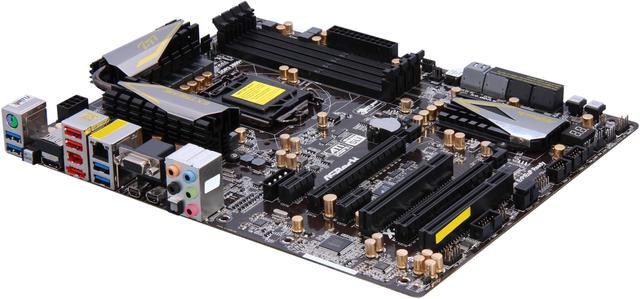
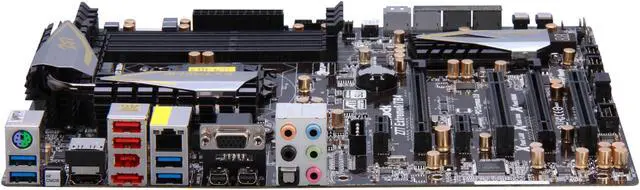
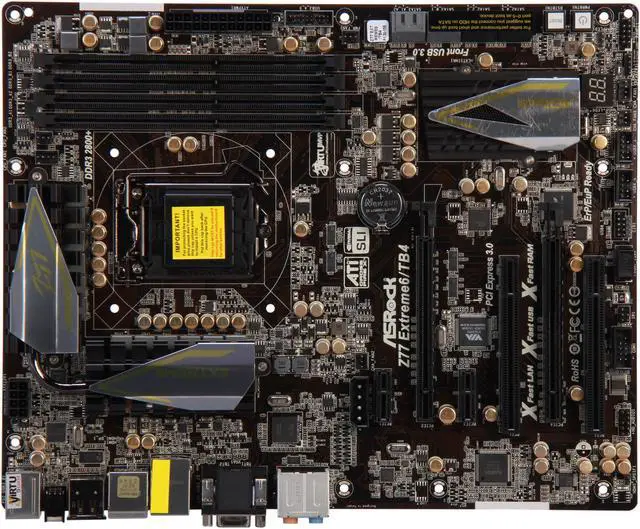
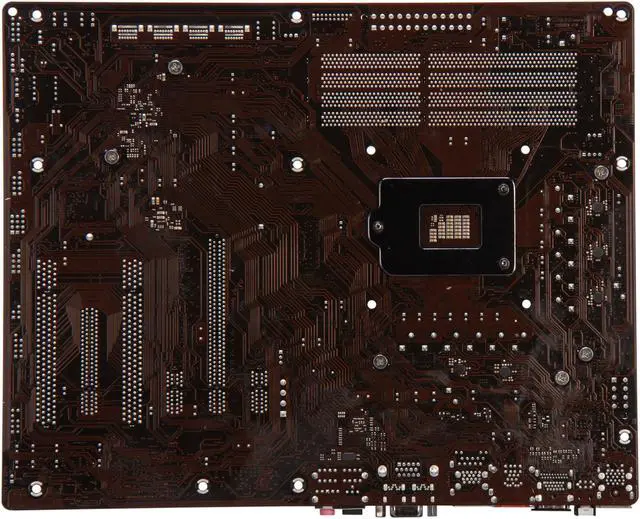
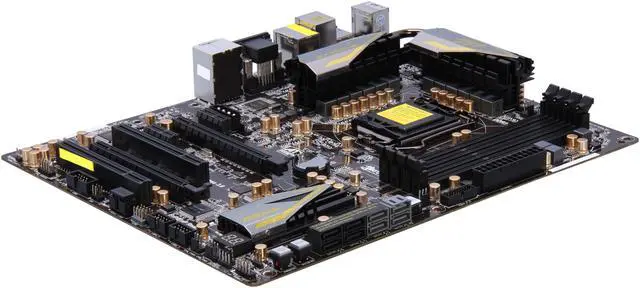
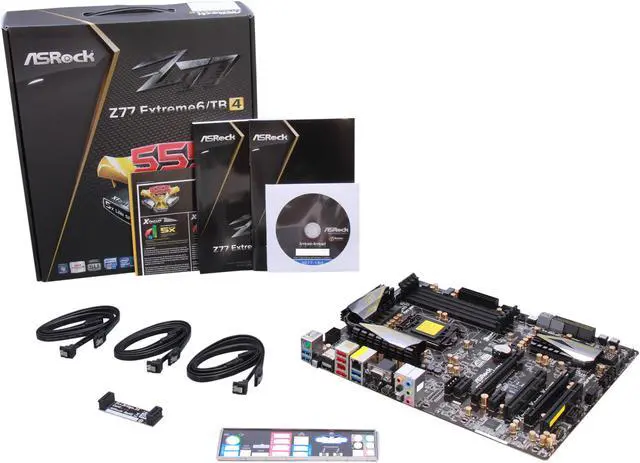
ASRock Z77 Extreme6/TB4 LGA 1155 Intel Z77 HDMI SATA 6Gb/s USB 3.0 ATX Intel Motherboard

  • LGA 1155
  • Intel Z77
  • 4×240pin DDR3 2800+(OC)/2400(OC)/2133(OC)/1866(OC)/1600/1333/1066
  • Pin It
  • Email this page
ICON Loading...

Learn more about the ASRock Z77 Extreme6/TB4

Model

Brand
ASRock
Model
Z77 Extreme6/TB4

Supported CPU

CPU Socket Type
LGA 1155
CPU Type
Core i7 / i5 / i3 (LGA1155)
Supported CPU Technologies
Turbo Boost Technology 2.0

Chipsets

North Bridge
Intel Z77

Memory

Number of Memory Slots
4×240pin
Memory Standard
DDR3 2800+(OC)/2400(OC)/2133(OC)/1866(OC)/1600/1333/1066
Maximum Memory Supported
32GB
Channel Supported
Dual Channel

Expansion Slots

PCI Express 3.0 x16
2
PCI Express x1
2
PCI Slots
2

Storage Devices

SATA 3Gb/s
4
SATA 6Gb/s
2 x SATA3 6.0 Gb/s connectors by Intel Z77
2 x SATA3 6.0 Gb/s connectors by ASMedia ASM1061
SATA RAID
0/1/5/10

Onboard Video

Onboard Video Chipset
Supported only by CPU with integrated graphic

Onboard Audio

Audio Chipset
Realtek ALC898
Audio Channels
7.1 Channels

Onboard LAN

LAN Chipset
Broadcom BCM57781
Max LAN Speed
10/100/1000Mbps

Rear Panel Ports

PS/2
1 x PS/2 keyboard/mouse port
Video Ports
D-Sub
HDMI
1 x HDMI
DisplayPort
1 x DisplayPort Input for Thunderbolt port (TBT2 for test only)
USB 1.1/2.0
2 x USB 2.0
USB 3.0
4 x USB 3.0
eSATA
1 x eSATA 6Gb/s
S/PDIF Out
1 x Optical
Audio Ports
5 Ports

Internal I/O Connectors

Onboard USB
2 x USB 3.0 + 6 x USB 2.0
Onboard 1394
1 x 1394a
Other Connectors
1 x IR header
1 x CIR header
1 x COM port header
1 x HDMI_SPDIF header
1 x Power LED header
2 x CPU Fan connectors (1 x 4-pin, 1 x 3-pin)
3 x Chassis Fan connectors (1 x 4-pin, 2 x 3-pin)
1 x Power Fan connector (3-pin)
24 pin ATX power connector
8 pin 12V power connector
SLI/XFire power connector
Front panel audio connector
1 x Dr. Debug with LED
1 x Power Switch with LED
1 x Reset Switch with LED
1 x Clear CMOS Switch with LED

Physical Spec

Form Factor
ATX
Dimensions
12" x 9.6"
Power Pin
24 Pin

Features

Features
Supports 4-Channel, Dual-Port Thunderbolt Technology

Premium Gold Caps, Digi Power Design, 8 + 4 Power Phase Design

Supports Dual Channel DDR3 2800+(OC)

Supports AMD Quad CrossFireX and NVIDIA Quad SLI

Rear VGA I/O: 1 x D-Sub, 1 x HDMI, 2 x TBT, 1 x DisplayPort Input (for test only)

7.1 CH HD Audio (Realtek ALC898), Supports THX TruStudio

Supports ASRock XFast 555, Fast Boot, Restart to UEFI, Dehumidifier, OMG, Lucid Virtu MVP

Free Bundle : 1 x Rear USB 3.0 Bracket, CyberLink MediaEspresso 6.5 Trial, ASRock MAGIX Multimedia Suite, Google Chrome and Toolbar

Quick Info

Warranty

  • Limited Warranty period (parts): 3 years
  • Limited Warranty period (labor): 3 years


Customer Reviews of the ASRock Z77 Extreme6/TB4

Do you own this product? Write a Review

Filter Results

Go
  • N/A
  • 5/10/2013 12:44:12 AM
  • Tech Level: High
  • Ownership: 1 day to 1 week
  • Verified Owner

1 out of 5 eggs

Pros: None

Cons: I always go Asus but thought i would give something else a try random reboots and would only read 8 of my 16 gigs of ram. RMA'd and replaced with the ASUS P8Z77-V Pro its running stable Overclocked

Manufacturer Response:

Dear ASRock Customer

We sincerely apologize for any inconvenience this may have caused you.
For the future reference, please trouble shoots the mainboard with known good components;
Please remove the CPU to check if the mainboard's CPU socket pins are normal (no bent pins or missing).
Test with 1 stick memory on each memory slot one at the time to eliminate the slots issue.
Set the UEFI BIOS default.
As always, we appreciate your purchase and constructive reviews are welcome.

Thank you

ASRock SUPPORT
Tech Support Email: user@ASRockamerica.com

Did you find this review helpful? Yes No

  • LPG975
  • 3/15/2013 1:44:21 PM
  • Tech Level: High
  • Ownership: 1 month to 1 year
  • Verified Owner

5 out of 5 eggsGreat board so far!

Pros: Everything about it is pretty much awesome

Cons: Can't really find anything.

Other Thoughts: I have owned A LOT of motherboards. I have been building computers for 13 years. This is a good motherboard, and my first venture away from ASUS in a long time (after I got burnt by DFI many years ago). I can see that ASRock has their act together!

Paired with:
i5 3570k Ivy Bridge
2x EVGA GTX 670s in SLI
16GB Mushkin Blackline 2400mhz DDR3
2x Intel 160GB SSD's in Raid 0
COOLER MASTER Silent Pro RSA00-AMBAJ3-US 1000watt PSU
Cooler Master Storm Sniper case

Did you find this review helpful? Yes No

  • Jake
  • 3/3/2013 10:42:28 PM
  • Tech Level: High
  • Ownership: 1 week to 1 month
  • Verified Owner

5 out of 5 eggsGood but not Great

Pros: Booted up first shot. No issues at all. Overclocks well. Decent price for what you get. I was happy that it still had a PCI slot... not many motherboards in the mid-high range do anymore.

Cons: None.

Other Thoughts: This board was perfect for my needs. I do some overclocking, but I'm not "hardcore." I don't have a ton of USB gadgets so there was plenty of ports, for me.

Just about everyone who has had a problem has gotten a faulty board. It happens, and the board itself should not be looked away because of that. I've gotten faulty boards from ALL manufactures over the years. It happens, move on.

1 out of 1 people found this review helpful. Did you? Yes No

  • biggerx
  • 2/28/2013 8:56:09 AM
  • Tech Level: Somewhat High
  • Ownership: 1 month to 1 year
  • Verified Owner

5 out of 5 eggsGreat mobo, features you may not use.

Pros: Great motherboard over all. UEFI BIOS. My first UEFI experience and I'm impressed. Easily OC'd my i7 3770k to 4.6GHz at 1.85v. RAM speed needs to be set manually. Turbo Boost can be turned off when you set your multiplier to "Per Core" instead of "All Core".

All ports connections & ports worked fine, firewire, SATA, USB, VGA, HDMI. I have not been able to test the TB ports.

ASRock Extreme 6/TB, i7 3770k @ 4.6GHz 1.85v, Crucial M4 128GB SSD, 16GB Corsair Vengance RAM in a Corsair 600t case.

Cons: Thunderbolt, probably wont use that. Display port input? I wont use that. I bought this mobo because NewEgg was out of the regular Extreme 6 & this one was only 15 bucks more.

The only real con, the Broadcom NIC (network adapter) does not get detected automatically by Windows 7 where as any Marvell NIC will. Weird, but the drivers were on the CD or you can just put them on a USB stick before you re-install Windows.

Other Thoughts: Looks sexy as heck. I'll update if anything goes wrong.

1 out of 1 people found this review helpful. Did you? Yes No

  • Mr.G
  • 2/17/2013 6:26:16 AM
  • Tech Level: Somewhat High
  • Ownership: 1 month to 1 year
  • Verified Owner

5 out of 5 eggsIt Works!

Pros: Price and has the "old" 1394 (Firewire) port for old Sony&Apple stuff as well as Thunderbolt and USB 3.0. Everything work ...!

Cons: None for hardware, but the manual could be better written and with more detailed information on system drivers and the install process for start up.

Did you find this review helpful? Yes No

  • DXMage
  • 2/13/2013 10:26:43 AM
  • Tech Level: High
  • Ownership: 1 week to 1 month
  • Verified Owner

5 out of 5 eggsGreat in Win 8

Pros: It works great. I installed Windows 8 with no difficulties. I didn't have any problems being able to install my HUGE ZALMAN CNPS9900MAX-B and having to use the other end of the tool supplied as the other end rounded off. Nothing is blocked so the layout of this board works great for me.

Running an OC of 4.0 but that is just the first try. I have to tinker more to get it maxed out.

Cons: None really BUT other thoughts. Well it didn't come with a bumper sticker that I could slap on the case or on my truck. =)

Other Thoughts: Rooting around in the BIOS overclocking the board just lend its self to easy overclocking. I just hit the multiplier. I have it running my 3570K at 4.0 with no problems. It just seems like some of the settings I can't change. I'll have to tinker with it more so that I can open up those settings.

It would be nice if they supplied more in the way of screws and standoffs.

Then there is the Lucid feature. I can't seem to get it working properly. I'll have to call support to see what I'm doing wrong. I'm sure it's something simple that I'm missing.

I have two other ASRock boards in other computers currently running at home and all of them have been running problem free. I even have a REALLY old one that I retired. It was still working but the tech was too old and slow.

2 out of 2 people found this review helpful. Did you? Yes No

  • N/A
  • 2/8/2013 12:05:00 PM
  • Tech Level: High
  • Ownership: less than 1 day
  • Verified Owner

1 out of 5 eggsTerrible

Pros: None

Cons: Received the motherboard and found it to be DOA. Sent it back for an RMA and was subsequently told it has suffered "end user" damage to the cpu socket implying i installed the cpu incorrectly. Even though the cpu socket configuration is pretty much one way.. Not sure what else to say about it that wont get filtered

Other Thoughts: dissatisfied

Manufacturer Response:

Dear AsRock Customer

We sincerely apologize for any inconvenience this may have caused you. Sorry to hear the mainboard’s CPU socket pins has bent. The CPU socket pins on the mainboard are fragile and need to be handling with carefully. In addition, the CPU socket is covered with the cap to avoid damage the pins and should not be removed until installing a CPU. Please contact us at http://www.asrock.com/support/tsd.asp. We can assist you shortly.

Thank you

AsRock SUPPORT
Tech Support Email: user@asrockamerica.com

0 out of 2 people found this review helpful. Did you? Yes No

  • Max
  • 2/6/2013 7:09:11 PM
  • Tech Level: High
  • Ownership: 1 week to 1 month
  • Verified Owner

5 out of 5 eggsPerfect

Pros: Work really well
OC is a breeze
3 secondes to post

Cons: I dont really like the bios.
Extra molex plug for crossfire placed of course on top of the pci slots where its pretty much impossible to hide the cable.

Did you find this review helpful? Yes No

  • Spanky
  • 1/29/2013 8:45:34 AM
  • Tech Level: Average
  • Ownership: 1 day to 1 week
  • Verified Owner

3 out of 5 eggsDisappointed

Pros: Price is way lower than any other boards with dual thunderbolt. Flashing the bios within the bios with one click was awesome. That's the best part about it.

Cons: I have had a few bsod. One during wei, it didn't happen the second time and my rating is nice. 8.1, 8.1, 7.9, 7.9, 7.9 respectively. It could be a driver issue. I will reinstall windows to be sure, even though I will be replacing. One of the sataIII ports is not working. It will not detect any drive I have tried. I don't need thunderbolt. When loading codmw3 a friend with I5 3570K loads faster than my I7 3770K. I didn't like the bios other than the one button flash. I have purchased 2 Gigabyte B75M-D3P which is what that I5 sits on and they have both been flawless. So I will not blame newegg. Curious as to why all my build are perfect until I do my own, lol.

Other Thoughts: I had a gigabyte ud4h but it had a bad pci express slot. So, I decided to give this a shot, against my better judgement. Although running decent, I miss the Gigabyte and will probably never switch again. No refund is something I didn't notice when I purchased it. I hope newegg doesnt hold me to it. I want the Gigabyte UD5H it has 5 SataIII ports plus an msata. No thunderbolt ports but like the previous review stated they are over rated. I have no idea how to rate tech knowledge, lol.

asrock Z77 extreme~soon to be the Gigabyte UD5H
I7 3770K
16GB mushkin redline
OCZ vertex III SSD(could be why I5 wins "load" race he has Vertex 4)
Gigabyte Gforce GTX 660 2GB

Manufacturer Response:

Dear AsRock Customer

We sincerely apologize for any inconvenience this may have caused you. BSOD usually related to memory and its setting. For the future reference, please set the UEFI BIOS default, test with 1 stick memory, try with another known good memory to check if the symptom still occurs. As always, we appreciate your purchase and constructive reviews are welcome.

Thank you

AsRock SUPPORT
Tech Support Email: user@asrockamerica.com

0 out of 2 people found this review helpful. Did you? Yes No

  • Bran85
  • 1/28/2013 11:43:41 PM
  • Tech Level: High
  • Ownership: 1 week to 1 month
  • Verified Owner

2 out of 5 eggsGarbage- Asrock sucks

Pros: Starts, but only after some tweaking. Might be half-decent if you only use the iGPU instead of a discrete graphics card.

Cons: Shorter list of supported RAM than the competitors, and took some coaxing by installing one DIMM at a time before the MB accepted the four that I bought.

Even if you disable the iGPU, it constantly interferes with GPU supported tasks like videos and games by causing unacceptable large stuttering that causes choppiness and unresponsiveness to mouse/KB inputs.

Other Thoughts: After years of good luck with EVGA and ASUS boards, I reluctantly took a chance on ASrock because it was the only board I could find that claimed to have 16x/16x PCI-E 3.0 slots. Big mistake. Asrock clearly intended this board to be used only with the included Virtu MPV feature installed. If you elect not to use it, even if you disable the iGPU in windows and/or the BIOS, it still interferes constantly causing the problem stutter. After some research, this is not an uncommon problem with the board, and it is completely unacceptable for an "extreme performance" MB. Asrock is the Walmart-equivalent brand of motherboards for a reason- their products are completely inferior to the well-known quality brands. Even if the features look better on paper, that doesn't mean they will work. Save yourself some grief by getting a quality brand instead of this junk, especially if you plan on using a graphics card with your build.

Manufacturer Response:

Dear AsRock Customer

We sincerely apologize for any inconvenience this may have caused you. The iGPU would be inactivate once disable in the BIOS and will not affect the system. However, the Lucid Virtu should be uninstalled once disable the iGPU in the BIOS. As always, we appreciate your purchase and constructive reviews are welcome. If you have any technical questions please contact us at http://www.asrock.com/support/tsd.asp. We can assist you shortly.

Thank you

AsRock SUPPORT
Tech Support Email: user@asrockamerica.com

1 out of 3 people found this review helpful. Did you? Yes No

ICON Loading...

Protect Your Investment!

    • (more options) read warranty details
Are you an E-Blast Insider? Subscribe Newegg e-Blast

Buzz

Better than Expected

5 out of 5 eggs
:: EUFI Bios (Honestly did not realize it had this)
:: Good Driver/Software Disc
:: ...
— AJ 12/28/2012

Great in Win 8

5 out of 5 eggs
It works great. I installed Windows 8 with no difficulties. I didn't have any problems being able to install my HUGE ...
— DXMage 2/13/2013


PayPal
Shop without retyping payment details. Secure shopping made faster.
Check out with PayPal.

Financing


Home
Home > 
Computer Hardware > 
Motherboards > 
Intel Motherboards > 
ASRock > 
Item#: N82E16813157344
LOADING... LOADING...
Shop by Region: United States | Canada | China
Follow us:   RSS Feeds Youtube
VeriSign Reliability Seal1This site protected by Trustwave's Trusted Commerce program Inc500
Policy & Agreement | Privacy Policy  © 2000-2013 Newegg Inc.  All rights reserved.
If the Adobe Reader does not appear when you click on a link for a PDF file, you can download Adobe Reader from the Adobe web site. nassau